Repository navigation
Cannot Create keybinding to restart a specific Task #35910

Description

- VSCode Version: 1.17.0-insider
- OS Version: Windows 10
Steps to Reproduce:
- Add these keybindings
[
	{"key":"f6","command":"workbench.action.tasks.runTask", "args":"run"},
	{"key":"ctrl+f6","command":"workbench.action.tasks.restartTask", "args":"run"}
]
- Type f6
- My run task begins
- Type Ctrl + f6
- The task selection screen pops up
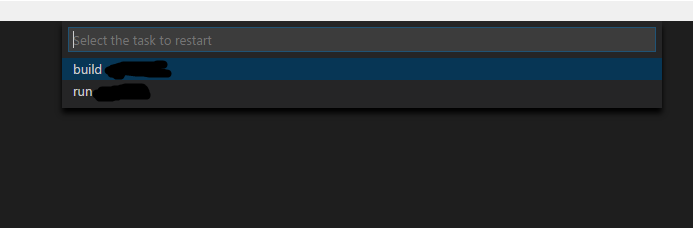

Reproduces without extensions: Yes
It seems like he arg behavior in runTask code https://github.com/Microsoft/vscode/blob/c8eb003402ce5d6e0529a4da459b863ac5610af9/src/vs/workbench/parts/tasks/electron-browser/task.contribution.ts#L1975
Needs to be replicated in runRestartTaskCommand
https://github.com/Microsoft/vscode/blob/c8eb003402ce5d6e0529a4da459b863ac5610af9/src/vs/workbench/parts/tasks/electron-browser/task.contribution.ts#L2163
The same issue also exists with runTerminateCommand
Activity
vemoo commentedon Oct 14, 2017
Is this issue available to work on? It would be my first time contributing, so I may need some guidance.
vemoo commentedon Oct 15, 2017
I have a question about what the terminate command should do. Right now if the user is in the terminal, it asks for a task to terminate, otherwise it terminates all tasks.
But that's different from what restartTask command does right now, when in the terminal, it ask for a task to restart, but otherwise it restarts the first task.
I have changed the restart behaviour to restart the task passed as argument when found, or ask for one to restart, whether we are in the terminal or not. Should the terminate command do the same?
dbaeumer commentedon Oct 16, 2017
vemoo thanks for looking into this. If the tasks a not executed in the terminal then they are executed in the old output runner which can only execute one task at a time. This is why the code is different for the non terminal case.
To answer your question: if the task can't be found you should show a picker to run it. If in non terminal no task name is required since there can only be one task.
vemoo commentedon Oct 17, 2017
I have implemented the fixes and it wasn't necesary to check whether the task system is the old one or not. Because the getActiveTasks method is implemented for both, and for the ProcessTaskSystem it returns one or no tasks.
I've also found and fixed a couple of bugs in processTaskSystem.ts when terminating the task.
Should I create a pull request?
dbaeumer commentedon Oct 18, 2017
vemoo yes please.
dbaeumer commentedon Jun 26, 2018
To verify create a key binding like
When using the above example ensure that the
package.jsoncontains a compile script that contains atsccompile command in watch mode. Alternatively you can have a fake compiler that sits and does nothing (echo something every n seconds)