Repository navigation
[BUG]: Compiler ARGS not taken over/considered when running build with g++ on Win10 #6366

Description
Activity
I repro the issue. Looks like a regression from 1.1.0-insiders/2. Downgrading to 1.0.1 and changing the task type to "shell" should be a workaround.
Elaheh Rashedi (@elahehrashedi) The problem is that F5 (Build and Debug Active File) is causing the wrong build task to be run, i.e. the default build task is not run (it's using the pre-generated task). I see it working correctly when Run Build Task is used.
Hasenradball (@hasenradball) A workaround is to change the label in tasks.json and the preLaunchTasks to match that new name in launch.json.
Ok thanks for the reply.
But why is it only in win10 the case?Sean McManus (@sean-mcmanus) I testet your proposal. BUT it does not work. same behavior as before.
My actual workaround is making a batch file with the following code:
g++ -o test.exe *.cppWith the batch erverything works fine.
Sean McManus (@sean-mcmanus)
One Question, is it possible to use a makefile in vscode?Yeah, you're right -- I'm seeing changing the label/name causes the correct tasks to be run, but the args are not correct still, i.e. there appear to be 2 bugs in the same scenario.
However, I'm hitting this bug on Mac/Linux as well. I'm pretty sure this bug would occur on Mac/Linux if 1.1.0-insiders or 1.1.0-insiders2 is used. Could Mac/Linux be using 1.0.1?
We have a Makefile Tools extension that will use the makefile to configure IntelliSense. It's in a private preview. Bob Brown (@bobbrow) may be able to add you the list.
Hasenradball (@hasenradball), let me know if you are interested in joining the preview and I will send you an invite to the repository where you can download the Makefile Tools extension.
The fix is available in https://github.com/microsoft/vscode-cpptools/releases/tag/1.1.0-insiders3 , but the launch.json label and tasks.json name has to not match the default generated. one. If you're still reproing the bug then we might need more repro info.
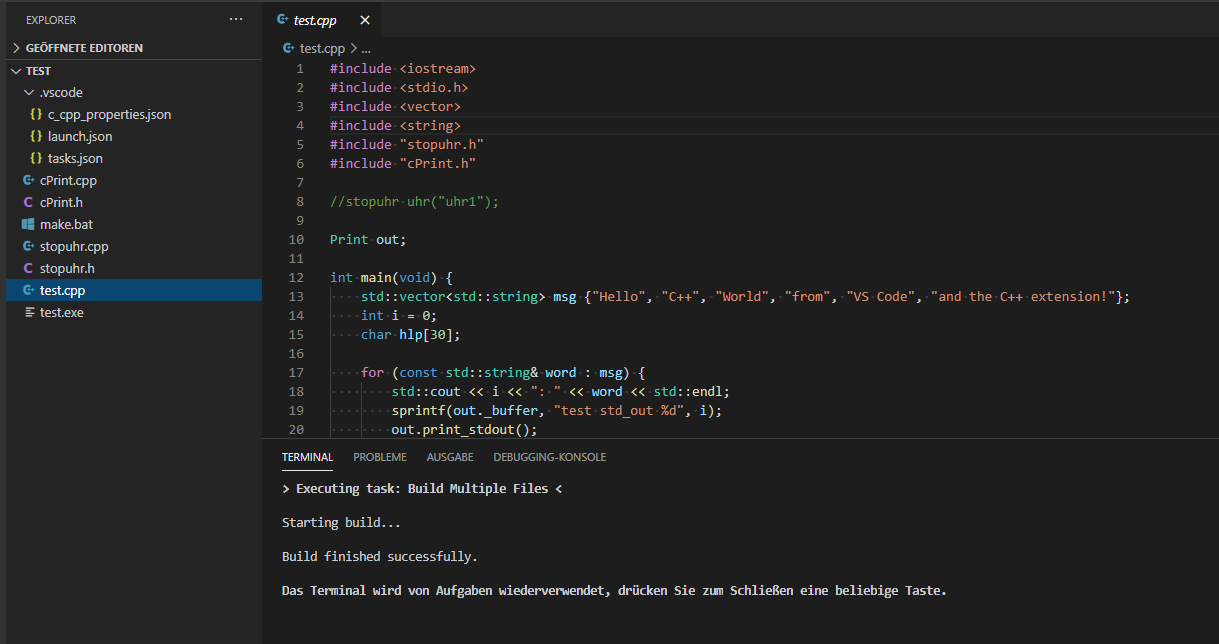
This is a screenshot of the "${workspaceFolder}\*.c" compiling multiple .c files in the workspace using mingw on Windows.

I'm using
tasks.json{ "version": "2.0.0", "tasks": [ { "type": "cppbuild", "label": "C/C++: g++.exe build active file2", "command": "C:\\Program Files\\mingw-w64\\x86_64-4.8.1-win32-seh-rt_v3-rev2\\mingw64\\bin\\g++.exe", "args": [ "-g", "${workspaceFolder}\\*.c", "-o", "${fileDirname}\\${fileBasenameNoExtension}.exe" ], "options": { "cwd": "${workspaceFolder}" }, "problemMatcher": [ "$gcc" ], "group": { "kind": "build", "isDefault": true }, "detail": "compiler: \"C:\\Program Files\\mingw-w64\\x86_64-4.8.1-win32-seh-rt_v3-rev2\\mingw64\\bin\\g++.exe\"" } ] }and launch.json
{ // Use IntelliSense to learn about possible attributes. // Hover to view descriptions of existing attributes. // For more information, visit: https://go.microsoft.com/fwlink/?linkid=830387 "version": "0.2.0", "configurations": [ { "name": "g++.exe - Build and debug active file", "type": "cppdbg", "request": "launch", "program": "${fileDirname}\\${fileBasenameNoExtension}.exe", "args": [], "stopAtEntry": false, "cwd": "${workspaceFolder}", "environment": [], "externalConsole": false, "MIMode": "gdb", "miDebuggerPath": "C:\\Program Files\\mingw-w64\\x86_64-4.8.1-win32-seh-rt_v3-rev2\\mingw64\\bin\\gdb.exe", "setupCommands": [ { "description": "Enable pretty-printing for gdb", "text": "-enable-pretty-printing", "ignoreFailures": true } ], "preLaunchTask": "C/C++: g++.exe build active file2" } ] }Hi thank you is the fix automatically installed?
How to install a specific version of c/c++?On my linux I have also the insiders2 instslled.
Sean McManus (@sean-mcmanus) Hi I tested the insiders2/3 on my MAC and there is absolutely no problem on the MAC.
Only change the tasks.json and it works fine.on the Win Machine I will test it today..
Sean McManus (@sean-mcmanus)
Hi I tested now the Insiders3 on Win10.
I have done the following:- changes the args field in the tasks.json (e.g. the output file name, build multiple cpp files)
- start Build Task via menue.
Result:
everything is fine now, args are taken over an considered on Win10!Thanks for your Support!!!
Sean McManus (@sean-mcmanus) Hi I have one short question....
Is it possible to add the Standard Build activity to the Activity bar to the left?
I havent found to modify the activity bar.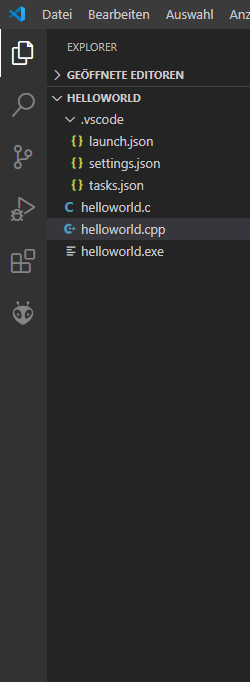
Extensions can add their own activity bars. What do you mean by "Standard Build activity"? We weren't planning to add a build activity bar. I'm not sure what would be in that pane. If you have an idea for how that would be useful, could you file a new feature request issue?
Hi in the c++ extension at the left there is a button for starting Debug.
Is it possible to add a button at this activity bar for starting the default build?
As a short cut.- locked and limited conversation to collaborators
on Dec 22, 2020


General Information
When compiling a simple c++ programm like "hello world" or just want to compile 2 or 3 files and link them together by adapting the
tasks.jsonfile, every change in the file works until theargspart.I you change the **
args**like change the output filename or using*.cppinstead of${file}.The compiler only uses the active file and nothing else!
Steps to Reproduce:
Hint:
On MAC and Linux there is no problem, it works fine.
On Win10 it does not work!
{ "version": "2.0.0", "tasks": [ { "type": "cppbuild", "label": "C/C++: g++.exe build active file", "command": "C:\Program Files (x86)\mingw-w64\i686-8.1.0-posix-dwarf-rt_v6-rev0\mingw32\bin\g++.exe", "args": ["-g", "${workspaceFolder}\*.cpp", "-o", "${fileDirname}\${fileBasenameNoExtension}.exe"], "options": { "cwd": "${workspaceFolder}" }, "problemMatcher": [ "$gcc" ], "group": { "kind": "build", "isDefault": true }, "detail": "compiler: "C:\Program Files (x86)\mingw-w64\i686-8.1.0-posix-dwarf-rt_v6-rev0\mingw32\bin\g++.exe"" } ] }
Does this issue occur when all extensions are disabled?:
actually not possible to tes