Repository navigation
cppbuild is not registered in tasks.json after installation until a reload window occurs #6450
Description
Activity
This only repros when installing the offline vsix (or cpptools.vsix) and not when upgrading from the the marketplace.
Seems like it might not meet the bar to fix.
it seems IT definitely meets "the bar to fix" >:(

2020-12-02
Has started out of the blue? all of a sudden CTRL+SHIFT+B does not work, menu "Terminal->Run Tasks" does not work repeatedly ... just reinstalled the VS Code ... still the same problem
Reacted by Ho Ngoc Duy and Anton Hoofok now it works all of a sudden ... i went to cpp file done CTRL+CHIFT+B and it worketh ... but since then it works whatever is the active file ... ok ...
few more tries ... it seems it gets confused when not starting from a cpp file ... then I start it from a CPP file and all is fine ...?
And now the next heisenbug

the task repeats itself in the terminal menu
- You should try 1.1.3 -- we fixed multiple build task bugs: https://github.com/microsoft/vscode-cpptools/releases/tag/1.1.3
- You should try VS Code Insiders, or change the task and preLaunchTask names to work around bug "F5" run the wrong "preLaunchTask", if preLaunchTask is a default custom task name vscode#109939 .
Are you still reproing a bug with repeated tasks? What are the repro steps?
Sean McManus (@sean-mcmanus) to be honest I am in the middle of this crazy multi-target building without using CMake. If using just VS Code to build multiple targets from the same code, one tries to avoid humongous tasks.json ... That involves some hackery with user-defined variables in there. And it seems
${env:whatever}approach does not work and${config:whatever}approach works. But that (it seems) "confuses" VS code when trying CTRL+SHIFT+B and tasks.json is full of tricks.Thus I have taken the way of VStudio + Share Code Projects .. Which is a shame since working tasks.json would be infinitely simpler way to achieve numerous build targets paradigm. Without learning CMake or Bazel or whatever.
I will report back soon.
I see a lot of fellow C++ devs are trying to tame VSCode tasks.json same as I do. Being able to define and use (normally) user-definable variables would be really (really) great.
1 remaining item
Let me check .... Issues were double quotes around args.
I was stuffing everything in a command string to make it work.
I am on Win10 , using CMD.
Sean McManus (@sean-mcmanus) Well I have installed the latest vsix and I see no improvement whatsoever.

Above I have never seen before too. Here is my tasks.json
{
	"version": "2.0.0",
	"options": {
		/* here are the UDV's to be shared among the tasks */
		"env": {
			/* has to be on the path*/
			"compiler" : "cl.exe"
		}
	},
	"tasks": [
		{
			"type": "shell",
			"label": "test_task",
			"command": "start env:comiler = [${env:compiler}]",
			"detail": "testing user defined variables from tasks.json",
			"problemMatcher": []
		},
     /* . . . the rest . . . */
Above "draws the blank"

If I change the type to cppbuild, I see the tasks multiplication problem as before
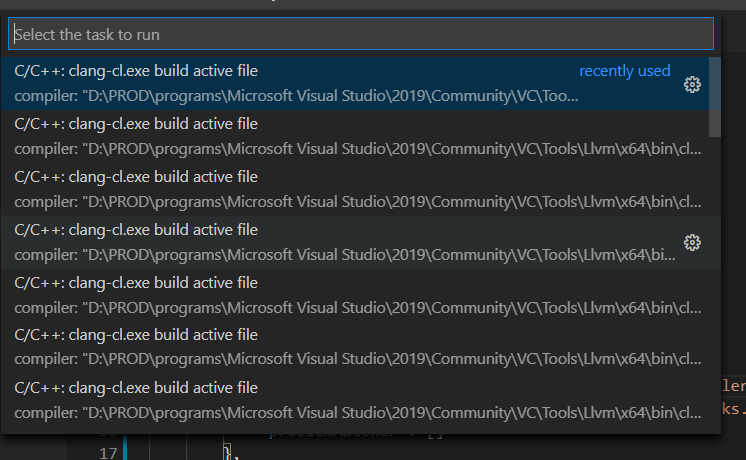
I am sorry guys, I am volunteering here and you are not. Let me know when this is fixed.
Kind regards
ps: if something above is documented to prove I am making a mistake(s) I would be more than happy to be corrected.
The env variable issue appears to be an issue with VS Code -- our extension is relying on VS Code to do all the variable resolving, see for example microsoft/vscode#47985 (comment) .
The large number of clang-cl.exe in your list of compilers is very odd. I'm not sure how you're reproing that. Can you file a new bug on that with more repro info?
If we're not able to repro the issue, you could clone our repo and put a breakpoint at https://github.com/microsoft/vscode-cpptools/blob/release/Extension/src/LanguageServer/cppBuildTaskProvider.ts#L198 to debug why it's creating so many duplicate tasks.
https://github.com/DBJDBJ/vscode-multi-target-build
that is as far as I think these days one can FEASIBLY get, using VSCode
ps: yes the "issue" is with VSCode .... but what is the task type "cppbuild" all about? I am using "shell" as one can see in that repo.
as I said: I would be glad to stand corrected
Thanks
We added the "cppbuild" task type recently in 1.1.0. It behaves similar to the shell command but we do some additional special handling, see #5659 .
But I am slightly confused: why doing anything until such a time when VSCode implementation of its things inside .vscode is bug-free? What might be the point of building anything on those swampy grounds?
If (for example) tasks.json would work as advertised, one could do very simple and very good builds with it. Now we just have endless debates in the "issues" section.
I don't understand. VS Code and our extension isn't going to ever be bug-free. You don't need to use tasks.json to create a build system in VS Code. The CMake Tools extension builds without using tasks.json: https://github.com/microsoft/vscode-cmake-tools . I wouldn't consider VS Code "swampy grounds". Lots of extensions have been built on it successfully.
It is swampy grounds indeed because of the simple fact that what is documented does not work. namely tasks.json reference documentation does not reflect reality. either put more text and examples in there on exactly how one can use ${env:varname} or remove it until it works.
I specifically documented in my small repo (I referenced) I did not want to use CMake because for very many use cases it is overkill.
I almost achieved what I wanted. But it would be much more usable and functional if obvious long-standing bugs would be removed from tasks.json.
Either that or documented them as features. Instead of debating with users on how should they think. Let me repeat: I just do want to use VSCode as it is documented it works.
What documentation are you referring to?
My reference to CMake Tools was in regards to their implementation of implementing a build system without using tasks.json. A similar system could be done without using CMake, e.g. we have a Makefile Tools extension in development that builds based on makefiles.
I don't work on the VS Code team (https://github.com/microsoft/vscode) or the VS Code docs teams (https://github.com/microsoft/vscode-docs/issues) -- if you think the docs could be improved you should file an issue on the vscode-docs page. This repo is for C/C++ extension issues. It seems like you were hitting some issue with duplicate cppbuild tasks (which our team is responsible for), but we don't have enough info to repro that yet and haven't received any other reports of a bug like that.
Sean McManus (@sean-mcmanus) forget CMake. I am not interested in CMake. Forget even VS Code team, which is weird of you to ask. You are paid for this job and I am not. I am volunteering my time for free. Walk down the (virtual) hall and talk to them, if need be.
There is no C++ sample repositories here. That is the problem generating these long fruitless debates. I would like you to make hello world C++ repo where you use Visual Studio also with clang added and VS Code. On Windows 10 of course.
In there please put a load of comments in files inside .vscode. Have two or more configurations in CPP properties, two or more configurations in tasks.json and mix and match them all at will ... This is at least the impression one gets when reading the documentations. That all should be possible, right?
Then we can use that repo to check and discuss how do things work. Or not work.
I've filed an issue at #6641 . Our team is going on vacations so the issue might not get triaged till January. If you're hitting any specific blockers we could try to address that earlier.
The steps should be the same as the docs for mingw on Windows is at https://code.visualstudio.com/docs/cpp/config-mingw , but the paths should be changed to the clang paths and the intelliSenseMode should be "clang-x64" instead of "gcc-x64".
If the clang-cl.exe installed by VS isn't working for you, you may want to try https://github.com/llvm/llvm-project/releases/download/llvmorg-11.0.0/LLVM-11.0.0-win64.exe .
A related issue is at #3387, but it looks like it's not fixed.
microsoft/vscode-docs#4168 (comment)
Many thanks, Sean, may you all have safe hollies ...
ps: clang-cl.exe coming with VS 2019 is working brilliantly.


Bug: Tasks.json squiggles on the "type": "cppbuild".
Doing a Reload Windows fixes it. No "Reload Window" prompt is shown though.