Repository navigation
categories #2
Description
Activity
As @karlitschek just showed me, turns out Apple Notes has categories/folders, at least when you start using it on the desktop (can’t do it just from iOS).
If this is a good idea is a different question. Just for the record.
Like implemented in my original app (and also used by "khtNotes" and "Papyrus Ex"), I suggest to use categories based on folders. Each folder in the Notes root dir is a category. I think one level of categories is enough so there would be no need to support subfolder.
Yeah, totally agree with you @caco3. Using subfolders and restricting it to one level sounds good.
Interface-wise I’m not sure how to do it yet. With visual »folders« like in the News app it seems everything will get difficult to sort automatically by date (or present it well visually) and to browse documents. Having a list with tags on the other hand seems like it gets messy, and also duplicates tags.
Other ideas? The problem is that I’d like the design to help you focus. Categories/folders seemingly accomplish that, but maybe they also just introduce a false sense of order and really an additional level of complexity.
I personally like to select the category and show only the notes of that category (see my existing app).
Mostly I know which note fits into which category, so I find them quickly.
This design way how ever makes it a bit harder to implement a search function.As for the sorting, I think notes should be sorted by name. If we can show the last modification date, that woudl be useful. But I wouldn’t sort a note by a date.
Its easier to remember the notes title as the last modification date.
The A+ solution would be if the user could select the sorting order.Excuse the honesty, but I strongly oppose sorting Notes by name, because the beginning character of the title has no relation to its importance. Introducing an option to offload the decisions to users is unnecessary cruft.
Automatic sorting by last modified date is a simple mental model: Notes important to you automatically bubble up to the top and less important ones go to the bottom.
What if you cant remember the last modification date of a note?
I use my notes to store informations I only once in a while need (i.e. list of command line commands for my Linux). I do not care or remember when I modified that list, but I know its titled "Linux commands".Looking at khtNotes as well as Papyrus Ex, both of them sort the notes by title name.
Please do not get me wrong, sorting by date is not wrong, I just think sorting by date is more common and more useful.
If you want to mark important notes, put them into an "important" category.
Or we could introduce a favourites tag where you could give stars to a note. This how ever would break the compatibility to other clients.It’s not more common just because 2 not particularly widely-used notes apps do that. ;) Look at iOS Notes, presumably used by a bunch of people (like me) or Evernote. Both sort by date. You do not need to remember the date (in fact we don’t even show it yet) but rather you scroll down and always roughly remember what was when.
For anything else, we just need a properly integrated search where you can type in »linux« and quickly get the note.Introducing tags and categories and stars is just like throwing so much features at such a small problem, I think it’s ill-advised to do so.
You can still implement stars /favourites as a filtering feature only. The user flags his note as "important" or whatever, either predefined or custom flag(s). From a search bar, the user can then filter. So the feature is still there if the user wants but default UI is not polluted.
Also, regarding the filesystem, an alternative is to have all notes onto root Notes folder, but favourites subfolder with symlinks to the root folder. So the file system would stick to the same logic.
Just a random idea actually, it's far from a rant :)
I would prefer a "tree-tagging" instead of a "tree-category" system.
That is, notes organized in tree, but that can belong to multiple branches/tags. Like gmail.
Don't forget the "untagged notes" branch/tag please.I like the way categories are done in ownnote.
Reacted by korelstarI am looking forward to this feature too. I agree that storing categories in a form of a folder structure brings a lot of benefits. Main one being the fact that it is easy to find notes even if accessing them on local filesystem when synced to the device.
I like "last modified" sort too. It works very well. The only problem I see is when you have 100s of notes since it could be hard to find older ones. Categorization would fix that I believe.
This notes app is file based - to make it easily accessible by file synchronization? So I think a directory based categorization system is the logical conclusion.
Tag systems are more appropriate for databased notes systems.
I also prefer them to be sorted by date, because I want my frequently used notes on top. Also you can find a note more easily by name, than by date, using a search string.
I would recomend Tags as for the possibility of adding more than one tag to a file. I think the Solution provides by Tagspaces http://www.tagspaces.org/ is a nice option which should work well on the file based aproach.
Basically a tag is added with [tagname] to the file name.
But with tags we need also to filter by tags :-(I think that a Notes app, being referenced as having a Tagging system, but which is not really a Tagging system, is just misleading and inappropriate.
" verb (used with object), tagged, tagging.
22. to furnish with a tag or tags; attach a tag to.
23. to append as a tag, addition, or afterthought to something else."If you can't apply multiple tags to a note, then it's not a tagging system. Quit pretending it is and call it for what it is.
I also think (radically) that using directory level categories is largely useless. Because most people are not by nature very well organized with their notes, documents, etc. For example, I try to be, but i do have a hard time with it and i find it impossible to work with the old notion of categories (in which one item can only have one category). And i think the same of notes by date. I often update my notes, so the notes timestamps would change right? Time is unimportant. What is important is having titles, tagging and searching.
I also think that copying and duplicating items to emulate the behavior of a tagging system is rather pointless and unpractical. And i don't think tagname in filenames would work. There are file system constrains and limits for example. Time is also dangerous to people with OCD.
Now criticism aside, i have a few ideas:
May i suggest something as simple as a tiny SQLite database, or a if not possible due to dependencies or synchronization/file locking issues, a metadata file per note file, with the tag information, and room for other stuff, like colors (Google Keep)? There you could store free-tagging associated to the file-based notes.
My last thoughts,
When data if being managed, from a developer perspective, i think it's better to plan the best way and develop the best solution, and not try the easiest or fastest solution. Long term problems and data loss will be avoided. And having to refactor code and ideology just sucks. As a user, i rather not use a solution if it's incomplete or taking the wrong path, and then one day in the future have to migrate to something else. It's what keeps me from dropping Keep to OwnCloud Notes ("keep" irony). Maybe one day i will be able to spare some time to help developing the Notes app. But i'll drop by now and then.Reacted by StörmWell database-wise we can easily use whatever ownCloud uses. Since we use the filesystem for the notes it would be best to use folders for categorization though (instead of tags) so they can still easily be used by other apps such as the desktop sync client etc.
If we want to support more stuff like images etc, it might be best to start supporting rich text formats. But that’s a really big step someone has to develop. cc @Raydiation @LukasReschke @Henni what do you think?
25 remaining items
Using ownCloud tags seems like a good idea to me. Can you access the tags externally via an api or WebDAV?
http://www.qownnotes.org would work with both subfolders or tags.
@olantrust I haven't experimented with the tagging of owncloud yet.
It would probably be possible to get these tags from owncloud via some kind of api. But you would need to use a client which supports this api.
Directories would allow to display the structure even if the files are simply synced with the owncloud desktop client.@pbek I'll take a deeper look at qownnotes in the future. It looks really great!
The problem with both subfolders and tags is, that we want to keep this app pretty simple. And two kinds of "categories" might confuse some users.@Henni, oh, I also wanted to keep it simple... but then users wanted tags, then they wanted hierarchical tags and then they wanted subfolders (in addition to the different note folders that already existed)... :) implementing the subfolders and dealing with all the side effects really was and is a pain in the bum.. ^_^
@pbek It's hard to see why users want both tags and folders. Surely a tag is equivalent to a folder (but better), and having two or more tags assigned is similar to a subfolder?
It seems tags haven't taken off generally because they haven't been implemented properly in various UIs.
They should be treated like filters as far as the user is concerned, but also like virtual folders, then it's easy to understand.@olantrust, they didn't want both. There were some who wanted tags and others already had hundreds of note file scattered in a folder structure... :)
Yes, tags are used in QOwnNotes as filters (like "virtual folders").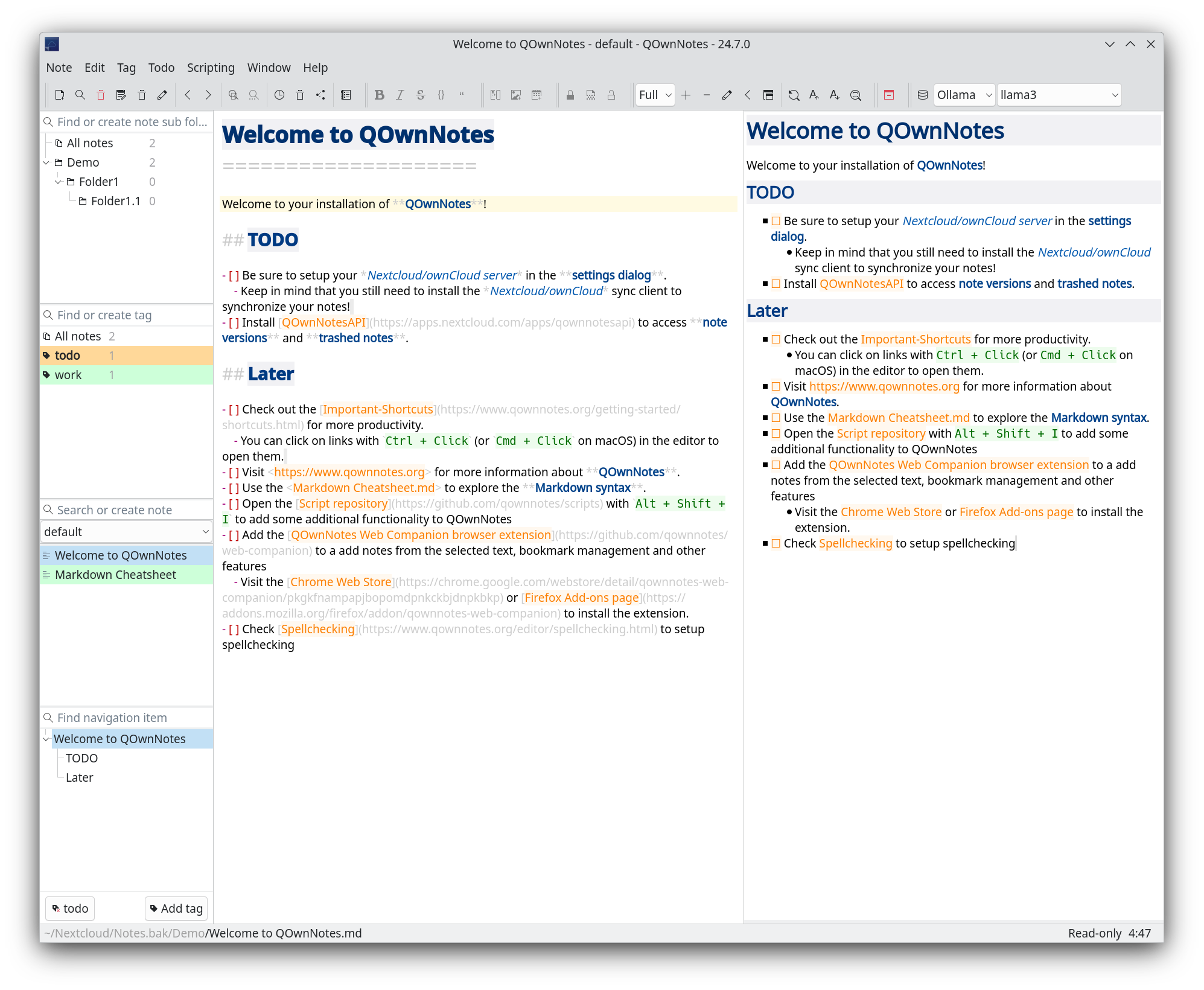 Reacted by Störm, bgommers and Thomas McWork
@xraMsamohT. then QOwnNotes really seems perfect for you. :)
Just keep on asking. 😁
Since 2013 you discuss if sub-folders or tags. Like this you will never go on and other's can't help with implementation.
Just decide what will be the simplest one to implement and do it!Reacted by korelstar, CaCO3, Jean-Baptiste Weibel, 1337sup3rh4x0r, Laurens, Thomas McWork and Constantine MolchanovI see it the same as @dasmaetthes: It´s FOUR YEARS NOW !
I newly dived in into the whole Notes thing on OwnCloud and immediately figured out there is no sorting/grouping feature - doesn´t matter if using subfolders (nice on the Windows end if you use QOwnNotes, brilliant) oder tags --> that´s an absolute basic feature... veeeeeery SAD :-( 👎Any chance folder-driven categories will be added? Notes aren’t usable without them.
Are there any iOS alternatives that do have categories?


Currently the notes are just a long list without any filtering (hopefully improving with search though). Maybe it would be good to have some sort of categories.
For now I want to keep it simple without categories (like iOS Notes or Litewrite), but if we have a good idea how to solve it in the interface we can do it.