Repository navigation
Pillow cannot read from array gray image? #3781
Description
Activity
Taking your code, I find that
fromarraywith L looks as you described, but if I omit the mode, it looks fine. Does this look okay for you? If not, what operating system and Pillow version are you using?import numpy as np from PIL import Image AB = Image.open("im.jpg") arr=np.array(AB) arr=arr@np.array([0.2125, 0.7154, 0.0721]) # I agree that this does not look good im = Image.fromarray(arr, 'L') # This looks fine however im = Image.fromarray(arr) im.convert('RGB').save('out.jpg')
@radarhere This is very strange since
fromarrayby default should read data asRGB. I checked the code from scipy.misc.toimage they use a different way to circumvent this bug:if len(shape) == 2: shape = (shape[1], shape[0]) # columns show up first if mode == 'F': data32 = data.astype(numpy.float32) image = Image.frombytes(mode, shape, data32.tostring()) return image if mode in [None, 'L', 'P']: bytedata = bytescale(data, high=high, low=low, cmin=cmin, cmax=cmax) image = Image.frombytes('L', shape, bytedata.tostring()) if pal is not None: image.putpalette(asarray(pal, dtype=uint8).tostring()) # Becomes a mode='P' automagically. elif mode == 'P': # default gray-scale pal = (arange(0, 256, 1, dtype=uint8)[:, newaxis] * ones((3,), dtype=uint8)[newaxis, :]) image.putpalette(asarray(pal, dtype=uint8).tostring()) return image if mode == '1': # high input gives threshold for 1 bytedata = (data > high) image = Image.frombytes('1', shape, bytedata.tostring()) return image if cmin is None: cmin = amin(ravel(data)) if cmax is None: cmax = amax(ravel(data)) data = (data*1.0 - cmin)*(high - low)/(cmax - cmin) + low if mode == 'I': data32 = data.astype(numpy.uint32) image = Image.frombytes(mode, shape, data32.tostring()) else: raise ValueError(_errstr) return image
fromarrayby default should read data asRGBWhat leads you to this conclusion?
https://pillow.readthedocs.io/en/stable/reference/Image.html#PIL.Image.fromarray
mode – Mode to use (will be determined from type if None) See: Modes.
scipy's
toimagedoesn't even read it as RGB by default, it reads it as L.>>> import numpy as np >>> import scipy.misc >>> from PIL import Image >>> AB = Image.open("391.jpg").convert('RGB') >>> arr=np.array(AB) >>> gray=arr@np.array([0.2125, 0.7154, 0.0721]) # gray scale now >>> scipy.misc.toimage(gray).mode 'L'
I'm confused. Could you clarify what you are after in this issue? Do you feel that
Image.fromarray(arr, 'L')should work, and are asking why it does not?@radarhere Yes I used
scipy.misc.toimagein my code and I issued this just because I thinkImage.fromarray(arr, 'L')should work(many users might think this way too) but it does not.Reacted by Amin Karbas and Shantal FabriHere's an even simpler example that triggers this behavior:
from PIL import Image
import numpy as np
x = np.tile(np.arange(0,100).reshape(-1,1),300)
Image.fromarray(x,mode='L').show()
Should get this (with scipy.misc.toimage):
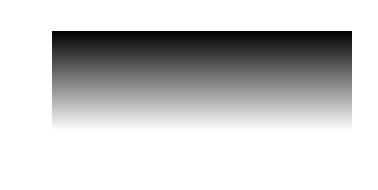
Instead get this:
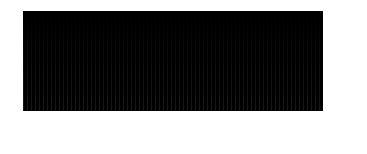 Reacted by Johan, Tinos and SpygR
Having been dealing with similar problems for a waay to long time, I realized that the issue was resolved by tacking on
.astype(np.uint8)to your array before passing it intoImage.fromarray(), as such:AB = Image.open("im.jpg") arr=np.array(AB) arr=arr@np.array([0.2125, 0.7154, 0.0721]) im = Image.fromarray(arr.astype(np.uint8), 'L')
or
x = np.tile(np.arange(0,100).reshape(-1,1),300)
Image.fromarray(x.astype(np.uint8), mode='L').show()
Although the most intuitive approach from the
PILlibrary in my opinion would be to cast whatever array that is passed in as an argument to auint8since that's what the formatmode="L"supports, I guess for now we can simply do it ourselves.Reacted by Jose Carlos Nuñez Valverde and SpygRRegarding the original image, it is an RGB image.
from PIL import Image
AB = Image.open("391.jpg")
print(AB.mode)  # RGB
If you try to apply
fromarray()to this using "L",import numpy as np from PIL import Image AB = Image.open("391.jpg") arr=np.array(AB) im = Image.fromarray(arr, "L")
you get
ValueError: Too many dimensions: 3 > 2. L is a single channel image, with two dimensions, width and height. RGB is a three channel image, and so has a third dimension.However, you've used the following line.
gray=arr@np.array([0.2125, 0.7154, 0.0721]) # gray scale now
Before this, the "typestr" of the NumPy array is "|u1". The above line turns it into "<f8". If the
modeargument is not given when usingfromarray, then Pillow observes that the "typestr" of the NumPy array is "<f8", which is an F image. If you would likefromarray()to correctly understand the image as an L mode image, then it should have only one channel and "typestr" should be kept as "|u1"Pillow is internally calling
arr.tobytes(), and then stepping over each row. It's not trying to interpret each value in the array in sequence. So if the data isn't related to the mode in a meaningful way, then the final image will not be meaningful.In the second image, the array has a "typestr" of "<i8". This isn't a type that Pillow supports.
Image.fromarray(arr.astype(np.uint8), 'L')is certainly a solution, converting the NumPy data to a form that Pillow will understand. However, I stand by my original note on the first image thatImage.fromarray(arr)works. If you would like it to be an L mode image afterwards,Image.fromarray(arr).convert('L')will take care of that.From what I see above, scipy is calling
astypeinternally. So why doesn't Pillow also do that, to match themodeparameter?My impression of this parameter (which, tbh, is not well documented) is that it's for overriding the mode that's detected from the dtype. Raising an error where it doesn't match is going to be problematical for the intended use case.
If the idea is that it is to override the detected mode, then automatically converting data to match the mode will break backwards compatibility.


I have a pic:

Do some conversion:
Whatever mode you use, it just looks like fucked up:

But if you use

scipy.misc.toimageit is still usable:
I don't know how. Just very strange