You signed in with another tab or window. Reload to refresh your session.You signed out in another tab or window. Reload to refresh your session.You switched accounts on another tab or window. Reload to refresh your session.Dismiss alert
{{ message }}
This repository was archived by the owner on Dec 5, 2025. It is now read-only.
Repository navigation
This repository was archived by the owner on Dec 5, 2025. It is now read-only.
------ Download ------
------ Unzip ------
Execute command: rm -rf /Applications/WeChat.app/Contents/MacOS/WeChatTweak.framework; unzip /tmp/WeChatTweak.zip -d /Applications/WeChat.app/Contents/MacOS
Install failed: Execute command: rm -rf /Applications/WeChat.app/Contents/MacOS/WeChatTweak.framework; unzip /tmp/WeChatTweak.zip -d /Applications/WeChat.app/Contents/MacOS failed: {
NSAppleScriptErrorAppName = "wechattweak-cli";
NSAppleScriptErrorBriefMessage = "checkdir error: cannot create /Applications/WeChat.app/Content unable to process WeChatTweak.framework/Versions/A/Resources/Base.lproj/TweakPrefere unable to process WeChatTweak.framework/Versions/A/Resources/Base.lproj/TweakPrefere unable to process WeChatTweak.framework/Versions/A/Resources/Base.lproj/TweakPrefere unable to process WeChatTweak.framework/Versions/A/Resources/en.lproj/Localizable.st unable to process WeChatTweak.framework/Versions/A/Resources/en.lproj/TweakPreferenc unable to process WeChatTweak.framework/Versions/A/Resources/zh-Hans.lproj/Localizab unable to process WeChatTweak.framework/Versions/A/Resources/zh-Hans.lproj/TweakPref unable to process WeChatTweak.framework/Versions/A/Resources/zh-Hant.lproj/Localizab unable to process WeChatTweak.framework/Versions/A/Resources/zh-Hant.lproj/TweakPref unable to process WeChatTweak.framework/WeChatTweak.";WeChatTweak.framework
NSAppleScriptErrorMessage = "checkdir error: cannot create /Applications/WeChat.app/Contents/Mac unable to process WeChatTweak.framework/Versions/A/Resources/Base.lproj/TweakPrefere unable to process WeChatTweak.framework/Versions/A/Resources/Base.lproj/TweakPrefere unable to process WeChatTweak.framework/Versions/A/Resources/Base.lproj/TweakPrefere unable to process WeChatTweak.framework/Versions/A/Resources/en.lproj/Localizable.st unable to process WeChatTweak.framework/Versions/A/Resources/en.lproj/TweakPreferenc unable to process WeChatTweak.framework/Versions/A/Resources/zh-Hans.lproj/Localizab unable to process WeChatTweak.framework/Versions/A/Resources/zh-Hans.lproj/TweakPref unable to process WeChatTweak.framework/Versions/A/Resources/zh-Hant.lproj/Localizab unable to process WeChatTweak.framework/Versions/A/Resources/zh-Hant.lproj/TweakPref unable to process WeChatTweak.framework/WeChatTweak.";WeChatTweak.framework
NSAppleScriptErrorNumber = 2;
NSAppleScriptErrorRange = "NSRange: {0, 157}";
}

Activity
liuhao16 commentedon Nov 10, 2022
我的13可以用 但是我刚刚微信升级到Version. 3.6.0 (24192)就不能用了
wuming-g commentedon Nov 10, 2022
------ Download ------
------ Unzip ------
Execute command: rm -rf /Applications/WeChat.app/Contents/MacOS/WeChatTweak.framework; unzip /tmp/WeChatTweak.zip -d /Applications/WeChat.app/Contents/MacOS
Install failed: Execute command: rm -rf /Applications/WeChat.app/Contents/MacOS/WeChatTweak.framework; unzip /tmp/WeChatTweak.zip -d /Applications/WeChat.app/Contents/MacOS failed: {
NSAppleScriptErrorAppName = "wechattweak-cli";
NSAppleScriptErrorBriefMessage = "checkdir error: cannot create /Applications/WeChat.app/Content unable to process WeChatTweak.framework/Versions/A/Resources/Base.lproj/TweakPrefere unable to process WeChatTweak.framework/Versions/A/Resources/Base.lproj/TweakPrefere unable to process WeChatTweak.framework/Versions/A/Resources/Base.lproj/TweakPrefere unable to process WeChatTweak.framework/Versions/A/Resources/en.lproj/Localizable.st unable to process WeChatTweak.framework/Versions/A/Resources/en.lproj/TweakPreferenc unable to process WeChatTweak.framework/Versions/A/Resources/zh-Hans.lproj/Localizab unable to process WeChatTweak.framework/Versions/A/Resources/zh-Hans.lproj/TweakPref unable to process WeChatTweak.framework/Versions/A/Resources/zh-Hant.lproj/Localizab unable to process WeChatTweak.framework/Versions/A/Resources/zh-Hant.lproj/TweakPref unable to process WeChatTweak.framework/WeChatTweak.";WeChatTweak.framework
NSAppleScriptErrorMessage = "checkdir error: cannot create /Applications/WeChat.app/Contents/Mac unable to process WeChatTweak.framework/Versions/A/Resources/Base.lproj/TweakPrefere unable to process WeChatTweak.framework/Versions/A/Resources/Base.lproj/TweakPrefere unable to process WeChatTweak.framework/Versions/A/Resources/Base.lproj/TweakPrefere unable to process WeChatTweak.framework/Versions/A/Resources/en.lproj/Localizable.st unable to process WeChatTweak.framework/Versions/A/Resources/en.lproj/TweakPreferenc unable to process WeChatTweak.framework/Versions/A/Resources/zh-Hans.lproj/Localizab unable to process WeChatTweak.framework/Versions/A/Resources/zh-Hans.lproj/TweakPref unable to process WeChatTweak.framework/Versions/A/Resources/zh-Hant.lproj/Localizab unable to process WeChatTweak.framework/Versions/A/Resources/zh-Hant.lproj/TweakPref unable to process WeChatTweak.framework/WeChatTweak.";WeChatTweak.framework
NSAppleScriptErrorNumber = 2;
NSAppleScriptErrorRange = "NSRange: {0, 157}";
}
wuming-g commentedon Nov 10, 2022
上面是更新时的错误提示。
我昨晚升级macOS系统到13.0.1,仍然出错。
微信版本号:Version.3.6.0(24191)
liuhao16 commentedon Nov 10, 2022
我现在正在重新安装。期待我的好消息
liuhao16 commentedon Nov 10, 2022
重新安装了也不行 等待作者更新吧
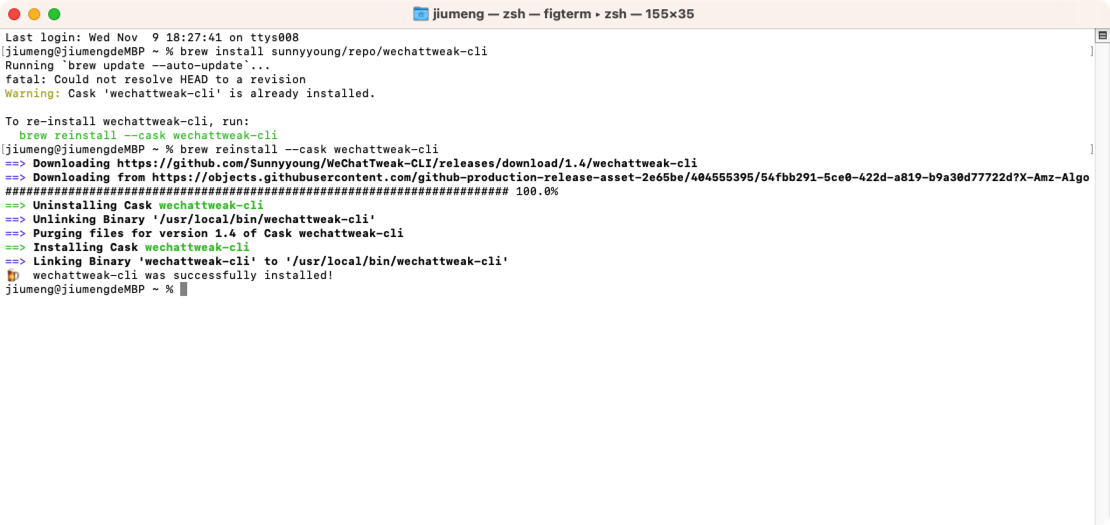
wuming-g commentedon Nov 10, 2022
simple4wan commentedon Nov 10, 2022
系统设置-隐私与安全性-App管理-iTerm(终端) 选中 就可以了。
wuming-g commentedon Nov 10, 2022
感谢楼上朋友!
按你说的方法,已经搞定!
------ Download ------
------ Unzip ------
Execute command: rm -rf /Applications/WeChat.app/Contents/MacOS/WeChatTweak.framework; unzip /tmp/WeChatTweak.zip -d /Applications/WeChat.app/Contents/MacOS
------ Backup ------
Created WeChat.bak...
------ Remove Codesign ------
Execute command: codesign --remove-sign /Applications/WeChat.app/Contents/MacOS/WeChat
------ Insert Dylib ------
Binary is a fat binary with 2 archs.
Added LC_LOAD_DYLIB to all archs in /Applications/WeChat.app/Contents/MacOS/WeChat
------ Add Codesign ------
Execute command: codesign --force --deep --sign - /Applications/WeChat.app/Contents/MacOS/WeChat
Install success!
zhangcheng commentedon Nov 21, 2022
不是 wechattweak-cli 本身的锅,是 MacOS 13 (Ventura) 更新了权限管理的影响,需要打开如图这个开关。
waynecjx commentedon Nov 24, 2022
chenrui333 commentedon Nov 24, 2022
这个方法就可以
HelloXiaoxi commentedon Nov 26, 2022
13.0.1,截屏功能不能用,总是提示要打开权限。如何解决呢?
隐私里删除微信-再添加-解决了。
zhangcheng commentedon Dec 3, 2022
能安装成功,就说明这个权限管理方面是 ok 的了。
WeChatTweak 功能没有生效,应该是其他的原因。
shubibin commentedon Jan 4, 2023
可以安装了,但是防撤回用不了
shubibin commentedon Jan 4, 2023
好吧,那就搞不懂为啥了,可以双开了,但是防撤回有些不太好使了
Chester-Chen commentedon Mar 20, 2023
可以解决,🙏。
0utman1 commentedon Jun 12, 2023
sudo wechattweak-cli install Password: ------ Download ------ ------ Unzip ------ Execute command: rm -rf /Applications/WeChat.app/Contents/MacOS/WeChatTweak.framework; unzip /tmp/WeChatTweak.zip -d /Applications/WeChat.app/Contents/MacOS ------ Backup ------ WeChat.bak exists, skip it... ------ Remove Codesign ------ Execute command: codesign --remove-sign /Applications/WeChat.app/Contents/MacOS/WeChat ------ Insert Dylib ------ Binary is a fat binary with 2 archs. Binary already contains a load command for that dylib. Skip it. Binary already contains a load command for that dylib. Skip it. Added LC_LOAD_DYLIB to all archs in /Applications/WeChat.app/Contents/MacOS/WeChat ------ Add Codesign ------ Execute command: codesign --force --deep --sign - /Applications/WeChat.app/Contents/MacOS/WeChat Install failed: Execute command: codesign --force --deep --sign - /Applications/WeChat.app/Contents/MacOS/WeChat failed: { NSAppleScriptErrorAppName = "wechattweak-cli"; NSAppleScriptErrorBriefMessage = "/Applications/WeChat.app/Contents/MacOS/WeIn subcomponent: /Applications/WeChat.app/Contents/MacOS/WeChat alias";d NSAppleScriptErrorMessage = "/Applications/WeChat.app/Contents/MacOS/WeChat:In subcomponent: /Applications/WeChat.app/Contents/MacOS/WeChat alias"; NSAppleScriptErrorNumber = 1; NSAppleScriptErrorRange = "NSRange: {0, 97}"; }给了App Managent和Full disk access两个权限也不行呢
0utman1 commentedon Jul 14, 2023
重新安装就好了,可能跟重复签名有关系?