Repository navigation
Running without reverse proxy? #13
Description
Activity
reverse-proxy:
    command: "caddy reverse-proxy --from $API_HOSTNAME --to api:8080"
    container_name: "xbs-reverse-proxy"
    depends_on:
      - "api"
    image: "caddy:2.3.0-alpine"
    ports:
      - "9002:443"
      - "9003:80"
    restart: "unless-stopped"
    volumes:
      - "xbs-caddy-config:/config"
      - "xbs-caddy-data:/data"
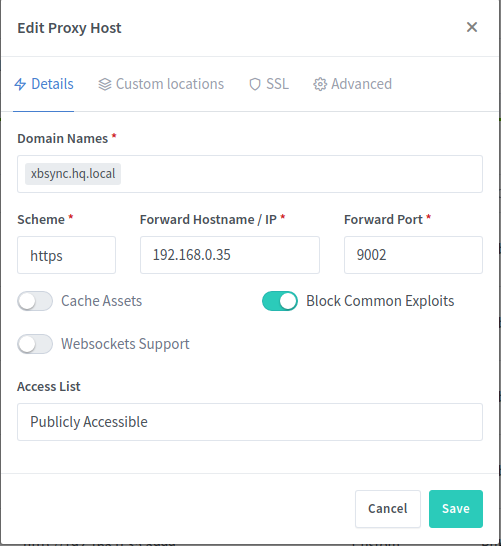
Changing the ports doesn't work behind my NPM, I just get a 502 Bad Gateway - openresty
Here's the NPM config
Just remove the
reverse-proxyand map theapiport8080to9001(or whatever port you want the api to expose):version: "3.7" services: db: container_name: "xbs-db" environment: - "MONGO_INITDB_DATABASE=$DB_NAME" - "MONGO_INITDB_ROOT_PASSWORD=$DB_PASSWORD" - "MONGO_INITDB_ROOT_USERNAME=$DB_USERNAME" - "XBS_DB_NAME=$DB_NAME" - "XBS_DB_PASSWORD=$DB_PASSWORD" - "XBS_DB_USERNAME=$DB_USERNAME" image: "mongo:4.4.4" restart: "unless-stopped" volumes: - "xbs-db-data:/data/db" - "xbs-db-backups:/data/backups" - "./mongoconfig.js:/docker-entrypoint-initdb.d/mongoconfig.js" api: container_name: "xbs-api" depends_on: - "db" environment: - "XBROWSERSYNC_DB_PWD=$DB_PASSWORD" - "XBROWSERSYNC_DB_USER=$DB_USERNAME" healthcheck: test: [ "CMD", "node", "/usr/src/api/healthcheck.js" ] interval: "1m" timeout: "10s" retries: "5" start_period: "30s" image: "xbrowsersync/api:1.1.13" ports: - "9001:8080" restart: "unless-stopped" volumes: - "./settings.json:/usr/src/api/config/settings.json" - "./healthcheck.js:/usr/src/api/healthcheck.js" volumes: xbs-db-backups: xbs-db-data:Then after running
docker-compose up -dyou can access the api at http://localhost:9001/.Reacted by rwjack


Hi,
I'm trying to get this running without the reverse proxy because I already use the NPM (nginx proxy manager) in docker.
What steps would I have to take to get this working?
I just need xbrowsersync on port let's say 9001, and NPM would do https for me.