<?xml version="1.0" encoding="utf-8"?><feed xmlns="http://www.w3.org/2005/Atom" ><generator uri="https://jekyllrb.com/" version="3.9.5">Jekyll</generator><link href="https://luke-biel.dev/feed.xml" rel="self" type="application/atom+xml" /><link href="https://luke-biel.dev/" rel="alternate" type="text/html" /><updated>2024-02-13T20:21:54+00:00</updated><id>https://luke-biel.dev/feed.xml</id><title type="html">Łukasz Biel</title><subtitle>Rust and C#. Backend dev from Wrocław. Sometimes I make games.
</subtitle><author><name>luke-biel</name><email>lukasz.p.biel@gmail.com</email></author><entry><title type="html">The marriage of Rust and Unity</title><link href="https://luke-biel.dev/technology/2020/03/22/the-sweet-marriage-of-rust-and-unity.html" rel="alternate" type="text/html" title="The marriage of Rust and Unity" /><published>2020-03-22T00:00:00+00:00</published><updated>2020-03-22T00:00:00+00:00</updated><id>https://luke-biel.dev/technology/2020/03/22/the-sweet-marriage-of-rust-and-unity</id><content type="html" xml:base="https://luke-biel.dev/technology/2020/03/22/the-sweet-marriage-of-rust-and-unity.html"><![CDATA[<p>Or setting up Continuous Delivery for Unity game with rust native plugin.</p>

<p>Contents:</p>
<ul id="markdown-toc">
  <li><a href="#game-dev--rust" id="markdown-toc-game-dev--rust">Game-dev &amp; Rust?</a></li>
  <li><a href="#unity-and-continuous-delivery" id="markdown-toc-unity-and-continuous-delivery">Unity and continuous delivery</a>    <ul>
      <li><a href="#the-yaml" id="markdown-toc-the-yaml">The yaml:</a></li>
    </ul>
  </li>
  <li><a href="#getting-the-unity-license-file" id="markdown-toc-getting-the-unity-license-file">Getting the Unity license file</a></li>
  <li><a href="#the-native-library" id="markdown-toc-the-native-library">The native library</a></li>
  <li><a href="#back-to-unity---dllimport" id="markdown-toc-back-to-unity---dllimport">Back to Unity - DllImport</a></li>
  <li><a href="#an-expanded-solution" id="markdown-toc-an-expanded-solution">An expanded solution</a></li>
</ul>

<h1 id="game-dev--rust">Game-dev &amp; Rust?</h1>

<p>Development of games in <strong>Rust</strong> is in quite raw state. There are tools, eg. <a href="https://github.com/amethyst/amethyst">Amethyst</a> or <a href="https://github.com/gfx-rs/gfx">gfx-rs</a>, however, there’s still plenty of work that needs to be done, before we’d be able to prototype something quickly or deliver a full fledged experience to a player.<br />
I’ve started thinking, why not use existing solutions and just integrate <strong>Rust</strong> into them, for that sweet performance boost and great experience during development.<br />
Game engine im most familiar with mould be <strong>Unity</strong>. I looked into whether <em>can I easily make this chimera multi-platform</em> and <em>can it support continuous delivery</em>? The answer was <em>yes</em> - it can.</p>

<h1 id="unity-and-continuous-delivery">Unity and continuous delivery</h1>

<p>There’s well known option for making <em>in the cloud</em> builds of unity apps: Unity’s <strong>Cloud Builds</strong> service. But theres a catch. Or two. It’s not free and it didn’t support custom steps last time I’ve checked. An alternative was needed. Here, to the rescue came github actions. They are fairly new, however, they have ever growing community of collaborators, that produce open source plugins, and what’s most important in my case: there was defined unity build template.</p>

<p><a href="https://github.com/webbertakken/unity-actions">unity-actions</a> allow to build and test projects on push. There are even actions responsible for requesting license server.</p>

<h3 id="the-yaml">The yaml:</h3>

<ul>
  <li>this part does not need any special explanation.</li>
</ul>

<div class="language-yaml highlighter-rouge"><div class="highlight"><pre class="highlight"><code><span class="na">name</span><span class="pi">:</span> <span class="s">Build my Game</span>

<span class="na">on</span><span class="pi">:</span> <span class="s">push</span>
</code></pre></div></div>

<ul>
  <li>we must provide unity license - in my case it was <em>Unity Personal</em> one. I’ll go deeper into where to get it in next section.</li>
</ul>

<div class="language-yaml highlighter-rouge"><div class="highlight"><pre class="highlight"><code><span class="na">env</span><span class="pi">:</span>
  <span class="na">UNITY_LICENSE</span><span class="pi">:</span> <span class="s">${{ secrets.UNITY_LICENSE }}</span>
</code></pre></div></div>

<ul>
  <li>first thing we checkout our repo and create cache for out Library folder, for the speedup of consecutive executions.</li>
</ul>

<div class="language-yaml highlighter-rouge"><div class="highlight"><pre class="highlight"><code><span class="na">jobs</span><span class="pi">:</span>
  <span class="na">build</span><span class="pi">:</span>
    <span class="na">name</span><span class="pi">:</span> <span class="s">Build for Windows</span>
    <span class="na">runs-on</span><span class="pi">:</span> <span class="s">ubuntu-latest</span>
    <span class="na">steps</span><span class="pi">:</span>
      <span class="pi">-</span> <span class="na">name</span><span class="pi">:</span> <span class="s">Checkout repository</span>
        <span class="na">uses</span><span class="pi">:</span> <span class="s">actions/checkout@v2</span>
        <span class="na">with</span><span class="pi">:</span>
          <span class="na">lfs</span><span class="pi">:</span> <span class="no">true</span>
      <span class="pi">-</span> <span class="na">uses</span><span class="pi">:</span> <span class="s">actions/cache@v1.1.0</span>
        <span class="na">with</span><span class="pi">:</span>
          <span class="na">path</span><span class="pi">:</span> <span class="s">Library</span>
          <span class="na">key</span><span class="pi">:</span> <span class="s">Library</span>
</code></pre></div></div>

<ul>
  <li>then we run - first tests using <code class="language-plaintext highlighter-rouge">webbertakken/unity-test-runner</code> action, followed by a build for desired <code class="language-plaintext highlighter-rouge">targetPlatform</code> using <code class="language-plaintext highlighter-rouge">webbertakken/unity-builder</code>. Simple, isn’t it?</li>
</ul>

<blockquote>
  <p>As of writing this article, I wasn’t able to setup those runs with 2020 beta, due to segmentation fault in license verifier. When setting up your own job, keep that in mind.</p>
</blockquote>

<blockquote>
  <p>It is important that editors version that’s assigned to <code class="language-plaintext highlighter-rouge">secrets.UNITY_LICENSE</code> is matching with the version we are making build on. I’ve seen notes that license files should work between versions but, well, that wasn’t my case.</p>
</blockquote>

<div class="language-yaml highlighter-rouge"><div class="highlight"><pre class="highlight"><code>      <span class="pi">-</span> <span class="na">name</span><span class="pi">:</span> <span class="s">Run tests</span>
        <span class="na">uses</span><span class="pi">:</span> <span class="s">webbertakken/unity-test-runner@v1.3</span>
        <span class="na">with</span><span class="pi">:</span>
          <span class="na">unityVersion</span><span class="pi">:</span> <span class="s">2019.3.5f1</span>
      <span class="pi">-</span> <span class="na">name</span><span class="pi">:</span> <span class="s">Build project</span>
        <span class="na">uses</span><span class="pi">:</span> <span class="s">webbertakken/unity-builder@v0.10</span>
        <span class="na">with</span><span class="pi">:</span>
          <span class="na">unityVersion</span><span class="pi">:</span> <span class="s">2019.3.5f1</span>
          <span class="na">targetPlatform</span><span class="pi">:</span> <span class="s">StandaloneWindows64</span> 
</code></pre></div></div>

<ul>
  <li>last thing, let’s upload our build somewhere. We don’t need to prepare release, so an artifact will be enough.</li>
</ul>

<div class="language-yaml highlighter-rouge"><div class="highlight"><pre class="highlight"><code>      <span class="pi">-</span> <span class="na">uses</span><span class="pi">:</span> <span class="s">actions/upload-artifact@v1</span>
        <span class="na">with</span><span class="pi">:</span>
          <span class="na">name</span><span class="pi">:</span> <span class="s">StandaloneWindows64</span>
          <span class="na">path</span><span class="pi">:</span> <span class="s">build</span>
</code></pre></div></div>

<h1 id="getting-the-unity-license-file">Getting the Unity license file</h1>

<p>Pro users have it easier, cause all they have to do is fill <em>UNITY_SERIAL</em>, <em>UNITY_EMAIL</em> and <em>UNITY_PASSWORD</em> variables in repository secrets. For personal edition users, we need to request special <em>.ulf</em> file directly from Unity’s website.<br />
First of all, we need license request file. It can be retrieved from <strong>Unity Hub</strong> in the settings, but it may be that It’ll output your first license from when you’ve created given account. For me that was edition 2017 - it didn’t work with my target editor.<br />
In order to overcome such an issue, I’ve created a dummy action on my github using https://github.com/marketplace/actions/unity-request-activation-file. This generated me <em>.alf</em> license request file with desired version. Then I’ve gone to https://license.unity3d.com/manual and was able to retrieve correct <em>.ulf</em> license file. I’ve then pasted it’s contents to new secret in my repository under name <code class="language-plaintext highlighter-rouge">UNITY_LICENSE</code>. The build started working.</p>

<h1 id="the-native-library">The native library</h1>

<p>With game building nicely on Github’s cloud we can switch our attention to getting it running with our rust native plugin. We create new library with <code class="language-plaintext highlighter-rouge">cargo new --lib</code>, we open Cargo.toml and add</p>
<div class="language-toml highlighter-rouge"><div class="highlight"><pre class="highlight"><code><span class="nn">[lib]</span>
<span class="py">crate-type</span> <span class="p">=</span> <span class="nn">["cdylib"]</span>
</code></pre></div></div>
<p>a crate type, so cargo will know how to build our lib when we run <code class="language-plaintext highlighter-rouge">cargo build --release</code>. We need a shared library, which is a <code class="language-plaintext highlighter-rouge">dll</code> on Windows, <code class="language-plaintext highlighter-rouge">dylib</code> on MacOS and <code class="language-plaintext highlighter-rouge">so</code> on Linux.</p>

<p>Our code may look whatever, but for the functions we’ll use outside must follow certain pattern:</p>
<div class="language-rust highlighter-rouge"><div class="highlight"><pre class="highlight"><code><span class="nd">#[no_mangle]</span>
<span class="k">pub</span> <span class="k">extern</span> <span class="k">fn</span> <span class="nf">test</span><span class="p">()</span> <span class="k">-&gt;</span> <span class="nb">i32</span> <span class="p">{</span>
    <span class="mi">42</span>
<span class="p">}</span>
</code></pre></div></div>
<p><code class="language-plaintext highlighter-rouge">extern</code> keyword tells the compiler that this function will be used outside and <code class="language-plaintext highlighter-rouge">#[no_mangle]</code> disables name mangling (rust usually adds a lot of useful information about the function to it’s name, when it compiles a library, however, from outside, we’d have to guess what would be exact name we want to import).<br />
Let’s place this code into <em>lib.rs</em> and setup a job, so github would compile it for us before adding as a <em>Plugin</em> to Unity.<br />
For that, as a base, I used <a href="https://github.com/XAMPPRocky/mean-bean-ci-template">mean-bean-ci-template</a>.</p>
<div class="language-yaml highlighter-rouge"><div class="highlight"><pre class="highlight"><code><span class="na">lib_windows</span><span class="pi">:</span>
  <span class="na">runs-on</span><span class="pi">:</span> <span class="s">windows-latest</span>
  <span class="na">needs</span><span class="pi">:</span> <span class="s">install-cross</span>
  <span class="na">steps</span><span class="pi">:</span>
    <span class="pi">-</span> <span class="na">uses</span><span class="pi">:</span> <span class="s">actions/checkout@v2</span>
      <span class="na">with</span><span class="pi">:</span>
        <span class="na">depth</span><span class="pi">:</span> <span class="m">50</span>
    <span class="pi">-</span> <span class="na">run</span><span class="pi">:</span> <span class="s">chmod +x ci/*</span>
    <span class="pi">-</span> <span class="na">run</span><span class="pi">:</span> <span class="s">ci/set_rust_version.bash stable x86_64-pc-windows-msvc</span>
    <span class="pi">-</span> <span class="na">run</span><span class="pi">:</span> <span class="s">cargo build --target x86_64-pc-windows-msvc --all-features --release</span>
    <span class="pi">-</span> <span class="na">uses</span><span class="pi">:</span> <span class="s">actions/upload-artifact@v1</span>
      <span class="na">with</span><span class="pi">:</span>
        <span class="na">name</span><span class="pi">:</span> <span class="s">library-x86_64-pc-windows-msvc.dll</span>
        <span class="na">path</span><span class="pi">:</span> <span class="s">target/x86_64-pc-windows-msvc/release/library.dll</span>
</code></pre></div></div>
<p>this required me to copy the folder <em>ci</em> from the <a href="https://github.com/XAMPPRocky/mean-bean-ci-template">XAMPPRocky’s repo</a> into mine.</p>

<p>One last thing - this artifact must be placed in <em>Assets/Plugins</em> directory in Unity Project. For that, we must add a step to unity build job:</p>
<div class="language-yaml highlighter-rouge"><div class="highlight"><pre class="highlight"><code><span class="pi">-</span> <span class="na">name</span><span class="pi">:</span> <span class="s">Download lib</span>
  <span class="na">uses</span><span class="pi">:</span> <span class="s">actions/download-artifact@v1</span>
  <span class="na">with</span><span class="pi">:</span>
    <span class="na">name</span><span class="pi">:</span> <span class="s">library-x86_64-pc-windows-msvc.dll</span>
    <span class="na">path</span><span class="pi">:</span> <span class="s">Assets/Plugins/</span>
</code></pre></div></div>

<p>and we are almost done.</p>

<h1 id="back-to-unity---dllimport">Back to Unity - DllImport</h1>

<p>Now we must head back to Unity, in main scene of our example project create an object and attach a script to it. Let’s make it more fun - let our object be UI Text. In it’s script we must first import our rust library. We do so by writing:</p>
<div class="language-csharp highlighter-rouge"><div class="highlight"><pre class="highlight"><code><span class="p">[</span><span class="nf">DllImport</span><span class="p">(</span><span class="s">"library"</span><span class="p">)]</span>
<span class="k">private</span> <span class="k">static</span> <span class="k">extern</span> <span class="n">Int32</span> <span class="nf">test</span><span class="p">();</span>
</code></pre></div></div>
<blockquote>
  <p>when building for iOS we’d use library named <strong>__Internal</strong> instead. That’s double underscore.</p>
</blockquote>

<p>after this operation, we can just call <code class="language-plaintext highlighter-rouge">test()</code> from our code as normal function. Eg.:</p>
<div class="language-csharp highlighter-rouge"><div class="highlight"><pre class="highlight"><code><span class="k">private</span> <span class="k">void</span> <span class="nf">Start</span><span class="p">()</span> <span class="p">{</span>
  <span class="k">this</span><span class="p">.</span><span class="n">GetComponent</span><span class="p">&lt;</span><span class="n">Text</span><span class="p">&gt;().</span><span class="n">text</span> <span class="p">=</span> <span class="nf">test</span><span class="p">().</span><span class="nf">ToString</span><span class="p">();</span>
<span class="p">}</span>
</code></pre></div></div>

<p>viola, when ran, our project should put <strong>42</strong> in that text field (taken we compile our lib and place it in <em>Plugins</em> folder on our local machine (we can always push to github and download artifact for testing)).</p>

<h1 id="an-expanded-solution">An expanded solution</h1>

<p>The following contains compilation for multiple platforms, without tests, but adding these would be quite easy.</p>

<style type="text/css">
  .gist-file
  .gist-data {max-height: 300px}
</style>

<script src="https://gist.github.com/luke-biel/ae708a4b0fcba9eafb27382971720499.js"></script>]]></content><author><name>luke-biel</name><email>lukasz.p.biel@gmail.com</email></author><category term="technology" /><summary type="html"><![CDATA[Or setting up Continuous Delivery for Unity game with rust native plugin.]]></summary></entry><entry><title type="html">Writing a trello client</title><link href="https://luke-biel.dev/technology/2020/03/09/a-typescript-course.html" rel="alternate" type="text/html" title="Writing a trello client" /><published>2020-03-09T00:00:00+00:00</published><updated>2020-03-09T00:00:00+00:00</updated><id>https://luke-biel.dev/technology/2020/03/09/a-typescript-course</id><content type="html" xml:base="https://luke-biel.dev/technology/2020/03/09/a-typescript-course.html"><![CDATA[<p>Or how I picked up typescript.</p>

<p>Contents:</p>
<ul id="markdown-toc">
  <li><a href="#the-project" id="markdown-toc-the-project">The project</a>    <ul>
      <li><a href="#what-this-article-is" id="markdown-toc-what-this-article-is">What this article is?</a></li>
    </ul>
  </li>
  <li><a href="#why-typescript" id="markdown-toc-why-typescript">Why typescript?</a></li>
  <li><a href="#setting-up" id="markdown-toc-setting-up">Setting up</a></li>
  <li><a href="#integrating-with-trello" id="markdown-toc-integrating-with-trello">Integrating with trello</a></li>
  <li><a href="#drawing-on-terminal" id="markdown-toc-drawing-on-terminal">Drawing on terminal</a></li>
  <li><a href="#conclusion" id="markdown-toc-conclusion">Conclusion</a>    <ul>
      <li><a href="#about-application" id="markdown-toc-about-application">About application</a></li>
    </ul>
  </li>
</ul>

<h1 id="the-project">The project</h1>

<p>I pick up new projects quite often. To balance the chaos I have numerous <a href="https://trello.com/">trello</a> boards. Each of them represents project or idea that I work on, or intend to work on. To organize them, I’ve created a tool that shows you (from across all of your boards) what tasks have you <strong>In Progress</strong> and some of those that you can pick up from <strong>To Do</strong>.</p>

<h3 id="what-this-article-is">What this article is?</h3>

<p>This article is more of a technical walk-through than case study with specific code in mind. If you are interested in viewing <em>how</em> I structured the code, you may visit my <a href="https://luke-biel.github.io/trollo">repo</a>.</p>

<h1 id="why-typescript">Why typescript?</h1>

<p>Other languages I’ve considered were <em>bash</em>, <em>python</em> and <em>ruby</em>. Apart for my personal desire to learn <em>JS</em> and <em>nodejs</em>, <em>TypeScript</em> stood out by being type safe <strong>AND</strong> by providing non-nullability by design. I got used to explicit “null” types when I started writing my applications in <em>Rust</em>.<br />
Additionally <em>TypeScript</em> was supplying me with whole <em>nodejs</em> ecosystem and libraries.</p>

<h1 id="setting-up">Setting up</h1>

<p><em>TypeScript</em> can be seamlessly integrated with <em>npm</em> environment.<br />
First we create new npm package <code class="language-plaintext highlighter-rouge">npm init</code>. This should prompt us with package creator:</p>
<div class="language-text highlighter-rouge"><div class="highlight"><pre class="highlight"><code>└─[0] &lt;&gt; npm init
This utility will walk you through creating a package.json file.
It only covers the most common items, and tries to guess sensible defaults.

See `npm help json` for definitive documentation on these fields
and exactly what they do.

Use `npm install &lt;pkg&gt;` afterwards to install a package and
save it as a dependency in the package.json file.

Press ^C at any time to quit.
package name: (test)
version: (1.0.0) 0.1.0
description: A dummy ts package
entry point: (index.js) lib/index.js
test command:
git repository: git@github.com:/luke-biel/test
keywords:
author: Łukasz Biel &lt;lukasz.p.biel@gmail.com&gt;
license: (ISC) MIT
</code></pre></div></div>
<p>Next thing we need to add typescript as a dependency - <code class="language-plaintext highlighter-rouge">npm install typescript @types/node --save-dev</code>. The <code class="language-plaintext highlighter-rouge">@types/node</code> module is necessary for <em>TypeScript</em> to know what function signatures does node export.<br />
We need to add couple of run scripts to <em>package.json</em>, ones that compile code to <em>js</em> and ones that run the app with <em>node</em>.</p>
<div class="language-json highlighter-rouge"><div class="highlight"><pre class="highlight"><code><span class="nl">"scripts"</span><span class="p">:</span><span class="w"> </span><span class="p">{</span><span class="w">
    </span><span class="nl">"build"</span><span class="p">:</span><span class="w"> </span><span class="s2">"tsc -p ."</span><span class="p">,</span><span class="w">
    </span><span class="nl">"clean"</span><span class="p">:</span><span class="w"> </span><span class="s2">"rm -rf ./lib"</span><span class="p">,</span><span class="w">
    </span><span class="nl">"refresh-pkg"</span><span class="p">:</span><span class="w"> </span><span class="s2">"rm -rf ./node_modules ./package-lock.json &amp;&amp; npm install"</span><span class="p">,</span><span class="w">
    </span><span class="nl">"app"</span><span class="p">:</span><span class="w"> </span><span class="s2">"node ./lib/index.js"</span><span class="w">
</span><span class="p">}</span><span class="w">
</span></code></pre></div></div>
<p>We add <code class="language-plaintext highlighter-rouge">tsconfig.json</code> so <em>TypeScript</em> compiler knows how to build our code:</p>
<div class="language-json highlighter-rouge"><div class="highlight"><pre class="highlight"><code><span class="p">{</span><span class="w">
    </span><span class="nl">"compilerOptions"</span><span class="p">:</span><span class="w"> </span><span class="p">{</span><span class="w">
        </span><span class="nl">"target"</span><span class="p">:</span><span class="w"> </span><span class="s2">"es5"</span><span class="p">,</span><span class="w">                  </span><span class="err">//</span><span class="w"> </span><span class="err">target</span><span class="w"> </span><span class="err">es</span><span class="w"> </span><span class="err">backend</span><span class="w">
        </span><span class="nl">"module"</span><span class="p">:</span><span class="w"> </span><span class="s2">"commonjs"</span><span class="p">,</span><span class="w">
        </span><span class="nl">"lib"</span><span class="p">:</span><span class="w"> </span><span class="p">[</span><span class="s2">"es6"</span><span class="p">,</span><span class="w"> </span><span class="s2">"es2019"</span><span class="p">],</span><span class="w">         </span><span class="err">//</span><span class="w"> </span><span class="err">libraries</span><span class="w"> </span><span class="err">to</span><span class="w"> </span><span class="err">include</span><span class="w">
        </span><span class="nl">"declaration"</span><span class="p">:</span><span class="w"> </span><span class="kc">true</span><span class="p">,</span><span class="w">              </span><span class="err">//</span><span class="w"> </span><span class="err">should</span><span class="w"> </span><span class="err">we</span><span class="w"> </span><span class="err">generate</span><span class="w"> </span><span class="err">.d.ts</span><span class="w"> </span><span class="err">files</span><span class="w">
        </span><span class="nl">"outDir"</span><span class="p">:</span><span class="w"> </span><span class="s2">"lib"</span><span class="p">,</span><span class="w">                  </span><span class="err">//</span><span class="w"> </span><span class="err">where</span><span class="w"> </span><span class="err">we</span><span class="w"> </span><span class="err">want</span><span class="w"> </span><span class="err">.js</span><span class="w"> </span><span class="err">files</span><span class="w"> </span><span class="err">generated</span><span class="w">
        </span><span class="nl">"rootDir"</span><span class="p">:</span><span class="w"> </span><span class="s2">"src"</span><span class="p">,</span><span class="w">                 </span><span class="err">//</span><span class="w"> </span><span class="err">where</span><span class="w"> </span><span class="err">we</span><span class="w"> </span><span class="err">place</span><span class="w"> </span><span class="err">out</span><span class="w"> </span><span class="err">.ts</span><span class="w"> </span><span class="err">code</span><span class="w">
        </span><span class="nl">"strict"</span><span class="p">:</span><span class="w"> </span><span class="kc">true</span><span class="p">,</span><span class="w">                   </span><span class="err">//</span><span class="w"> </span><span class="err">we</span><span class="w"> </span><span class="err">want</span><span class="w"> </span><span class="err">strict</span><span class="w"> </span><span class="err">type</span><span class="w"> </span><span class="err">checking</span><span class="w">
        </span><span class="nl">"types"</span><span class="p">:</span><span class="w"> </span><span class="p">[</span><span class="s2">"node"</span><span class="p">],</span><span class="w">                </span><span class="err">//</span><span class="w"> </span><span class="err">what</span><span class="w"> </span><span class="err">name</span><span class="w"> </span><span class="err">definitions</span><span class="w"> </span><span class="err">should</span><span class="w"> </span><span class="err">we</span><span class="w"> </span><span class="err">include</span><span class="w">
        </span><span class="nl">"esModuleInterop"</span><span class="p">:</span><span class="w"> </span><span class="kc">true</span><span class="p">,</span><span class="w">          </span><span class="err">//</span><span class="w"> </span><span class="err">compatibility</span><span class="w"> </span><span class="err">option</span><span class="w">
        </span><span class="nl">"resolveJsonModule"</span><span class="p">:</span><span class="w"> </span><span class="kc">true</span><span class="w">         </span><span class="err">//</span><span class="w"> </span><span class="err">include</span><span class="w"> </span><span class="err">modules</span><span class="w"> </span><span class="err">imported</span><span class="w"> </span><span class="err">with</span><span class="w"> </span><span class="err">.json</span><span class="w"> </span><span class="err">extension</span><span class="w">
    </span><span class="p">}</span><span class="w">
</span><span class="p">}</span><span class="w">
</span></code></pre></div></div>
<p>With all those things set up, we can create <code class="language-plaintext highlighter-rouge">src/index.ts</code> file:</p>
<div class="language-typescript highlighter-rouge"><div class="highlight"><pre class="highlight"><code><span class="nx">console</span><span class="p">.</span><span class="nx">log</span><span class="p">(</span><span class="dl">"</span><span class="s2">Hello, world!</span><span class="dl">"</span><span class="p">);</span>
</code></pre></div></div>
<p>Running it with <code class="language-plaintext highlighter-rouge">npm run build &amp;&amp; npm run app</code> results in:</p>
<div class="language-text highlighter-rouge"><div class="highlight"><pre class="highlight"><code>└─[0] &lt;&gt; npm run build &amp;&amp; npm run app

&gt; test@0.1.0 build /home/lbiel/zone/test
&gt; tsc -p .


&gt; test@0.1.0 app /home/lbiel/zone/test
&gt; node ./lib/index.js

Hello, world!
</code></pre></div></div>

<h1 id="integrating-with-trello">Integrating with trello</h1>

<p>Trello provides REST api via url <a href="https://api.trello.com/1">https://api.trello.com/1</a>.</p>

<p>In order to make any request to their service we need their API key and token, first one we get at <a href="https://trello.com/app-key">https://trello.com/app-key</a>, latter at <a href="https://trello.com/1/authorize?expiration=never&amp;scope=read,write,account&amp;response_type=token&amp;name=Server%20Token&amp;key=$TRELLO_KEY">https://trello.com/1/authorize?expiration=never&amp;scope=read,write,account&amp;response_type=token&amp;name=Server%20Token&amp;key=$TRELLO_KEY</a>, where we should replace <strong>$TRELLO_KEY</strong> with our app-key. Further reading is available at <a href="https://developers.trello.com/docs/api-introduction">https://developers.trello.com/docs/api-introduction</a>.</p>

<p>In order to get list of user boards, we need to <strong>GET</strong> <code class="language-plaintext highlighter-rouge">/members/me/boards</code>. We may want to limit json fields to only contain <em>name</em> by adding <code class="language-plaintext highlighter-rouge">?fields=name</code>. <em>id</em> will be added anyway. We won’t use other fields for now. An example of response is:</p>
<div class="language-json highlighter-rouge"><div class="highlight"><pre class="highlight"><code><span class="p">[</span><span class="w">
  </span><span class="p">{</span><span class="w">
    </span><span class="nl">"name"</span><span class="p">:</span><span class="w"> </span><span class="s2">"bts"</span><span class="p">,</span><span class="w">
    </span><span class="nl">"id"</span><span class="p">:</span><span class="w"> </span><span class="s2">"5d1dd88d8a013d245d94bf79"</span><span class="w">
  </span><span class="p">},</span><span class="w">
  </span><span class="p">{</span><span class="w">
    </span><span class="nl">"name"</span><span class="p">:</span><span class="w"> </span><span class="s2">"dir-assert"</span><span class="p">,</span><span class="w">
    </span><span class="nl">"id"</span><span class="p">:</span><span class="w"> </span><span class="s2">"5e1e1813e86c19040b01120a"</span><span class="w">
  </span><span class="p">},</span><span class="w">
  </span><span class="p">{</span><span class="w">
    </span><span class="nl">"name"</span><span class="p">:</span><span class="w"> </span><span class="s2">"ion-fmt"</span><span class="p">,</span><span class="w">
    </span><span class="nl">"id"</span><span class="p">:</span><span class="w"> </span><span class="s2">"5e1afde5d3055a80b84bfe5c"</span><span class="w">
  </span><span class="p">}</span><span class="w">
</span><span class="p">]</span><span class="w">
</span></code></pre></div></div>

<p>I’ve used <em>axios</em> for http client (<code class="language-plaintext highlighter-rouge">npm install axios --save</code>).</p>
<div class="language-typescript highlighter-rouge"><div class="highlight"><pre class="highlight"><code><span class="nx">axios</span><span class="p">.</span><span class="kd">get</span><span class="p">(</span>
    <span class="nx">$</span><span class="p">{</span><span class="nx">MY_BOARDS_URL</span><span class="p">}?</span><span class="nx">key</span><span class="o">=</span><span class="nx">$</span><span class="p">{</span><span class="k">this</span><span class="p">.</span><span class="nx">config</span><span class="p">.</span><span class="nx">apiKey</span><span class="p">}</span><span class="o">&amp;</span><span class="nx">token</span><span class="o">=</span><span class="nx">$</span><span class="p">{</span><span class="k">this</span><span class="p">.</span><span class="nx">config</span><span class="p">.</span><span class="nx">apiToken</span><span class="p">}</span><span class="o">&amp;</span><span class="nx">fields</span><span class="o">=</span><span class="nx">name</span><span class="p">,</span><span class="nx">id</span><span class="s2">`
);
</span></code></pre></div></div>
<p>and prepared interface beforehand, to function as a DTO:</p>
<div class="language-typescript highlighter-rouge"><div class="highlight"><pre class="highlight"><code><span class="kr">interface</span> <span class="nx">BoardDTO</span> <span class="p">{</span>
    <span class="nl">name</span><span class="p">:</span> <span class="kr">string</span><span class="p">;</span>
    <span class="nl">id</span><span class="p">:</span> <span class="kr">string</span><span class="p">;</span>
<span class="p">}</span>
</code></pre></div></div>
<p>this is huge benefit of <strong>TypeScript</strong>, we can have typed DTOs as opposed to vague and uncertain data structures that some other languages would provide.</p>

<p>Having board <em>id</em> we can now query each of the boards to get names of lists (columns) available. We do that on endpoint <code class="language-plaintext highlighter-rouge">/boards/$ID/lists</code>. We can again limit ourselves only to download <em>name</em> field. Here’s an excerpt from <em>dir-assert</em> board:</p>
<div class="language-json highlighter-rouge"><div class="highlight"><pre class="highlight"><code><span class="p">[</span><span class="w">
  </span><span class="p">{</span><span class="w">
    </span><span class="nl">"id"</span><span class="p">:</span><span class="w"> </span><span class="s2">"5e1e481819a7f78868014c9e3"</span><span class="p">,</span><span class="w">
    </span><span class="nl">"name"</span><span class="p">:</span><span class="w"> </span><span class="s2">"To Do"</span><span class="w">
  </span><span class="p">},</span><span class="w">
  </span><span class="p">{</span><span class="w">
    </span><span class="nl">"id"</span><span class="p">:</span><span class="w"> </span><span class="s2">"5e1e481c41772d7c02ddf38b"</span><span class="p">,</span><span class="w">
    </span><span class="nl">"name"</span><span class="p">:</span><span class="w"> </span><span class="s2">"In Progress"</span><span class="w">
  </span><span class="p">},</span><span class="w">
  </span><span class="p">{</span><span class="w">
    </span><span class="nl">"id"</span><span class="p">:</span><span class="w"> </span><span class="s2">"5e1e4811276d9c1b3a6f1210"</span><span class="p">,</span><span class="w">
    </span><span class="nl">"name"</span><span class="p">:</span><span class="w"> </span><span class="s2">"Done"</span><span class="w">
  </span><span class="p">}</span><span class="w">
</span><span class="p">]</span><span class="w">
</span></code></pre></div></div>

<p>We are only interested with boards that have lists named <strong>To Do</strong> and <strong>In Progress</strong>, so we can filter out other ones.</p>

<p>We need cards from each <strong>To Do</strong> list and each <strong>In Progress</strong> list grouped in one place.
This purpose fulfils <code class="language-plaintext highlighter-rouge">/lists/$ID/cards</code> endpoint. Example response:</p>
<div class="language-json highlighter-rouge"><div class="highlight"><pre class="highlight"><code><span class="p">[</span><span class="w">
  </span><span class="p">{</span><span class="w">
    </span><span class="nl">"id"</span><span class="p">:</span><span class="w"> </span><span class="s2">"5e440f40baa1f3516713b575"</span><span class="p">,</span><span class="w">
    </span><span class="nl">"name"</span><span class="p">:</span><span class="w"> </span><span class="s2">"assert should println! or debug! all paths it went through"</span><span class="w">
  </span><span class="p">},</span><span class="w">
  </span><span class="p">{</span><span class="w">
    </span><span class="nl">"id"</span><span class="p">:</span><span class="w"> </span><span class="s2">"5e440f8939420000a178e545"</span><span class="p">,</span><span class="w">
    </span><span class="nl">"name"</span><span class="p">:</span><span class="w"> </span><span class="s2">"unit test error new_* functions"</span><span class="w">
  </span><span class="p">},</span><span class="w">
  </span><span class="p">{</span><span class="w">
    </span><span class="nl">"id"</span><span class="p">:</span><span class="w"> </span><span class="s2">"5e4410c2c00a4a49e3540929"</span><span class="p">,</span><span class="w">
    </span><span class="nl">"name"</span><span class="p">:</span><span class="w"> </span><span class="s2">"Cleanup code"</span><span class="w">
  </span><span class="p">}</span><span class="w">
</span><span class="p">]</span><span class="w">
</span></code></pre></div></div>

<p>With all that information collected in DTOs we can now start drawing it!</p>

<h1 id="drawing-on-terminal">Drawing on terminal</h1>

<p>I’ve tested some of the available <a href="https://en.wikipedia.org/wiki/Text-based_user_interface">tui</a>s but none was feeling right, therefore I’ve settled down with plain <em>chalk</em>. <em>chalk</em> is a library that allows you to paint text in easy way, by using template strings.</p>
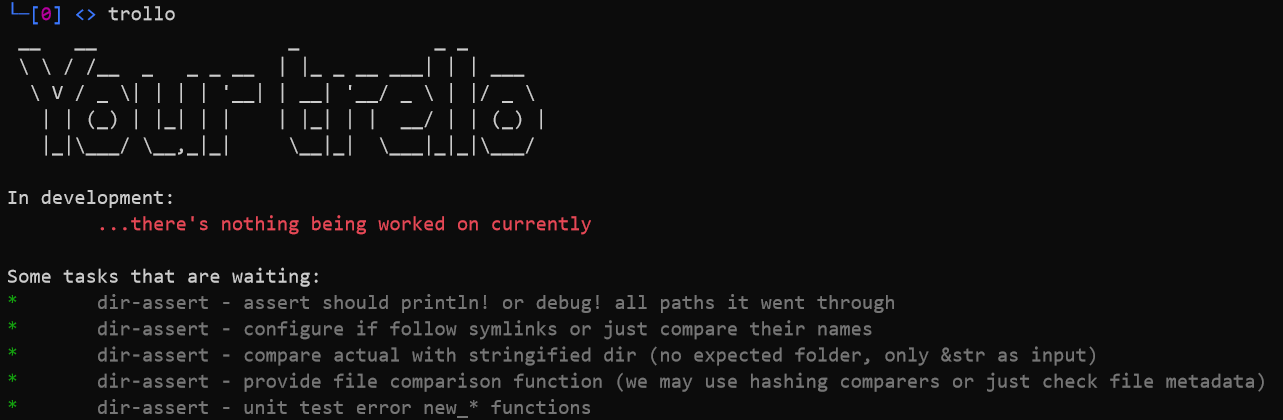
<div class="language-typescript highlighter-rouge"><div class="highlight"><pre class="highlight"><code><span class="nx">chalk</span><span class="s2">`{red ...there's nothing being worked on currently}`</span>
</code></pre></div></div>

<p>The final result looks like this:</p>

<p><img src="https://luke-biel.dev/images/2020-03-09-a-typescript-course/usage.png" alt="Trollo" /></p>

<h1 id="conclusion">Conclusion</h1>

<p><a href="https://luke-biel.github.io/trollo">repo</a></p>

<p>I’m quite shocked how easy to use, yet so powerful typescript is. It’s language that I feel quite comfortable writing in, which I haven’t said about anything since the time I started programming in <em>rust</em> and <em>haskell</em>.</p>

<h3 id="about-application">About application</h3>

<p>It works. It even displays useful information, so that’s a success. However…</p>

<p>    …it’s a bit slow. I can use it once a while, but if I’d start each bash session with <a href="https://luke-biel.github.io/trollo">trollo</a> run, as I intended, I’d get annoyed quite quickly for how slow the app is.<br />
Bottleneck is in amount of requests I make. <em>1</em> request for boards, <em>X</em> requests for each boards list, <em>2*X</em> requests for each list cards. So when <em>X is 10</em>, I’m effectively making 31 http requests. That’s a lot.<br />
Well, it’s time to create board for <a href="https://luke-biel.github.io/trollo">trollo</a> and put caching in <strong>To Do</strong> :)</p>]]></content><author><name>luke-biel</name><email>lukasz.p.biel@gmail.com</email></author><category term="technology" /><summary type="html"><![CDATA[Or how I picked up typescript.]]></summary></entry><entry><title type="html">Welcome to my tech blog</title><link href="https://luke-biel.dev/misc/2020/03/08/welcome-post.html" rel="alternate" type="text/html" title="Welcome to my tech blog" /><published>2020-03-08T00:00:00+00:00</published><updated>2020-03-08T00:00:00+00:00</updated><id>https://luke-biel.dev/misc/2020/03/08/welcome-post</id><content type="html" xml:base="https://luke-biel.dev/misc/2020/03/08/welcome-post.html"><![CDATA[<h4 id="at-last---it-begins">At last - it begins.</h4>

<p>As a part of group project with my <a href="https://kbobnis.github.io/">friend</a> we are going to create blogs that would contain our findings and summaries of development we’ve made.<br />
Our mission is to gather knowledge we gain in one place for our and others further use. You may expect blog posts about small libraries we wrote, frameworks we’ve created, games we’ve made or tools we’ve used. For example I know in fact that I may post about beginner point of view about AutoCAD - I’m currently using it to design my laptop stand to print it with 3d printer. And I can already tell that there are many gimmicks that not everyone would know at the beginning.<br />
Our goal is to put together all those tools (probably only part of them, I don’t see how directly a laptop stand would affect our ability in reaching the goal) and create a game. Many people have dreams of developing one, many fail. We were considering making this game for years, with no success. Thus we’ve came up with an idea - let’s start making small things, small frameworks and libs that get us closer to this goal. Making smaller things is easier as we can see the results immediately. Jam games ain’t enough to satisfy our desires.<br />
So if you are interested in watching this path unravel, please subscribe and engage with us. It may be quite interesting.</p>]]></content><author><name>luke-biel</name><email>lukasz.p.biel@gmail.com</email></author><category term="misc" /><summary type="html"><![CDATA[At last - it begins.]]></summary></entry></feed>