
Pulse AI
(Tech Preview) AI Assistant now supports more Compliance actions (Oct 8)
You can now do more work with your ControlUp for Compliance data through our AI Assistant. For example, you can:
Get detailed breakdowns of the issues found in your environment.
Get a report with the latest status of each installation action started during a certain time range, either for a specific Template or Job, or across your whole environment.
Start a remediation Job to fix an issue, including setting a schedule and defining remediation behavior.
These updates are in public tech preview and ready for you to try. For a full list of the new actions you can perform, refer to the API documentation.
Platform
Tags in Tenant Manager (Oct 8)
You can now create tags in a tenant manager and use them in all the individual tenants that are connected to that tenant manager. See Centralized Tags Management for details on how to work with tags throughout the product.
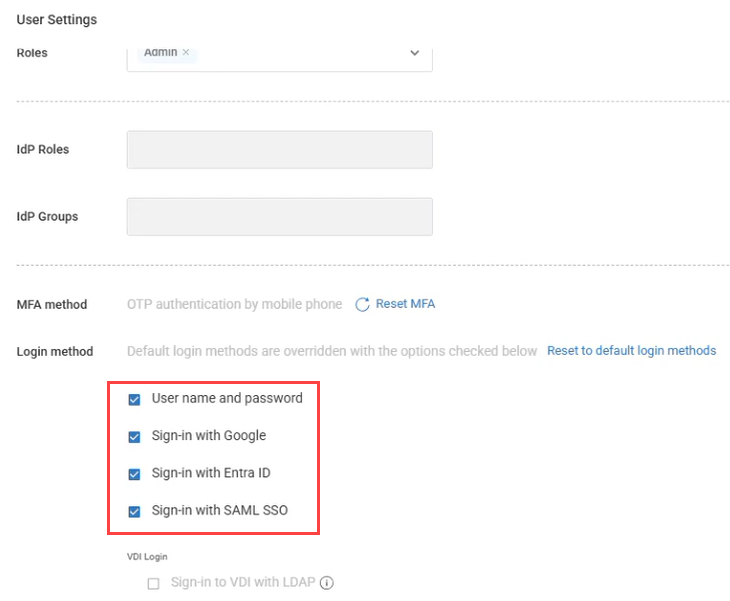
User-Level Login Method Override (Oct 5)
You can now override login methods for individual users, independent of your organization's global authentication settings. This includes enabling a login method for a specific user even if it isn't allowed organization-wide, such as a break-glass method for emergency account access. This gives you greater flexibility to support users with different authentication requirements within the same organization.
Tenant Manager Blueprints (Oct 5)
Blueprints makes it easier for admins of multiple tenants and MSPs to standardize and replicate configurations across tenants without having to configure everything manually. With Blueprints, you can:
Create reusable configuration templates
Copy supported entities and settings between tenants
Override existing configurations or add new ones
Review changes with versioning and diff preview
This helps you save time, reduce configuration errors, and keep environments consistent at scale. The following configuration types can be copied from a source tenant to target tenants:
Alert rules
Workflows
Scripts
Event logs
Dashboards
Custom roles
You can choose a deployment mode to override existing or add to existing when creating a blueprint. When you run a blueprint and select the target tenants, you can preview the impact details of exactly what will be copied and what won’t. Once the blueprint is executed, you can view the run status of each configuration type.
A log is maintained of every blueprint run so you can go back and view the job history of which blueprints were run, all its details and what the impact was on every target tenant.
Dashboards
Drill-down from Your Dashboards (Oct 5)
Dashboards just became a lot more actionable!
Anywhere you see a device count in a dashboard, you can now click that number to drill directly into the Devices page, automatically filtered to show those specific devices. From there, you can immediately investigate further or perform actions on those devices.
This creates a much smoother workflow from insight to investigation to action, without having to manually recreate filters or search for the affected devices.
New Dashboards (Oct 5)
Disk Cleanup Results
Built for the new Disk Cleanup script, this dashboard gives you visibility into cleanup results across your environment, making it easy to see what was cleaned up and the impact across your devices.
Device Registration Failure Tracking
Quickly identify devices that are failing to register. This is especially useful alongside the recent changes to refreshing registration codes, helping you spot and investigate registration issues across your environment.
ControlUp for Desktops
Windows Agent version 2.18.1.9515 (Oct 8)
Fixed an issue with the
ONLYSTARTONBOOTinstallation flag which caused problems with golden image deployments.Fixed an issue causing network usage stats to intermittently report empty values and log Event 2213.
cuconnect.exe now launches only when the required extended settings are enabled.
Mac Agent Manager version 2.18.4.4107 (Oct 5)
macOS Agent version 2.18 now officially supports macOS 27
This Agent Manager version includes fixes for installation issues on macOS 27. With these changes, macOS 27 is now officially supported.
Changes
The macOS Agent Manager installer is now distributed as a .pkg file instead of a .dmg. This fixes an issue that caused the tenant information step of the installer to not appear when you manually performed a fresh install on macOS 27.
Known issues
Manually running the Agent Manager installer over an existing installation on macOS 27 displays a generic administrator access request prompt for InstallerRemotePluginService-arm64 (Installer) instead of a prompt with the ControlUp icon and branding. The prompt allows the installer to read the current tenant and device registration code and prefill them.
Compliance
ControlUp Audit Log (Oct 5)
Every configuration change made in Compliance is now recorded in the ControlUp platform Audit Log, so you can see who changed what, when, and from which IP. This covers creating, editing and deleting templates, jobs and custom issues, plus changes to agent version configuration, ADC, integrations, user risk analysis and workflows.
Use it to keep accountability for configuration changes, trace an unexpected rollout or score change back to its cause.
ControlUp for VDI
See details in the Latest VDI Version release notes.
For previous versions, see ControlUp for VDI (Real-Time DX versions).
For Remote Clients, see Remote Clients Plugins.
Go to the Download Center to get this latest build for the Real-Time DX Console, Agents and Remote Clients.
Need help? Contact your support representative.
Synthetic Monitoring
We continuously release Cloud and Custom hives. To keep your hives and scouts updated, be sure to use the latest and see what we released here:
Cloud and Custom Hive Release Notes.
Enabled Scouts Now Displayed by Default (Oct 8)
The scouts table now hides disabled scouts by default for a cleaner view. To display disabled scouts, change the filter for the table.
Workflows
New Integrations: Splunk, Netskope, and Microsoft Defender for Endpoint (Oct 8)
Workflows now supports integrations with Splunk, Netskope, and Microsoft Defender for Endpoint, adding actions for Splunk searches and notable events, Netskope security and DLP data, and Defender device investigation and isolation.
Expanded ServiceNow Integration (Oct 8)
The ServiceNow integration now supports OAuth 2.0 client credentials in addition to Basic authentication.
New actions are also available for Event Management, Asset Management, and service catalog data.
New Workflow Data and Query Capabilities (Oct 8)
Flows can now use the Run namespace to access how a flow was started and information about the user who initiated it.
Get Group Transitive Members retrieves users from nested Microsoft Entra ID groups at any depth.
New Query Metrics, Get Tables, and Get Table Fields nodes let flows discover and query ControlUp for VDI metrics directly.
Extract Values extracts a property from each item in an array and returns the values as a flat list, including nested properties using dot notation.
Improvements and Fixes (Oct 8)
Date and time filter fields now provide date/time selection and show conditions appropriate for those fields.
Get Device Performance now supports 10-minute and 1-hour durations.
Count Array can now use array outputs from previous nodes directly.
Listener nodes now highlight missing required configuration directly on the node.
Updated the Microsoft Entra ID required API scopes to include permissions needed for BitLocker recovery keys, password resets, and revoking user sessions.
Fixed an issue where actions in shared custom integrations could be visible only to the user who created them.
Fixed issues affecting the Tag Devices from Entra ID Group Membership, License Reclamation via Entra ID Groups, and password-expiry notification templates.
Fixed an issue where locked variables could fail to resolve correctly in some regions.
Fixed workflows that displayed as running even after the run had completed or had been canceled.
Fixed Get Device Performance runs that could appear successful even when no performance data was returned because of an error.
Fixed references to properties inside JSON returned as text, including JSON values returned by Splunk searches.