

Google BigQuery is a fully managed, serverless data warehouse for storing and analyzing large datasets using SQL. It integrates with Google Cloud services like Cloud Storage, Dataflow, Pub/Sub, and Looker Studio for scalable data analytics and pipelines.
- It enables fast analysis of terabytes to petabytes of data using standard SQL.
- Integrates with multiple GCP services for end-to-end analytics pipelines.
- Automatically handles infrastructure, scaling, and resource management.
- Widely used in industries like e-commerce, healthcare, finance, and IoT for data-driven decisions.
Need for a Data Warehouse
- As data grows, extracting meaningful insights becomes more challenging.
- Large datasets can lead to slow processing and longer query response times.
- Handles massive datasets efficiently, such as retail logs and global IoT data.
- Google manages the infrastructure and scaling, allowing users to focus on data analysis.
Avoiding the Data Silo Problem
One of the key benefits of BigQuery is its ability to avoid the "Data Silo" problem. This issue occurs when different teams in your company have independent data marts, which can create friction when analyzing data across teams and pose challenges for data version control.
- Thanks to its integration with Google Cloud's native identity and access management, BigQuery allows you to assign read or write permissions to specific users, groups, or projects.
- This ensures that your sensitive data remains secure while still enabling collaboration across teams.
Architecture
BigQuery uses a distributed architecture that separates storage and compute, allowing them to scale independently. Its query processing is powered by Dremel, Google’s distributed query engine.
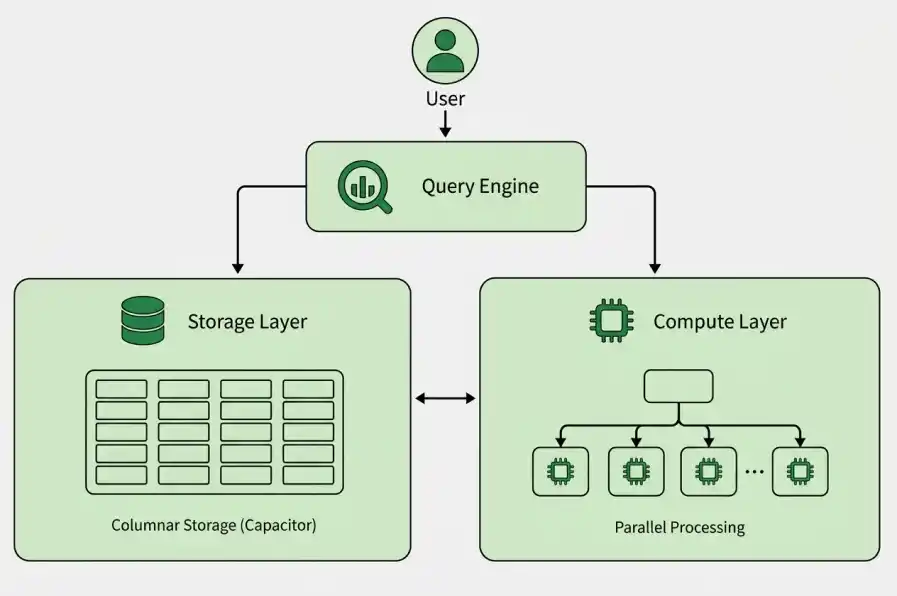
1. Storage Layer
- Storage and query processing scale independently.
- Uses the Capacitor format to store data by columns.
- Reads only the required columns, reducing I/O and improving performance.
- Provides high durability and reliability.
2. Compute Layer
- Uses Google’s distributed compute infrastructure to process queries.
- Automatically allocates and scales resources based on the workload.
- Executes queries in parallel across multiple machines.
- Uses slots, which represent units of compute capacity for query execution.
3. Query Engine
- Powered by Dremel, BigQuery’s distributed query engine.
- Breaks queries into smaller tasks and executes them in parallel.
- Uses a tree-based structure with root, intermediate, and leaf nodes.
- Aggregates results efficiently while minimizing data movement.
- Supports high performance even with multiple users running queries simultaneously.
BigQuery Table Types
1. Native Tables
- Store data directly in BigQuery's managed storage.
- Optimized for large-scale SQL queries and analytics.
- Support features such as partitioning and clustering for better performance.
2. External Tables
- Allow BigQuery to query data stored outside BigQuery, such as files in Cloud Storage.
- No need to load or copy the data into BigQuery first.
- Useful when data needs to remain in an external storage system.
3. Temporary Tables
- Used to store intermediate results during query processing.
- Automatically deleted after a limited period.
- Useful for temporary calculations and multi-step queries.
4. Views
- A virtual table created from a SQL query.
- Does not store a separate copy of the underlying data.
- Useful for simplifying complex queries and controlling access to data.
In Short: Native tables store data in BigQuery, external tables query data stored elsewhere, temporary tables hold intermediate results, and views provide a virtual representation of data.
Key Components of Working with Data in BigQuery
BigQuery is a fully managed service, which means you don't need to set up or install anything. And you don't require a database administrator. You can simply log into your Google Cloud project from a browser and get started. BigQuery simplifies working with data through three primary steps:
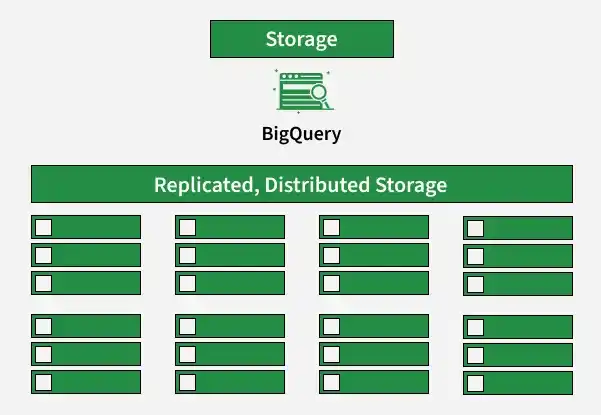
1. Storage
BigQuery stores data in structured tables that can be queried using SQL. Storage and scaling are managed automatically as data grows.
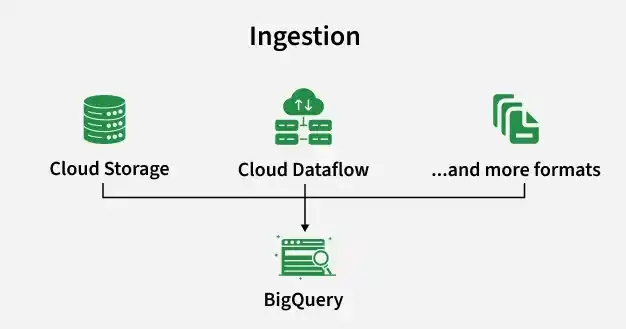
2. Ingestion
Data can be loaded into BigQuery from various sources, including:
- Cloud Storage.
- Dataflow for streaming
- Cloud Data Fusion for ETL pipeline
- Files such as CSV, JSON, and Avro
3. Querying
BigQuery uses Standard SQL for analyzing large datasets. Key capabilities include:
- Joins across large tables
- Window functions for rankings and running calculations
- Aggregations such as
SUM,COUNT, andAVG - Nested and repeated fields for complex data
- Geospatial analysis for location-based data
Queries are processed in parallel across distributed systems, enabling fast analysis of large datasets.
BigQuery Concepts
BigQuery provides several core resources and concepts used to organize data and manage query execution.
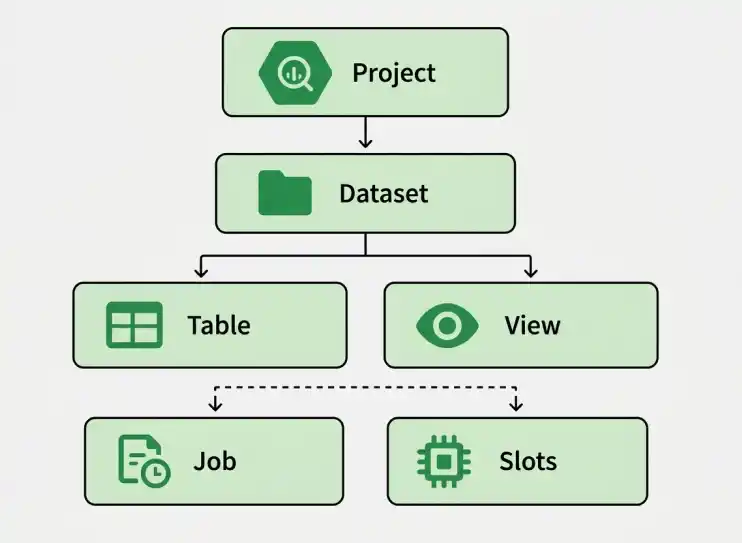
1. Project
- Acts as the top-level container for BigQuery resources.
- Handles billing, permissions, and resource management.
2. Dataset
- A logical container for organizing tables, views, and other data objects.
- Helps manage access and permissions for related data.
3. Table
- Stores data in rows and columns.
- Can be native, external, temporary, or other supported table types.
4. View
- A virtual table created from a SQL query.
- Helps simplify complex queries and control access to underlying data.
5. Job
- Represents an operation performed by BigQuery.
- Examples include querying, loading, exporting, and copying data.
6. Slots
- Represent units of compute capacity used to execute queries.
- BigQuery automatically manages compute resources based on the workload.
Key Features
- No infrastructure management is required; BigQuery automatically scales based on workload.
- Processes large datasets, from terabytes to petabytes, efficiently.
- Enables analysis of continuously updated data for quick insights.
- Uses standard SQL, making it easy to query and analyze data.
- Offers usage based pricing, allowing you to pay based on your storage and query usage.
- Integrates with services like Cloud Storage, Google Analytics, and Looker Studio for data ingestion and visualization.
- BigQuery ML allows users to build and train ML models directly using SQL.
- Provides encryption, access controls, and compliance with major industry standards.
Partitioning and Clustering
BigQuery supports partitioning and clustering to organize large tables, improve query performance, and reduce the amount of data that needs to be processed.
Partitioning
Partitioning divides a large table into smaller sections called partitions based on a specific column, commonly a DATE, DATETIME, or TIMESTAMP column.
- Each partition contains data belonging to a specific range or value.
- When a query includes a filter on the partitioning column, BigQuery can scan only the relevant partitions instead of the entire table.
- This reduces the amount of data processed and can improve query performance and cost efficiency.
Clustering
Clustering organizes data within a table or partition based on one or more selected columns.
- BigQuery groups related data together based on the clustering columns.
- This allows queries that filter or aggregate on those columns to locate relevant data more efficiently.
- Clustering is particularly useful for large tables where queries frequently filter on specific columns.
In Short: Partitioning reduces the amount of data scanned, while clustering improves how data is organized within partitions.
Security
BigQuery provides multiple security features to protect data and control access.
- Controls who can access BigQuery resources and what actions they can perform.
- Permissions can be applied at different resource levels.
- Data is encrypted at rest and in transit.
- Restricts access to specific rows based on user permissions.
- Controls access to sensitive columns within tables.
- Cloud Audit Logs can track access and administrative activities.
BigQuery vs Other Market Options
| Feature | BigQuery | Snowflake | Amazon Redshift | Databricks |
|---|---|---|---|---|
| Architecture | Serverless | Managed cloud warehouse | Managed warehouse | Lakehouse |
| Cloud | Google Cloud | Multi-cloud | AWS | AWS, Azure, GCP |
| Storage & Compute | Separated | Separated | Separated | Separated |
| Query Language | SQL | SQL | SQL | SQL + Python/Scala |
| Data Processing | Distributed query engine | Distributed engine | MPP | Apache Spark |
| Data Engineering | Strong | Strong | Strong | Very strong |
| ML/AI | BigQuery ML | ML/AI features | ML integrations | Strong ML/AI capabilities |
| Best suited for | Large-scale analytics | Cloud data warehousing | AWS-based analytics | Data engineering + analytics + ML |
Limitations
- Large queries that scan significant amounts of data can increase costs.
- Advanced features such as partitioning, clustering, and slot management require additional knowledge.
- BigQuery is optimized for analytics rather than frequent transactional operations.
- Very complex or poorly optimized queries can take longer to execute.
- Heavy reliance on BigQuery can make migration to another data warehouse more difficult.