

A Java Socket-based Chat Application allows multiple clients to connect to a central server and exchange messages over a network. This project demonstrates how Java networking, TCP socket communication, and multithreading can be used to build a simple real-time client-server application.
- Uses TCP sockets for reliable communication between the server and clients.
- Uses multithreading to handle multiple client connections simultaneously.
- Uses classes from the java.net package, such as Socket and ServerSocket.
- Allows messages from one client to be broadcast to all connected clients.
How the Chat Application Works
The application follows a client-server architecture. A central server accepts connections from multiple clients and manages communication between them.
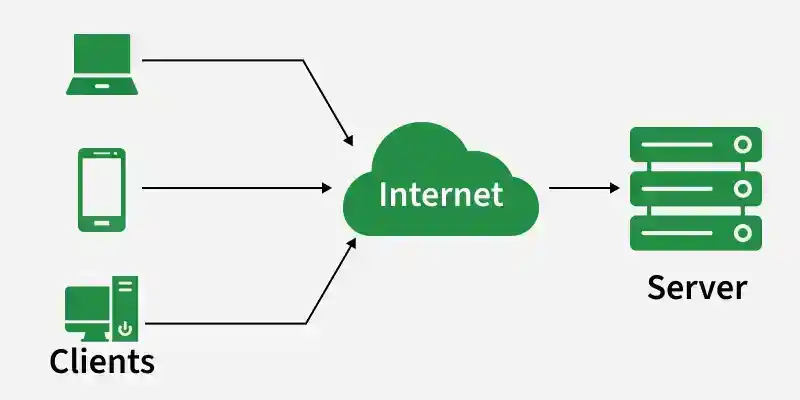
When a client sends a message:
- The client sends the message to the server.
- The server receives the message.
- The server broadcasts the message to all connected clients.
- Each client displays the received message.
Client-Side Working
The client establishes a connection with the server using the Socket class. Two important values are required to create the connection:
- Server IP Address: Identifies the computer on which the server is running.
- Port Number: Identifies the server application that the client wants to connect to.
For example:
Socket socket = new Socket("localhost", 5000);
Here:
- localhost represents the server address.
- 5000 represents the port number on which the server is listening.
In the Java client, we create a new thread when each new message is received from the Java Server Client.
import java.io.*;
import java.net.*;
import java.util.Scanner;

public class Client {
    private static final String SERVER_ADDRESS = "localhost";
    private static final int SERVER_PORT = 12346;

    public static void main(String[] args) {
        try {
            Socket socket = new Socket(SERVER_ADDRESS, SERVER_PORT);
            System.out.println("Connected to the chat server!");

            // Setting up input and output streams
            PrintWriter out = new PrintWriter(socket.getOutputStream(), true);
            BufferedReader in = new BufferedReader(new InputStreamReader(socket.getInputStream()));

            // Start a thread to handle incoming messages
            new Thread(() -> {
                try {
                    String serverResponse;
                    while ((serverResponse = in.readLine()) != null) {
                        System.out.println(serverResponse);
                    }
                } catch (IOException e) {
                    e.printStackTrace();
                }
            }).start();

            // Read messages from the console and send to the server
            Scanner scanner = new Scanner(System.in);
            String userInput;
            while (true) {
                userInput = scanner.nextLine();
                out.println(userInput);
            }

        } catch (IOException e) {
            e.printStackTrace();
        }
    }
}
Client Responsibilities
The client performs the following tasks:
- Connects to the server using a socket.
- Sends the username to the server.
- Reads messages entered by the user.
- Sends those messages to the server.
- Continuously listens for messages coming from the server.
A separate thread can be used for receiving messages so that the client can send and receive messages at the same time.
Note: It is better to use one continuously running receiver thread instead of creating a new thread for every message received.
Server-Side Working
In the server side. we will get the username of each connected client and stores each client in the CopyOnWriteArrayList after accepting the connection from the connected client. Every time create another thread for each client. Every message will be broadcast to every connected client.
For example:
ServerSocket serverSocket = new ServerSocket(5000);
The server continuously waits for clients:
Socket clientSocket = serverSocket.accept();
Whenever a new client connects:
- The server accepts the connection.
- The server receives the client's username.
- The connected client is added to a shared collection.
- A separate thread is created to handle that client.
- The server listens for messages from that client.
- Received messages are broadcast to the connected clients
import java.io.*;
import java.net.*;
import java.util.concurrent.CopyOnWriteArrayList;
import java.util.Scanner;

public class Server {
    private static final int PORT = 12346;
    private static CopyOnWriteArrayList<ClientHandler> clients = new CopyOnWriteArrayList<>();

    public static void main(String[] args) {
        try {
            ServerSocket serverSocket = new ServerSocket(PORT);
            System.out.println("Server is running and waiting for connections...");

            // Thread to handle server admin input
            new Thread(() -> {
                Scanner scanner = new Scanner(System.in);
                while (true) {
                    String serverMessage = scanner.nextLine();
                    broadcast("[Server]: " + serverMessage, null);
                }
            }).start();

            // Accept incoming connections
            while (true) {
                Socket clientSocket = serverSocket.accept();
                System.out.println("New client connected: " + clientSocket);

                // Create a new client handler for the connected client
                ClientHandler clientHandler = new ClientHandler(clientSocket);
                clients.add(clientHandler);
                new Thread(clientHandler).start();
            }
        } catch (IOException e) {
            e.printStackTrace();
        }
    }

    // Broadcast a message to all clients
    public static void broadcast(String message, ClientHandler sender) {
        for (ClientHandler client : clients) {
            if (client != sender) {
                client.sendMessage(message);
            }
        }
    }

    // Internal class to handle client connections
    private static class ClientHandler implements Runnable {
        private Socket clientSocket;
        private PrintWriter out;
        private BufferedReader in;
        private String username;

        public ClientHandler(Socket socket) {
            this.clientSocket = socket;

            try {
                out = new PrintWriter(clientSocket.getOutputStream(), true);
                in = new BufferedReader(new InputStreamReader(clientSocket.getInputStream()));
            } catch (IOException e) {
                e.printStackTrace();
            }
        }

        @Override
        public void run() {
            try {
                // Get the username from the client
                out.println("Enter your username:");
                username = in.readLine();
                System.out.println("User " + username + " connected.");
                out.println("Welcome to the chat, " + username + "!");
                out.println("Type Your Message");

                String inputLine;
                while ((inputLine = in.readLine()) != null) {
                    System.out.println("[" + username + "]: " + inputLine);
                    broadcast("[" + username + "]: " + inputLine, this);
                }

                // Remove the client handler from the list
                clients.remove(this);
                System.out.println("User " + username + " disconnected.");
            } catch (IOException e) {
                e.printStackTrace();
            } finally {
                try {
                    in.close();
                    out.close();
                    clientSocket.close();
                } catch (IOException e) {
                    e.printStackTrace();
                }
            }
        }

        public void sendMessage(String message) {
            out.println(message);
        }
    }
}
Execution
To run the chat application, first compile and start the server. Then, open separate terminals for each client you want to connect.
1. Compile and Run the Server
Open a terminal in the project directory and run:
javac Server.java
java Server
The server starts and waits for incoming client connections.
2. Compile and Run the Client
Open a new terminal in the same project directory and run:
javac Client.java
java Client
The client connects to the running server and can start sending and receiving messages.
3. Connect Multiple Clients
To test the multi-client chat functionality, open additional terminals and run:
java Client
Each client establishes a separate connection with the server, allowing multiple users to exchange messages.
Output:
The server terminal displays client connection and messaging activity, while each client terminal displays the messages exchanged during the chat.
Note: Always start the server before running the clients. Also, use java Server and java Client to run the compiled classes, not java Server.java or java Client.java.