

The URL class in the java.net package represents a Uniform Resource Locator, which identifies the location of a resource on the internet. It provides methods to access URL components and open a connection to the resource.
- Provides access to components such as the protocol, host, port, path, and query.
- Enables connections to resources through supported protocols, such as HTTP, HTTPS, and FTP.
Components of a URL
A URL can have many forms. The most general however follows a three-component system as proposed below:

Its main components are:
| Component | Example | Description |
|---|---|---|
| Protocol/Scheme | https | Specifies how the resource is accessed |
| Host | www.example.com | Identifies the server that hosts the resource |
| Port | 443 | Identifies the network port used for communication |
| Path | /products/search | Identifies the resource location on the server |
| Query | q=java | Contains parameters passed after ? |
| Fragment | results | Identifies a specific section after |
URL Class
The URL class is a core Java networking class used to access internet-based resources.
- It can point to static files, dynamic content, and APIs
- Provides constructors to create URL objects
- Offers methods to extract different parts of a URL
Constructors of URL class
1. URL(String address): It creates a URL object from the specified String.
URL url = new URL("https://www.example.com/");
2. URL(String protocol, String host, String file): Creates a URL object from the specified protocol, host, and file name.
URL url = new URL("http", "www.example.com", "/path/to/resource");
3. URL(String protocol, String host, int port, String file): Creates a URL object from protocol, host, port, and file name.
URL url = new URL("https", "www.example.com", 443, "/path/to/resource");
4. URL(URL context, String spec): Creates a URL object by parsing the given spec in the given context.
URL baseUrl = new URL("https://www.example.com/");
URL relativeUrl = new URL(baseUrl, "/path/to/resource");
5. URL(String protocol, String host, int port, String file, URLStreamHandler handler): Creates a URL object from the specified protocol, host, port number, file, and handler.
URL url = new URL("http", "www.example.com", 80, "/path/to/resource", new MyCustomHandler());
6. URL(URL context, String spec, URLStreamHandler handler): Creates a URL by parsing the given spec with the specified handler within a specified context.
URL baseUrl = new URL("https://www.example.com/");
URL relativeUrl = new URL(baseUrl, "/path/to/resource", new MyCustomHandler());
Example: Program to demonstrate the working of URL.
import java.net.URI;
import java.net.URL;

public class Geeks {

    public static void main(String[] args) throws Exception
    {

        URL u1
            = URI.create("https://www.google.co.in/?gfe_rd=cr&ei=ptYq"
                     + "WK26I4fT8gfth6CACg#q=geeks+for+geeks+java").toURL();

        URL u2 = URI.create("http://www.geeksforgeeks.org/"
                            + "jvm-works-jvm-architecture/")
                     .toURL();

        URL u3
            = URI.create("https://www.google.co.in/search"
                     + "?q=gnu&rlz=1C1CHZL_enIN714IN715"
                     + "&oq=gnu&sourceid=chrome"
                     + "&ie=UTF-8#q=geeks+for+geeks+java")
                  .toURL();

        System.out.println(u1);
        System.out.println(u2);

        System.out.println(
            "\nDifferent components of URL3:");

        System.out.println("Protocol: " + u3.getProtocol());

        System.out.println("Hostname: " + u3.getHost());

        System.out.println("Default port: "
                           + u3.getDefaultPort());

        System.out.println("Query: " + u3.getQuery());

        System.out.println("Path: " + u3.getPath());

        System.out.println("File: " + u3.getFile());

        System.out.println("Reference: " + u3.getRef());
    }
}
Output:
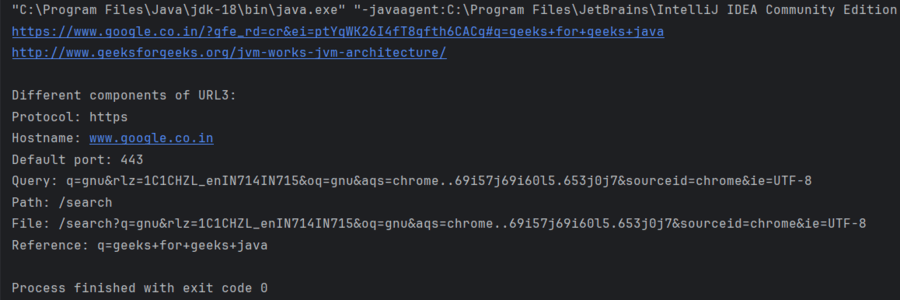
Java URL Methods
| Method | Description |
|---|---|
| getAuthority() | Returns the authority part of URL or null if empty |
| getDefaultPort() | Returns the default port used |
| getFile() | Returns the file name. |
| getHost() | Return the hostname of the URL. If the host is a literal IPv6 address, it may be returned in bracketed IPv6 format. |
| getPath() | Returns the path of the URL, or null if empty |
| getPort() | Returns the port associated with the protocol specified by the URL |
| getProtocol() | Returns the protocol used by the URL |
| getQuery() | Return the query part of the URL, which is the portion following the ? character, used to pass parameters to a web application. |
| getRef() | Return the reference part of the URL, which is the portion following the # character, typically used to navigate to a specific section within a web page. |
| toString() | As in any class, toString() returns the string representation of the given URL object. |