

Wildcards in Java Generics allow you to work with unknown types in a flexible and type-safe way. They are represented using the ? symbol and help in writing reusable code that can handle different generic types.
- Used when the exact type of a generic parameter is not known in advance
- Commonly applied in method arguments to increase flexibility
- Helps maintain type safety while working with collections of different types
Types of wildcards
In Java, wildcards are mainly classified into three types based on how they define type flexibility and restrictions.
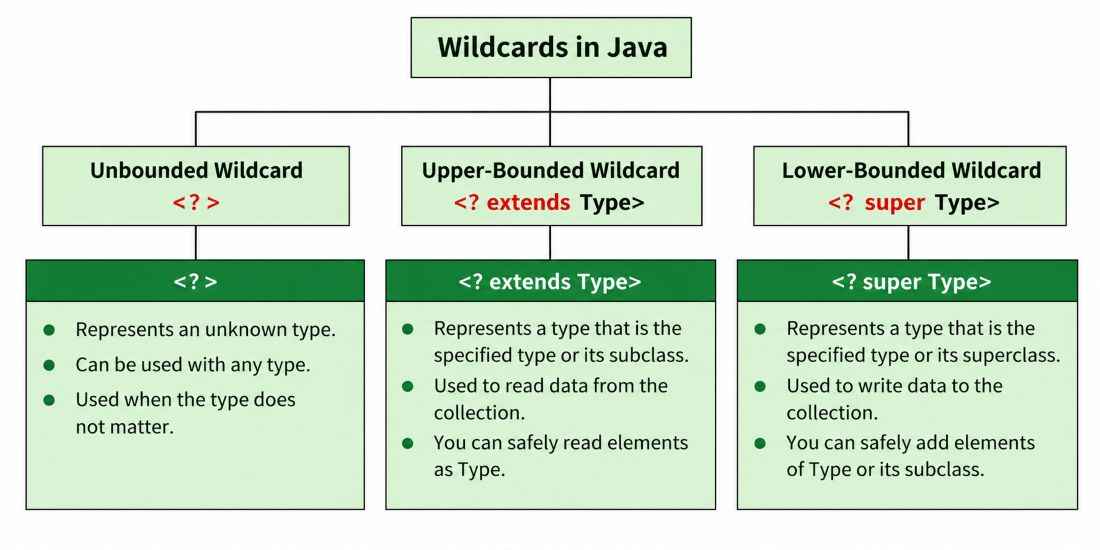
1. Upper Bounded Wildcards
These wildcards can be used when you want to relax the restrictions on a variable. For example, say you want to write a method that works on List < Integer >, List < Double > and List < Number >, you can do this using an upper bounded wildcard.
To declare an upper-bounded wildcard, use the wildcard character ('?'), followed by the extends keyword, followed by its upper bound.
public static void add(List<? extends Number> list)
import java.util.Arrays;
import java.util.List;

class WildcardDemo {
    public static void main(String[] args)
    {
        // Upper Bounded Integer List
        List<Integer> list1 = Arrays.asList(4, 5, 6, 7);

        System.out.println("Total sum is:" + sum(list1));

        // Double list
        List<Double> list2 = Arrays.asList(4.1, 5.1, 6.1);

        System.out.print("Total sum is:" + sum(list2));
    }

    private static double sum(List<? extends Number> list)
    {
        double sum = 0.0;
        for (Number i : list) {
            sum += i.doubleValue();
        }

        return sum;
    }
}
Output
Total sum is:22.0
Total sum is:15.299999999999999
Explanation: In the above program, list1 holds Integer values and list2 holds Double values. Both are passed to the sum method, which uses a wildcard <? extends Number>. This means it can accept any list of a type that is a subclass of Number, like Integer or Double.
2. Lower Bounded Wildcards
It is expressed using the wildcard character ('?'), followed by the super keyword, followed by its lower bound: <? super A>.
Syntax: Collectiontype <? super A>
import java.util.Arrays;
import java.util.List;

class WildcardDemo {
    public static void main(String[] args)
    {
        // Lower Bounded Integer List
        List<Integer> list1 = Arrays.asList(4, 5, 6, 7);

        // Integer list object is being passed
        printOnlyIntegerClassorSuperClass(list1);

        // Number list
        List<Number> list2 = Arrays.asList(4, 5, 6, 7);

        // Integer list object is being passed
        printOnlyIntegerClassorSuperClass(list2);
    }

    public static void printOnlyIntegerClassorSuperClass(
        List<? super Integer> list)
    {
        System.out.println(list);
    }
}
Output
[4, 5, 6, 7]
[4, 5, 6, 7]
Explanation: Here, the method printOnlyIntegerClassorSuperClass accepts only Integer or its superclasses (like Number). If you try to pass a list of Double, it gives a compile-time error because Double is not a superclass of Integer.
Note: Use extend wildcard when you want to get values out of a structure and super wildcard when you put values in a structure. Don’t use wildcard when you get and put values in a structure. You can specify an upper bound for a wildcard or you can specify a lower bound, but you cannot specify both.
3. Unbounded Wildcard
An unbounded wildcard is represented by <?> and is used when the exact type of a generic object is unknown or does not need to be specified. For example, List<?> represents a list of an unknown type.
Syntax:
GenericType<?> variableName;
Unbounded wildcards are useful when:
- A method needs to work with generic objects regardless of their specific type.
- The operation only requires functionality available from the Object class.
- The code does not need to modify values based on a specific type parameter.
import java.util.Arrays;
import java.util.List;

class unboundedwildcardemo {
    public static void main(String[] args)
    {

        // Integer List
        List<Integer> list1 = Arrays.asList(1, 2, 3);

        // Double list
        List<Double> list2 = Arrays.asList(1.1, 2.2, 3.3);

        printlist(list1);

        printlist(list2);
    }

    private static void printlist(List<?> list)
    {

        System.out.println(list);
    }
}
Output
[1, 2, 3]
[1.1, 2.2, 3.3]