You signed in with another tab or window. Reload to refresh your session.You signed out in another tab or window. Reload to refresh your session.You switched accounts on another tab or window. Reload to refresh your session.Dismiss alert
{{ message }}
Repository navigation
Download speeds from release page are dog slow #14589
At best I can get a 200 to 300 Kb/s download speeds for the widows msi, this is way way to slow. Can we please get some mirrors or proper download servers vs. using the slow GitHub file hosting.
You can also help us all - use PathPing and trace the path from you to GitHub. I get fine download speeds here in the UK and wonder if the issue is due to an ISP routing or path problem.
You can also help us all - use PathPing and trace the path from you to GitHub. I get fine download speeds here in the UK and wonder if the issue is due to an ISP routing or path problem.
This is the output
PathPing -n github.com

Tracing route to github.com [140.82.121.3]
over a maximum of 30 hops:
  0  192.168.1.63
  1  192.168.1.1
  2  213.200.143.2
  3     *        *        *
Computing statistics for 50 seconds...
            Source to Here   This Node/Link
Hop  RTT    Lost/Sent = Pct  Lost/Sent = Pct  Address
  0                                           192.168.1.63
                                0/ 100 =  0%   |
  1    2ms     0/ 100 =  0%     0/ 100 =  0%  192.168.1.1
                                0/ 100 =  0%   |
  2    6ms     0/ 100 =  0%     0/ 100 =  0%  213.200.143.2

Trace complete.
Not sure why I should report it to GitHub, it's the powershell project that seems to have issues with download speeds and thus, if a limitation with GitHub something the Powershell project should deal with towards GitHub or provide an alternative download path as I see it.
Two comments.
First, to answer your last question, the project downloads are hosted at Github so the speed issue is their problem, not ta PowerShell team issue.
Second, that path ping and my experience are different from mine and I suspect that may account for it; I can't believe that you are in a direct hop to Github. 192.168.* addresses are, presumably local - are you really one router hop away from Github>
Also, my tracert output is significantly longer than yours:
PS C:\Foo> tracert github.comTracing route to github.com [140.82.121.3]over a maximum of 30 hops: 1 <1 ms <1 ms <1 ms fritz.box [10.10.1.100] 2 20 ms 6 ms 6 ms vt2.cor1.lond2.ptn.zen.net.uk [51.148.72.43] 3 7 ms 6 ms 6 ms lag-8.p2.ixn-lon.zen.net.uk [51.148.73.206] 4 6 ms 6 ms 6 ms 51-148-73-195.dsl.zen.co.uk [51.148.73.195] 5 7 ms 6 ms 6 ms ae15.mpr1.lhr15.uk.above.net [195.66.224.76] 6 * 17 ms 16 ms ae3.cs1.lhr15.uk.eth.zayo.com [64.125.28.150] 7 * * 18 ms ae10.cs3.ams10.nl.eth.zayo.com [64.125.29.16] 8 16 ms 16 ms 16 ms ae4.cs1.ams17.nl.eth.zayo.com [64.125.28.36] 9 16 ms 16 ms 16 ms ae2.cs1.fra6.de.eth.zayo.com [64.125.29.58] 10 17 ms 16 ms 17 ms ae1.mcs1.fra6.de.eth.zayo.com [64.125.29.57] 11 17 ms 16 ms 16 ms 82.98.193.31.IPYX-270403-001-ZYO.zip.zayo.com [82.98.193.31] 12 * * * Request timed out. 13 * * * Request timed out. 14 17 ms 16 ms 16 ms lb-140-82-121-3-fra.github.com [140.82.121.3]
I am in the UK, and the first few hopts are my ISPs. BUt from hop 7, my path to GitHub goes to Europe. I am guessing that Github has a CDN stop somewhere near Frankfurt.
This is a user/GitHub issue and nothing that the PowerShell team has any control over.
Not sure why I should report it to GitHub, it's the powershell project that seems to have issues with download speeds and thus, if a limitation with GitHub something the Powershell project should deal with towards GitHub or provide an alternative download path as I see it.
The repository is only for developers. Nobody in PowerShell project responsible for GitHub network or your network issues. PowerShell project is public and no one in the project is required to be an intermediary between you and GitHub team. As community member you can directly communicate with GitHub team and directly discuss the issue with them and thus help all members of GitHub community.
As I am getting the below then this has to be an issue related to how your networking is setup - either locally, or the middle layers between you and the endpoint where the release files are located.
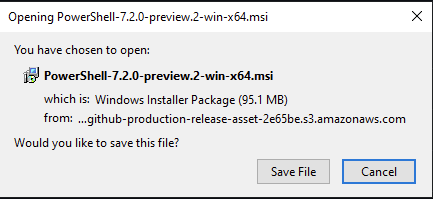
Also note that the files are actually stored on AWS as per the below so this would be as Thomas Lee (@doctordns) suggested and be an issue with you and connection to AWS & not the connection to GitHub.
If you are on a corporate network (especially via VPN) it's likely there's traffic inspection going on somewhere and you should raise this with your organisation's helpdesk.
If just via your own home internet, then you need to speak with your ISP and get them to investigate.
Let's start with the technical stuff, doing a tracert renders the following response on the same laptop
tracert github.com
Tracing route to github.com [140.82.121.4]
over a maximum of 30 hops:
1 2 ms 2 ms 2 ms router.grenangen.local [192.168.1.1]
2 8 ms 7 ms 7 ms c213-200-143-2.bredband.comhem.se [213.200.143.2]
3 * * * Request timed out.
4 * * * Request timed out.
5 19 ms 20 ms 19 ms lm1-peer-1-be2.net.comhem.se [213.200.168.46]
6 39 ms 32 ms 31 ms 80.249.213.114
7 * * * Request timed out.
8 * * * Request timed out.
9 * * * Request timed out.
10 36 ms 34 ms 34 ms lb-140-82-121-4-fra.github.com [140.82.121.4]
Trace complete.
So no more than 10 hops, but I'm a bit puzzled over the timeout entries there.
For the less technical part, I get that the Powershell team just uses the facilities of GitHub, not my intention to try to stir something up here. But from an outside perspective of someone that just wants to consume the binaries for PowerShell I would not really care where or how it's hosted/distributed but only that my DL speeds are good. And to further my argument, doing a web search for installing powershell core will point to this repo and the release page.
Two comments.
First, to answer your last question, the project downloads are hosted at Github so the speed issue is their problem, not ta PowerShell team issue.
Second, that path ping and my experience are different from mine and I suspect that may account for it; I can't believe that you are in a direct hop to Github. 192.168.* addresses are, presumably local - are you really one router hop away from Github>
Also, my tracert output is significantly longer than yours:
PS C:\Foo> tracert github.com

Tracing route to github.com [140.82.121.3]
over a maximum of 30 hops:

  1    <1 ms    <1 ms    <1 ms  fritz.box [10.10.1.100]
  2    20 ms     6 ms     6 ms  vt2.cor1.lond2.ptn.zen.net.uk [51.148.72.43]
  3     7 ms     6 ms     6 ms  lag-8.p2.ixn-lon.zen.net.uk [51.148.73.206]
  4     6 ms     6 ms     6 ms  51-148-73-195.dsl.zen.co.uk [51.148.73.195]
  5     7 ms     6 ms     6 ms  ae15.mpr1.lhr15.uk.above.net [195.66.224.76]
  6     *       17 ms    16 ms  ae3.cs1.lhr15.uk.eth.zayo.com [64.125.28.150]
  7     *        *       18 ms  ae10.cs3.ams10.nl.eth.zayo.com [64.125.29.16]
  8    16 ms    16 ms    16 ms  ae4.cs1.ams17.nl.eth.zayo.com [64.125.28.36]
  9    16 ms    16 ms    16 ms  ae2.cs1.fra6.de.eth.zayo.com [64.125.29.58]
 10    17 ms    16 ms    17 ms  ae1.mcs1.fra6.de.eth.zayo.com [64.125.29.57]
 11    17 ms    16 ms    16 ms  82.98.193.31.IPYX-270403-001-ZYO.zip.zayo.com [82.98.193.31]
 12     *        *        *     Request timed out.
 13     *        *        *     Request timed out.
 14    17 ms    16 ms    16 ms  lb-140-82-121-3-fra.github.com [140.82.121.3]
I am in the UK, and the first few hopts are my ISPs. BUt from hop 7, my path to GitHub goes to Europe. I am guessing that Github has a CDN stop somewhere near Frankfurt.
This is a user/GitHub issue and nothing that the PowerShell team has any control over.
Those timeouts are most likely routers that drop ICMP Echo request. This is normal.
There is nothing the PowerShell team can do here. If you look closely, your transit times to Github are double mine. And that is something you really need to take up with your ISP as it's their peering/.routing. And reporting it to GitHub may help from their

Activity
iSazonov commentedon Jan 10, 2021
Marcus Grenängen (@SneWs) Please report the issue to GitHub support.
doctordns commentedon Jan 10, 2021
You can also help us all - use PathPing and trace the path from you to GitHub. I get fine download speeds here in the UK and wonder if the issue is due to an ISP routing or path problem.
SneWs commentedon Jan 10, 2021
This is the output
SneWs commentedon Jan 10, 2021
Not sure why I should report it to GitHub, it's the powershell project that seems to have issues with download speeds and thus, if a limitation with GitHub something the Powershell project should deal with towards GitHub or provide an alternative download path as I see it.
doctordns commentedon Jan 10, 2021
Two comments.
First, to answer your last question, the project downloads are hosted at Github so the speed issue is their problem, not ta PowerShell team issue.
Second, that path ping and my experience are different from mine and I suspect that may account for it; I can't believe that you are in a direct hop to Github. 192.168.* addresses are, presumably local - are you really one router hop away from Github>
Also, my tracert output is significantly longer than yours:
I am in the UK, and the first few hopts are my ISPs. BUt from hop 7, my path to GitHub goes to Europe. I am guessing that Github has a CDN stop somewhere near Frankfurt.
This is a user/GitHub issue and nothing that the PowerShell team has any control over.
iSazonov commentedon Jan 10, 2021
The repository is only for developers. Nobody in PowerShell project responsible for GitHub network or your network issues. PowerShell project is public and no one in the project is required to be an intermediary between you and GitHub team. As community member you can directly communicate with GitHub team and directly discuss the issue with them and thus help all members of GitHub community.
kilasuit commentedon Jan 10, 2021
As I am getting the below then this has to be an issue related to how your networking is setup - either locally, or the middle layers between you and the endpoint where the release files are located.

Also note that the files are actually stored on AWS as per the below so this would be as Thomas Lee (@doctordns) suggested and be an issue with you and connection to AWS & not the connection to GitHub.
If you are on a corporate network (especially via VPN) it's likely there's traffic inspection going on somewhere and you should raise this with your organisation's helpdesk.
If just via your own home internet, then you need to speak with your ISP and get them to investigate.
But like both Ilya (@iSazonov) & Thomas Lee (@doctordns) have said this isn't a PowerShell issue and as such this issue should be closed
SneWs commentedon Jan 10, 2021
Let's start with the technical stuff, doing a tracert renders the following response on the same laptop
So no more than 10 hops, but I'm a bit puzzled over the timeout entries there.
For the less technical part, I get that the Powershell team just uses the facilities of GitHub, not my intention to try to stir something up here. But from an outside perspective of someone that just wants to consume the binaries for PowerShell I would not really care where or how it's hosted/distributed but only that my DL speeds are good. And to further my argument, doing a web search for installing powershell core will point to this repo and the release page.
doctordns commentedon Jan 10, 2021
Those timeouts are most likely routers that drop ICMP Echo request. This is normal.
There is nothing the PowerShell team can do here. If you look closely, your transit times to Github are double mine. And that is something you really need to take up with your ISP as it's their peering/.routing. And reporting it to GitHub may help from their