Repository navigation
When copying output to the clipboard on macOS, output is padded to 80 columns wide with whitespace #5532

Description

Steps to reproduce
Install PowerShell on macOS
Open a new PowerShell instance
Do something that causes text to be output to the terminal
Copy and paste this text into somewhere else, e.g. a text editor or an email.
There is extraneous whitespace at the end of every line to pad it out to the width of my Terminal window, which is by default 80 columns.
Expected behavior
It is expected that the text output in the Terminal will not have extra whitespace at the end of each and every line.
Actual behavior
Output is padded to the width of the Terminal window.
e.g. if you look at the output for $PSVersionTable below, copy and paste it into a text editor and you will notice that every line is 150 characters long, padded out with the space character. My Terminal window was 150 characters wide so that it could fit in the output for the OS line without truncating it.
Environment data
PS /Users/kai> $PSVersionTable

Name                           Value
----                           -----
PSVersion                      6.0.0-rc
PSEdition                      Core
GitCommitId                    v6.0.0-rc
OS                             Darwin 16.7.0 Darwin Kernel Version 16.7.0: Thu Jun 15 17:36:27 PDT 2017; root:xnu-3789.70.16~2/RELEASE_X86_64
Platform                       Unix
PSCompatibleVersions           {1.0, 2.0, 3.0, 4.0...}
PSRemotingProtocolVersion      2.3
SerializationVersion           1.1.0.1
WSManStackVersion              3.0
Activity
iSazonov commentedon Nov 23, 2017
I can not repo on Windows.
kai-h commentedon Nov 23, 2017
Yes, it works correctly on Windows 10. I haven't tested it on Linux.
thezim commentedon Nov 24, 2017
Repros for me. Using
Trailing Spacesextension for vscode. Note that it is padding to terminal width, mine is higher than 80.iSazonov commentedon Nov 24, 2017
Greg Zimmerman (@thezim) What is a platform/version you repo on?
thezim commentedon Nov 24, 2017
Ilya (@iSazonov) High Sierra.
Running a native command within PowerShell does not exhibit the same output behavior..
mklement0 commentedon Nov 25, 2017
This behavior is by (perhaps unfortunate) design:
PowerShell's formatting system always produces lines right-padded to the (implied or explicitly specified) output width with spaces.
It is only when you copy directly from a Windows console window that it extends you the (debatable) courtesy of trimming the trailing spaces (the macOS terminal program doesn't do that, and neither does Ubuntu's default terminal program, for instance).
You can verify the behavior by piping to
clipon Windows as opposed to manually copying in the console window:thezim commentedon Nov 25, 2017
Is this something that can be changed without breaking something? Seems inefficient for a console to waste time adding and displaying right padded characters.
iSazonov commentedon Nov 25, 2017
It would be interesting to know the history of that console padding.
kai-h commentedon Nov 26, 2017
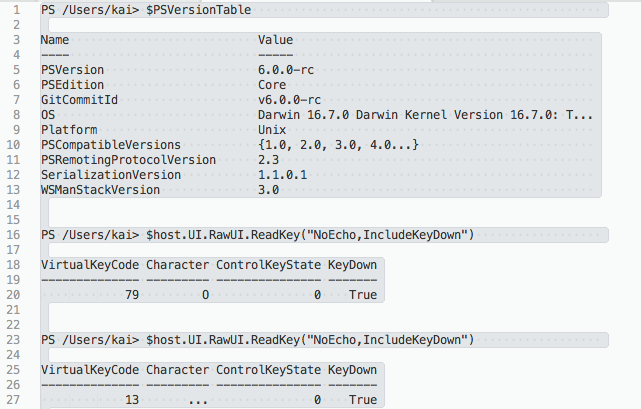
I'm having most output padded to, say, 80 columns, but not all. e.g. the output from $host.UI.RawUI.ReadKey isn't padded:
mklement0 commentedon Nov 26, 2017
Kai Howells (@kai-h):
The padding seems to happen only for types for which type-specific output formatting was explicitly defined, as described in
Get-Help about_Format.ps1xml, and (as Steve Lee (@SteveL-MSFT) points out below) when a table view is being rendered (whether implicitly or viaFormat-Table).To illustrate the difference (assume an 80-column terminal):
Normally you could use
Get-FormatData <type-name>to check if a given type has associated formatting data, but that is currently broken - see #4237 and #4235.SteveL-MSFT commentedon Nov 27, 2017
This appears to be
by design. Any table view has padding. Any non-table view, I made a PR (merged awhile back) to remove padding and linebreaks.thezim commentedon Nov 27, 2017
What about the the PS > line itself? I see it is being padded as well.
mklement0 commentedon Nov 28, 2017
Steve Lee (@SteveL-MSFT): Thanks for the clarification re table view.
We now know that the behavior is by design, but perhaps it's time to revisit that, as Greg Zimmerman (@thezim) suggests - especially given that it is behavior related to for-display-only output that no one can expect to rely on for long-term stability and machine parsing, as @lzybkr has previously noted.
Doing away with the padding might also help with #4767 and the fix that @lzybkr had contemplated.
iSazonov commentedon Nov 28, 2017
These trailing spaces may be necessary (on display only) if we want to recolor the background of the table.
kai-h commentedon Nov 28, 2017
Following "The law of least surprise" for how things generally should work, if you're getting plain text output, it should not be padded to some arbitrary width that depends on the size of your Terminal window. If it's padded (and it probably shouldn't be) it would possibly be better to be padded to a fixed width, dependent on the width of the output table.
Or, if you're not recolouring the output, it shouldn't be padded at all.
Or somehow have the trailing spaces trimmed when copying to the clipboard, however this may be out of your control and depend more on the Terminal app in use.
iSazonov commentedon Nov 28, 2017
Users may want to copy including color.
lzybkr commentedon Nov 28, 2017
Copying w/ color works fine w/o padding,
CaptureScreenin PSReadLine handles it cleanly.mklement0 commentedon Nov 28, 2017
Re color and output width: also note that adjusting the output behavior based on whether a terminal is being targeted or not is sensible, as many Unix utilities (e.g.,
ls) do (which is again what #4767 would benefit fromtoo).SteveL-MSFT commentedon Nov 28, 2017
For Tables, it seems that there should be no reason for the trailing padding. A new line should be sufficient. This isn't macOS specific, it repros on Linux as well (the code is the same on all platforms). I think Windows clipboard may be doing something to trim trailing whitespace...
I'll look into this as I've made changes to this code previously and think it should be a small change (although not entirely sure of the side effects...)
iSazonov commentedon Nov 28, 2017
If console background is black and we output a table with green background then we can not trim trailing whitespace - we lost green background.
mklement0 commentedon Nov 28, 2017
It's actually the console window that does it (copying directly out of a window) - if you pipe to
clip.exein order to copy to the clipboard, you do get the padding.SteveL-MSFT commentedon Nov 28, 2017
Ilya (@iSazonov) I think we should support cells in the table having a background, but not the entire table. Alternatively, if we want to support colored background, then we can special case that to preserve padding.