Repository navigation
Change the publishId in VS Code marketplace #690
Description

Since the project has been transferred to REditorSupport as suggested in #98, we may better have a discussion on the issue of changing publishId in the VS Code marketplace here.
When the repo is transferred, the following are examples for both sides: changing or keeping the publishId.
Changed:
Unchanged: dbaeumer.vscode-eslint, esbenp.prettier-vscode
Some related issues:
Activity
Ikuyadeu commentedon Jul 1, 2021
When I discussed with them, I got the opinion to keep the current id for users' experience.
But I'll ask again about differences with your examples.
eitsupi commentedon Jul 1, 2021
Thank you all for your continued work.
Looking at the Prettier extension, it seems that the ID of the extension remains the same
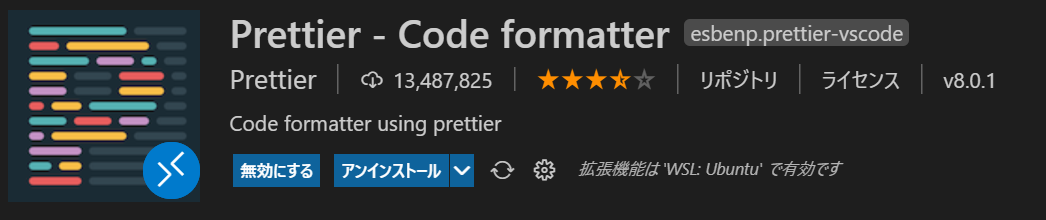
even if the publisher is changed. If it is changed, will it affect the user?renkun-ken commentedon Jul 1, 2021
@eitsupi Thanks for pointing out. Looks like the case of changed publishId is quite few?
Ikuyadeu commentedon Jul 1, 2021
publishidand author are different.Changing
author, does not have any impact on the user.I think,
Yuki Uedato beREditoris enough.renkun-ken commentedon Jul 1, 2021
To be consistent with the organization name and vscode-r-lsp, the author should be "REditorSupport".
eitsupi commentedon Jul 1, 2021
The Prettier extension seems to have changed publishers in March of this year when it was no longer in beta?
prettier/prettier-vscode@78ae1a5
eitsupi commentedon Jul 1, 2021
It seems that the Prettier extension has changed its publisher several times between
esbenpandprettierin order to publish the development version as a separate ID, and the stable version has not changed fromesbenp.https://marketplace.visualstudio.com/items?itemName=prettier.prettier-vscode
https://marketplace.visualstudio.com/items?itemName=prettier.prettier-vscode-beta
renkun-ken commentedon Jul 2, 2021
From the existing cases, it looks like we might better stick to the current publishId and only update the author.
randy3k commentedon Jul 2, 2021
Thanks for initiating the discussion. Looks like we could stick with the current publisher for now.
We could consider it again in the future if there is a necessity (e.g. cannot publish releases). An alternative but less ideal solution is to publish a new extension under REditorSupport and deprecate this extension.
randy3k commentedon Oct 17, 2021
It seems changing the author of a package is not enough to change the display name on the extension page.
For the case of https://marketplace.visualstudio.com/publishers/esbenp. The publisher id is
esbenpand the display name is "Prettier".It is possible for @Ikuyadeu to change his display name to "REditorSupport" but I wonder if he wants to do it because it would apply to all his other extensions.
@Ikuyadeu, do you mind transferring the extension to the publisher REditorSupport which you are already one of the owners alongside @renkun-ken and me.
Ikuyadeu commentedon Oct 18, 2021
I can not change my display name, because I have other extensions that are crated with other teams.
I already send the request to the Microsoft microsoft/vsmarketplace#133 microsoft/vsmarketplace#142
randy3k commentedon Oct 18, 2021
I recall that we did the transfer of vscode-r-lsp via email. Perhaps you could send an email to [email protected] to initiate the transfer.
isidorn commentedon Mar 31, 2022
Hi VS Code PM here 👋
I apologise that the Marketplace team did not respond to your request.
Can the current extension author please email [email protected] and make sure to include me [email protected] in the email.
We can easily move your extension to your publisher, however please note that if there are current extension packs or extension dependencies on your extension they will have to get updated.
Extension recommendations also need to be updated, but I can easily do that on the VS Code side to take into account the new publisher id.
Ikuyadeu commentedon Mar 31, 2022
Thank you for your response.
Now, I send the e-mail from [email protected]
renkun-ken commentedon May 3, 2022
Just notice that the publisher id of the extension has been updated:
https://marketplace.visualstudio.com/items?itemName=REditorSupport.r
I wonder if there's anything broken on user side?
eitsupi commentedon May 3, 2022
I was wondering why the R extension was not automatically installed when I rebuilt Dev Container last night.
Definitely an effect of the ID change.
https://github.com/microsoft/vscode-dev-containers/blob/7a8fa56b33f0477c3f9aed3afdc4e22ace1d606c/containers/r/.devcontainer/devcontainer.json#L29
In other words, if the ID is specified in
settings.json, etc., it would be affected.eitsupi commentedon May 3, 2022
Perhaps it would be a good idea to announce in the README or elsewhere that the ID has been changed.
renkun-ken commentedon May 3, 2022
Yes. I'll include it in the NEWS in the next release.
isidorn commentedon May 3, 2022
@eitsupi thanks for letting us know. I will update the
devcontainer.jsontoday.eitsupi commentedon May 3, 2022
FYI, after rewriting the ID in
devcontainer.json(toreditorsupport.r), it is now installed automatically again.isidorn commentedon May 3, 2022
@Ikuyadeu you should also update the publisher in the
package.jsonof your extension to be the new one.xgdgsc commentedon May 11, 2022
When I click
Install in SSH:...in vscode which has a reditorsupport.r installed locally when using remote ssh, it installsikuyadeu.r.renkun-ken commentedon May 11, 2022
It should work if you uninstall the extension on both local and remote machine, reload vscode, and install again.
xgdgsc commentedon May 11, 2022
No. It doesn' t work for me. I also tried removing
.vscode-server/extensions/ikuyadeu.r-2.4.0/and.vscode-server/. It still would installreditorsupport.rlocally andikuyadeu.rremotely.Even I download vsix from https://github.com/REditorSupport/vscode-R/releases/tag/v2.4.0 and use "install with VSIX" menu it would show as
ikuyadeu.rand the R activity bar icon cannot be shown.isidorn commentedon May 11, 2022
The reason for this is that the latest published extension version still has the
publisher: ikuyadeuin thepackage.json.@renkun-ken To fix this the extension simply needs to publish a new version (since the publisher is already fixed on the main branch).
renkun-ken commentedon May 14, 2022
A new version is released. @isidorn You could take a look if this still happens.
isidorn commentedon May 16, 2022
@renkun-ken thanks! @xgdgsc can try it out and let us know.