Repository navigation
fread with large csv (44 GB) takes a lot of RAM in latest data.table dev version #2073
Description
Activity
This is the output from the non-parallel fread implementation (data.table 1.10.5 IN DEVELOPMENT built 2017-02-09)

And I double checked the amount of memory used and it just goes up to 84GB.
Guillermo
Yes you're right. Thanks for the great report. The estimated nrow looks about right (858,881 vs 872,505) but then the allocation is 4.2X bigger than that (3,683,116) and way off. I've improved the calculation and added more details to the verbose output. Hold off retesting for now though until a few more things have been done.
- added a commit that references this issue
on Mar 26, 2017 Ok please retest - should be fixed now.
I just installed data.table dev:
data.table 1.10.5 IN DEVELOPMENT built 2017-03-27 02:50:31 UTCThe first thing I got when I tried to read the same 44 GB file was this message:
DT <- fread('dt.daily.4km.csv')
Error: protect(): protection stack overflowThen I just re-run the same command and started to work fine. However, this version is not using a multi-core mode. It is taking ~ 25 minutes to load, same as before you put the fread-parallel version.
Guillermo
I closed all r-sessions and re-run a test and I'm getting an error:
The guessed column type was insufficient for 34711745 values in 508 columns. The first in each column was printed to the console. Use colClasses to set these column classes manually.
See below, I get several messages regarding "guessed integer but contains <<0....>>
Read 872505 rows x 12785 columns from 43.772GB file in 15:27.024 wall clock time (can be slowed down by any other open apps even if seemingly idle)
Column 171 ('D_19810618') guessed 'integer' but contains <<2.23000001907349>>
Column 347 ('D_19811211') guessed 'integer' but contains <<1.02999997138977>>
Column 348 ('D_19811212') guessed 'integer' but contains <<3.75>>Wow - your file is really testing the edge cases. Great. In future please run with
verbose=TRUEand provide the full output. But with the information you provided in this case I can see what the problem is actually. There is a buffer created for each column for each thread (in this case, over 12,000 columns). Each one is separately PROTECTed currently. There is a way to avoid that - will do. The messages about the type guessing are correct. Do those 508 columns mean something to you and you agree they should be numeric? You can pass a range of columns tocolClasseslike this:colClasses=list("numeric"=11:518)What field is this data from? Are you creating the file? It feels like it has been twisted to wide format where normal best practice is to write (and keep it in memory too) in long format. I'd normally expect to see the 508 columns names such as "D_19810618" as values in a column, not as columns themselves. Which is why I ask if you are creating the file and can you create it in long format. If not, suggest to whoever is creating the file that they can do it better. I guess that you are applying operations through columns perhaps using
.SDand.SDcols. It's really much better in long format andkeyby=the column holding the values like "D_19810618".But I'll still try and make
freadas good as it can be in dealing with any input -- even very wide files of over 12,000 columns.I hope that other people are testing and finding no problems at all on their files!
Do those 508 columns mean something to you and you agree they should be numeric? You can pass a range of columns to colClasses like this: colClasses=list("numeric"=11:518)
This table contains time series by row. IDx,IDy, Time1_value, Time2_value, Time3_value... and all the TimeN_value columns contain only numeric values. If I use colClasses, I'm going to need to do it for 12783: list("numeric"=2:12783). I'll try this.
What field is this data from?
Geospatial data. I'm doing euclidean-distance searches within DT using IDx & IDy. I'm guessing that the more rows the slower the searches, right?
Right now is pretty fast (wide format). I have a map, where a user can click on an area and then a time series is generated within a csv file from the closest location (with data available) to the given click. I'll implement it with a long format instead.I'll get back with some results.
Ok good. You don't need
list("numeric"=2:12783)iiuc because it only needs help with 508 columns. Oh - I see - the 508 are scattered through the columns I guess then (they aren't a contiguous set of columns)?No - data.table is almost never faster when it's wide! Long is almost always faster and more convenient. Have you seen and have you tried
roll="nearest"? How are you doing it now? Please show the code so we can understand. Almost certainly long format is better but we may need some enhancements for 2D nearest. Please show the timings as well. When you say "pretty fast" it turns out that people have wildly different ideas about what "pretty fast" is.- added a commit that references this issue
on Mar 28, 2017 melt'ing this table reach the 2^31 limit. I'm getting the error: "negative length vectors are not allowed".
I'll get back to the source to see if I can generate it in the long-format.
# Read Data
DT <- fread('dt.daily.4km.csv', showProgress = FALSE)
# Add two columns with truncated values of x and y (these are geog. coords.)
DT[,y_tr:=trunc(y)]
DT[,x_tr:=trunc(x)]

# For using on plotting (x-axis values)
xaxis<-seq.Date(as.Date("1981-01-01"),as.Date("2015-12-31"), "day")

# subset by truncated coordinates to avoid full-table search. Now searches
# will happen in a smaller subset
DT2 <- DT[y_tr==trunc(y_clicked) & x_tr==trunc(x_clicked),]
# Add distance from each point in the data.table to the provided location, "gdist" is from
# Imap package for euclidean distance.
DT2[,DIST:=gdist(lat.1 = DT2$y,
                       lon.1 = DT2$x,
                       lat.2 = y_clicked,
                       lon.2 = x_clicked, units="miles")]
# Get the minimum distance
minDist <- min(DT2[,DIST])

# Get the y-axis values
yt <- transpose(DT2[DIST==minDist,3:(ncol(DT2)-3)])$V1`

# Ready to plot xaxis vs yt
...
...
I don't have the application on a public server. Essentially, user can click on a map and then I capture those coordinates and perform the search above, get the time series, and create a plot.
Oh. That's a point. 872505 rows * 12780 cols is 11 billion rows. So my suggestion to go long format won't work for you as that's > 2^31. Sorry - I should have spotted that. We'll just have to bite the bullet and go > 2^31 then. In the meantime let's stick with the wide format you have working and I'll nail that down.
17 remaining items
Thanks for that, great explanation. Let me know if you want me to test something else with this file. I'm working on another data set that is more on the long-format, with ~21 million rows x 1432 columns.
NAME NROW NCOL MB [1,] DT 21,812,625 1,432 238,310Adding an additional data point to this. 89G
.tsv, peak memory usage during loading is ~180G. I think this is expected as there are many NA and double.I am also happy to test on this.
Ubuntu 16.04 64bit / Linux 4.4.0-71-generic
R version 3.3.2 (2016-10-31)
data.table 1.10.5 IN DEVELOPMENT built 2017-04-04 14:27:46 UTC

Architecture:          x86_64
CPU op-mode(s):        32-bit, 64-bit
Byte Order:            Little Endian
CPU(s):                64
On-line CPU(s) list:   0-63
Thread(s) per core:    2
Core(s) per socket:    16
Socket(s):             2
NUMA node(s):          2
Vendor ID:             GenuineIntel
CPU family:            6
Model:                 79
Model name:            Intel(R) Xeon(R) CPU E5-2686 v4 @ 2.30GHz
Stepping:              1
CPU MHz:               2699.984
CPU max MHz:           3000.0000
CPU min MHz:           1200.0000
BogoMIPS:              4660.70
Hypervisor vendor:     Xen
Virtualization type:   full
L1d cache:             32K
L1i cache:             32K
L2 cache:              256K
L3 cache:              46080K
NUMA node0 CPU(s):     0-15,32-47
NUMA node1 CPU(s):     16-31,48-63
Flags:                 fpu vme de pse tsc msr pae mce cx8 apic sep mtrr pge mca cmov pat pse36 clflush mmx fxsr sse sse2 ht syscall nx pdpe1gb rdtscp lm constant_tsc rep_good nopl xtopology nonstop_tsc aperfmperf eagerfpu pni pclmulqdq monitor est ssse3 fma cx16 pcid sse4_1 sse4_2 x2apic movbe popcnt tsc_deadline_timer aes xsave avx f16c rdrand hypervisor lahf_lm abm fsgsbase bmi1 hle avx2 smep bmi2 erms invpcid rtm xsaveopt ida
Parameter na.strings == <<NA>> None of the 1 na.strings are numeric (such as '-9999'). Input contains no \n. Taking this to be a filename to open File opened, filesize is 88.603947 GB. Memory mapping ... ok Detected eol as \n only (no \r afterwards), the UNIX and Mac standard. Positioned on line 1 starting: <<allele prediction_uuid sample_>> Detecting sep ... sep=='\t' with 101 lines of 76 fields using quote rule 0 Detected 76 columns on line 1. This line is either column names or first data row (first 30 chars): <<allele prediction_uuid sample_>> All the fields on line 1 are character fields. Treating as the column names. Number of sampling jump points = 101 because 95137762779 bytes from row 1 to eof / (2 * 24414 jump0size) == 1948426 Type codes (jump 000) : 5555542444111145424441111444111111111111111111111111111111111111111111111111 Quote rule 0 Type codes (jump 009) : 5555542444114445424441144444111111111111111111111111111111111111111111111111 Quote rule 0 Type codes (jump 042) : 5555542444444445424444444444111111111111111111111111111111111111111111111111 Quote rule 0 Type codes (jump 048) : 5555544444444445444444444444225225522555545111111111111111111111111111111111 Quote rule 0 Type codes (jump 083) : 5555544444444445444444444444225225522555545254452454411154454452454411154455 Quote rule 0 Type codes (jump 085) : 5555544444444445444444444444225225522555545254452454454454454452454454454455 Quote rule 0 Type codes (jump 100) : 5555544444444445444444444444225225522555545254452454454454454452454454454455 Quote rule 0 ===== Sampled 10028 rows (handled \n inside quoted fields) at 101 jump points including middle and very end Bytes from first data row on line 2 to the end of last row: 95137762779 Line length: mean=465.06 sd=250.27 min=198 max=929 Estimated nrow: 95137762779 / 465.06 = 204571280 Initial alloc = 409142560 rows (204571280 + 100%) using bytes/max(mean-2*sd,min) clamped between [1.1*estn, 2.0*estn] ===== Type codes (colClasses) : 5555544444444445444444444444225225522555545254452454454454454452454454454455 Type codes (drop|select) : 5555544444444445444444444444225225522555545254452454454454454452454454454455 Allocating 76 column slots (76 - 0 dropped) Reading 90752 chunks of 1.000MB (2254 rows) using 64 threads- added a commit that references this issue
on Apr 15, 2017 If it helps, here are results on a very long database: 419,124,196 x 42 (~2^34) with one header row and colClasses passed.
> library(data.table)
data.table 1.10.5 IN DEVELOPMENT built 2017-09-27 17:12:56 UTC; travis
  The fastest way to learn (by data.table authors): https://www.datacamp.com/courses/data-analysis-the-data-table-way
  Documentation: ?data.table, example(data.table) and browseVignettes("data.table")
  Release notes, videos and slides: http://r-datatable.com
> CC <- c(rep('integer', 2), rep('character', 3),
+      rep('numeric', 2), rep('integer', 3),
+      rep('character', 2), 'integer', 'character', 'integer',
+      rep('character', 4), rep('numeric', 11), 'character',
+      'numeric', 'character', rep('numeric', 2),
+      rep('integer', 3), rep('numeric', 2), 'integer',
+      'numeric')
> P <- fread('XXXX.csv', colClasses = CC, header = TRUE, verbose = TRUE)
Input contains no \n. Taking this to be a filename to open
[01] Check arguments
  Using 40 threads (omp_get_max_threads()=40, nth=40)
  NAstrings = [<<NA>>]
  None of the NAstrings look like numbers.
  show progress = 1
  0/1 column will be read as boolean
[02] Opening the file
  Opening file XXXXcsv
  File opened, size = 51.71GB (55521868868 bytes).
  Memory mapping ... ok
[03] Detect and skip BOM
[04] Arrange mmap to be \0 terminated
  \r-only line endings are not allowed because \n is found in the data
[05] Skipping initial rows if needed
  Positioned on line 1 starting: <<X,X,X,X>>
[06] Detect separator, quoting rule, and ncolumns
  Detecting sep ...
  sep=','  with 100 lines of 42 fields using quote rule 0
  Detected 42 columns on line 1. This line is either column names or first data row. Line starts as: <<X,X,X,X>>
  Quote rule picked = 0
  fill=false and the most number of columns found is 42
[07] Detect column types, good nrow estimate and whether first row is column names
  'header' changed by user from 'auto' to true
  Number of sampling jump points = 101 because (55521868866 bytes from row 1 to eof) / (2 * 13006 jump0size) == 2134471
  Type codes (jump 000)    : 5161010775551055105101111111111111110110771117717  Quote rule 0
  Type codes (jump 022)    : 5561010775551055105101111111111111110110771117717  Quote rule 0
  Type codes (jump 030)    : 5561010775551055105101010107517171151110110771117717  Quote rule 0
  Type codes (jump 037)    : 5561010775551055105101010107517771171110110771117717  Quote rule 0
  Type codes (jump 073)    : 5561010775551055105101010107517771177110110771117717  Quote rule 0
  Type codes (jump 093)    : 5561010775551055105101010107717771177110110771117717  Quote rule 0
  Type codes (jump 100)    : 5561010775551055105101010107717771177110110771117717  Quote rule 0
  =====
  Sampled 10049 rows (handled \n inside quoted fields) at 101 jump points
  Bytes from first data row on line 1 to the end of last row: 55521868866
  Line length: mean=132.68 sd=6.00 min=118 max=425
  Estimated number of rows: 55521868866 / 132.68 = 418453923
  Initial alloc = 460299315 rows (418453923 + 9%) using bytes/max(mean-2*sd,min) clamped between [1.1*estn, 2.0*estn]
  =====
[08] Assign column names
[09] Apply user overrides on column types
  After 11 type and 0 drop user overrides : 551010107755510105105101010107777777777710710775557757
[10] Allocate memory for the datatable
  Allocating 42 column slots (42 - 0 dropped) with 460299315 rows
[11] Read the data
  jumps=[0..52960), chunk_size=1048373, total_size=55521868441
Read 98%. ETA 00:00
[12] Finalizing the datatable
Read 419124195 rows x 42 columns from 51.71GB (55521868868 bytes) file in 13:42.935 wall clock time
Thread buffers were grown 0 times (if all 40 threads each grew once, this figure would be 40)
Final type counts
         0 : drop
         0 : bool8
         0 : bool8
         0 : bool8
         0 : bool8
        11 : int32
         0 : int64
        19 : float64
         0 : float64
         0 : float64
        12 : string
=============================
   0.000s (  0%) Memory map 51.709GB file
   0.016s (  0%) sep=',' ncol=42 and header detection
   0.016s (  0%) Column type detection using 10049 sample rows
 188.153s ( 23%) Allocation of 419124195 rows x 42 cols (125.177GB)
 634.751s ( 77%) Reading 52960 chunks of 1.000MB (7901 rows) using 40 threads
   =    0.121s (  0%) Finding first non-embedded \n after each jump
   +   17.036s (  2%) Parse to row-major thread buffers
   +  616.184s ( 75%) Transpose
   +    1.410s (  0%) Waiting
   0.000s (  0%) Rereading 0 columns due to out-of-sample type exceptions
 822.935s        Total
> memory.size()
[1] 134270.3
> rm(P)
> gc()
             used    (Mb)  gc trigger     (Mb)    max used     (Mb)
Ncells     585532    31.3     5489235    293.2     6461124    345.1
Vcells 1508139082 11506.2 20046000758 152938.9 25028331901 190951.1
> memory.size()
[1] 87.56
> P <- fread('XXXX.csv', colClasses = CC, header = TRUE, verbose = TRUE)
Input contains no \n. Taking this to be a filename to open
[01] Check arguments
  Using 40 threads (omp_get_max_threads()=40, nth=40)
  NAstrings = [<<NA>>]
  None of the NAstrings look like numbers.
  show progress = 1
  0/1 column will be read as boolean
[02] Opening the file
  Opening file XXXX.csv
  File opened, size = 51.71GB (55521868868 bytes).
  Memory mapping ... ok
[03] Detect and skip BOM
[04] Arrange mmap to be \0 terminated
  \r-only line endings are not allowed because \n is found in the data
[05] Skipping initial rows if needed
  Positioned on line 1 starting: <<X,X,X,X>>
[06] Detect separator, quoting rule, and ncolumns
  Detecting sep ...
  sep=','  with 100 lines of 42 fields using quote rule 0
  Detected 42 columns on line 1. This line is either column names or first data row. Line starts as: <<X,X,X,X>>
  Quote rule picked = 0
  fill=false and the most number of columns found is 42
[07] Detect column types, good nrow estimate and whether first row is column names
  'header' changed by user from 'auto' to true
  Number of sampling jump points = 101 because (55521868866 bytes from row 1 to eof) / (2 * 13006 jump0size) == 2134471
  Type codes (jump 000)    : 5161010775551055105101111111111111110110771117717  Quote rule 0
  Type codes (jump 022)    : 5561010775551055105101111111111111110110771117717  Quote rule 0
  Type codes (jump 030)    : 5561010775551055105101010107517171151110110771117717  Quote rule 0
  Type codes (jump 037)    : 5561010775551055105101010107517771171110110771117717  Quote rule 0
  Type codes (jump 073)    : 5561010775551055105101010107517771177110110771117717  Quote rule 0
  Type codes (jump 093)    : 5561010775551055105101010107717771177110110771117717  Quote rule 0
  Type codes (jump 100)    : 5561010775551055105101010107717771177110110771117717  Quote rule 0
  =====
  Sampled 10049 rows (handled \n inside quoted fields) at 101 jump points
  Bytes from first data row on line 1 to the end of last row: 55521868866
  Line length: mean=132.68 sd=6.00 min=118 max=425
  Estimated number of rows: 55521868866 / 132.68 = 418453923
  Initial alloc = 460299315 rows (418453923 + 9%) using bytes/max(mean-2*sd,min) clamped between [1.1*estn, 2.0*estn]
  =====
[08] Assign column names
[09] Apply user overrides on column types
  After 11 type and 0 drop user overrides : 551010107755510105105101010107777777777710710775557757
[10] Allocate memory for the datatable
  Allocating 42 column slots (42 - 0 dropped) with 460299315 rows
[11] Read the data
  jumps=[0..52960), chunk_size=1048373, total_size=55521868441
Read 98%. ETA 00:00
[12] Finalizing the datatable
Read 419124195 rows x 42 columns from 51.71GB (55521868868 bytes) file in 05:04.910 wall clock time
Thread buffers were grown 0 times (if all 40 threads each grew once, this figure would be 40)
Final type counts
         0 : drop
         0 : bool8
         0 : bool8
         0 : bool8
         0 : bool8
        11 : int32
         0 : int64
        19 : float64
         0 : float64
         0 : float64
        12 : string
=============================
   0.000s (  0%) Memory map 51.709GB file
   0.031s (  0%) sep=',' ncol=42 and header detection
   0.000s (  0%) Column type detection using 10049 sample rows
  28.437s (  9%) Allocation of 419124195 rows x 42 cols (125.177GB)
 276.442s ( 91%) Reading 52960 chunks of 1.000MB (7901 rows) using 40 threads
   =    0.017s (  0%) Finding first non-embedded \n after each jump
   +   12.941s (  4%) Parse to row-major thread buffers
   +  262.989s ( 86%) Transpose
   +    0.495s (  0%) Waiting
   0.000s (  0%) Rereading 0 columns due to out-of-sample type exceptions
 304.910s        Total
> memory.size()
[1] 157049.7

> sessionInfo()
R version 3.4.2 beta (2017-09-17 r73296)
Platform: x86_64-w64-mingw32/x64 (64-bit)
Running under: Windows Server >= 2012 x64 (build 9200)

Matrix products: default

locale:
[1] LC_COLLATE=English_United States.1252  LC_CTYPE=English_United States.1252
[3] LC_MONETARY=English_United States.1252 LC_NUMERIC=C
[5] LC_TIME=English_United States.1252

attached base packages:
[1] stats     graphics  grDevices utils     datasets  methods   base

other attached packages:
[1] data.table_1.10.5

loaded via a namespace (and not attached):
[1] compiler_3.4.2 tools_3.4.2
A couple of notes. I would have suggested putting [09] before [07] in that if colClasses are passed there isn't a reason to check. Also, Windows showed about 160GB in use after each run. memory.size() probably does some cleaning. With 532GB RAM on this server, memory caching may have what to do with the increase in speed on the second run. Hope that helps.
Reacted by Paulo E. Cardoso and Matt DowleTest on a wide "real-world" table (hospital data): 30M rows × 125 columns v readr ‘1.2.0’ and
read.csv3.4.3.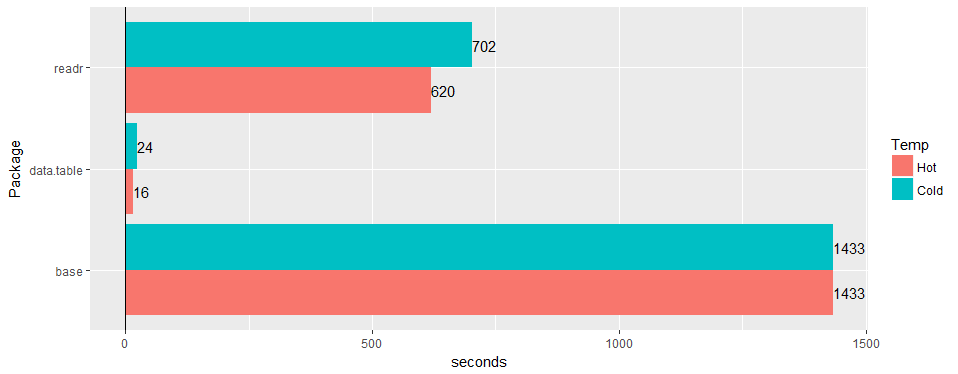 Reacted by John Andrews, Ben Bolker, Matt Dowle, Scott Stanfield and Jan Gorecki
any chance to confirm issue is still valid on 1.11.4? or code to produce example data.


Hi,
Hardware and software:
Server: Dell R930 4-Intel Xeon E7-8870 v3 2.1GHz,45M Cache,9.6GT/s QPI,Turbo,HT,18C/36T and 1TB in RAM
OS:Redhat 7.1
R-version: 3.3.2
data.table version: 1.10.5 built 2017-03-21
I'm loading a csv file (44 GB, 872505 rows x 12785 cols). It loads very fast, in 1.30 minutes using 144 cores (72 cores from the 4 processors with hyperthreading enabled to make it 144 cores box).
The main issue is that when the DT is loaded the amount of memory on-use increases significantly in relation to the size of the csv file. In this case the 44 GB csv (saved with fwrite, saved with saveRDS and compress=FALSE creates a file of 84GB) is using ~ 356 GB of RAM.
Here is the output using "verbose=TRUE"
Allocating 12785 column slots (12785 - 0 dropped)
madvise sequential: ok
Reading data with 1440 jump points and 144 threads
Read 95.7% of 858881 estimated rows
Read 872505 rows x 12785 columns from 43.772GB file in 1 mins 33.736 secs of wall clock time (affected by other apps running)
0.000s ( 0%) Memory map
0.070s ( 0%) sep, ncol and header detection
26.227s ( 28%) Column type detection using 34832 sample rows from 1440 jump points
0.614s ( 1%) Allocation of 3683116 rows x 12785 cols (350.838GB) in RAM
0.000s ( 0%) madvise sequential
66.825s ( 71%) Reading data
93.736s Total
It is showing a similar issue that sometimes arises when working with the parallel package, where one rsession is launched per core when using functions like "mclapply". See the Rsessions created/listed in this screenshot:
if I do "rm(DT)" RAM goes back to the initial state and the "Rsessions" get removed.
Already tried e.g. "setDTthreads(20)" and still using same amount of RAM.
By the way, if the file is loaded with the non-parallel version of "fread", the memory allocation only gets up to ~106 GB.
Guillermo