Repository navigation
Ensure our release binaries work on Apple Silicon #2426
Description
Activity
If there is anything to test, I'm happy to help :)
Reacted by Mislav Marohnićthis isn't directly useful for your signing question, but since this is the search result for "Apple Silicon" in this repo, I'm sharing my experience:
- I couldn't install through brew since
gois currently broken on brew - I downloaded the latest release (
gh_1.3.1_macOS_amd64.tar.gzat the time of writing) untarred, and tried to run. I was hit with an untrusted binary error from Apple. - I opened
gh_1.3.1_macOS_amd64/bin/ghwith a right click through Finder and was given the option to run anyway. That succeeded. - I
sudo mv gh_1.3.1_macOS_amd64/bin/gh /usr/local/bin(which I've added to my$PATH), and it's working great!
as an aside: I have a valid
gobinary that I compiled myself in my$PATH. I'm assuming that doesn't affectgh, since I downloaded a binary that shouldn't look for the go executable, but if you're having trouble replicating my instructions you might need to get a workinggoon your machine firstReacted by J. Alexander Curtis and Yun MiaoReacted by Mislav Marohnić, Richik SC, J. Alexander Curtis and Yun Miao- I couldn't install through brew since
- I downloaded the latest release (
gh_1.3.1_macOS_amd64.tar.gzat the time of writing) untarred, and tried to run. I was hit with an untrusted binary error from Apple. - I opened
gh_1.3.1_macOS_amd64/bin/ghwith a right click through Finder and was given the option to run anyway. That succeeded. - I
sudo mv gh_1.3.1_macOS_amd64/bin/gh /usr/local/bin(which I've added to my$PATH), and it's working great!
@AndrewSB This was also my experience installing
ghon an M1 MacBook. I didn't attempt to install throughbrew, but I downloaded the tar, manually cleared it through Finder (could also be done with thexattr com.apple.quarantinecommand I believe), and then moved it to/usr/local/bin. I don't havegoinstalled, so it doesn't look like you need agobinary installed for it to work.@mislav I don't know about Go, but I built a Rust binary on a standard
macosx11.0x86_64 GitHub Actions runner using theaarch64-apple-darwintoolchain in Rust v1.49 beta, and the binary it produced was signed.Here's the output from running
codesign --verify --verbose [my_binary]on that after freshly downloading it:% codesign --verify --verbose badlogvis-aarch64-apple-darwin badlogvis-aarch64-apple-darwin: valid on disk badlogvis-aarch64-apple-darwin: satisfies its Designated RequirementEdit: for comparison, here's the output of
codesign --verifyfor freshly downloaded and untarredgh:% codesign --verify --verbose gh gh: code object is not signed at all In architecture: x86_64Reacted by Mislav Marohnić- I downloaded the latest release (
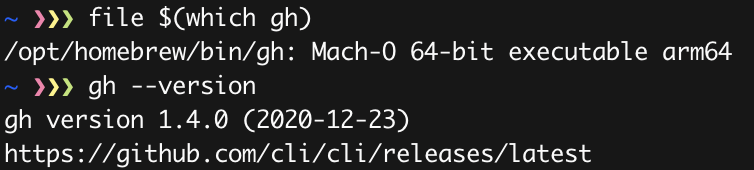
FWIW I got the thing to compile on an M1 from source when using this brew PR Homebrew/homebrew-core#67154
cd /opt/homebrew/Library/Taps/homebrew/homebrew-core
arch -x86_64 gh pr checkout 67154
HOMEBREW_NO_AUTO_UPDATE=1 brew install --HEAD --build-from-source go --verbose
HOMEBREW_NO_AUTO_UPDATE=1 brew install --build-from-source gh --verbose
echo "vois la"
 Reacted by Richik SCReacted by Mislav Marohnić
go@ 1.16 pre-relase go merged intobrewmaster so this shoud be possible now by just runningbrew install gh -swithout any of the stuff above. Not sure a bottle's been built yet.go@ 1.16 pre-relase go merged intobrewmaster so this shoud be possible now by just runningbrew install gh -swithout any of the stuff above. Not sure a bottle's been built yet.@flying-sausages A bottle has been built! I installed the native version this morning with
brew install ghand it works like a charm. No more long delays for random actions especially opening things in the web browser withgh pr/issue view --webcompared to the Rosetta 2 binary.Reacted by Mislav Marohnićgh is installed in Mac silicon laptop but when I run the gh repo clone xxx/repo , it’s not working
@ervaneet82 I'm sorry, but you will have to report your issue more specific than that. How did you install gh? Which error did you get?
Our release binaries are not compatible with M1 yet, but you can use Homebrew to run
brew install gh. Please try that first.you can use Homebrew to run
brew install gh -sFYI, the
-sflag is no longer needed, since Homebrew has pre-built bottles available forghonarm64.Reacted by Mislav MarohnićHi ,
Simple install but first you need to run "xcode-select --install" after that I ran the following commands.
-
brew install gh
-
which gh
-
/opt/homebrew/bin/gh
gh repo clone ervaneet82/terraform12
signal: killed ---> This is error coming gettingMacBook Pro (13-inch, M1, 2020)
-
gh repo clone ervaneet82/terraform12 signal: killed ---> This is error coming getting
@ervaneet82 You most likely don't have the arm64 version
$ file $(which gh) → /opt/homebrew/bin/gh: Mach-O 64-bit executable arm64I have arm64.
Vaneets-MacBook-Pro ~ % file $(which gh)
/opt/homebrew/bin/gh: Mach-O 64-bit executable arm64I have arm64.
Vaneets-MacBook-Pro ~ % file $(which gh)
/opt/homebrew/bin/gh: Mach-O 64-bit executable arm64Do you have git installed?
9 remaining items
Assuming “most” macOS users use homebrew is a bad assumption. Homebrew and macPorts both have huge security holes that make them unsuitable for many environments. Also, not codesigning binaries, which is not an Apple Silicon specific issue, requires disabling security features of the OS.
You should either code sign your releases, or stop shipping them for macOS.
Reacted by GMbrianlaw, Tristan Morgan, Sebastian Blask and Armin BriegelYou should either code sign your releases, or stop shipping them for macOS.
We are already planning to code-sign binaries attached to gh releases, which this ticket is about. I'm not sure which new information you are bringing to this thread, but it feels like your intent is merely to rush us into doing so? Please note that Apple has started enforcing binary-signing restrictions after we started publishing gh, so it's not like we planned to deliberately go against Apple's guidelines.
We force no one to use our precompiled binaries, nor to use Homebrew or MacPorts. Anyone can compile gh by themselves, which you should absolutely do if security is paramount on your own machines. Over time, we will work incrementally to improve our precompiled binaries to the best of our team's abilities.
We are already planning to code-sign binaries attached to gh releases, which this ticket is about. I'm not sure which new information you are bringing to this thread, but it feels like your intent is merely to rush us into doing so? Please note that Apple has started enforcing binary-signing restrictions after we started publishing gh, so it's not like we planned to deliberately go against Apple's guidelines.
This issue has been around for a long time and is a security issue for your users. It should be treated with appropriate priority.
Apple's guidelines have advised code signing since macOS 10.8 with the introduction of GateKeeper. Ever since 10.8 you've had to set a setting to disable codesign enforcement on macOS, which has weakened the security of the system.
Since the release of Apple Silicon macs code signatures became a hard requirement, but this is not new. Code signing has been part of Apple's guidelines for macOS development for almost a decade, far longer than gh has existed.
Reacted by Stephan Esch, HD, Shawn Cicoria, Brandon Kurtz and Chris B- moved this from 📋 Backlog to 6️⃣4️⃣ Apple Silicon (arm64) support in @n8felton's backlog
on Nov 4, 2022 - added 2 commits that reference this issue
on Feb 2, 2023 Note that the original Go issue linked from here (golang/go#42684) is now resolved. Go ad-hoc signs all macOS binaries by default, even when cross-building. This is sufficient -- I've tested this, and just adding arm64 to the architectures in the goreleaser configuration is sufficient to get binaries that run on Apple Silicon Macs, even when cross-building from Linux.
- moved this from 🦾6️⃣4️⃣ Si (arm64) support to ✅ Done in @n8felton's backlog
on Feb 17, 2023 Hi all, thanks for contributing to this discussion and for your patience. We are moving forward with signing & notarizing our macOS builds, but seeing as we still have a few items to check off before all that's done, we will be shipping this in two steps:
-
We will add an
arm64build to our Releases starting from the next release. Initially, this build might not be signed with a valid Developer identity nor notarized (that will be covered by step 2), but even without a valid signature, this will help scripts that programmatically download builds from our Releases section. This marks this thread as closed. -
We will add developer signature & notarization to our
amd64andarm64builds for macOS. This will enable the extractedghbinaries to run on macOS after using a web browser to download our Release tarballs, as well as hopefully improve users' trust in our binaries. We are tracking this in macOS binaries not signed with a verified identity #6970
Step 1 is easy and immediately shippable; step 2 will be delayed by us having to first procure an Apple Developer identity and modify our release automation process to include a notarization step.
Why did this take so long?
Since GitHub CLI is a tool primarily aimed at developers, signing & notarizing wasn't strictly necessary from our point of view, and it was easier for us to set up release automation without it. Developers tend to use package managers to obtain command-line tools, and since Homebrew is our primary distribution mechanism for macOS users, anyone on Intel or Apple Silicon architectures was able to
brew install ghand have GitHub CLI working without any other restrictions.What Homebrew does is either compiles gh from source, which results in an ad-hoc signed binary courtesy of the Go toolchain, or downloads a pre-built "bottle" of gh for your architecture and applies an ad-hoc signature to it after downloading.
For those who do not wish to use Homebrew, after we generate
arm64builds in the next release, any script or package manager will be able towget https://github.com/cli/cli/releases/download/v{VERSION}/gh_{VERSION}_macOS_arm64.tar.gz, extract it, and haveghworking on their machine. To my knowledge and in my testing, using a command-line tool such aswgetorcurlto obtain a package will not trigger Gatekeeper's restrictions on running unpacked software.Gatekeeper, the runtime security mechanism built into macOS, seems to only kick in when a GitHub CLI package was downloaded via a web browser: i.e. by navigating to our Releases section and downloading a package from there. According to
xattr <file>, this sets thecom.apple.quarantineattribute, which is copied to theghbinary after extraction, which serves as a signal to the system to exercise extra precaution with this executable at runtime.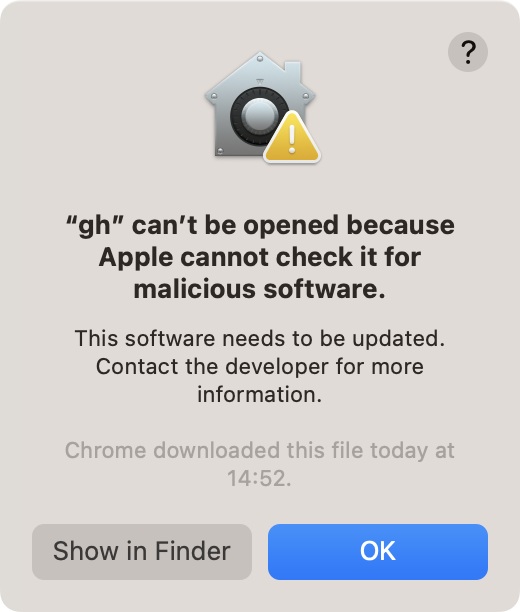
A valid signature and notarization for our binary will help avoid this notice by Gatekeeper, but until then, please either use Homebrew or use a command-line tool to download and extract our release packages for macOS.
Addendum for posterity
How to verify a signature of an executable, including ad-hoc signatures:
$ codesign --verify -vvvv gh_2.23.0_macOS_arm64/bin/gh
gh_2.23.0_macOS_arm64/bin/gh: valid on disk
gh_2.23.0_macOS_arm64/bin/gh: satisfies its Designated Requirement
How to verify whether a quarantined executable will be allowed to run:
$ spctl --asses --verbose gh_2.23.0_macOS_arm64/bin/gh gh_2.23.0_macOS_arm64/bin/gh: rejectedReacted by Ame アメ and Ricardo PradoReacted by Takuya Fukuju-


It looks like macOS arm64 architecture requires all Go binaries to be signed: golang/go#42684
We currently produce macOS binaries from Linux, but if we switch our release automation to compiling them from macOS, this might be enough to alleviate this. I'm not yet sure whether that would require the Actions runner to also be arm64.