Repository navigation
Additional or alternative authentication method #297
Description
Activity
Thanks for the feedback! Our current suggested work-around is to authenticate in a GUI environment and then copy gh's config file to the headless environment.
Looking at the code, it seems like it is supposed to print out the URL if opening the browser fails:
Line 58 in c03b0d1
did this not happen for you? if so, we should capture that as a bug.
Reacted by Egbert and Armand MousaviLooking at the code, it seems like it is supposed to print out the URL if opening the browser fails:
Did not happen for me. After pressing Enter to open the browser, it just hangs there waiting for my inevitable Ctrl+C.
Reacted by Zaahir Moolla, Stephen Rosen, yrammos, Gabriel Birke and Egbertoof, thanks for the clarification. I'll mark this as a bug, then.
Reacted by Sam ZeitlinMarking as a p3 since there is a workaround (manually copying gh's config). We should at a minimum ensure that the URL is being printed.
Making life easy for folks who already have an oauth token.
$HOME/.config/gh/config.ymlgithub.com: - user: USERNAME oauth_token: TOKEN
Reacted by Josh Kuhn, Don Grote, Michael McMahon, Adam Vigneaux, Sandro, Shaposhnikoff, Stephen Rosen, userabuser, Terrance Kennedy, Dani Comnea and 6 moreReacted by Patrick Withams and Bassel Al AraajCould you print URL should be opened? To open it manually.
Reacted by Jason Kölker, Sreetam Das, Bradley Dice, Egbert and faximanFor me, the URL is shown and I can open it manually.
But then manually calling the callback results in a "the access token could not be read from HTTP response" error$ ssh [email protected] -T Hi eplodn! You've successfully authenticated, but GitHub does not provide shell access.I don't understand. If GitHub can successfully authenticate me by my private key (which is inherently more secure than passwords or tokens in files), why does it need any further authentication?
Reacted by Jonathon McMurray, Lewis Cowles, Alberto Gonzalez, Daniyal, Stuart Mitchell, Pak Wah Chan, Jonathan Gilmore (pro), Jérôme Alet and Seth R. JohnsonReacted by Pak Wah ChanA more detailed step-by-step workaround for authenticating on headless environments without a browser:
- when you get the "Please open the following URL manually:" prompt, open that URL on a different system that does have a browser (e.g. the one you're reading this on right now), and authorize in the UI
- the UI will then attempt to redirect to a
localhostURL, which will fail because the temporary gh auth server is running on your headless system, not the one with the browser - copy the URL that it failed to open from your browser address bar (it will look something like
http://localhost:35399/callback?browser_session_id=...) - in another terminal session on your headless system, use cURL or another http client to send the request, e.g.
curl 'http://localhost:35399/callback?browser_session_id=...'(single-quotes around the address to avoid shell interpreting special chars like &). - the original terminal where you were trying to run
ghshould now display "Authentication complete. Press Enter to continue..." - you now have valid credentials stored on the headless system in
~/.config/gh/config.ymland can runghwithout re-authenticating. fun times
Reacted by Sandro, ohmeow, Matt, Jack Lindamood, Paul O'Leary McCann and Jun TianA more detailed step-by-step workaround for authenticating on headless environments
Thanks, this is appreciated, but.... this lack of simple authentication in the CLI is a great deterrent.
There are at least 10 one/two-liners for doing things the CLI does, without all this complication.I have been working my GitHub account day and night though my own CLI scripts and tools, having nothing but a
GITHUB_ACCESS_TOKENin my environment. Headless should be a first class citizen for CLI, not an afterthought.Although I see this "bug" progressing in the project columns - which is appreciated - I think the authentication method should be changed (or expanded), and not fixed to just show the URL for headless.
Reacted by Jonas Rauber, balloonio, Jonathon McMurray, Odin Ugedal, StarlitGhost, Patrick Withams, Adam Jarvis, Adam Vigneaux, Bradley Dice, Sandro and 21 moreWhat about something like the one used in the kubernetes cli? https://kubernetes.io/docs/reference/access-authn-authz/authentication/#client-go-credential-plugins. It makes it simple to use custom auth logic based on running shell commands. I don't like storing my credentials in plain text, so I am using pass for everything. Using such a method allows the user to use everything from webhooks, to pass, to plain env vars.
Here is a simple proof-of-concept (that I am currently using): https://github.com/cli/cli/compare/master...odinuge:exec-auth?expand=1
Any thoughts?
cc @vilmibm
24 remaining items
The last paragraph would seem to me to fall into unreasonable asks, but I don't work for GitHub so I'll leave them to make that determination.
The first paragraph hints at needing a default timeout and possible detection of non-interactive session.
The middle paragraph needs secrets to work, which is what tokens and using an environment variable will solve for us. It's a one-time effort to retrieve / create the token, and then all your environments can use a secrets manager to ensure that the oauth token is protected.
Part of the problem is that much of this isn't protecting GitHub, it's protecting your team members and you.
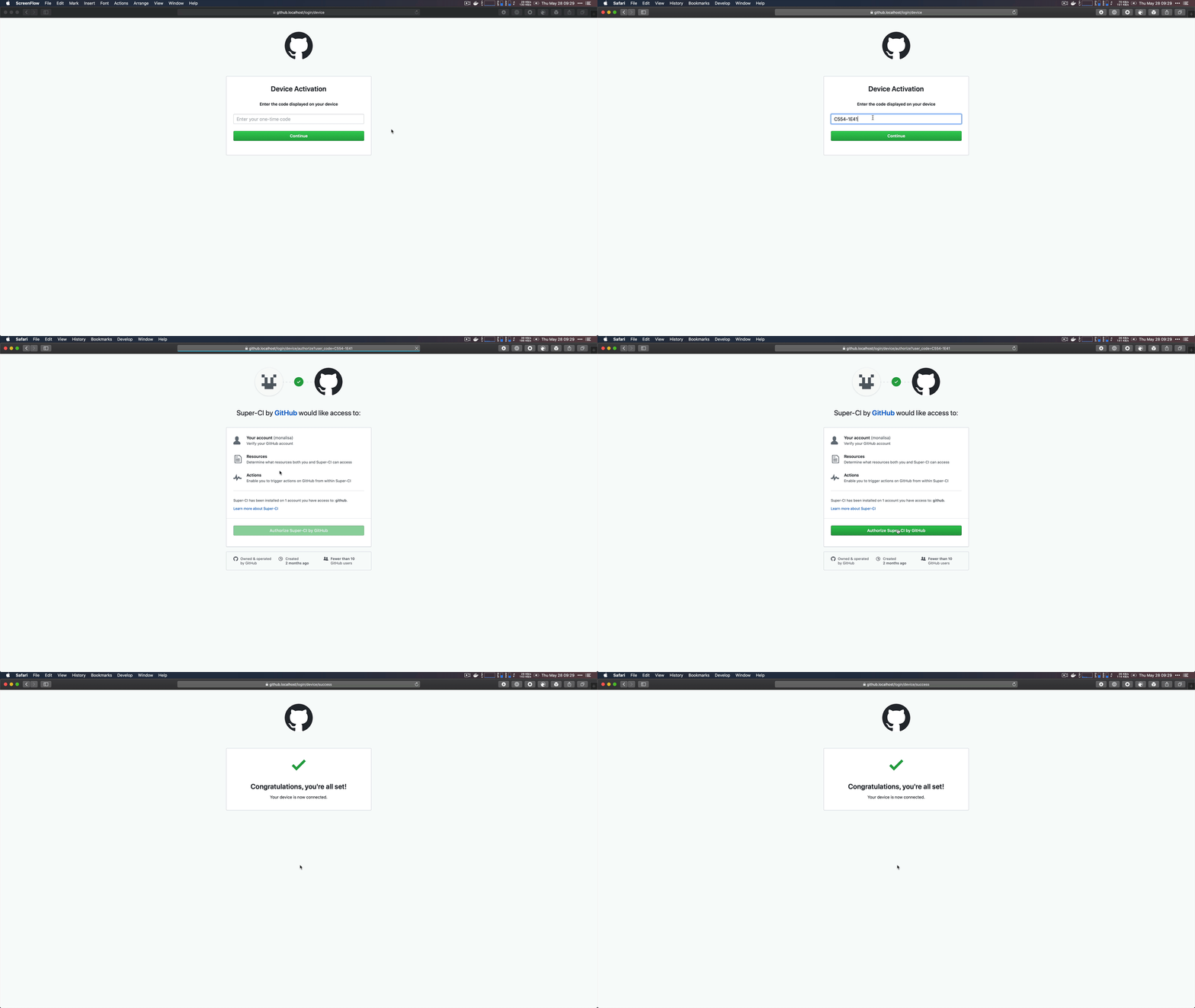
In late July, GitHub is releasing support for the OAuth Device Authorization Flow in public beta. This allows any CLI client or developer tool to authenticate using a secondary system with a browser. We developed this because sometimes tools running virtual machines or containers can't accept callbacks on localhost ports even if they have an acceptable browser with javascript enabled. And it would be neat if someone wanted to build a GitHub app for a smart television!
The CLI team is evaluating the device flow as a potential solution for this issue, as part the broader authentication-related work in #957.
 Reacted by Mislav Marohnić and Billy GriffinReacted by Aliabbas Merchant
While it might be part of a solution for people who have an interactive session. I think after #1245 drops, it should be possible to then use that token for non-interactive sessions like those in CI. It could actually be really cool documentation for how to use the
ghtool, to look at tests and see, oh look they supply a token via ENV (of course the token would be in secrets)Based on @tdumitrescu's instructions, I created the following bash script to streamline the whole process of authenticating on headless environments without a browser, all within a single terminal session.
#!/bin/bash

if [[ "$1" == "-f" ]]; then
  echo "Deleting existing credentials"
  rm -f $HOME/.config/gh/*
fi

if [[ -f $HOME/.config/gh/config.yml ]]; then
  echo "Already authenticated."
  exit 0
fi

set -euo pipefail

echo -e "Browse to the following URL and authenticate:\n"
echo -e "\n" \
  | gh repo view dummy/dummy 2>&1 >/dev/null \
  | grep 'https://' &

sleep 0.1s
echo -e "\nYou will then be redirected to an invalid URL, which you should cut and paste here:"
read -r URL
curl -s "$URL" \
  | grep -o "Successfully authenticated GitHub CLI" || echo "Authentication failed"
Note that you can pass a
-fflag to the script to force recreating credentials file, otherwise if the file already exists, it will skip the whole process.Enjoy! =)
Reacted by Lewis Cowles and Chad BoyceReacted by SandroReacted by Felipe Santos@mathieusama Awesome work!
But I hope we won't need this anymore with
gh auth login.@mathieusama That's really nifty; thank you for sharing!
I also hope that this won't be necessary in gh v0.12.0+ (coming next week!)
Really looking forward to that v0.12.0 release! (especially for the
gh repo create -yflag to prevent prompting user!)The v0.12 release with improved authentication is out! https://github.com/cli/cli/releases/tag/v0.12.0
Try
gh auth loginon a headless host. When no graphical browser is detected, the flow prints out a URL that you can now open in a graphical browser on any other machine to complete the flow.Additionally, you may pass in a token to skip browser authentication via
gh auth login --with-token < mytoken-file.txtReacted by Lewis Cowles, Danil Pismenny, Mathieu Frenette, Egbert and Christopher Fenner- added a commit that references this issue
on Dec 6, 2020 If you want to see the URL
gh auth loginuses, useBROWSER=nonexistent gh auth login, and it ultimately printshttps://github.com/login/deviceReacted by Lewis Cowles and Danny SauerReacted by Danny SauerIs this device-mode OAuth?
- added a commit that references this issue
on Jul 21, 2025


A browser is not always available for authentication.
I am working on a vagrant linux guest, which cannot open browser in the Windows host.
I would love to see a
gh logincommand (or similar) to store credentials as appropriate by the system without opening a browser.At the very least - if this is not changed, or until it is - I would love to see the URL it wants to open so I can open it manually.