Repository navigation
Support all flavors of search via gh search <foo> #6945
Description
Activity
@nr-dbuckwalter Is your feature request specifically around code search? If so please checkout #6931 and the discussion there. We are open to adding other forms of search that we do not currently support as well. I would say that each form should get its own issue though instead of a single issue capturing all the flavors of search.
I looked in open issues only for prior art, oops! 😅
Code search consistent with the other functions the CLI already provides is the feature I was looking for. I use the CLI with GitHub Enterprise Server, so I don't think the forward-looking statements in #6931 about 'better search is coming (someday)' apply to me the same way.I think that is fair point that waiting for the new code search on GHES has a whole different timeline. I don't know if/when it will be released on GHES. I will discuss with our team and see if we want to address this feature sooner for our GHES users.
I didn't find a way to use
gh search repos <foo>where<foo>is the exact name of repo, even when using--match name, for example. It always get unwanted results.... searching for:gh search repos --include-forks only --match name `My-Repo`Returns forks for
My-Other-RepoandMy-Repo.Maybe I'm missing something...
GH version:
gh version 2.23.0 (2023-02-07)(installed via homebrew)Isadora
@isaitgirl hello! this issue is about adding new search types to
gh searchand it sounds like you have a question aboutgh search reposspecifically -- could you open a new issue or discussion to track your comment?as far as supporting the current code search API, we'd be in favor of merging a PR adding such support. We don't have a super clear timeline of when the new code search stuff is coming and in the interim there is value in having a code search affordance in
gh.Unfortunately there is no room on the core team to pick up this kind of work right now, so I'm marking
help wanted.In terms of implementation and UX,
gh search codeshould be similar enough to the existing code for the search types for someone to start by taking inspiration from there; let us know what questions arise.Hello @vilmibm 👋 I am interested in working on this, but noticed this blog post: Changes to the code search API. With these changes coming on April 10th, is there still value in adding functionality here or would it be better to wait for the changes to the code search API to be released?
@joshkraft I think it is okay to get started on this feature and just avoid adding in functionality to sort the search results which exists in other search commands. All the other changes should not have an affect on the implementation. We will probably want to wait till after April 10th to actually release the new search code command to make sure everything still works but that shouldn't block getting this work started.
Reacted by Josh KraftI've made some progress here but running into a bit of a UX challenge. The code search API works by returning text fragments, as outlined here. The first two matches within each file are returned. For example, if we performed a search for
functionin this JavaScript file:function foo() { return bar; } function baz() { return qux; }
We might get back something like this:
{
  "text_matches": [
    {
      "fragment": "function foo() {\nreturn bar;\n}\n\nfunction baz() {\nreturn qux;\n}",
      "matches": [
        {
          "text": "function",
          "indices": [
            0,
            7
          ]
        },
        {
          "text": "function",
          "indices": [
            36,
            43
          ]
        }
      ]
    }
  ]
}
I am trying to figure out the best way to display this data within the confines of a row in a table, to be consistent with the other search commands. My first thought was to try to fit each search result into a row and highlight each match by rendering it in a different color. Here is what that might look like:

In this case, the results look alright (to me), but the limited space we are working with means there are lots of situations where the results are not very usable. A few issues I have come across:
- long fragments or long matches might truncated to a point where the 'area of interest' is cut off
- compressing fragments that span multiple lines into a single line can result in strange spacing
I am sure these issues can be improved to a degree, but before I start digging into options I wanted to check if it makes sense to try and make the table approach work, or if I should also explore alternative ways of displaying code search results to users. For example, we could try to mimic the functionality of the web-based code search results, where each fragment is rendered in its entirety with the matches highlighted, though this would probably add a good deal of complexity.
Another thing I noticed - the
--limitparameter limits the number of results returned, but each result can contain 2 matches. A query with a--limitof 2 might yield 2 results, with 2 matches in each result. Should we display all 4 matches to the user, or cut it off at 2 to respect the requested--limit?The table result looks usable to me; I'd love to see some mock-ups of alternative ideas you have just to see if there's another approach worth considering.
re:
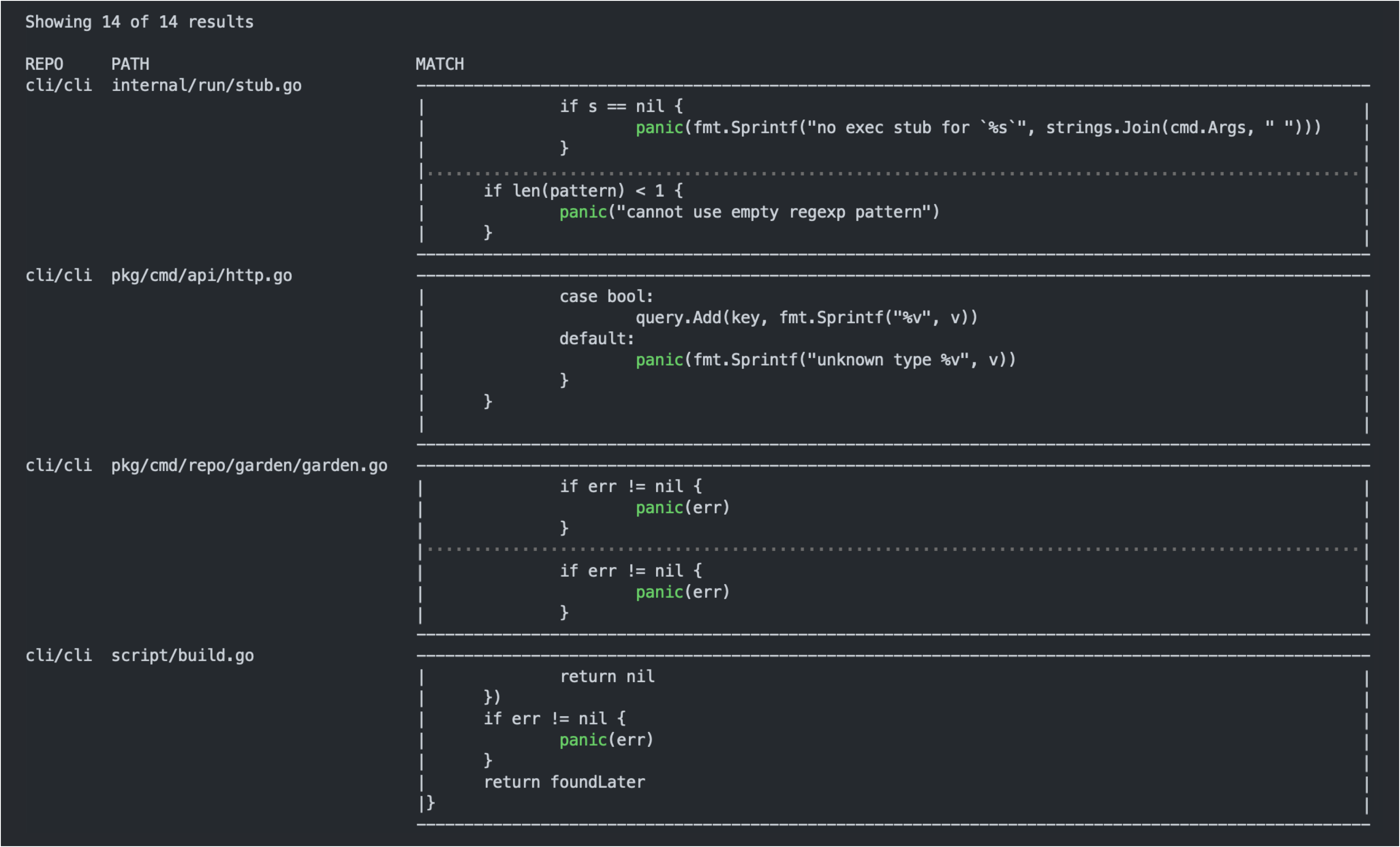
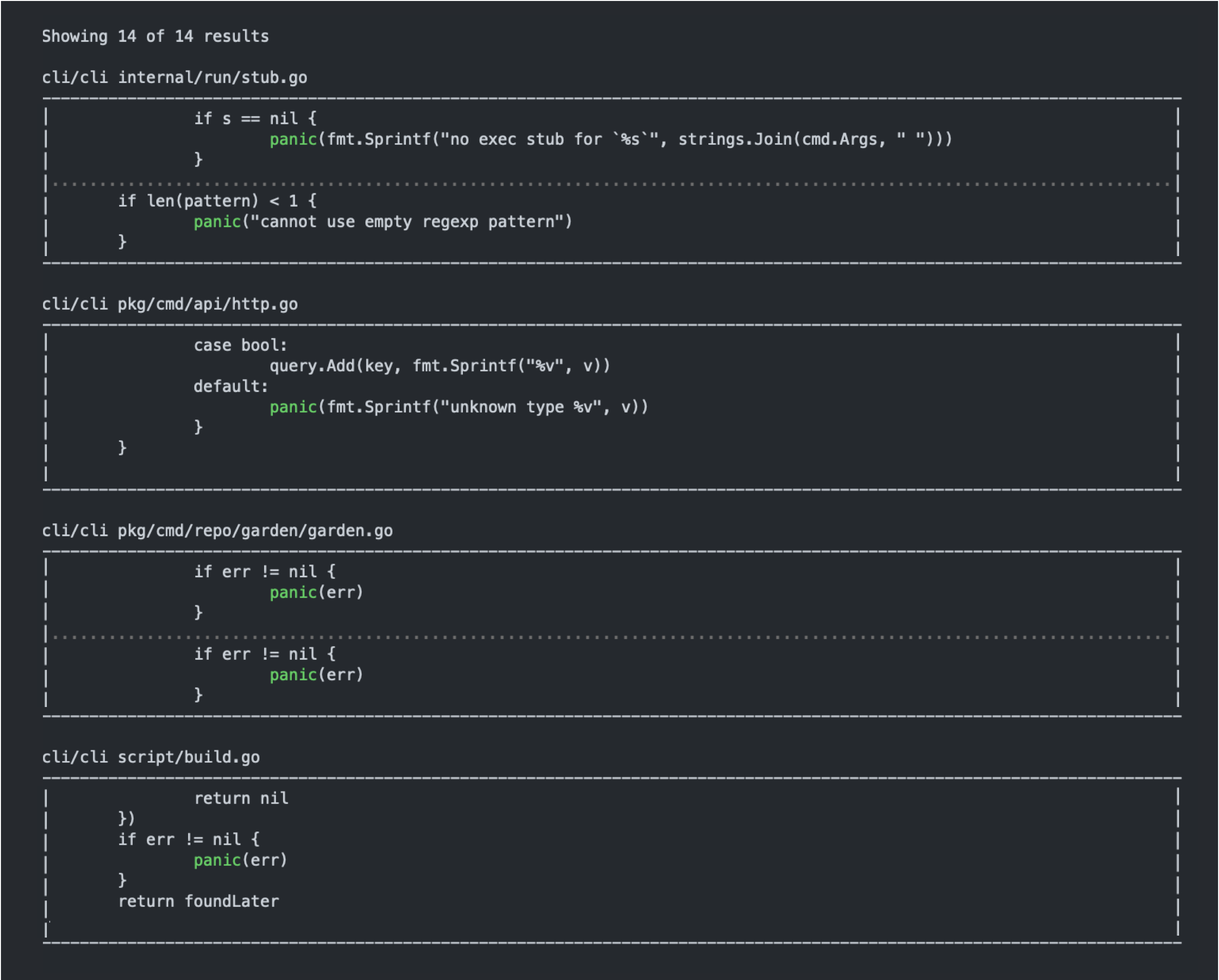
--limit; it's the case that a result has a maximum of 2 matches? If so I'm comfortable with having--limitgovern matches and not results. A user should be able to use--limitto add a maximum to the number of rows displayed.Here are a few possible formats I came up with for displaying the results. They each strike a different balance of brevity and readability. I like the latter two options for more complex queries where the context of the surrounding code is important, but I could see an argument for going the simple route for the CLI given how easy it is for users to open the results in the web and get access to the full Github search functionality for complex queries.
Option 1: Normal
tableprintertable with code compressed into a single cell

Option 2:
tableprintertable with code split across multiple rows
Option 3: Code blocks rendered full width, similar to the web search results
I need to do some more testing on the 'matches' behavior. It seems like you can get up to 2 matches per file, but each match might contain the search term multiple times. So we have the ability to apply the limit based on number of overall results, number of matches, or number of appearances of the search term.
@joshkraft Thanks for those visualizations! Very useful.
I personally think of GitHub code search primarily as if
grepwere operating on some server rather than locally. With that in mind, I think that the default output of code search could be a line-based format, which includes the table prototype you already proposed in this thread.Here is how
grepdisplays matches:

Here is how my favorite search utility
agdisplays results to a terminal:

And here is how
agprints results for scripts:

Of course, these utilities support a lot of flags to control the format of the output (for example, I've activated line numbers for
grepoutput), but whatever the default is, I would vote for a line-based format to be developed first, perhaps with these fields:<filepath>:<linenumber>: <match>and for terminal/rich output, I would like to see something like
agdisplay for terminals, i.e. a file name is a header and a code snippet is rendered with line numbers. I see no need for rendering a faux GUI with-------or|for drawing boxes.Reacted by Josh Kraft


Describe the feature or problem you’d like to solve
Support all flavors of
gh search <foo>as listed in the API. For example,gh search code 'somestring'would be useful from the CLI.Proposed solution
Will provide a more consistent experience for search via CLI.
Additional context
gh api -X GET search/code -f q='somestring'is a hacky workaround