Skip to content

Migrate flutter counter template to Material 3 #111118

Description

@darrenaustin

Once we have enough of the framework migrated to Material 3 (#91605), we should update the default Flutter counter app template to use Material 3 by default. This may require some new design work on the template itself, as currently if we just switch over the existing template we get something like:

Sample code
  import 'package:flutter/material.dart';
  
  void main() {
    runApp(const MyApp());
  }
  
  class MyApp extends StatelessWidget {
    const MyApp({super.key});
  
    // This widget is the root of your application.
    @override
    Widget build(BuildContext context) {
      return MaterialApp(
        title: 'Flutter Demo',
        theme: ThemeData(
          // This is the theme of your application.
          //
          // Try running your application with "flutter run". You'll see the
          // application has a blue toolbar. Then, without quitting the app, try
          // changing the primarySwatch below to Colors.green and then invoke
          // "hot reload" (press "r" in the console where you ran "flutter run",
          // or simply save your changes to "hot reload" in a Flutter IDE).
          // Notice that the counter didn't reset back to zero; the application
          // is not restarted.
          colorSchemeSeed: const Color(0xff6750a4),
          useMaterial3: true,
        ),
        home: const MyHomePage(title: 'Flutter Demo Home Page'),
      );
    }
  }
  
  class MyHomePage extends StatefulWidget {
    const MyHomePage({super.key, required this.title});
  
    // This widget is the home page of your application. It is stateful, meaning
    // that it has a State object (defined below) that contains fields that affect
    // how it looks.
  
    // This class is the configuration for the state. It holds the values (in this
    // case the title) provided by the parent (in this case the App widget) and
    // used by the build method of the State. Fields in a Widget subclass are
    // always marked "final".
  
    final String title;
  
    @override
    State<MyHomePage> createState() => _MyHomePageState();
  }
  
  class _MyHomePageState extends State<MyHomePage> {
    int _counter = 0;
  
    void _incrementCounter() {
      setState(() {
        // This call to setState tells the Flutter framework that something has
        // changed in this State, which causes it to rerun the build method below
        // so that the display can reflect the updated values. If we changed
        // _counter without calling setState(), then the build method would not be
        // called again, and so nothing would appear to happen.
        _counter++;
      });
    }
  
    @override
    Widget build(BuildContext context) {
      // This method is rerun every time setState is called, for instance as done
      // by the _incrementCounter method above.
      //
      // The Flutter framework has been optimized to make rerunning build methods
      // fast, so that you can just rebuild anything that needs updating rather
      // than having to individually change instances of widgets.
      return Scaffold(
        appBar: AppBar(
          // Here we take the value from the MyHomePage object that was created by
          // the App.build method, and use it to set our appbar title.
          title: Text(widget.title),
        ),
        body: Center(
          // Center is a layout widget. It takes a single child and positions it
          // in the middle of the parent.
          child: Column(
            // Column is also a layout widget. It takes a list of children and
            // arranges them vertically. By default, it sizes itself to fit its
            // children horizontally, and tries to be as tall as its parent.
            //
            // Invoke "debug painting" (press "p" in the console, choose the
            // "Toggle Debug Paint" action from the Flutter Inspector in Android
            // Studio, or the "Toggle Debug Paint" command in Visual Studio Code)
            // to see the wireframe for each widget.
            //
            // Column has various properties to control how it sizes itself and
            // how it positions its children. Here we use mainAxisAlignment to
            // center the children vertically; the main axis here is the vertical
            // axis because Columns are vertical (the cross axis would be
            // horizontal).
            mainAxisAlignment: MainAxisAlignment.center,
            children: <Widget>[
              const Text(
                'You have pushed the button this many times:',
              ),
              Text(
                '$_counter',
                style: Theme.of(context).textTheme.headlineMedium,
              ),
            ],
          ),
        ),
        floatingActionButton: FloatingActionButton(
          onPressed: _incrementCounter,
          tooltip: 'Increment',
          child: const Icon(Icons.add),
        ), // This trailing comma makes auto-formatting nicer for build methods.
      );
    }
  }

m3_template

Which is a pretty bland looking introduction to Flutter.

Out of the box, we want a simple but attractive example. If needed, we could change it to something other than a counter, but it would have to be simple while still showing off hot reload and basic state management.

Activity

  1. added
    frameworkflutter/packages/flutter repository. See also f: labels.
    p: material_uimaterial_ui package in flutter/packages
    on Sep 7, 2022
  2. self-assigned this
    on Sep 7, 2022
  3. moved this to 🗺 Planned in Material 3on Nov 4, 2022
  4. srivats22 commented on Nov 11, 2022

    @srivats22
    Contributor

    Maybe we can update the example to something like this:
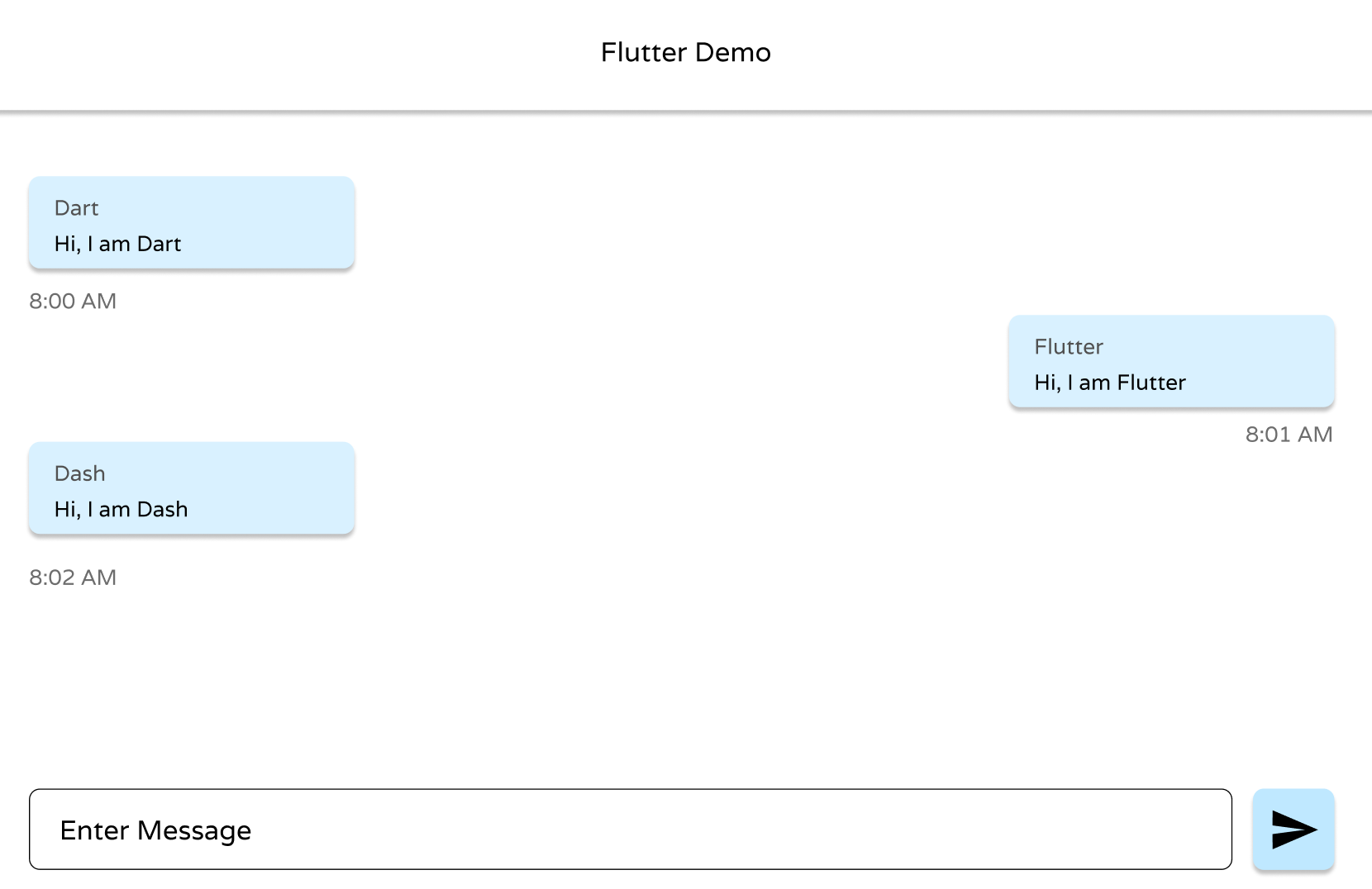
    Screenshot 2022-11-11 at 8 27 22 AM

    It shows more UI elements using M3 Design. This is just a design file I created on Figma, but I could develop it using Flutter.

  5. chaudharydeepanshu commented on Nov 15, 2022

    @chaudharydeepanshu

    @srivats22 Sorry, I don't think your example would be fit for the default template as it has a custom widget(chat bubble), textfield, scrollview, sender-receiver alignment, and msg timestamp.

    This is what I think a default template should do or have:

    • It should help anyone get easily started on their own projects instead of first deleting lots of code.
    • It should be fairly simple just as showing the setState in action through updating a few visual elements.

    Tbh I don't think there is a need for an update to the current example as it suits its purpose perfectly without overcomplicating anything for beginners and I don't think it needs to look cool.

    Still, maybe adding a theme switcher to play with would be cool and simple.

  6. gspencergoog commented on Nov 15, 2022

    @gspencergoog
    Contributor

    It should help anyone get easily started on their own projects instead of first deleting lots of code.

    Note that we recently added the --empty argument to flutter create, which creates a very minimal code setup without the test directory, and without any comments or more than just "hello world". So you shouldn't need to delete a lot of code.

  7. chaudharydeepanshu commented on Nov 15, 2022

    @chaudharydeepanshu

    @gspencergoog Thanks for pointing that out I didn't know that.

    But I think many people are used to Android Studio "File->New->New Flutter Project" and they may continue using that trend (especially beginners) so I think we should still keep that in consideration.

  8. srivats22 commented on Nov 15, 2022

    @srivats22
    Contributor

    That makes sense, I just realized it might be a bit too much, my bad.

    Maybe like a switch for theme change might work.

  9. gspencergoog commented on Nov 15, 2022

    @gspencergoog
    Contributor

    I added feature requests for both IntelliJ (a.k.a. Android Studio) and VSCode to implement creating an empty project.

  10. moved this from 🗺 Planned to 🚧 In Progress in Material 3on Jan 27, 2023
  11. moved this from 🚧 In Progress to ✅ Done in Material 3on Feb 2, 2023
  12. github-actions commented on Mar 3, 2023

    @github-actions

    This thread has been automatically locked since there has not been any recent activity after it was closed. If you are still experiencing a similar issue, please open a new bug, including the output of flutter doctor -v and a minimal reproduction of the issue.

  13. locked as resolved and limited conversation to collaborators on Mar 3, 2023
Sign up for free to join this conversation on GitHub. Already have an account? Sign in to comment

Metadata

Metadata

Assignees

No one assigned

    Labels

    frameworkflutter/packages/flutter repository. See also f: labels.p: material_uimaterial_ui package in flutter/packages

    Type

    No type

    Projects

      Milestone

      No milestone

      Relationships

      None yet

      Development

      No branches or pull requests

      Issue actions