Repository navigation
flutter devices doesn't properly list emulator names #11850
Description

Steps to Reproduce
- Create and name some AVDs in the Android Virtual Device Manager
- Run
flutter devices
=> list shows the wrong names of the AVDs

mit-macbookpro2:battery mit$ flutter devices
2 connected devices:

Android SDK built for x86 64 • emulator-5554                        • android-x64 • Android 7.1.1 (API 25) (emulator)
iPhone 5s                    • 603DCE1D-B3A5-48CD-A309-1C45ED7AC3CF • ios         • iOS 10.3 (simulator)
Activity
mit-mit commentedon Aug 30, 2017
cc @tvolkert any idea who knows how this device detection works?
mit-mit commentedon Aug 30, 2017
cc @devoncarew looks like the devices are correctly named in IntelliJ. How do we get the names there?
devoncarew commentedon Aug 30, 2017
Hmm, we're using the same logic as flutter_tools (and in fact, just asking it for the list of devices). AVDs names can be different from the device names that start from the AVD; I don't know of a way (using the android tools) to reconcile the names.
tvolkert commentedon Sep 7, 2017
The IntelliJ screenshot shows the same output as
flutter devices(which makes sense since it just delegates to flutter_tools).@mit-mit if you do a straight-up
adb devices, which name does it list?mit-mit commentedon Sep 11, 2017
Sorry, I should have been more clear: IntelliJ seems to show a different string for emulators that are already running, and ones that are not running. The names for the stopped ones are the correct/interesting ones:
mit-mit commentedon Sep 11, 2017
That gives me a third set of names:
devoncarew commentedon Sep 11, 2017
These names we're getting from adb (
adb devices -lmay show you longer versions of the names).These names we're getting from the
emulatorcommand. I don't know how to reconcile the names from the two commands - to match up which one goes with which device.devoncarew commentedon Sep 19, 2017
These links may provide some hint for getting better device names:
android/tools/adt/idea/android/src/com/android/tools/idea/run/AndroidDeviceRenderer.javaandroid/tools/adt/idea/android/src/com/android/tools/idea/explorer/adbimpl/AdbDeviceFileSystemRenderer.javazoechi commentedon Dec 28, 2018
The highlighted emulator is started
The selected shows just
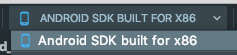
This output doesn't contain the custom defined name
Pixel 2 API 28This produces different output but still does not contain my custom defined name.
DanTup commentedon May 22, 2019
@jonahwilliams @devoncarew FYI - this might be relevant if we start showing devices + emulators in a single list in future. Running emulators would appear twice (once as a running device, once as an available emulator - which may fail to launch because it's already running).
The answer may be in the Android Studio files Devon mentions above, though I couldn't find anything obvious with a quick dig around there.
DanTup commentedon Sep 11, 2019
@mit-mit @devoncarew I was just making some improvements in this area in VS Code after it came up again. I got this working (by having VS Code use the Emulator name for the Device - it alread matches these up as part of the new device picker work) - here's the offline emulators:
And after launching two of them, they now show with the same emulator names:
Previously they'd show as "Android SDK built for x86 (mobile)".
However I'm thinking again about whether we should do it here instead so all editors and cli get it. Running
flutter deviceswould have to connect to each device (we already do that for the daemon devices now but not for the command line) and and then read the name from the ini files. We should have all the code to do this, so I think the implications are:flutter devicesa little slower)flutter devicesmight stall on timeouts for bad device connections, or fail to find the emulator files if they're not in a standard location)If we'd rather not do that, I'll finish the fix in VS Code, but otherwise I can try it here.
TahaTesser commentedon Mar 12, 2020
Hi @mit-mit
Given the merges and closed issues mentioned above
Does this issue still exist?
Thank you
DanTup commentedon Mar 12, 2020
I think this still exists. The VS Code extension matches these up client-side to improve the presentation there (emulators and devices are shown in the same list so without this, the same device would appear twice with different names). It would be nice to have that logic handler in Flutter though (for the benefit of other editors and the command line tool).
jacob314 commentedon Oct 25, 2023
Fyi @christopherfujino now could be a good time to revisit this. We're now adding a delay to Flutter Tools to wait for iOS devices connected via WIFI on Mac so it would be faster if we loaded the proper emulator names at the same time as we waited for wifi devices to show up (relative to waiting for the emulator names from VSCode like we do now). This would also help keep the DevExp experience consistent across all IDEs.
jacob314 commentedon Oct 25, 2023
Fyi @DanTup who added the support for this directly to the VSCode plugin
DanTup commentedon Oct 26, 2023
I think there are probably a few parts to this. There are a few different places we output devices but it's not clear to me exactly what should show where:
1. Output of
flutter devicesThis is a simple table like:
The top item here is an emulator and the emulator name (which we get by connecting to the emulator) is Pixel_3a_API_33_x86_64. Should this name replace one of the existing fields, or should we add a new column for the name from the emulator?
2. Output of
flutter devices --machineThis output is JSON, and includes devices like:
Should we add new fields (
emulatorId,emulatorName?), or replace the existing name? Or a new field that is the whole emulator object? The work is essentially the same as the above, we just need to define the output format (replacing the existing name will show up in IDEs without changes, but adding new fields will require some IDE changes).3.
flutter daemondevice eventsThis is what the IDEs use, and when a new device shows up it sends a payload like this:
The JSON here is the same as the above so we'd probably want to match it. We'd probably want to keep a short cache of emulators to look up the names (since we only get the IDs when we connect to the emulator). Without a cache we'll fetch the emulators multiple times when several devices show up at startup, and with a long cache we don't detect newly-created emulators while the IDE is open.
ahmdt commentedon Dec 18, 2024
It would be useful to get to get DanTup's suggestion implemented. Still cant map emulator names to device id for effective integration testing in ci.
Edit:
I found a solution per bash magic for android devices. Just replace
my_custom_emulator_nameand you will get the emulator_id as stated influtter devicesand you are able to use the -d parameter forflutter run.Resolve issue flutter#11850: Resolve emulator display names in flutte…