Repository navigation
Left aligned title for SlicerAppBar and FlexibleSpace #11951
Description

Hi!
I'm trying to implement a "Collapsing Toolbar", or the "Flexible space with image" scrolling technique from the Material Design spec, but I don't have a back button or navigation drawer. So I would like the title to be near the left edge, without any left padding/space. When I use the SliverAppBar and FlexibleSpace I can only get it to display the title with a considerable left padding, which when collapsed gives space to a back button or navigation drawer (hamburger) icon. This is not the behaviour I want, I would like to do something similar to the Android Contacts app:

Is this possible (without implementing my new SicerAppBar and FlexibleSpace class from scratch), and if so, how to do it?
Activity
Hixie commentedon May 18, 2018
cc @HansMuller
hereisderek commentedon Sep 21, 2018
this is brought up a year ago, and I'd still very much like to see this
Paul5823 commentedon Dec 6, 2018
Any solution?
crushman1 commentedon Jul 1, 2019
In
FlexibleSpaceBarsettitlePadding: EdgeInsets.all(0.0),hardypatel30 commentedon Dec 9, 2019
@crushman1 this solution would overlap title and left icon in the appbar. We need to find another solution for the same.
I asked question in s.o also .
https://stackoverflow.com/questions/59243525/sliver-appbar-collapsing-toolbar-animate-title-from-left-to-center-in-flutter
hardypatel30 commentedon Dec 21, 2019
@Unfreeze-kk , @balazsgerlei Found the solution on my own and added answer there as well.
https://stackoverflow.com/questions/59243525/sliver-appbar-collapsing-toolbar-animate-title-from-left-to-center-in-flutter/59434248#59434248
Check it.
xJon commentedon Jun 1, 2020
@crushman1's answer actually fits the request of @balazsgerlei, but a more flexible option is possible with a scroll controller:
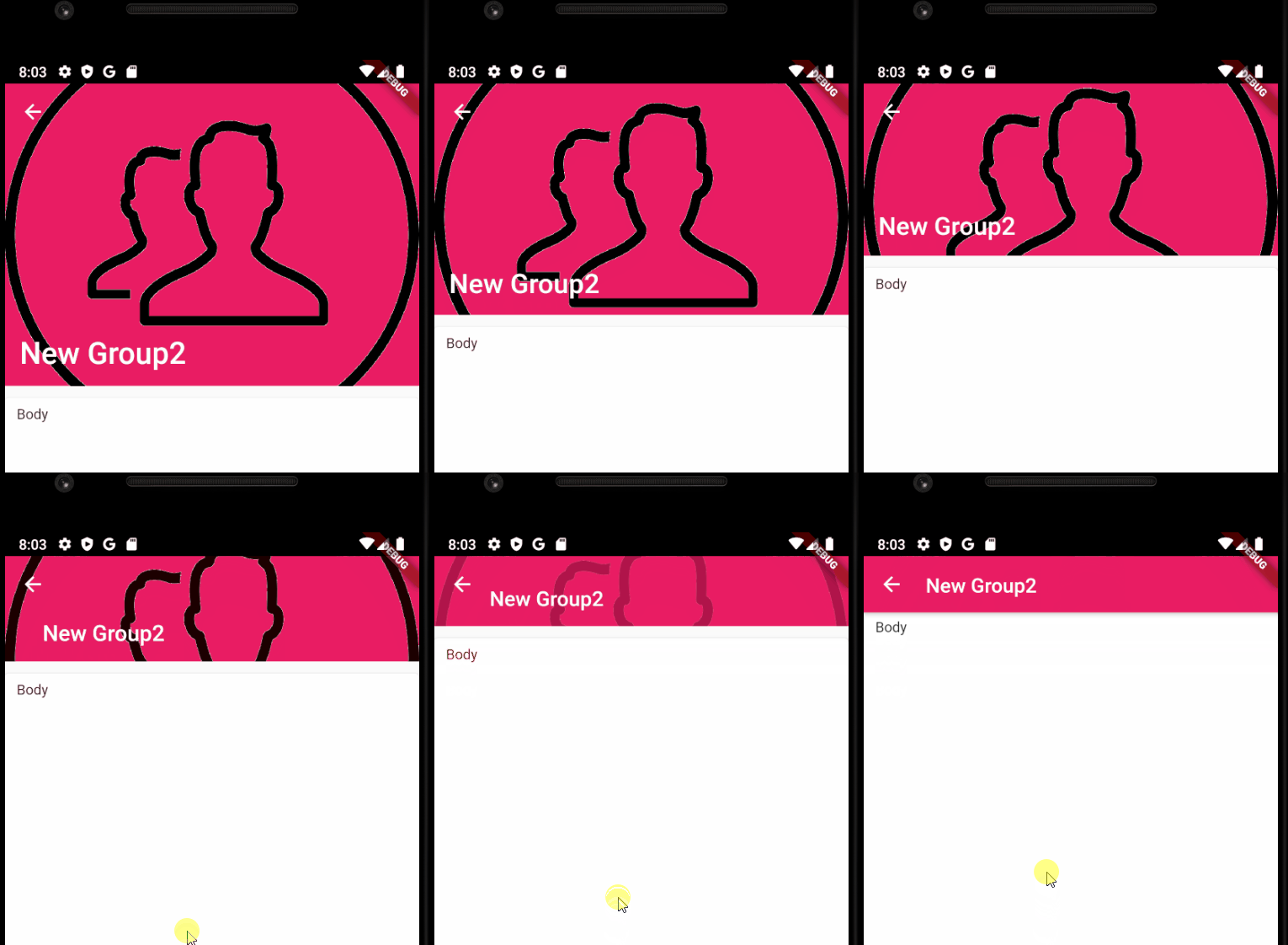
https://stackoverflow.com/a/62137478/7885980
lucasjinreal commentedon Sep 16, 2020
@Hixie @xJon Any standard solution to get the exactly same effect?
xJon commentedon Sep 16, 2020
See my answer over https://stackoverflow.com/a/62137478
lucasjinreal commentedon Sep 17, 2020
@xJon I tried your anwser, it's nto work like this, not smooth..
prazedotid commentedon Sep 19, 2020
Unfortunately, this answer does not work for SliverAppBar with kExpandedHeight value of less than around 250.
lucasjinreal commentedon Sep 21, 2020
@prazeblaze Do u have a better solution on this? my kExpandedHeight actually less than 250, (100)
percula commentedon Oct 29, 2020
Checkout my solution at https://stackoverflow.com/a/64583870/6591585. It only rebuilds what is necessary and will work for smaller expanded heights.
lucasjinreal commentedon Oct 29, 2020
@percula Do u have gif to post?
percula commentedon Oct 30, 2020
No gif, just copy/paste.
I ended up creating a better solution that utilizes the transformations already happening within the FlexibleSpaceBar. Just provide a
titlePaddingTweensuch asinstead of
titlePadding.I also added a
foregroundparameter that displays above thetitleandbackground, but doesn't transform as they do.lucasjinreal commentedon Oct 30, 2020
@percula Can u make it a github repo or pub.dev lib for quickly usage?
DishitaShah commentedon May 21, 2021
To left align your SliverAppBar title, just use property "centerTitle" of SliverAppBar
SliverAppBar(
centerTitle: false,
title: Text('Title'),
),
github-actions commentedon Aug 1, 2021
This thread has been automatically locked since there has not been any recent activity after it was closed. If you are still experiencing a similar issue, please open a new bug, including the output of
flutter doctor -vand a minimal reproduction of the issue.