Repository navigation
Unable to 'pub upgrade' flutter tool. #12666
Description

Guys Please help me!!
C:\Users\git>flutter doctor
Updating flutter tool...
The system cannot find the path specified.
Error: Unable to 'pub upgrade' flutter tool. Retrying in five seconds...

Waiting for 0 seconds, press CTRL+C to quit ...
The system cannot find the path specified.
Error: Unable to 'pub upgrade' flutter tool. Retrying in five seconds...

Waiting for 3 seconds, press CTRL+C to quit ...
Terminate batch job (Y/N)?
version of PowerShell do you have on your system :

To know which code path gets triggered in the system
Get-Command 7z
Get-Command Expand-Archive


Activity
Hixie commentedon Oct 24, 2017
@goderbauer any ideas?
goderbauer commentedon Oct 24, 2017
@09abhishek You should probably consider updating your PowerShell. Version 2 is very old. It should still work with flutter, though.
In your
flutterdir, does the following file exist?bin\cache\dart-sdk\bin\pub.bat?Can you cd into
flutter\packages\flutter_toolsand in there execute..\..\bin\cache\dart-sdk\bin\pub.bat upgrade --verbosity=error --no-packages-dir. What does that get you?09abhishek commentedon Oct 25, 2017
@goderbauer
@Hixie
No .. There is nothing, any file like pub.bat at the mentioned path!
goderbauer commentedon Oct 25, 2017
Looks like something went wrong while downloading the dart sdk. Can you delete the
cachefolder insidebinand then runflutter doctoragain? What's the output?Are you by any chance behind a firewall (or using a proxy) that might be blocking the download of the dart sdk?
09abhishek commentedon Oct 27, 2017
@goderbauer ... Thanks for your assistance Issue got fixed!! Thanks!!
NathanaelA commentedon Nov 11, 2017
Is there any manual instructions on this; I've tried three times now; I have the exact same output @09abhishek. I'm running windows 7; so also powershell 2. Have 7z installed; tried killing the cache; tried a fresh re-install in another folder. BITS shows it downloaded (i.e. the progress bar goes across). But the dart-sdk is empty.
@09abhishek - What did you do to fix it?
09abhishek commentedon Nov 11, 2017
@NathanaelA Hi, please share the screenshot of the download path of dart-sdk, So, I could help you in better way!
NathanaelA commentedon Nov 11, 2017
Download PATH's that I tried:
d:\projects\flutterand
c:\progra~1\flutter(Unlocked security on folder to allow writes by user)and
c:\android\flutterBoth were full checkouts of the alpha folder via git.
However, I believe I have it fixed. But for anyone else that runs into this:
I was able to fix it by MOVING the download and extracted data from
C:\progra~1\flutter\bin\$cachePathtoC:\progra~1\flutter\bin\cacheThen manually running the instructions that Michael put in above:
"
Can you cd into
flutter\packages\flutter_toolsand in there execute..\..\bin\cache\dart-sdk\bin\pub.bat upgrade --verbosity=error --no-packages-dir. What does that get you?"
After that point
flutter doctorappears to be working correctly and it appears to be downloading the rest of the needed items. Yay!--
Small Update: I've since this time moved everything to C:\android\flutter; do to some weird issues with paths that have spaces in it breaking some of the android tools. But even that path has had the same flutter upgrade issue.
09abhishek commentedon Nov 11, 2017
@NathanaelA so, the issue got sorted out ..right??
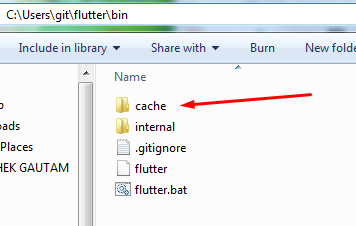
just in case if you still facing any error try to delete the "cache" folder :
and $cachePath :
and try to run flutter doctor again..
and most probably after doing this Flutter's "Doctor" would run without any exceptions!! :-p
94 remaining items
tarisham commentedon Aug 11, 2019
hi
go to the bios and change vm (Virtual machine) from disable to enable. you want to run emulator so its Necessary.
bdoubleu86 commentedon Aug 23, 2019
I am having the same issue with extracting and before I had the issue "Unable to 'pub upgrade' flutter tool"
MartinErskine commentedon Aug 25, 2019
Can't get past this no matter what I do, nightmare!
Yes, I've tried changing the host folder, deleting the cache, running the pub upgrade directly et al, help!
Checking Dart SDK version...
Downloading Dart SDK from Flutter engine deca2c0...
Unzipping Dart SDK...
Building flutter tool...
Running pub upgrade...
[ +9 ms] executing: [C:\src\flutter] git -c log.showSignature=false log -n 1 --pretty=format:%H
doha22 commentedon Aug 26, 2019
i fixed that problem by these steps :
https://flutter.dev/docs/development/tools/sdk/upgrading
MartinErskine commentedon Aug 27, 2019
I tried installing onto another PC:
Using Powershell, I noted that there were two instances of the cyan progress bar. The first for the BITS download of the Dart package and the other for the unzip process.
Running Flutter Doctor after initial install on the rogue PC only shows the first progress bar, not the second Unzip progress routine.
I tried again on the rogue PC and sure enough, no second step (unzip process). I appear to have unzipped files though.
I found mention elsewhere of 7zip failing quietly. I uninstalled 7Zip and went through the whole process again.
This time I got both progress bars, however, it still hangs on any flutter command.
bdoubleu86 commentedon Sep 1, 2019
Running flutter doctor downloads the Dart SDK. However, extracting the archive does not work somehow. I am getting a lot of failures saying:
I am using Windows Powershell 5.1
cvuillecard commentedon Sep 6, 2019
#12666
I just had the same issue after trying to install flutter on my windows platform
using the official web page for installing flutter (at this moment) :
https://flutter.dev/docs/get-started/install/windows
My configuration :
What i did :
(or 'flutter doctor' depending of which configuration or terminal you used)
Problem : it failed many times with the same error 'unable to pub upgrade' flutter tool (...)'
Finally, after few tries, i discovered that the executable 'pub.bat'
(which apparently is the package manager used with dart and flutter) wasn't in any flutter's sub-directories.
So i decided to install Dart from https://dart.dev/get-dart according the documentation, using the 'Dart SDK installer for Windows'.
Apparently, this installer doesn't create any entry in the windows global environment variables.
What i did to make the 'flutter.bat doctor' command work :
I installed Dart using the 'Dart SDK installer for Windows' from the official link.
I added an entry in the windows environment variables pointing to the dart sdk (for me 'C:\Program Files\Dart\dart-sdk') called : %DART_SDK%
I added a second entry in the windows environment variables pointing to the flutter installation's root folder (for me C:\framework\lib\flutter) called : %FLUTTER_ROOT%
In the flutter installation's directory, i modified the file 'flutter\bin\flutter.bat' to use the 2 environment variables.
In the begining of the file, just comment and modify the line assigning 'dart_sdk_path' as bellow :
-> replace the line 'SET dart_sdk_path=%cache_dir%\dart-sdk' by 'SET dart_sdk_path=%DART_SDK%'
-> The 'FLUTTER_ROOT' environment vriable just added is already used by the script.
Re-run 'flutter.bat doctor' or 'flutter_console.bat' and 'flutter doctor'.
It's the only solution i found at this moment with this version and the actual official guide,
but i hope the 'stable' repository of flutter is going to change to have a stable installation on windows with environment variables defined by default
to make sure the flutter.bat working on all windows platforms...
Note : I faced a second problem after installing the 'flutter' plugin using intellij version 2017
when i tried to configure the flutter SDK location in my settings (to just point the flutter directory cloned with git).
Finally the solution on this link helped me :
https://ladwhocodes.blogspot.com/2019/02/fix-flutter-sdk-not-found-in-specified-location.html
-> I hope it works for you in case of using intellij IDE.
utkarshai commentedon Sep 13, 2019
Failed to rename directory because access was denied.
This may be caused by a virus scanner or having a file
in the directory open in another application.
utkarshai commentedon Sep 13, 2019
this is what i got
AoiKuiyuyou commentedon Sep 14, 2019
I'm using Flutter 1.9.1 on Windows 10. In my case, a misconfigured 7-Zip
executable path has caused the extracting step to fail, leaving an empty
dart-sdkdirectory.The script that downloads the dart SDK archive file is
_FLUTTER_DIR_\bin\internal\update_dart_sdk.ps1.To find the URL of the archive file to download, add one line to
update_dart_sdk.ps1:after the line:
Then run:
to print the URL, and then terminate the process.
Now you can manually download the archive file and put it in the
_FLUTTER_DIR_\bin\cachedirectory.Then comment out the code in
update_dart_sdk.ps1that does the downloading:Add 7-Zip's directory path to PATH:
Then run:
It will skip the downloading step and start with the extracting step directly.
kelechukwuu commentedon Jan 14, 2020
I Tried No.2 of your solutions, it printed out lots of stuffs buh still does not solve my problem...... my flutter has been working fine untill i tried upgrading, all of a sudden flutter stopped working.. Can anyone assist please
ratnapriya4g commentedon Apr 28, 2020
run flutter pub global activate devtools
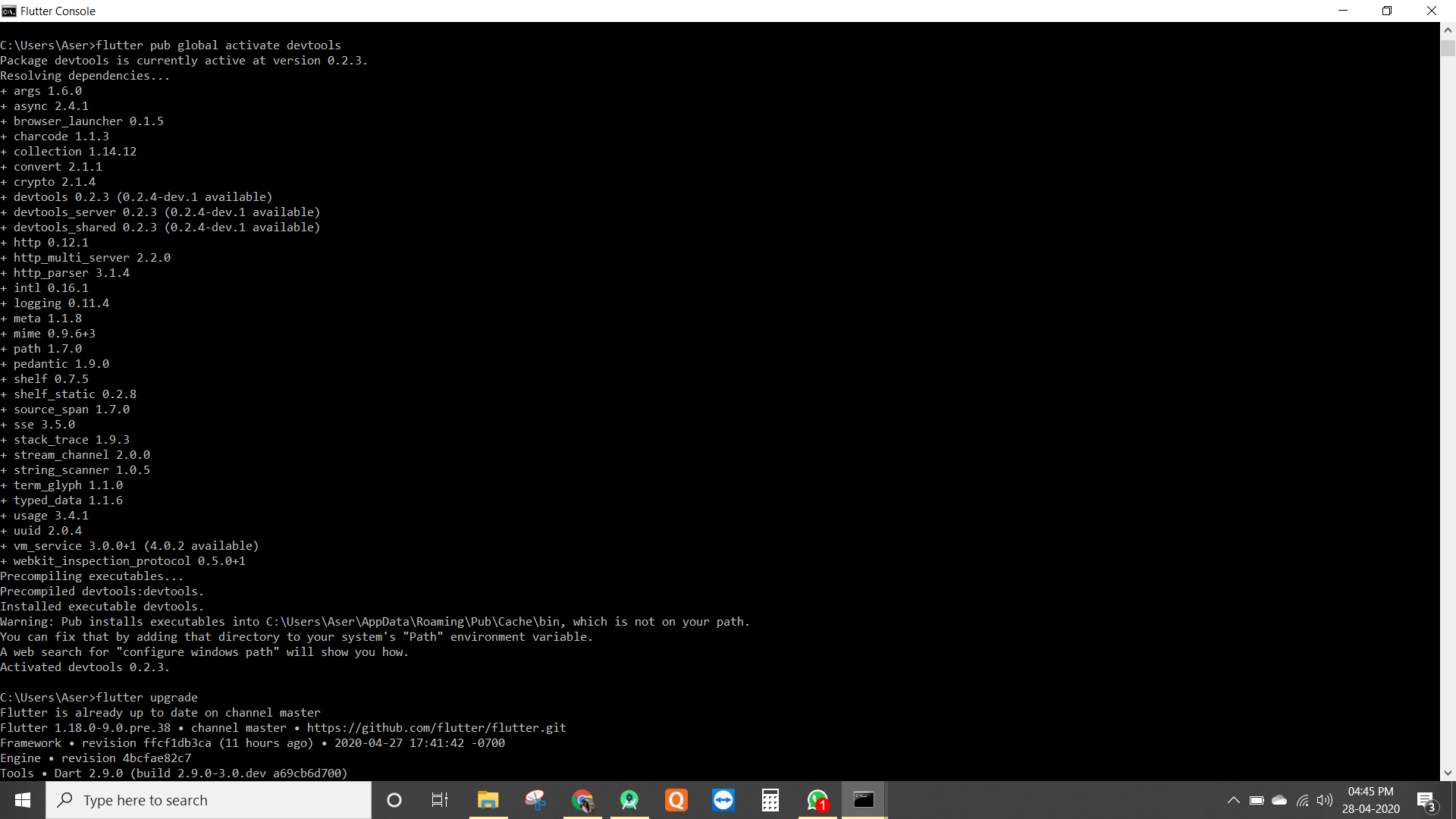
then run flutter upgrade
Now it will be working fine.
Definitely, it will help you.
FrankHB commentedon May 31, 2020
This bug should be definitely reopened for reasons of poor diagnostics, or there needs a meta bug for this. There are too many causes for this. Sometimes the downloading is successful, sometimes it is not.
To me, I'd learn a stupid lesson that I should make sure
7zor7zain%PATH%(if any) can work, in particular where there are only some shell scripts (from MSYS2, for example) which make troubles with PowerShell. Otherwise,update_dart_sdk.ps1would silently fail and the downloaded package will be removed.(Also note
timeoutmay not work well if it is not from%WINDIR%\System32.)zanderso commentedon Jun 3, 2020
This issue is quite old and overloaded. I think we will struggle to distill anything actionable from the long thread. I'm going to lock this issue. If you are still experiencing a problem, please file a new issue with full details. Thanks!