You signed in with another tab or window. Reload to refresh your session.You signed out in another tab or window. Reload to refresh your session.You switched accounts on another tab or window. Reload to refresh your session.Dismiss alert
{{ message }}
Repository navigation
[docs] explain difference between animation and secondaryAnimation in buildTransitions #23206
I want to achieve the animation effect of routing switching in the video.
Explicitly, The child page switches to the parent page, and both the child page and the parent page move. And, the animation looks like: the parent page is completely removed, and the child page is completely moved in.
I tested the PageRouteBuilder for custom animations, but it only allows subpages to customize the animation, and the parent page does not.
[✓] Flutter (Channel beta, v0.8.2, on Mac OS X 10.13.6 17G65, locale zh-Hans-CN)
• Flutter version 0.8.2 at /Users/fusilin/Develop/flutter
• Framework revision 5ab9e70727 (6 weeks ago), 2018-09-07 12:33:05 -0700
• Engine revision 58a1894a1c
• Dart version 2.1.0-dev.3.1.flutter-760a9690c2
[✓] Android toolchain - develop for Android devices (Android SDK 28.0.3)
• Android SDK at /Users/fusilin/Library/Android/sdk
• Android NDK location not configured (optional; useful for native profiling support)
• Platform android-28, build-tools 28.0.3
• Java binary at: /Applications/Android Studio 2.app/Contents/jre/jdk/Contents/Home/bin/java
• Java version OpenJDK Runtime Environment (build 1.8.0_152-release-1024-b01)
• All Android licenses accepted.
[!] iOS toolchain - develop for iOS devices
✗ Xcode installation is incomplete; a full installation is necessary for iOS development.
Download at: https://developer.apple.com/xcode/download/
Or install Xcode via the App Store.
Once installed, run:
sudo xcode-select --switch /Applications/Xcode.app/Contents/Developer
✗ libimobiledevice and ideviceinstaller are not installed. To install, run:
brew install --HEAD libimobiledevice
brew install ideviceinstaller
✗ ios-deploy not installed. To install:
brew install ios-deploy
• CocoaPods version 1.5.3
[✓] Android Studio (version 3.1)
• Android Studio at /Applications/Android Studio 2.app/Contents
✗ Flutter plugin not installed; this adds Flutter specific functionality.
✗ Dart plugin not installed; this adds Dart specific functionality.
• Java version OpenJDK Runtime Environment (build 1.8.0_152-release-1024-b01)
[✓] IntelliJ IDEA Ultimate Edition (version 2018.2.4)
• IntelliJ at /Applications/IntelliJ IDEA.app
• Flutter plugin version 29.0.4
• Dart plugin version 182.4505.50
[✓] VS Code (version 1.27.2)
• VS Code at /Applications/Visual Studio Code.app/Contents
• Flutter extension version 2.19.0
[✓] Connected devices (1 available)
• Custom Phone, 8 0, API 26, 768x1280 • 192.168.56.101:5555 • android-x86 • Android 8.0.0 (API 26)
! Doctor found issues in 1 category.
I also have a similar problem. I'm trying to implement that when a second page is pushed to the stack, sliding from right, the first page should slide away to the left, like in the video posted here.
I couldn't get this to work with go router and CustomTransitionPage, whereas its transitionsBuilder is:
The code I use is taken from official docs and it's documented as the case I want to have:
"When the Navigator pushes a route on the top of its stack, the secondaryAnimation can be used to define how the route that was on the top of the stack leaves the screen. [...] The example below adds a transition that's driven by the secondaryAnimation. When this route disappears because a new route has been pushed on top of it, it translates in the opposite direction of the new route."
Debugging, I can see the secondary animation is always zero:
secondaryAnimation will run from 0.0 - 1.0 when [nextRoute] is pushed on top of this one. Similarly, if the [nextRoute] is popped off of this route, the secondaryAnimation will run from 1.0 - 0.0
[Solved] When I ran into this, it turned out that the problem was: one of the pages were inheriting MaterialRouteTransitionMixin, and the older MaterialRouteTransitionMixin pages will only animate if the new route is also a MaterialRouteTransitionMixin, and it wasn't, so secondaryAnimation doesn't play by default.
To fix this, get your canTransitionTo in order. You can override it and make sure it'll return true when you want it to. Or instead, you could make sure everything inherits MaterialRouteTransitionMixin.
Unsure what documentation change I'd recommend here. Personally I wasn't reading the docs either before or after solving the problem, I guess it's possible that my code assistant did, but I think mostly they just learn from looking at code. The assistant did see this thread, so maybe me commenting here is enough to resolve the issue :)
This thread has been automatically locked since there has not been any recent activity after it was closed. If you are still experiencing a similar issue, please open a new bug, including the output of flutter doctor -v and a minimal reproduction of the issue.
Activity
zoechi commentedon Oct 17, 2018
Please add the output of
flutter doctor -v.fusilin commentedon Oct 18, 2018
HansMuller commentedon Oct 18, 2018
PageRouteBuilder's transitionBuilders callback makes it possible to define how a new route animates in as well as how it animates out.
fusilin commentedon Oct 19, 2018
I have tried it, but the parent page has no animation, only custom animations for subpages.
fusilin commentedon Oct 19, 2018
fusilin commentedon Oct 23, 2018
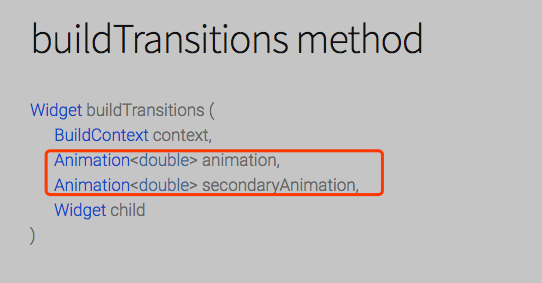
Excuse me, What is the difference between these two parameters, what are they used for?
5 remaining items
alefwd commentedon Dec 12, 2023
I also have a similar problem. I'm trying to implement that when a second page is pushed to the stack, sliding from right, the first page should slide away to the left, like in the video posted here.
I couldn't get this to work with go router and CustomTransitionPage, whereas its transitionsBuilder is:
The code I use is taken from official docs and it's documented as the case I want to have:
"When the Navigator pushes a route on the top of its stack, the secondaryAnimation can be used to define how the route that was on the top of the stack leaves the screen. [...] The example below adds a transition that's driven by the secondaryAnimation. When this route disappears because a new route has been pushed on top of it, it translates in the opposite direction of the new route."
Debugging, I can see the secondary animation is always zero:
fusilin commentedon Dec 12, 2023
himanshugarg08 commentedon Jan 23, 2024
secondaryAnimationwill run from 0.0 - 1.0 when [nextRoute] is pushed on top of this one. Similarly, if the [nextRoute] is popped off of this route, thesecondaryAnimationwill run from 1.0 - 0.0fusilin commentedon Jan 23, 2024
iapicca commentedon Apr 4, 2024
@darshankawar
I think the problem here is that the secondary animation has the tween "reverse" compared to one's expectations
see example below
fusilin commentedon Apr 4, 2024
makoConstruct commentedon Nov 28, 2025
[Solved] When I ran into this, it turned out that the problem was: one of the pages were inheriting MaterialRouteTransitionMixin, and the older MaterialRouteTransitionMixin pages will only animate if the new route is also a MaterialRouteTransitionMixin, and it wasn't, so secondaryAnimation doesn't play by default.
To fix this, get your canTransitionTo in order. You can override it and make sure it'll return true when you want it to. Or instead, you could make sure everything inherits MaterialRouteTransitionMixin.
Unsure what documentation change I'd recommend here. Personally I wasn't reading the docs either before or after solving the problem, I guess it's possible that my code assistant did, but I think mostly they just learn from looking at code. The assistant did see this thread, so maybe me commenting here is enough to resolve the issue :)
fusilin commentedon Nov 28, 2025
Clarify route transition animations (flutter#186552)
github-actions commentedon Jul 14, 2026
This thread has been automatically locked since there has not been any recent activity after it was closed. If you are still experiencing a similar issue, please open a new bug, including the output of
flutter doctor -vand a minimal reproduction of the issue.