Repository navigation
Remove Y-axis rounding for lines in LibTxt and floating point hack rounding in framework #31707
Description
Activity
I recommend trying to just remove it all and seeing what happens. I would not be overly surprised if nothing noticeably changed in the common case.
- added this to the milestone
on May 2, 2019 Removing
_applyFloatingPointHackwould be very nice indeed. I suspect it would improve jumpy text in CupertinoNavigationBar when sliding back. However I do remember trying to remove it a while ago and immediately got hit by tiny overflows.Removing
_applyFloatingPointHackis more likely to cause overflows than removing the rounding in LibTxt. Flutter often lays out with the ground truth being the LibTxt metrics, whereas the framework-side rounding are operations on top of this already rounded ground truth.Changing either will require a fairly time consuming pass of adjusting hard-coded test values across all of our tests and goldens.
I removed rounding in LibTxt as an experiment, and I am seeing about ~150 broken values in txt_unittests and 104 broken tests in the framework tests. It causes the text to visually shift slightly, which is most noticeable when there are many lines of text, although this shifting can be considered an improvement in both accuracy and precision.
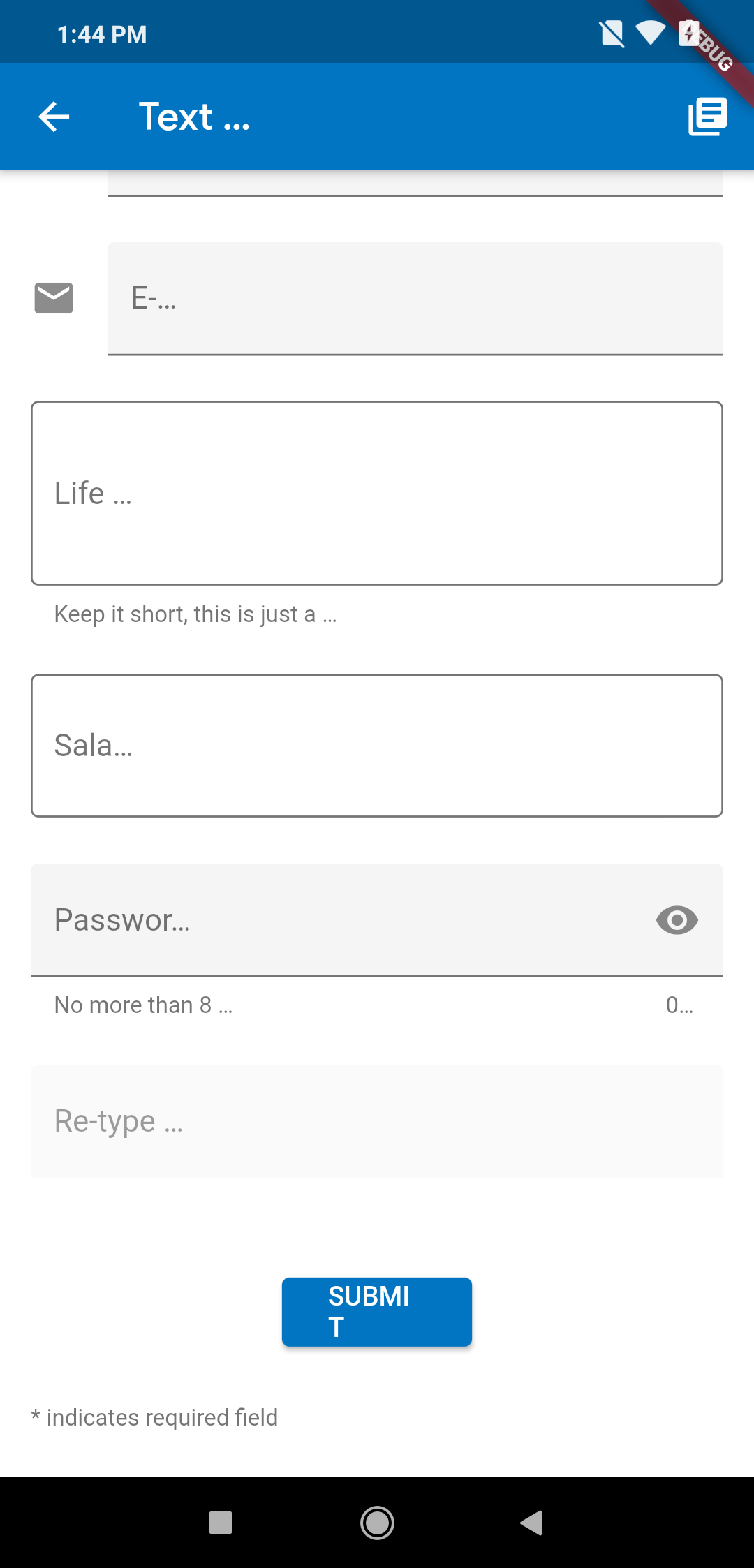
This is what happens with a simple removal of
_applyFloatingPointHackwith no other changes.Removing rounding in LibTxt looks harmless in terms of layout though and I should be able to proceed with that in a fairly straightforwards (if not tedious) manner.
Removing both instances of rounding results in 120 broken framework tests, and incorrect layout.
If you remove the _applyFloatingPointHack then you need to make sure in each layout calculation that you don't overflow. Also it would be nice to ensure that a Text widget will not shift next widget to subpixel position, as that might cause blurry rendering of images on lower dpi devices. Although maybe that already happens when
devicePixelRatiois not integer and widgets don't land on pixel boundaries.I don't understand why removing the hack would make the "SUBMIT" text wrap. We should be setting the width of the paragraph to exactly the width we get back from the layout, which shouldn't trigger another layout of the paragraph. In fact, the fact that it's even possible for this to happen is concerning, because there shouldn't be a codepath by which we can lay out the text twice. We should lay it out once, get the metrics, and paint it, without any possibility of the metrics or layout changing again.
The second pass of layout is done by
TextPainter.layoutafter the first pass obtains themaxIntrinsicWidth. See https://github.com/flutter/flutter/blob/master/packages/flutter/lib/src/painting/text_painter.dart#L431If you remove
_applyFloatingPointHack, then the second pass of layout may result in word wrap becauseParagraph::layoutin the engine is truncating the width passed into the framework:
https://github.com/flutter/engine/blob/master/third_party/txt/src/txt/paragraph.cc#L486The
floor(width)originated from an attempt to be consistent with Blink's behavior (including the interaction between_applyFloatingPointHackand Blink). See flutter-team-archive/engine#5962 and #18665.10 remaining items
Can I check what the status of this is? Strange rounding is precisely the type of thing that I suspect might be behind a number of small-but-noticeable text rendering errors I've seen with baseline-alignments. Two example scenarios:
- For a
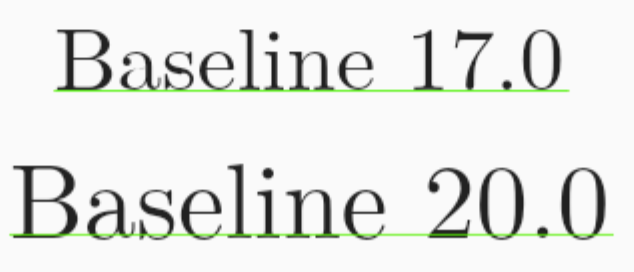
Textwidget with a given font, at a certain font size the relative alignment of the text on the baseline might be correct, but at a different font size it can be fractionally below the baseline. Screenshot, with the same font at size 17.0 and size 20.0 (heavily zoomed in in the emulator, withdebugPaintBaselinesEnabled = true):
- Incorrect baseline alignments between text and widgets in a
Text.rich. This seems to happen particularly when there are multiple lines involved. Despite text and theWidgetSpans being set to be aligned by alphabetic baseline, the alignment can be correct on some lines while incorrect on others (with the exact same text and widgets in the differentWidgetSpans).
It could be that these issues are caused by something else, but the mismatch in baseline alignment is in both cases very small, and rounding somewhere seems a likely issue.
- For a
This issue still appears to be a problem after SkParagraph. Is this still viable to fix/remedy?
Reacted by olof-devIs it currently possible to get the real size without the hack being applied to it? Assuming one would be willing to accept the dangers of floating point
Reacted by Albert Wolszon- added a commit that references this issue
on Jul 12, 2023 - added a commit that references this issue
on Jul 14, 2023 There're still a few cleanup tasks left, but the rounding is now disabled.
Reacted by Taha Tesser and Rafał ChabasińskiThis thread has been automatically locked since there has not been any recent activity after it was closed. If you are still experiencing a similar issue, please open a new bug, including the output of
flutter doctor -vand a minimal reproduction of the issue.- locked as resolved and limited conversation to collaborators
on Aug 25, 2023


Text is currently being rounded in two places:
LibTxt rounds as a legacy feature (from blink) to better align vertical layouts with pixel boundaries to produce sharper text on low-DPI devices. This is no longer necessary as device DPI has increased significantly in recent years, and we now prefer more accurate layout.
TextPainterapplies a rounding we call_applyFloatingPointHackto metrics. The reasoning is probably best explained by the todo:We should remove such rounding sooner rather than later, as it will result in < 0.5px (logical) shifts across almost all text in Flutter. Such a change should eventually be made, and the earlier, the less disruption it can cause.