Repository navigation
DropdownButtonFormField has additional padding on top and bottom after upgrade to v1.12.13+hotfix.5 #46844

Description

DropdownButtonFormField looks different after building my app against latest stable flutter.
After Upgrading to Flutter v1.12.13+hotfix.5

Before Upgrading to v1.12.13+hotfix.5 (I was using latest stable version prior to v1.12.13+hotfix.5)

Target Platform: Ubuntu Mate
Target OS version/browser: Android Pie
Devices: Mi A1
[✓] Flutter (Channel stable, v1.12.13+hotfix.5, on Linux, locale en_IN)
    • Flutter version 1.12.13+hotfix.5 at /home/tirth/flutter
    • Framework revision 27321ebbad (28 hours ago), 2019-12-10 18:15:01 -0800
    • Engine revision 2994f7e1e6
    • Dart version 2.7.0


[✓] Android toolchain - develop for Android devices (Android SDK version 29.0.2)
    • Android SDK at /home/tirth/Android/Sdk
    • Android NDK location not configured (optional; useful for native profiling support)
    • Platform android-29, build-tools 29.0.2
    • Java binary at: /home/tirth/android-studio/jre/bin/java
    • Java version OpenJDK Runtime Environment (build 1.8.0_202-release-1483-b49-5587405)
    • All Android licenses accepted.

[✓] Android Studio (version 3.5)
    • Android Studio at /home/tirth/android-studio
    • Flutter plugin version 42.0.1
    • Dart plugin version 191.8593
    • Java version OpenJDK Runtime Environment (build 1.8.0_202-release-1483-b49-5587405)

[✓] VS Code (version 1.40.2)
    • VS Code at /usr/share/code
    • Flutter extension version 3.7.1

[!] Connected device
    ! No devices available

! Doctor found issues in 1 category.
Activity
HansMuller commentedon Dec 12, 2019
It would help if you could provide a small self-contained app that demonstrates the problem. Note also: https://gist.github.com/ is a useful way to share the code.
gabrielginter commentedon Dec 16, 2019
same issue here, I had to set the contentPadding in the decoration to improve its look, but still have some extra padding that I can't remove.
tirth-aubergine commentedon Dec 16, 2019
@HansMuller Here is the example. If the below example is built against the latest flutter stable version then you'll get this issue. If it is built against the stable version prior to the latest stable then you won't see this issue.
Other example I posted
DropdownButtonFormFieldlooks different after building my app against latest stable flutter.After Upgrading to Flutter v1.12.13+hotfix.5
Before Upgrading to v1.12.13+hotfix.5 (I was using latest stable version prior to v1.12.13+hotfix.5)
shihaohong commentedon Dec 16, 2019
There was recently a change to increase the minimum height of TextFields from 40px to 48px, and that resulted in some changes to
InputDecorator, which is used byDropdownButtonFormField. Here is the PR.If that's the case, if you set InputDecorator's
isDenseproperty to true, you should be able to get the original size.@justinmc would that change have caused this? That was the only thing I could find or think of.
justinmc commentedon Dec 16, 2019
I just tried comparing the size of the dropdown on master vs. after reverting my PR (924e48e), and it was the same size. TextFields did change size, though. That PR seems suspicious, but I don't think it's affecting this.
isDense still might help, but it looks like a real regression.
shihaohong commentedon Dec 16, 2019
Edit: Somehow I deleted my original comment, but here it is again:
Thanks for the help. I think I've narrowed it down to #36998. When I revert it, the spacing seems to return to its original state. @sarbagyastha, if you have some time, could you take a look at what might be causing this issue? I plan on looking at it as well, but my first guess would be that some default parameter value was not properly translated
[-]DropdownButtonFormField looks different after building my app against latest stable flutter. [/-][+]DropdownButtonFormField has additional padding on top and bottom after upgrade to v1.12.13+hotfix.5[/+]shihaohong commentedon Dec 16, 2019
I figured it out --
isDenseused to be true by default for DropdownButtonFormField, but is now false by default.tirth-aubergine commentedon Dec 17, 2019
Thank you @shihaohong, now I understand. 👍 I've observed this change in the master channel a few months back but when I saw it stable I was surprised.
tirth-aubergine commentedon Dec 17, 2019
Thank you @justinmc 👍
cassioseffrin commentedon Jun 30, 2020
@shihaohong take a look:
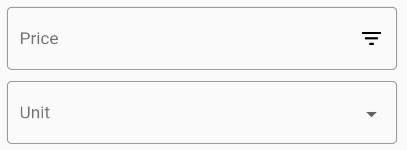
the 1st field (price) is a common TextField with OutlineInputBorder border;
the 2nd field (unit) is a DropdownButtonFormField with OutlineInputBorder border;
Even with isDense=true there is an extra padding (8 pixes in total: 4 on top, 4 on bottom) between the labelText and the widget that wraps the labelText and the Icon
in dropdown.dart line 1284 there is a method that calculates the height, the result is 24 if I set it to 16 the DropdownButtonFormField render the same height of the TextField, however I think it's not correct to set it as a constant. I can't figure out where this 8 pixels of extra padding were created.
Line 1284 of dropdown.dart.
I am in last stable release of Flutter (Channel stable, v1.17.4)
HansMuller commentedon Jun 30, 2020
It seems unlikely that this is due to #59196, but it would be worth ruling out.
@cassioseffrin - please open up a new issue and include a small complete test app that demos the problem. Let us know if the problem exists in the latest version of Flutter. Thanks for the report!
cassioseffrin commentedon Jun 30, 2020
@HansMuller, I don't think it's related to #59196, in this case the Text height is exactly the same. I actually have made a correction in the widget dropdown.dart, just 1 line of code. May I could make a PR?
The problem is the icon size calculation, the resulting height is stretching all the DropdownButtonFormField: see the results, both components are now with exactly the same height.

Here without debug paint:
HansMuller commentedon Jun 30, 2020
@cassioseffrin - I have opened a new issue for the bug you've reported: #60624. Please add new comments there, since this issue is closed.
cassioseffrin commentedon Jun 30, 2020
Thks for opening the issue @HansMuller, I will continue there!
github-actions commentedon Jul 31, 2021
This thread has been automatically locked since there has not been any recent activity after it was closed. If you are still experiencing a similar issue, please open a new bug, including the output of
flutter doctor -vand a minimal reproduction of the issue.