Repository navigation
Flutter does not see IDEA installed via Jetbrains Toolbox #47583
Description
Activity
Can you provide
flutter doctor --verboseflutter doctor --verbose:[✓] Flutter (Channel dev, v1.13.5, on Mac OS X 10.15.3 19D49f, locale en-RU) • Flutter version 1.13.5 at /Users/borz/Development/com.github/flutter/flutter • Framework revision 41a911099b (2 days ago), 2019-12-19 13:48:02 -0800 • Engine revision 0f90e6546b • Dart version 2.8.0 (build 2.8.0-dev.0.0 aa6709974d) [✓] Android toolchain - develop for Android devices (Android SDK version 29.0.2) • Android SDK at /Users/borz/Library/Android/sdk • Android NDK location not configured (optional; useful for native profiling support) • Platform android-29, build-tools 29.0.2 • ANDROID_HOME = /Users/borz/Library/Android/sdk • Java binary at: /Users/borz/Library/Application Support/JetBrains/Toolbox/apps/AndroidStudio/ch-0/193.6052267/Android Studio 4.0 Preview.app/Contents/jre/jdk/Contents/Home/bin/java • Java version OpenJDK Runtime Environment (build 1.8.0_212-release-1586-b4-5784211) • All Android licenses accepted. [✓] Xcode - develop for iOS and macOS (Xcode 11.3) • Xcode at /Applications/Xcode.app/Contents/Developer • Xcode 11.3, Build version 11C29 • CocoaPods version 1.8.3 [✓] Chrome - develop for the web • Chrome at /Applications/Google Chrome.app/Contents/MacOS/Google Chrome [✓] Android Studio • Android Studio at /Users/borz/Library/Application Support/JetBrains/Toolbox/apps/AndroidStudio/ch-0/193.6052267/Android Studio 4.0 Preview.app/Contents • Flutter plugin version 39.0.5 • Dart plugin version 193.2956.37 • Java version OpenJDK Runtime Environment (build 1.8.0_212-release-1586-b4-5784211) [✓] Connected device (3 available) • macOS • macOS • darwin-x64 • Mac OS X 10.15.3 19D49f • Chrome • chrome • web-javascript • Google Chrome 78.0.3904.87 • Web Server • web-server • web-javascript • Flutter Tools • No issues found!➜ ls -1Fh ~/Library/Application\ Support/JetBrains/Toolbox/apps AndroidStudio/ IDEA-U/ ... ➜ ls -1Fh ~/Library/Application\ Support/JetBrains/Toolbox/apps/IDEA-U ch-1/ ➜ ls -1Fh ~/Library/Application\ Support/JetBrains/Toolbox/apps/AndroidStudio ch-0/- changed the title
[-]Flutter does not see IDEA installed via Jetbrans Toolbox[/-][+]Flutter does not see IDEA installed via Jetbrains Toolbox[/+]on Jun 11, 2020 Just to add - I use Jetbrains Toolbox on my Mac and PC and I have the same issues too, flutter seems to be looking for the standalone Android Studio rather than IDE's handled through Toolbox.
Toolbox is a lot simpler for many developers who use a variety of JetBrains tools across different languages.
Support would be great!
Reacted by peter, Alber, Tommy K, David Drinnan, Sang, devpandaz and seanmamasdeI think this was fixed via #57963 . Is this not the case?
Not working for me with latest and greatest version of Flutter...
flutter doctor Doctor summary (to see all details, run flutter doctor -v): [✓] Flutter (Channel stable, 1.22.1, on Mac OS X 10.15.7 19H2, locale nb-NO) [✓] Android toolchain - develop for Android devices (Android SDK version 30.0.2) [✓] Xcode - develop for iOS and macOS (Xcode 12.0.1) [!] Android Studio (version 4.0) ✗ Flutter plugin not installed; this adds Flutter specific functionality. ✗ Dart plugin not installed; this adds Dart specific functionality. [!] Android Studio (version 4.1) ✗ Flutter plugin not installed; this adds Flutter specific functionality. ✗ Dart plugin not installed; this adds Dart specific functionality. [!] Android Studio ✗ Flutter plugin not installed; this adds Flutter specific functionality. ✗ Dart plugin not installed; this adds Dart specific functionality. [!] Android Studio ✗ Flutter plugin not installed; this adds Flutter specific functionality. ✗ Dart plugin not installed; this adds Dart specific functionality. ✗ Android Studio not found at /Users/ovestorholt/Library/Application Support/JetBrains/Toolbox/apps/AndroidStudio/ch-2/193.6453388/Android Studio 4.0 Preview.app/Contents [!] Android Studio ✗ Flutter plugin not installed; this adds Flutter specific functionality. ✗ Dart plugin not installed; this adds Dart specific functionality. ✗ Android Studio not found at /Users/ovestorholt/Library/Application Support/JetBrains/Toolbox/apps/AndroidStudio/ch-0/202.6811877/Android Studio 4.2 Preview.app/Contents [!] IntelliJ IDEA Ultimate Edition (version 2020.2.3) ✗ Flutter plugin not installed; this adds Flutter specific functionality. ✗ Dart plugin not installed; this adds Dart specific functionality. [✓] VS Code (version 1.49.2) [✓] Connected device (2 available)Reacted by Alberto Margarido, Christian Holländer, Alber, Laurent Garcin, Igor Artasevych, Hayk Safaryan, seanmamasde and Joel L.Reacted by Chigozirim and AlberStill a problem on 1.22.2 Linux
[✓] Flutter (Channel stable, 1.22.2, on Linux, locale en_GB.UTF-8) • Flutter version 1.22.2 at /home/ablanco061/development/flutter • Framework revision 84f3d28555 (8 days ago), 2020-10-15 16:26:19 -0700 • Engine revision b8752bbfff • Dart version 2.10.2 [!] Android toolchain - develop for Android devices (Android SDK version 29.0.3) • Android SDK at /home/ablanco061/Android/Sdk • Platform android-29, build-tools 29.0.3 • Java binary at: /usr/bin/java • Java version OpenJDK Runtime Environment (build 11.0.8+10-post-Ubuntu-0ubuntu118.04.1) ✗ Android license status unknown. Run `flutter doctor --android-licenses` to accept the SDK licenses. See https://flutter.dev/docs/get-started/install/linux#android-setup for more details. [!] Android Studio (not installed) • Android Studio not found; download from https://developer.android.com/studio/index.html (or visit https://flutter.dev/docs/get-started/install/linux#android-setup for detailed instructions). [✓] Connected device (1 available) • LG H870 (mobile) • LGH8703a3754a9 • android-arm64 • Android 9 (API 28) ! Doctor found issues in 2 categories.Reacted by Igor Artasevych, Nurgazy Nazhimidinov, Hayk Safaryan, Arturo J. Pérez and Nimrod AbingStill on 1.22.3
flutter doctor --verbose[✓] Flutter (Channel stable, 1.22.3, on Linux, locale zh_CN.UTF-8) • Flutter version 1.22.3 at /home/wang/SDK/flutter • Framework revision 8874f21e79 (6 天前), 2020-10-29 14:14:35 -0700 • Engine revision a1440ca392 • Dart version 2.10.3 • Pub download mirror https://mirrors.tuna.tsinghua.edu.cn/dart-pub • Flutter download mirror https://mirrors.tuna.tsinghua.edu.cn/flutter [✓] Android toolchain - develop for Android devices (Android SDK version 30.0.2) • Android SDK at /home/wang/Android/Sdk • Platform android-30, build-tools 30.0.2 • Java binary at: /usr/bin/java • Java version OpenJDK Runtime Environment (build 1.8.0_272-8u272-b10-0ubuntu1~20.10-b10) • All Android licenses accepted. [!] Android Studio (not installed) • Android Studio not found; download from https://developer.android.com/studio/index.html (or visit https://flutter.dev/docs/get-started/install/linux#android-setup for detailed instructions). [✓] VS Code (version 1.50.1) • VS Code at /usr/share/code • Flutter extension version 3.16.0 [!] Connected device ! No devices available ! Doctor found issues in 2 categories.Reacted by Alber, Asayama Kodai, Wayne, Nurgazy Nazhimidinov and Hayk SafaryanStill on 1.22.4
flutter doctor --verbose[✓] Flutter (Channel stable, 1.22.4, on Linux, locale en_GB.UTF-8) • Flutter version 1.22.4 at /home/ablanco061/development/flutter • Framework revision 1aafb3a8b9 (3 days ago), 2020-11-13 09:59:28 -0800 • Engine revision 2c956a31c0 • Dart version 2.10.4 [!] Android toolchain - develop for Android devices (Android SDK version 29.0.3) • Android SDK at /home/ablanco061/Android/Sdk • Platform android-29, build-tools 29.0.3 • Java binary at: /usr/bin/java • Java version OpenJDK Runtime Environment (build 11.0.9.1+1-Ubuntu-0ubuntu1.18.04) ✗ Android license status unknown. Run `flutter doctor --android-licenses` to accept the SDK licenses. See https://flutter.dev/docs/get-started/install/linux#android-setup for more details. [!] Android Studio (not installed) • Android Studio not found; download from https://developer.android.com/studio/index.html (or visit https://flutter.dev/docs/get-started/install/linux#android-setup for detailed instructions). [✓] Connected device (1 available) • Android SDK built for x86 (mobile) • emulator-5554 • android-x86 • Android 10 (API 29) (emulator) ! Doctor found issues in 2 categories.Reacted by Siarhei Krukau, Nurgazy Nazhimidinov, Md. Mahmudul Hasan Shohag, untoldbyte and Hayk SafaryanReacted by Siarhei Krukau, Nurgazy Nazhimidinov and Hayk SafaryanStill on 1.22.5
flutter doctor --verbose• Flutter version 1.22.5 at /home/cliod/.local/share/flutter • Framework revision 7891006299 (9 天前), 2020-12-10 11:54:40 -0800 • Engine revision ae90085a84 • Dart version 2.10.4 • Pub download mirror https://pub.flutter-io.cn • Flutter download mirror https://storage.flutter-io.cn [✓] Android toolchain - develop for Android devices (Android SDK version 30.0.1) • Android SDK at /opt/android-sdk • Platform android-30, build-tools 30.0.1 • ANDROID_SDK_ROOT = /opt/android-sdk • Java binary at: /opt/java/bin/java • Java version Java(TM) SE Runtime Environment (build 1.8.0_271-b09) • All Android licenses accepted. [!] Android Studio (not installed) • Android Studio not found; download from https://developer.android.com/studio/index.html (or visit https://flutter.dev/docs/get-started/install/linux#android-setup for detailed instructions). [✓] VS Code (version 1.52.1) • VS Code at /usr/share/code • Flutter extension version 3.17.0 [✓] Connected device (1 available) • sdk gphone x86 arm (mobile) • emulator-5554 • android-x86 • Android 11 (API 30) (emulator)```Reacted by Lathe Abusaid, Hayk Safaryan, trietbui85, ayyildiz, Grégoire Joncour and Arturo J. PérezStill on 1.22.6
[✓] Flutter (Channel stable, 1.22.6, on Linux, locale en_GB.UTF-8) • Flutter version 1.22.6 at /home/ablanco061/development/flutter • Framework revision 9b2d32b605 (8 days ago), 2021-01-22 14:36:39 -0800 • Engine revision 2f0af37152 • Dart version 2.10.5 [✓] Android toolchain - develop for Android devices (Android SDK version 29.0.3) • Android SDK at /home/ablanco061/Android/Sdk • Platform android-29, build-tools 29.0.3 • Java binary at: /usr/bin/java • Java version OpenJDK Runtime Environment (build 11.0.9.1+1-Ubuntu-0ubuntu1.18.04) • All Android licenses accepted. [!] Android Studio (not installed) • Android Studio not found; download from https://developer.android.com/studio/index.html (or visit https://flutter.dev/docs/get-started/install/linux#android-setup for detailed instructions). [!] Connected device ! No devices availableReacted by Cozy! and David DrinnanI'm on Ubuntu 18.04. I only have Android Studio installed using the JetBrains Toolbox -- no manual installation -- and thus for me
flutter doctorfinds no Android Studio installation at all (as shown in the comment just above).The workaround for me was to find where Android Studio is running from, using
ps auxf, and then deduce that it was using/home/myuser/.local/share/JetBrains/Toolbox/apps/AndroidStudio/ch-0/201.7042882-- where the./201.70428821varies based on the currently installed version.Then tell flutter where to find it, by running:
flutter config --android-studio-dir=/home/myuser/.local/share/JetBrains/Toolbox/apps/AndroidStudio/ch-0/201.7042882Reacted by Alber, Gabriel Barbosa, Lucena, Nimrod Abing, Lukas Wöllhaf and Krishn Agarwal@david-drinn It's a good workaround, but it shouldn't be needed. We hope the Flutter team fix it soon.
What OS is everyone on? It looks like the #57963 PR fix was for Mac. I'm on Ubuntu.
You can use something like this, let's say, in ~/.profile to have the config automatically update with every start of your session:
flutter config --android-studio-dir=$(ls -d ~/.local/share/JetBrains/Toolbox/apps/AndroidStudio/ch-0/* | grep "[0-9]\+$" | sort | tail -n 1)Reacted by math-gallou, Subhan Raj and Saif Allah KhaledReacted by AlberIn my case Android Studio dir was:
ls -d ~/Library/Application\ Support/JetBrains/Toolbox/apps/AndroidStudio/ch-0/* | grep "[0-9]\+$" | sort | tail -n 1 | awk '{print $0"/Android Studio.app"}' | read -r ANDROID_STUDIO_DIR flutter config --android-studio-dir="$ANDROID_STUDIO_DIR"Reacted by Constantine ChernenkoWe did some testing on windows and linux(ubuntu) and it looks like this issue has been fixed.
Is anyone else still facing this issue?
windows
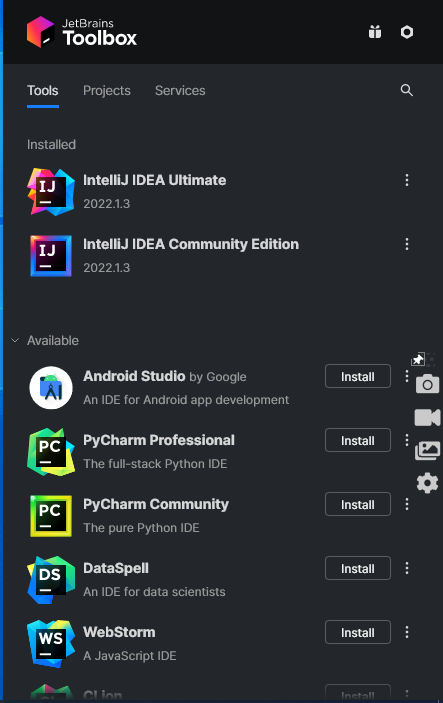
flutter doctor -v
[√] Flutter (Channel stable, 3.0.4, on Microsoft Windows [Version 10.0.19043.1766], locale en-GH)
    • Flutter version 3.0.4 at c:\src\sdks\stable\flutter
    • Upstream repository https://github.com/flutter/flutter.git
    • Framework revision 85684f9300 (2 weeks ago), 2022-06-30 13:22:47 -0700
    • Engine revision 6ba2af10bb
    • Dart version 2.17.5
    • DevTools version 2.12.2

Checking Android licenses is taking an unexpectedly long time...[√] Android toolchain - develop for Android devices (Android SDK version 32.1.0-rc1)
    • Android SDK at C:\Users\Deana\AppData\Local\Android\sdk
    • Platform android-32, build-tools 32.1.0-rc1
    • Java binary at: C:\Program Files\Android\Android Studio\jre\bin\java
    • Java version OpenJDK Runtime Environment (build 11.0.12+7-b1504.28-7817840)
    • All Android licenses accepted.

[√] Chrome - develop for the web
    • Chrome at C:\Program Files\Google\Chrome\Application\chrome.exe

[√] Visual Studio - develop for Windows (Visual Studio Community 2022 17.2.3)
    • Visual Studio at C:\Program Files\Microsoft Visual Studio\2022\Community
    • Visual Studio Community 2022 version 17.2.32526.322
    • Windows 10 SDK version 10.0.22000.0

[√] Android Studio (version 2021.2)
    • Android Studio at C:\Program Files\Android\Android Studio
    • Flutter plugin can be installed from:
       https://plugins.jetbrains.com/plugin/9212-flutter
    • Dart plugin can be installed from:
       https://plugins.jetbrains.com/plugin/6351-dart
    • Java version OpenJDK Runtime Environment (build 11.0.12+7-b1504.28-7817840)

[√] IntelliJ IDEA Community Edition (version 2022.1)
    • IntelliJ at C:\Users\Deana\AppData\Local\JetBrains\Toolbox\apps\IDEA-C\ch-0\221.5921.22
    • Flutter plugin can be installed from:
       https://plugins.jetbrains.com/plugin/9212-flutter
    • Dart plugin can be installed from:
       https://plugins.jetbrains.com/plugin/6351-dart

[√] IntelliJ IDEA Ultimate Edition (version 2022.1)
    • IntelliJ at C:\Users\Deana\AppData\Local\JetBrains\Toolbox\apps\IDEA-U\ch-0\221.5921.22
    • Flutter plugin can be installed from:
       https://plugins.jetbrains.com/plugin/9212-flutter
    • Dart plugin can be installed from:
       https://plugins.jetbrains.com/plugin/6351-dart

[√] VS Code (version 1.68.1)
    • VS Code at C:\Users\Deana\AppData\Local\Programs\Microsoft VS Code
    • Flutter extension version 3.44.0

[√] Connected device (3 available)
    • Windows (desktop) • windows • windows-x64    • Microsoft Windows [Version 10.0.19043.1766]
    • Chrome (web)      • chrome  • web-javascript • Google Chrome 103.0.5060.114
    • Edge (web)        • edge    • web-javascript • Microsoft Edge 103.0.1264.37

[√] HTTP Host Availability
    • All required HTTP hosts are available

• No issues found!
ubuntu

flutter doctor -v
[✓] Flutter (Channel stable, 3.0.4, on Ubuntu 20.04.4 LTS 5.13.0-48-generic, locale en_IN) • Flutter version 3.0.4 at /home/mahesh/Development/stable • Upstream repository https://github.com/flutter/flutter.git • Framework revision 85684f9300 (12 days ago), 2022-06-30 13:22:47 -0700 • Engine revision 6ba2af10bb • Dart version 2.17.5 • DevTools version 2.12.2 [✓] Android toolchain - develop for Android devices (Android SDK version 31.0.0) • Android SDK at /home/mahesh/Android/Sdk • Platform android-31, build-tools 31.0.0 • Java binary at: /home/mahesh/.local/share/JetBrains/Toolbox/apps/AndroidStudio/ch-0/212.57 12.43.2112.8609683/jre/bin/java • Java version OpenJDK Runtime Environment (build 11.0.12+0-b1504.28-7817840) • All Android licenses accepted. [✓] Chrome - develop for the web • Chrome at google-chrome [✓] Linux toolchain - develop for Linux desktop • clang version 10.0.0-4ubuntu1 • cmake version 3.16.3 • ninja version 1.10.0 • pkg-config version 0.29.1 [✓] Android Studio (version 2021.2) • Android Studio at /home/mahesh/.local/share/JetBrains/Toolbox/apps/AndroidStudio/ch-0/212.57 12.43.2112.8609683 • Flutter plugin version 67.1.2 • Dart plugin version 212.5744 • Java version OpenJDK Runtime Environment (build 11.0.12+0-b1504.28-7817840) [✓] IntelliJ IDEA Ultimate Edition (version 2022.1) • IntelliJ at /home/mahesh/.local/share/JetBrains/Toolbox/apps/IDEA-U/ch-0/221.5921.22 • Flutter plugin can be installed from: 🔨 https://plugins.jetbrains.com/plugin/9212-flutter • Dart plugin can be installed from: 🔨 https://plugins.jetbrains.com/plugin/6351-dart [✓] VS Code (version 1.68.0) • VS Code at /usr/share/code • Flutter extension version 3.44.0 [✓] Connected device (2 available) • Linux (desktop) • linux • linux-x64 • Ubuntu 20.04.4 LTS 5.13.0-48-generic • Chrome (web) • chrome • web-javascript • Google Chrome 102.0.5005.115 [✓] HTTP Host Availability • All required HTTP hosts are available • No issues found!Reacted by Jakub WalusiakWithout additional information, we are unfortunately not sure how to resolve this issue. We are therefore reluctantly going to close this bug for now.
If you find this problem please file a new issue with the same description, what happens, logs and the output of 'flutter doctor -v'. All system setups can be slightly different so it's always better to open new issues and reference the related ones.
Thanks for your contribution.This thread has been automatically locked since there has not been any recent activity after it was closed. If you are still experiencing a similar issue, please open a new bug, including the output of
flutter doctor -vand a minimal reproduction of the issue.- locked as resolved and limited conversation to collaborators
on Aug 18, 2022


Use case
flutter doctorI expect to see in the IDEA list the same as Android Studio is displayed