Repository navigation
TextField should support typing accented words with external keyboard #59541

Description
Activity
- changed the title
[-]TextField didn't support typing accent words with external keyboard[/-][+]TextField should support typing accented words with external keyboard[/+]on Jun 16, 2020 Reproducible on the latest master
1.21.0-2.0.pre.83.flutter doctor -v
[√] Flutter (Channel master, 1.21.0-2.0.pre.83, on Microsoft Windows [Version 10.0.18362.900], locale et-EE) • Flutter version 1.21.0-2.0.pre.83 at C:\Development\flutter_master • Framework revision 9e658bc3d5 (8 hours ago), 2020-07-21 03:56:07 +0200 • Engine revision dcc9a4048d • Dart version 2.9.0 (build 2.9.0-21.0.dev 9dca49e71e) [√] Android toolchain - develop for Android devices (Android SDK version 30.0.0) • Android SDK at C:\Users\Isa\AppData\Local\Android\sdk • Platform android-30, build-tools 30.0.0 • Java binary at: C:\Users\Isa\AppData\Local\JetBrains\Toolbox\apps\AndroidStudio\ch-0\193.6626763\jre\bin\java • Java version OpenJDK Runtime Environment (build 1.8.0_242-release-1644-b01) • All Android licenses accepted. [√] Chrome - develop for the web • Chrome at C:\Program Files (x86)\Google\Chrome\Application\chrome.exe [√] Visual Studio - develop for Windows (Visual Studio Community 2019 16.6.4) • Visual Studio at C:\Program Files (x86)\Microsoft Visual Studio\2019\Community • Visual Studio Community 2019 version 16.6.30309.148 • Windows 10 SDK version 10.0.18362.0 [√] Android Studio (version 4.0) • Android Studio at C:\Users\Isa\AppData\Local\JetBrains\Toolbox\apps\AndroidStudio\ch-0\193.6626763 • Flutter plugin version 47.1.2 • Dart plugin version 193.7361 • Java version OpenJDK Runtime Environment (build 1.8.0_242-release-1644-b01) [√] VS Code (version 1.47.2) • VS Code at C:\Users\Isa\AppData\Local\Programs\Microsoft VS Code • Flutter extension version 3.12.2 [√] Connected device (5 available) • SM G950F (mobile) • ce12171c51cc001c03 • android-arm64 • Android 9 (API 28) • sdk gphone x86 (mobile) • emulator-5554 • android-x86 • Android 11 (API 30) (emulator) • Windows (desktop) • windows • windows-x64 • Microsoft Windows [Version 10.0.18362.900] • Web Server (web) • web-server • web-javascript • Flutter Tools • Chrome (web) • chrome • web-javascript • Google Chrome 84.0.4147.89 • No issues found!It seems that we also have the same issue with the Physical keyboard having an input language as Portuguese (Brazil).
- type ˜
- type a
- It should become ã but it is not.
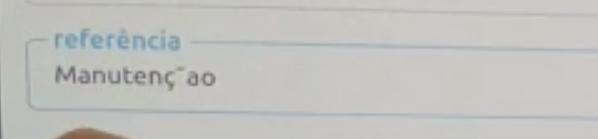
Device:
Any updates on this problem? I'm not be able to use accents when I connect an external keyboard to my device. So for example, when try to achieve a work like camión I get cami´on.
I have the same problem with Flutter (Channel stable, 3.7.6, on Microsoft Windows [version 10.0.19044.2604], locale pt-BR).
I develop on Windows, but I compile for IOS and test on an IOS with an external keyboard.This issue is reproducible on the latest
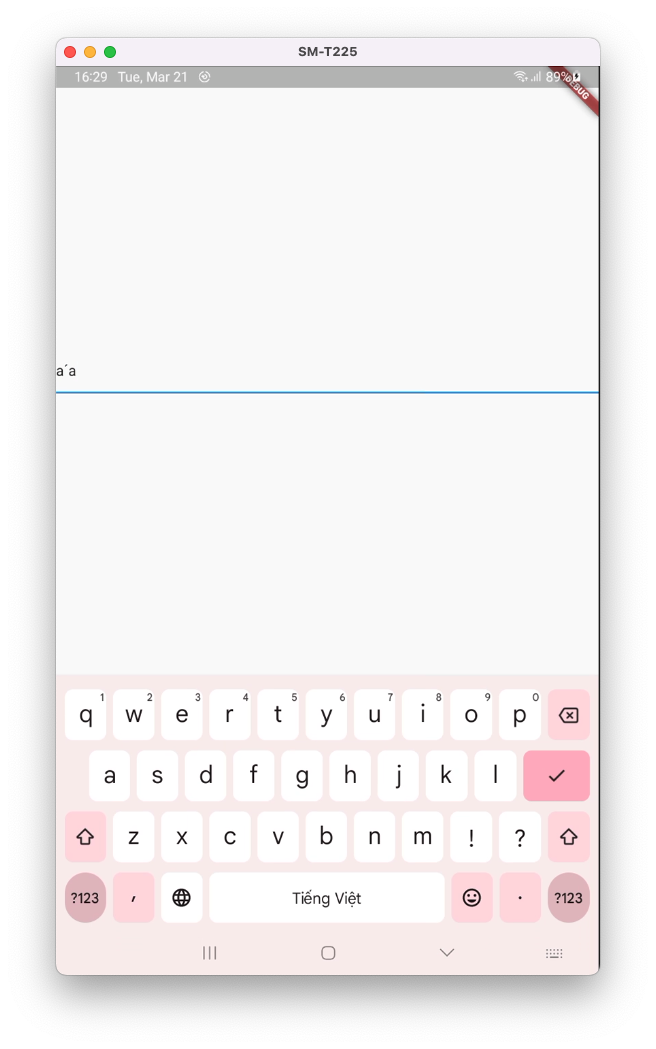
stableandmasterchannels.Verified with Vietnamese by two methods:
Using scrcpy
- Input: a + s
- Expected result:
á - Actual result:
a´a
Connect with physical keyboard via Bluetooth (switching to Vietnamese language)
- Input: a + s
- Expected result:
á - Actual result:
as
Demo
flutter doctor -v (stable and master)
[✓] Flutter (Channel stable, 3.7.7, on macOS 13.0.1 22A400 darwin-x64, locale en-EE) • Flutter version 3.7.7 on channel stable at /Users/huynq/Documents/GitHub/flutter • Upstream repository https://github.com/flutter/flutter.git • Framework revision 2ad6cd72c0 (10 hours ago), 2023-03-08 09:41:59 -0800 • Engine revision 1837b5be5f • Dart version 2.19.4 • DevTools version 2.20.1 [✓] Android toolchain - develop for Android devices (Android SDK version 31.0.0) • Android SDK at /Users/huynq/Library/Android/sdk • Platform android-33, build-tools 31.0.0 • ANDROID_HOME = /Users/huynq/Library/Android/sdk • Java binary at: /Applications/Android Studio.app/Contents/jbr/Contents/Home/bin/java • Java version OpenJDK Runtime Environment (build 11.0.15+0-b2043.56-8887301) • All Android licenses accepted. [✓] Xcode - develop for iOS and macOS (Xcode 14.1) • Xcode at /Applications/Xcode.app/Contents/Developer • Build 14B47b • CocoaPods version 1.11.3 [✓] Chrome - develop for the web • Chrome at /Applications/Google Chrome.app/Contents/MacOS/Google Chrome [!] Android Studio • Android Studio at /Applications/Android Studio Preview.app/Contents • Flutter plugin can be installed from: 🔨 https://plugins.jetbrains.com/plugin/9212-flutter • Dart plugin can be installed from: 🔨 https://plugins.jetbrains.com/plugin/6351-dart ✗ Unable to find bundled Java version. • Try updating or re-installing Android Studio. [✓] Android Studio (version 2022.1) • Android Studio at /Applications/Android Studio.app/Contents • Flutter plugin can be installed from: 🔨 https://plugins.jetbrains.com/plugin/9212-flutter • Dart plugin can be installed from: 🔨 https://plugins.jetbrains.com/plugin/6351-dart • Java version OpenJDK Runtime Environment (build 11.0.15+0-b2043.56-8887301) [✓] IntelliJ IDEA Community Edition (version 2022.1.1) • IntelliJ at /Users/huynq/Library/Application Support/JetBrains/Toolbox/apps/IDEA-C/ch-0/221.5591.52/IntelliJ IDEA CE.app • Flutter plugin can be installed from: 🔨 https://plugins.jetbrains.com/plugin/9212-flutter • Dart plugin can be installed from: 🔨 https://plugins.jetbrains.com/plugin/6351-dart [✓] VS Code (version 1.76.0) • VS Code at /Applications/Visual Studio Code.app/Contents • Flutter extension version 3.60.0 [✓] Connected device (2 available) • macOS (desktop) • macos • darwin-x64 • macOS 13.0.1 22A400 darwin-x64 • Chrome (web) • chrome • web-javascript • Google Chrome 110.0.5481.177 [✓] HTTP Host Availability • All required HTTP hosts are available ! Doctor found issues in 1 category.[!] Flutter (Channel master, 3.9.0-12.0.pre.17, on macOS 13.0.1 22A400 darwin-x64, locale en-VN) • Flutter version 3.9.0-12.0.pre.17 on channel master at /Users/huynq/Documents/GitHub/flutter_master ! Warning: `flutter` on your path resolves to /Users/huynq/Documents/GitHub/flutter/bin/flutter, which is not inside your current Flutter SDK checkout at /Users/huynq/Documents/GitHub/flutter_master. Consider adding /Users/huynq/Documents/GitHub/flutter_master/bin to the front of your path. ! Warning: `dart` on your path resolves to /Users/huynq/Documents/GitHub/flutter/bin/dart, which is not inside your current Flutter SDK checkout at /Users/huynq/Documents/GitHub/flutter_master. Consider adding /Users/huynq/Documents/GitHub/flutter_master/bin to the front of your path. • Upstream repository https://github.com/flutter/flutter.git • Framework revision 6b7c60d69a (2 hours ago), 2023-03-20 18:08:51 -0700 • Engine revision ea6ed14b4e • Dart version 3.0.0 (build 3.0.0-345.0.dev) • DevTools version 2.22.2 • If those were intentional, you can disregard the above warnings; however it is recommended to use "git" directly to perform update checks and upgrades. [✓] Android toolchain - develop for Android devices (Android SDK version 31.0.0) • Android SDK at /Users/huynq/Library/Android/sdk • Platform android-33, build-tools 31.0.0 • ANDROID_HOME = /Users/huynq/Library/Android/sdk • Java binary at: /Applications/Android Studio.app/Contents/jbr/Contents/Home/bin/java • Java version OpenJDK Runtime Environment (build 11.0.15+0-b2043.56-8887301) • All Android licenses accepted. [✓] Xcode - develop for iOS and macOS (Xcode 14.1) • Xcode at /Applications/Xcode.app/Contents/Developer • Build 14B47b • CocoaPods version 1.11.3 [✓] Chrome - develop for the web • Chrome at /Applications/Google Chrome.app/Contents/MacOS/Google Chrome [✓] Android Studio (version 2022.1) • Android Studio at /Applications/Android Studio.app/Contents • Flutter plugin can be installed from: 🔨 https://plugins.jetbrains.com/plugin/9212-flutter • Dart plugin can be installed from: 🔨 https://plugins.jetbrains.com/plugin/6351-dart • Java version OpenJDK Runtime Environment (build 11.0.15+0-b2043.56-8887301) [✓] IntelliJ IDEA Community Edition (version 2022.1.1) • IntelliJ at /Users/huynq/Library/Application Support/JetBrains/Toolbox/apps/IDEA-C/ch-0/221.5591.52/IntelliJ IDEA CE.app • Flutter plugin can be installed from: 🔨 https://plugins.jetbrains.com/plugin/9212-flutter • Dart plugin can be installed from: 🔨 https://plugins.jetbrains.com/plugin/6351-dart [✓] VS Code (version 1.76.2) • VS Code at /Applications/Visual Studio Code.app/Contents • Flutter extension version 3.60.0 [✓] Connected device (2 available) • macOS (desktop) • macos • darwin-x64 • macOS 13.0.1 22A400 darwin-x64 • Chrome (web) • chrome • web-javascript • Google Chrome 111.0.5563.64 [✓] Network resources • All expected network resources are available. ! Doctor found issues in 1 category.
52 remaining items
Just so it's not lost, here were my notes on the iOS issue that was deduplicated to this one: #146486 (comment)
On iOS, pressing
ALT-u + uon an external keyboard should produceü. However, it produces¨ü:- I press
ALT-u - This calls
[FlutterTextInputView setMarkedText:selectedRange:] - The framework receives a
TextInputClient.updateEditingStatemessage with value¨ - I press
u - This calls
[FlutterTextInputView insertText:] - The framework receives a
TextInputClient.updateEditingStatemessage with value¨ü
Apple's Handling text interactions in custom keyboards docs state:
Calling
setMarkedTextselects the text specified by range. Subsequent insertions replace the characters selected in the range. In the example above, a space with a combining acute accent is shown. If the next character input by the user is an a, you could then insert a combined á.This indicates that
[FlutterTextInputView insertText:]needs to be updated to replace the characters that were selected by[FlutterTextInputView setMarkedText:selectedRange:]'s range.Reacted by LongCatIsLooong and İbrahim Çetin- I press
Removing p2 label so we can take a look at this again next triage, since the fix is straightforward and the bug affects many users.
Reacted by fchamone, Dennis Kugelmann and Pierre V. Larivière- added a commit that references this issue
on Sep 4, 2026 This thread has been automatically locked since there has not been any recent activity after it was closed. If you are still experiencing a similar issue, please open a new bug, including the output of
flutter doctor -vand a minimal reproduction of the issue.- locked as resolved and limited conversation to collaborators
on Sep 18, 2026


Steps to Reproduce
Spanish (Spain)[aExpected results: à
Actual results: `à
we tested it on iOS/Android with external keyboard. both native behaviors showing the accented a without additional prefix `. in Flutter, it shows two words ` and à.
flutter doctor -v