Skip to content

upgrade to 1.20.1 app can not load the flutter module and creates a new folder  #63176

Closed

Description

@beydeng

Flutter 1.20.1 • channel stable • https://github.com/flutter/flutter.git
Framework • revision 2ae3451 (29 hours ago) • 2020-08-05 19:53:19 -0700
Engine • revision c8e3b94853
Tools • Dart 2.9.0

My iOS podfile
flutter_application_path = '../flutter_module'
load File.join(flutter_application_path, '.ios', 'Flutter', 'podhelper.rb')

# Pods for iOSFlutterHybrid

install_all_flutter_pods(flutter_application_path)

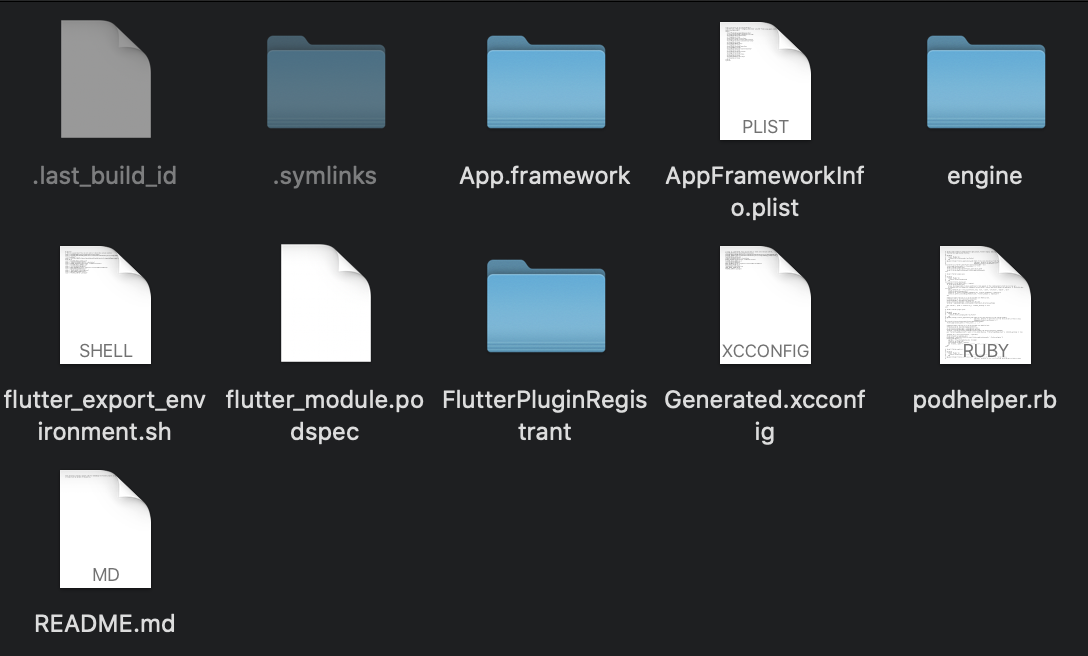
end

as i run pod install,it will create a new folder on my app root;
like this :

flutter_module
Dany/flutter_module/.ios/Flutter/podhelper.rb (the new floder)
myiOS

it seems like my app can not find podhelper.rb in the flutter_module floder,but to the new floder;

how can i solve this problem

Activity

  1. TahaTesser commented on Aug 7, 2020

    @TahaTesser
    Contributor

    Hi @beydeng
    Do you have any custom pods in your podfile i am unable to reproduce the issue, app runs fine
    Screenshot 2020-08-07 at 5 22 29 PM

    flutter doctor -v
    [✓] Flutter (Channel stable, 1.20.1, on Mac OS X 10.15.6 19G73, locale en-GB)
        • Flutter version 1.20.1 at /Users/taha/Code/flutter_stable
        • Framework revision 2ae34518b8 (33 hours ago), 2020-08-05 19:53:19 -0700
        • Engine revision c8e3b94853
        • Dart version 2.9.0
    
     
    [✓] Android toolchain - develop for Android devices (Android SDK version 30.0.1)
        • Android SDK at /Users/taha/Code/sdk
        • Platform android-30, build-tools 30.0.1
        • ANDROID_HOME = /Users/taha/Code/sdk
        • Java binary at: /Applications/Android Studio.app/Contents/jre/jdk/Contents/Home/bin/java
        • Java version OpenJDK Runtime Environment (build 1.8.0_242-release-1644-b3-6222593)
        • All Android licenses accepted.
    
    [✓] Xcode - develop for iOS and macOS (Xcode 11.6)
        • Xcode at /Applications/Xcode.app/Contents/Developer
        • Xcode 11.6, Build version 11E708
        • CocoaPods version 1.9.3
    
    [✓] Android Studio (version 4.0)
        • Android Studio at /Applications/Android Studio.app/Contents
        • Flutter plugin version 48.0.2
        • Dart plugin version 193.7361
        • Java version OpenJDK Runtime Environment (build 1.8.0_242-release-1644-b3-6222593)
    
    [✓] VS Code (version 1.47.3)
        • VS Code at /Applications/Visual Studio Code.app/Contents
        • Flutter extension version 3.13.2
    
    [✓] Connected device (2 available)
        • Taha’s iPhone (mobile) • 00008020-001059882212002E            • ios • iOS 14.0
        • iPhone 11 (mobile)     • 1EB615AF-5AB9-4AAA-A587-A6642BB79484 • ios • com.apple.CoreSimulator.SimRuntime.iOS-13-6 (simulator)
    
    • No issues found!


    Can you please provide your podfile, your pubspec.yaml a complete reproducible minimal code sample with steps by steps to reproduce
    Thank you

  2. added
    in triagePresently being triaged by the triage team
    waiting for responseThe Flutter team cannot make further progress on this issue until the original reporter responds
    on Aug 7, 2020
  3. beydeng commented on Aug 10, 2020

    @beydeng
    Author

    @TahaTesser
    image

    my iOS podfile is

    Uncomment this line to define a global platform for your project

    flutter_application_path = '../flutter_module/'
    load File.join(flutter_application_path, '.ios', 'Flutter', 'podhelper.rb')

    platform :ios,
    target "XiaobanParent" do
    # Uncomment thisline if you're using Swift or would like to use dynamic frameworks
    # use_frameworks!
    # Pods for khb
    pod 'SDWebImage', '5.0.0'

    pod 'WechatOpenSDK', '1.8.7'
    pod 'AFNetworking',  '3.2.0'
    pod 'Masonry', '1.1.0'
    
    #pod 'PLMediaStreamingKit' 
    pod 'PLPlayerKit' 
    pod 'AMap3DMap', '6.6.0'
    pod 'AMapSearch', '6.9.0'
    pod 'AMapLocation'
    
    pod 'RongCloudIM/IMLib', '2.8.32' 
    pod 'RongCloudIM/IMKit', '2.8.32'
    
    pod 'GTSDK', '2.2.0.0'
    
    pod 'SDAutoLayout'
    pod 'ReactiveObjC'
    pod 'JJException', '0.2.8'
    pod 'BAPickView', '1.1.9'
    pod 'TZImagePickerController'
    
    pod 'CYLTabBarController', '~> 1.29.0'
    
    pod 'SDCycleScrollView','>= 1.80'
    
    # Pods for iOSFlutterHybrid
    
    install_all_flutter_pods(flutter_application_path)
    

    end

  4. removed
    waiting for responseThe Flutter team cannot make further progress on this issue until the original reporter responds
    on Aug 10, 2020
  5. beydeng commented on Aug 10, 2020

    @beydeng
    Author

    I can't find any problem in my app...

  6. beydeng commented on Aug 10, 2020

    @beydeng
    Author

    image

  7. beydeng commented on Aug 10, 2020

    @beydeng
    Author

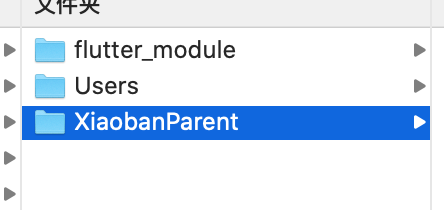
    it seems like the iOS load the flutter engine module to the new floder(User),but i can't find the problem why "pod install" create the new floder(User)

    image

  8. changed the title [-]As I upgrade to 1.20.1,my app can not run[/-] [+]As I upgrade to 1.20.1,my app can not load the flutter module[/+] on Aug 10, 2020
  9. beydeng commented on Aug 10, 2020

    @beydeng
    Author

    As i switch V17.5,it's runs fine.

  10. TahaTesser commented on Aug 10, 2020

    @TahaTesser
    Contributor

    I can reproduce this issue, it creates this new folder when running native app with flutter module when using your pod files

    Screenshot 2020-08-10 at 5 34 45 PM 1

    test_projects.zip

    flutter doctor -v
    [✓] Flutter (Channel stable, 1.20.1, on Mac OS X 10.15.6 19G73, locale en-GB)
        • Flutter version 1.20.1 at /Users/taha/Code/flutter_stable
        • Framework revision 2ae34518b8 (4 days ago), 2020-08-05 19:53:19 -0700
        • Engine revision c8e3b94853
        • Dart version 2.9.0
    
     
    [✓] Android toolchain - develop for Android devices (Android SDK version 30.0.1)
        • Android SDK at /Users/taha/Code/sdk
        • Platform android-30, build-tools 30.0.1
        • ANDROID_HOME = /Users/taha/Code/sdk
        • Java binary at: /Applications/Android
          Studio.app/Contents/jre/jdk/Contents/Home/bin/java
        • Java version OpenJDK Runtime Environment (build
          1.8.0_242-release-1644-b3-6222593)
        • All Android licenses accepted.
    
    [✓] Xcode - develop for iOS and macOS (Xcode 12.0)
        • Xcode at /Applications/Xcode-beta.app/Contents/Developer
        • Xcode 12.0, Build version 12A8179i
        • CocoaPods version 1.9.3
    
    [✓] Android Studio (version 4.0)
        • Android Studio at /Applications/Android Studio.app/Contents
        • Flutter plugin version 48.0.2
        • Dart plugin version 193.7361
        • Java version OpenJDK Runtime Environment (build
          1.8.0_242-release-1644-b3-6222593)
    
    [✓] VS Code (version 1.47.3)
        • VS Code at /Applications/Visual Studio Code.app/Contents
        • Flutter extension version 3.13.2
    
    [✓] Connected device (1 available)
        • SM M305F (mobile) • 32003c30dc19668f • android-arm64 • Android 10 (API 29)
    
    • No issues found!
    
    
    flutter doctor -v
    [✓] Flutter (Channel master, 1.21.0-8.0.pre.122, on Mac OS X 10.15.6 19G73, locale en-GB)
        • Flutter version 1.21.0-8.0.pre.122 at /Users/taha/Code/flutter_master
        • Framework revision 7c6f9dd239 (22 hours ago), 2020-08-09 10:31:03 -0400
        • Engine revision 6d86e67f04
        • Dart version 2.10.0 (build 2.10.0-4.0.dev 0341576448)
    
     
    [✓] Android toolchain - develop for Android devices (Android SDK version 30.0.1)
        • Android SDK at /Users/taha/Code/sdk
        • Platform android-30, build-tools 30.0.1
        • ANDROID_HOME = /Users/taha/Code/sdk
        • Java binary at: /Applications/Android Studio.app/Contents/jre/jdk/Contents/Home/bin/java
        • Java version OpenJDK Runtime Environment (build 1.8.0_242-release-1644-b3-6222593)
        • All Android licenses accepted.
    
    [✓] Xcode - develop for iOS and macOS (Xcode 12.0)
        • Xcode at /Applications/Xcode-beta.app/Contents/Developer
        • Xcode 12.0, Build version 12A8179i
        • CocoaPods version 1.9.3
    
    [✓] Chrome - develop for the web
        • Chrome at /Applications/Google Chrome.app/Contents/MacOS/Google Chrome
    
    [✓] Android Studio (version 4.0)
        • Android Studio at /Applications/Android Studio.app/Contents
        • Flutter plugin version 48.0.2
        • Dart plugin version 193.7361
        • Java version OpenJDK Runtime Environment (build 1.8.0_242-release-1644-b3-6222593)
    
    [✓] VS Code (version 1.47.3)
        • VS Code at /Applications/Visual Studio Code.app/Contents
        • Flutter extension version 3.13.2
    
    [✓] Connected device (5 available)
        • SM M305F (mobile)  • 32003c30dc19668f                     • android-arm64  • Android 10 (API 29)
        • iPhone 11 (mobile) • D872C450-D8D2-4AF7-BFF2-9278640BA1D6 • ios            • com.apple.CoreSimulator.SimRuntime.iOS-14-0
          (simulator)
        • macOS (desktop)    • macos                                • darwin-x64     • Mac OS X 10.15.6 19G73
        • Web Server (web)   • web-server                           • web-javascript • Flutter Tools
        • Chrome (web)       • chrome                               • web-javascript • Google Chrome 84.0.4147.105
    
    • No issues found!
    
  11. added
    a: existing-appsIntegration with existing apps via the add-to-app flow
    engineflutter/engine related. See also e: labels.
    and removed
    in triagePresently being triaged by the triage team
    on Aug 10, 2020
  12. 7 remaining items

  13. chinmaygarde commented on Aug 10, 2020

    @chinmaygarde
    Contributor
  14. jmagman commented on Aug 12, 2020

    @jmagman
    Member

    I fixed up the App.framework path problem (which #63568 also does) and it still doesn't embed the App.framework into the resulting host app, though it does make the phantom /User/ directory go away. The Flutter script doesn't run any flutter code, it just bails at flutter_export_environment.sh: line 8: inherited: command not found. When I escape the export "OTHER_LDFLAGS=$(inherited) -framework Flutter" parenthesis, it embeds as expected.

  15. szotp commented on Aug 12, 2020

    @szotp

    Interesting, for me it would still make App.framework after printing that error:

    <my directory>/app/.ios/Flutter/flutter_export_environment.sh: line 8: inherited: command not found
    Project<my directory>/app built and packaged successfully.
    

    And the app ran fine, but I'm still using Xcode 11.

  16. jmagman commented on Aug 12, 2020

    @jmagman
    Member

    @szotp you're right. I updated #63412 to just fix the path issue and make the test more complete. The tests pass, and in my own local test I see the embedded App.framework.

    Would you mind reviewing and validating that PR works? I appreciate that you already did #63568, I fixed it in a slightly different way.

  17. jmagman commented on Aug 12, 2020

    @jmagman
    Member

    The workaround is to use beta. It's only a few commits behind stable. The regression was introduced in #62372.

    Screen Shot 2020-08-12 at 9 59 03 AM

  18. szotp commented on Aug 12, 2020

    @szotp

    Another workaround: make App.framework manually before running pod install:

    app_framework="my_flutter/.ios/Flutter/App.framework"
    mkdir $app_framework
    echo "static const int Moo = 88;" | xcrun clang -x c -dynamiclib -o "${app_framework}/App" -
    cd MyApp
    pod install
    
  19. github-actions commented on Aug 13, 2021

    @github-actions

    This thread has been automatically locked since there has not been any recent activity after it was closed. If you are still experiencing a similar issue, please open a new bug, including the output of flutter doctor -v and a minimal reproduction of the issue.

  20. locked as resolved and limited conversation to collaborators on Aug 13, 2021
Sign up for free to join this conversation on GitHub. Already have an account? Sign in to comment

Metadata

Metadata

Assignees

No one assigned

    Labels

    a: existing-appsIntegration with existing apps via the add-to-app flowc: regressionIt was better in the past than it is nowfound in release: 1.20Found to occur in 1.20found in release: 1.21Found to occur in 1.21has reproducible stepsThe issue has been confirmed reproducible and is ready to work onplatform-iosiOS applications specificallytoolAffects the "flutter" command-line tool. See also t: labels.

    Type

    No type

    Projects

    No projects

      Milestone

      No milestone

      Relationships

      None yet

      Development

      No branches or pull requests

      Issue actions