You signed in with another tab or window. Reload to refresh your session.You signed out in another tab or window. Reload to refresh your session.You switched accounts on another tab or window. Reload to refresh your session.Dismiss alert
{{ message }}
Repository navigation
InteractiveViewer should support mouse scrolling #64210
We use @justinmc's InteractiveViewer widget for vertical lists that can have an arbitrary width (the items can have arbitrary widths).
→ you can obviously apply the same to the reverse dimensions :)
This is very nice for allowing this use case. However, what is a bummer that the mouse scrolling characteristic is lost due to this widget.
Users find this to be really unintuitive on web.
Proposal
The InteractiveViewer should have something like a scrollingDirection attribute, which determines the Axis along which a mouse scroll will scroll the InteractiveViewer.
In my example, this would allow to use the mouse scroll wheel (or trackpad scrolling) to scroll vertically while scrolling horizontally still needs a drag.
That sounds reasonable, thanks for opening this issue. Maybe if scaling is disabled via scaleEnabled we could make scroll events cause panning by default? Or maybe that's too simplistic and we do need a parameter, because people might not want the behavior to change if they temporarily disable scale, for example.
We should also think about mice that have directional scrolling, like Apple's mice.
Reacted by creativecreatorormaybenot and Joshua Leivenzon
creativecreatorormaybenot commented on Aug 26, 2020
Actually, just yesterday we also discovered the case of directional scrolling. Any trackpad usually allows scrolling in all directions and that would be a great fit :)
An example for this would be Lucidchart (in case you know it). It allows to pan using trackpads by default.
Regarding your point of automatic panning on scroll: I think that this is very reasonable because it seems like it would be the natural choice. If we create an interactive viewer, we probably expect it to be interactive.
In all of the use cases that I had, I only used it for panning actually and disabled scaling because of that.
Ah thanks for the Lucidchart example. It looks like they do panning with bidirectional scrolling by default, and holding down the option key + scrolling does zoom. Come to think of it, I think this is how photo editors like Gimp and Photoshop work on desktop too.
I think we can do a panByScrolling boolean to enable this behavior, or even a controlScheme enum with these two options.
Reacted by creativecreatorormaybenot, Piotr Krawczyk, :o: and Hoàng Xuân Trường
I just copied the InteractiveViewer class and replaced the _receivedPointerSignal(PointerSignalEvent) function with this
void_receivedPointerSignal(PointerSignalEvent event) {
if (event isPointerScrollEvent) {
if (_gestureIsSupported(_GestureType.scale)) {
final childRenderBox =
_childKey.currentContext.findRenderObject() asRenderBox;
final childSize = childRenderBox.size;
final scaleChange =1.0- event.scrollDelta.dy / childSize.height;
if (scaleChange ==0.0) {
return;
}
final focalPointScene = _transformationController.toScene(
event.localPosition,
);
_transformationController.value =_matrixScale(
_transformationController.value,
scaleChange,
);
// After scaling, translate such that the event's position is at the// same scene point before and after the scale.final focalPointSceneScaled = _transformationController.toScene(
event.localPosition,
);
_transformationController.value =_matrixTranslate(
_transformationController.value,
focalPointSceneScaled - focalPointScene,
);
} elseif (_gestureIsSupported(_GestureType.pan)) {
final childRenderBox =
_childKey.currentContext.findRenderObject() asRenderBox;
final childSize = childRenderBox.size;
final yScroll =-event.scrollDelta.dy;
final xScroll =-event.scrollDelta.dx;
_transformationController.value =_matrixTranslate(
_transformationController.value,
Offset(xScroll, yScroll),
);
}
}
}
Scaleing takes precedence, but if that's disabled the widget works like a charm with mousepads or scrollwheels.
Now I am just missing scrollbars, in both directions.
Reacted by creativecreatorormaybenot, Joshua Leivenzon, Sergey Solodukhin, :o:, pirminj, David Alcalde, Shinichi Katayama and Fernando Rosentalski
Reacted by creativecreatorormaybenot, Jeff Heisler, Mathis Fouques and :o:
It looks like a rotation feature is in the works (#57698); it'd be great if a rotation touch gesture on macOS and iPadOS could trigger that as well, as is done in native apps like macOS's Preview.
On another note, for those on the dev channel, click to expand @Schwusch's solution ported to Flutter 1.26.0-17.1.pre.
// Handle mousewheel scroll events.void_receivedPointerSignal(PointerSignalEvent event) {
if (event isPointerScrollEvent) {
widget.onInteractionStart?.call(
ScaleStartDetails(
focalPoint: event.position,
localFocalPoint: event.localPosition,
),
);
if (_gestureIsSupported(_GestureType.scale)) {
// Ignore left and right scroll.if (event.scrollDelta.dy ==0.0) {
return;
}
// In the Flutter engine, the mousewheel scrollDelta is hardcoded to 20 per scroll, while a trackpad scroll can be any amount.// The calculation for scaleChange here was arbitrarily chosen to feel natural for both trackpads and mousewheels on all platforms.finaldouble scaleChange = math.exp(-event.scrollDelta.dy /200);
finalOffset focalPointScene = _transformationController!.toScene(
event.localPosition,
);
_transformationController!.value =_matrixScale(
_transformationController!.value,
scaleChange,
);
// After scaling, translate such that the event's position is at the// same scene point before and after the scale.finalOffset focalPointSceneScaled = _transformationController!.toScene(
event.localPosition,
);
_transformationController!.value =_matrixTranslate(
_transformationController!.value,
focalPointSceneScaled - focalPointScene,
);
widget.onInteractionUpdate?.call(ScaleUpdateDetails(
focalPoint: event.position,
localFocalPoint: event.localPosition,
rotation:0.0,
scale: scaleChange,
horizontalScale:1.0,
verticalScale:1.0,
));
widget.onInteractionEnd?.call(ScaleEndDetails());
} else {
widget.onInteractionEnd?.call(ScaleEndDetails());
if (_gestureIsSupported(_GestureType.pan)) {
_transformationController!.value =_matrixTranslate(
_transformationController!.value,
Offset(-event.scrollDelta.dx, -event.scrollDelta.dy),
);
}
}
}
}
I just copied the InteractiveViewer class and replaced the _receivedPointerSignal(PointerSignalEvent) function with this
void_receivedPointerSignal(PointerSignalEvent event) {
if (event isPointerScrollEvent) {
if (_gestureIsSupported(_GestureType.scale)) {
final childRenderBox =
_childKey.currentContext.findRenderObject() asRenderBox;
final childSize = childRenderBox.size;
final scaleChange =1.0- event.scrollDelta.dy / childSize.height;
if (scaleChange ==0.0) {
return;
}
final focalPointScene = _transformationController.toScene(
event.localPosition,
);
_transformationController.value =_matrixScale(
_transformationController.value,
scaleChange,
);
// After scaling, translate such that the event's position is at the// same scene point before and after the scale.final focalPointSceneScaled = _transformationController.toScene(
event.localPosition,
);
_transformationController.value =_matrixTranslate(
_transformationController.value,
focalPointSceneScaled - focalPointScene,
);
} elseif (_gestureIsSupported(_GestureType.pan)) {
final childRenderBox =
_childKey.currentContext.findRenderObject() asRenderBox;
final childSize = childRenderBox.size;
final yScroll =-event.scrollDelta.dy;
final xScroll =-event.scrollDelta.dx;
_transformationController.value =_matrixTranslate(
_transformationController.value,
Offset(xScroll, yScroll),
);
}
}
}
Scaleing takes precedence, but if that's disabled the widget works like a charm with mousepads or scrollwheels.
Now I am just missing scrollbars, in both directions.
Have you implemented scrollbars, can you share it?
@creativecreatorormaybenot Mouse scrolling on some platforms (macOS notably) requires scrolling physics, and implementing that requires either the whole scrolling infrastructure or duplicating that whole logic, neither of which is reasonable to retrofit into a widget that wasn't built for it. Our goal is to have widgets be coherent and implement the same APIs so that they are easier to fit together. How exactly this will turn out for InteractiveViewer is yet to be determined. I recommend letting @Piinks work through the design and see what they come up with. In the meantime if you would be satisfied with a variant of InteractiveViewer that implements just part of the problem (e.g. non-physics-aware mouse scrolling) then you are welcome to fork the widget and upload a package to pub.
I did the impossible... I found a way to both support mouse scrolling and showing both scrollbars using InteractiveViewer class. I made this package: flutterx_table
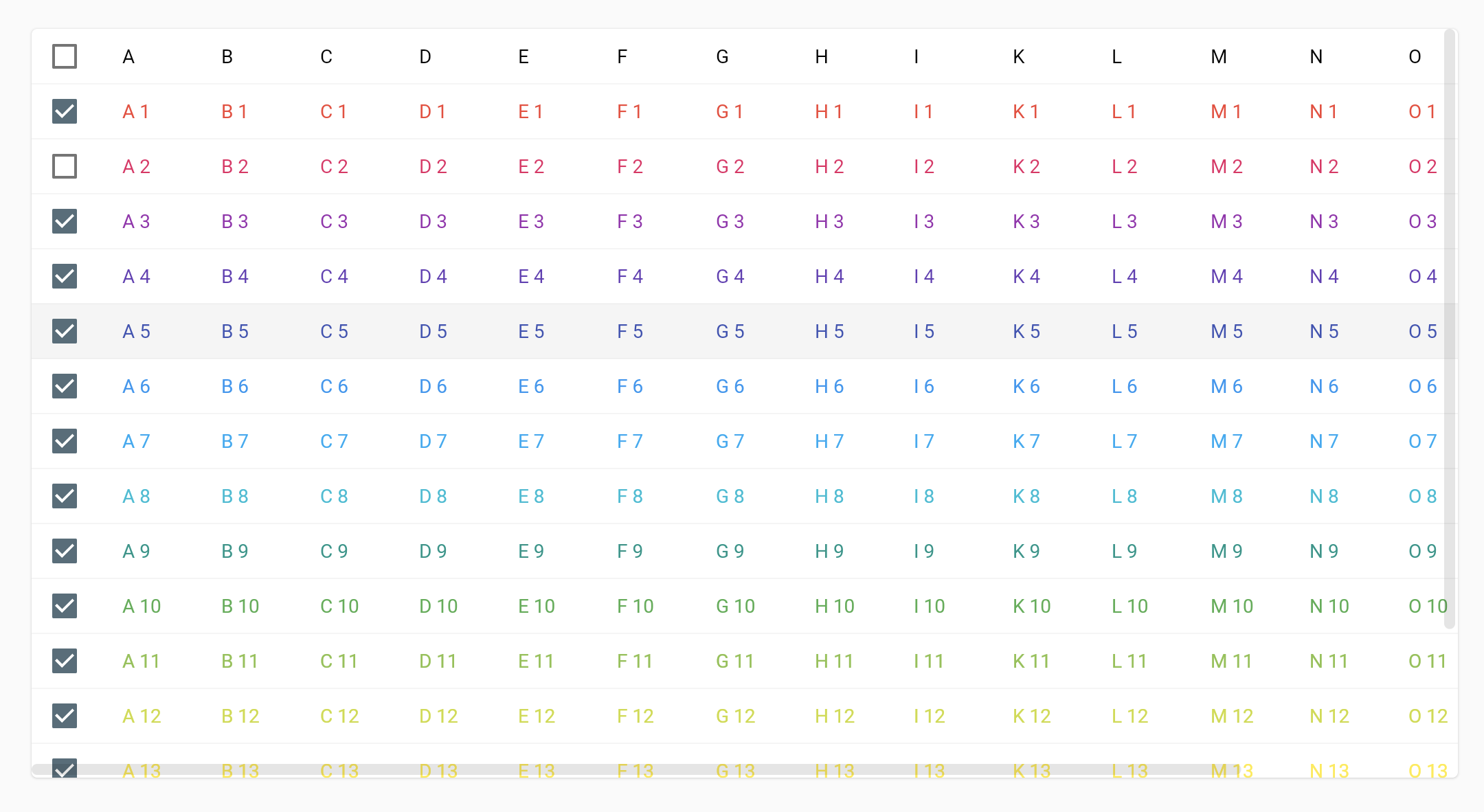
This package was originally created as a more customizable alternative to DataTable but I also introduced a very useful component: ScrollableViewScrollbar.both( controllerX: _controllerX, controllerY: _controllerY, child: ScrollableView( controllerX: _controllerX, controllerY: _controllerY, child: <whatever>));
It works perfectly with Apple Trackpad and allows to scroll smoothly in every direction
I am removing my assignment because I am focused on a separate 2D scrolling widget (See 2D Scrolling), and @moffatman has been working on this specifically in the linked PRs above. :)
In my case I need interactive viewer for mobile devices but ** don't want to update scale for mouse wheel events**. Is there any way to disable it or do we need to write custom code ourselves?
Now that #112171 and related PRs are merged, scrolling on a mouse or trackpad causes a pan, and pinching on a trackpad causes a scale. There are several other suggestions in this issue (like the previous comment), but I'm going to consider this issue complete.
For any other related features/bugs, please create a new issue and tag me.
For the option to allow scrolling to scale as before, see #114280.
This thread has been automatically locked since there has not been any recent activity after it was closed. If you are still experiencing a similar issue, please open a new bug, including the output of flutter doctor -v and a minimal reproduction of the issue.
Activity
justinmc commentedon Aug 25, 2020
That sounds reasonable, thanks for opening this issue. Maybe if scaling is disabled via
scaleEnabledwe could make scroll events cause panning by default? Or maybe that's too simplistic and we do need a parameter, because people might not want the behavior to change if they temporarily disable scale, for example.We should also think about mice that have directional scrolling, like Apple's mice.
creativecreatorormaybenot commentedon Aug 26, 2020
@justinmc That sounds very good! 👍🏽
Actually, just yesterday we also discovered the case of directional scrolling. Any trackpad usually allows scrolling in all directions and that would be a great fit :)
An example for this would be Lucidchart (in case you know it). It allows to pan using trackpads by default.
Regarding your point of automatic panning on scroll: I think that this is very reasonable because it seems like it would be the natural choice. If we create an interactive viewer, we probably expect it to be interactive.
In all of the use cases that I had, I only used it for panning actually and disabled scaling because of that.
justinmc commentedon Aug 26, 2020
Ah thanks for the Lucidchart example. It looks like they do panning with bidirectional scrolling by default, and holding down the option key + scrolling does zoom. Come to think of it, I think this is how photo editors like Gimp and Photoshop work on desktop too.
I think we can do a
panByScrollingboolean to enable this behavior, or even acontrolSchemeenum with these two options.Schwusch commentedon Aug 31, 2020
I just copied the
InteractiveViewerclass and replaced the_receivedPointerSignal(PointerSignalEvent)function with thisScaleing takes precedence, but if that's disabled the widget works like a charm with mousepads or scrollwheels.
Now I am just missing scrollbars, in both directions.
hacker1024 commentedon Jan 30, 2021
It looks like a rotation feature is in the works (#57698); it'd be great if a rotation touch gesture on macOS and iPadOS could trigger that as well, as is done in native apps like macOS's Preview.
On another note, for those on the dev channel, click to expand @Schwusch's solution ported to Flutter 1.26.0-17.1.pre.
zhou67832033 commentedon Feb 2, 2021
@justinmc InteractiveViewer should support scrollbars, in both directions. Just like figma. Thanks!
Example:
https://www.figma.com/file/B0NMrrVSGh64uFmXqA1Ly8/Pegasus-Design-System-(Community)?node-id=99%3A921
justinmc commentedon Feb 2, 2021
@zhou67832033 Thanks, that's a great example of 2d mouse scrolling with scroll bars!
zhou67832033 commentedon Feb 3, 2021
Are there currently plans to support Scrollbar feature?
zhou67832033 commentedon Feb 3, 2021
Have you implemented scrollbars, can you share it?
justinmc commentedon Feb 3, 2021
No one is currently working on scrollbars for InteractiveViewer that I'm aware of, but it seems like a good idea.
16 remaining items
Hixie commentedon Jun 21, 2022
@creativecreatorormaybenot Mouse scrolling on some platforms (macOS notably) requires scrolling physics, and implementing that requires either the whole scrolling infrastructure or duplicating that whole logic, neither of which is reasonable to retrofit into a widget that wasn't built for it. Our goal is to have widgets be coherent and implement the same APIs so that they are easier to fit together. How exactly this will turn out for InteractiveViewer is yet to be determined. I recommend letting @Piinks work through the design and see what they come up with. In the meantime if you would be satisfied with a variant of InteractiveViewer that implements just part of the problem (e.g. non-physics-aware mouse scrolling) then you are welcome to fork the widget and upload a package to pub.
davsl commentedon Jul 20, 2022
I did the impossible... I found a way to both support mouse scrolling and showing both scrollbars using InteractiveViewer class. I made this package: flutterx_table

This package was originally created as a more customizable alternative to DataTable but I also introduced a very useful component:
ScrollableViewScrollbar.both( controllerX: _controllerX, controllerY: _controllerY, child: ScrollableView( controllerX: _controllerX, controllerY: _controllerY, child: <whatever>));It works perfectly with Apple Trackpad and allows to scroll smoothly in every direction
Piinks commentedon Dec 2, 2022
I am removing my assignment because I am focused on a separate 2D scrolling widget (See 2D Scrolling), and @moffatman has been working on this specifically in the linked PRs above. :)
krishnagandrath commentedon Jan 6, 2023
It should also have an
option to disable mouse wheel events.
In my case I need interactive viewer for mobile devices but ** don't want to update scale for mouse wheel events**. Is there any way to disable it or do we need to write custom code ourselves?
justinmc commentedon Jan 6, 2023
Now that #112171 and related PRs are merged, scrolling on a mouse or trackpad causes a pan, and pinching on a trackpad causes a scale. There are several other suggestions in this issue (like the previous comment), but I'm going to consider this issue complete.
For any other related features/bugs, please create a new issue and tag me.
For the option to allow scrolling to scale as before, see #114280.
github-actions commentedon Mar 4, 2023
This thread has been automatically locked since there has not been any recent activity after it was closed. If you are still experiencing a similar issue, please open a new bug, including the output of
flutter doctor -vand a minimal reproduction of the issue.