Repository navigation
Copy and paste text of dialog with TextField for Japanese is not centered vertically in iOS #73681
Description
Activity
- changed the title
[-]Copy and paste text dialog in TextField for Japanese is not centered vertically[/-][+]Copy and paste dialog in TextField for Japanese is not centered vertically in iOS[/+]on Jan 11, 2021 - changed the title
[-]Copy and paste dialog in TextField for Japanese is not centered vertically in iOS[/-][+]Copy and paste text of dialog with TextField for Japanese is not centered vertically in iOS[/+]on Jan 11, 2021 I think this may be a regression in CupertinoButton (which is used inside the text selection menu). @HansMuller Is this a regression or is it intended?
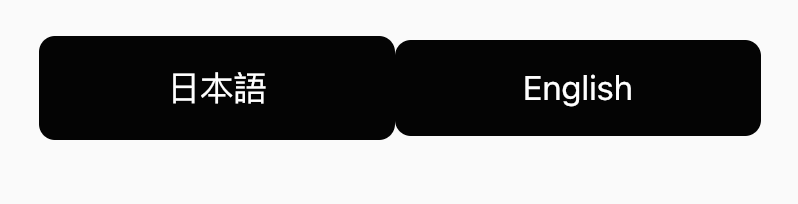
If I create two CupertinoButtons side-by-side, one with Japanese text and one with English, I see that they have different heights:
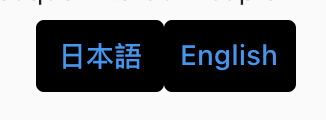
However, if I try this with TextButtons, there is no height difference:
Also, when trying the CupertinoButtons on DartPad, which is using an older version of Flutter, they have the same height:
 Reacted by donchan922 and Kabo
This was not an intentional change per the updates to the buttons and their themes.
Reacted by Justin McCandless and donchan922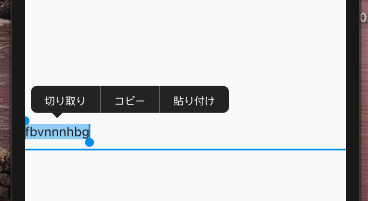
flutter doctor -v
[✓] Flutter (Channel master, 1.26.0-2.0.pre.295, on Mac OS X 10.15.7 19H2 darwin-x64, locale en) • Flutter version 1.26.0-2.0.pre.295 at /Users/pedromassango/Code/flutter_master • Framework revision c19fdad097 (10 hours ago), 2021-01-11 22:19:02 -0500 • Engine revision 0ed964d6b7 • Dart version 2.12.0 (build 2.12.0-212.0.dev) [✓] Android toolchain - develop for Android devices (Android SDK version 30.0.2) • Android SDK at /Users/pedromassango/Library/Android/sdk • Platform android-30, build-tools 30.0.2 • Java binary at: /Applications/Android Studio.app/Contents/jre/jdk/Contents/Home/bin/java • Java version OpenJDK Runtime Environment (build 1.8.0_242-release-1644-b3-6915495) • All Android licenses accepted. [!] Xcode - develop for iOS and macOS (Xcode 12.1) • Xcode at /Applications/Xcode.app/Contents/Developer • Xcode 12.1, Build version 12A7403 ! CocoaPods 1.9.3 out of date (1.10.0 is recommended). CocoaPods is used to retrieve the iOS and macOS platform side's plugin code that responds to your plugin usage on the Dart side. Without CocoaPods, plugins will not work on iOS or macOS. For more info, see https://flutter.dev/platform-plugins To upgrade see https://guides.cocoapods.org/using/getting-started.html#installation for instructions. [✓] Chrome - develop for the web • Chrome at /Applications/Google Chrome.app/Contents/MacOS/Google Chrome [✓] Android Studio (version 4.1) • Android Studio at /Applications/Android Studio.app/Contents • Flutter plugin can be installed from: 🔨 https://plugins.jetbrains.com/plugin/9212-flutter • Dart plugin can be installed from: 🔨 https://plugins.jetbrains.com/plugin/6351-dart • Java version OpenJDK Runtime Environment (build 1.8.0_242-release-1644-b3-6915495) [✓] IntelliJ IDEA Community Edition (version 2020.3.1) • IntelliJ at /Applications/IntelliJ IDEA CE.app • Flutter plugin version 52.1.5 • Dart plugin version 203.6912 [✓] VS Code (version 1.52.1) • VS Code at /Applications/Visual Studio Code.app/Contents • Flutter extension version 3.18.1 [✓] Connected device (3 available) • iPhone 12 Pro Max (mobile) • ECCF5C4A-8BEC-411D-B23E-85A836C3847E • ios • com.apple.CoreSimulator.SimRuntime.iOS-14-1 (simulator) • macOS (desktop) • macos • darwin-x64 • Mac OS X 10.15.7 19H2 darwin-x64 • Chrome (web) • chrome • web-javascript • Google Chrome 87.0.4280.141 ! Doctor found issues in 1 category.Reacted by donchan922This thread has been automatically locked since there has not been any recent activity after it was closed. If you are still experiencing a similar issue, please open a new bug, including the output of
flutter doctor -vand a minimal reproduction of the issue.- locked as resolved and limited conversation to collaborators
on Aug 6, 2021


Steps to Reproduce
flutter_localizationspackage)main.dart
pubspec.yaml
flutter doctor -v
Expected results:
Copy and paste text of dialog with TextField for Japanese should be centered vertically in iOS.
Actual results:
Copy and paste text of dialog with TextField for Japanese is not centered vertically (a little below the center).