Repository navigation
TextButton not working inside AppBar actions[ ] #84642

Description
Activity
Edit the style property and make the text font color to white
Edit the style property and make the text font color to white
It's visible. I thought default color is white that's why i didn't thought about changing text color
Reacted by RohanEdit the style property and make the text font color to white
It's visible. I thought default color is white that's why i didn't thought about changing text color
Solved then??
Edit the style property and make the text font color to white
It's visible. I thought default color is white that's why i didn't thought about changing text color
Solved then??
yes button is visible. But shouldn't the default text color supposed to be white or something that is visible with respect to theme color?
That is because of the primary swatch defined in Theme Data, where there is a map of colors by default for the entire app. Also, I guess the text button copies the same ThemeData and hence the primary swatch.
That is because of the primary swatch defined in Theme Data, where there is a map of colors by default for the entire app. Also, I guess the text button copies the same ThemeData and hence the primary swatch.
I see, Basically what is happening is if primarySwatch is green then TextButton text color becomes green, if primarySwatch is blue then TextButton text color becomes blue or anything thing else, In all these cases TextButton will not be visible because TextButton text color matches with background color of appbar. So we explicitly set text color for TextButton to make it visible.
But the case with Elevated button is not same, It's not required to set style property of Elevated button to make it visible. It automatically takes different color as compared to background of AppBar to make itself visible.I think TextButton should also exhibit the same behaviour isn't?
Also in
theme_data.dartit's mentioned207 | /// The [textTheme] [TextStyle] colors are black if the color scheme's 208 | /// brightness is [Brightness.light], and white for [Brightness.dark].textTheme and TextStyle should be by default such that it is visible with any primarySwatch color. This is not working as expected in case of TextButton. Isn't?
Check out the TextButton properties, the textstyle references the foreground color. I am not sure if that is the case, but you can check this
textStyle: resolvedTextStyle?.copyWith(color: resolvedForegroundColor),@ayaankhan98
You may override theprimarySwatchproperty usingcolorSchemeproperty, as below:theme: ThemeData( primarySwatch: Colors.blue, colorScheme: ColorScheme.fromSwatch( primarySwatch: Colors.green ).copyWith() ),which shows the
TextButtonsin green color and are visible in appbar, as below: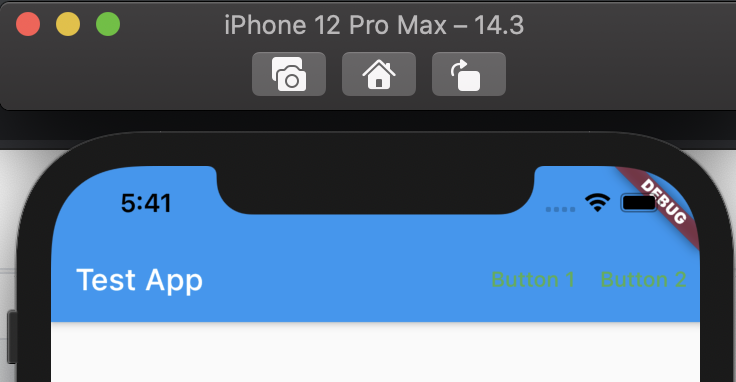 Reacted by Ayaan Khan
You may override the
primarySwatchproperty usingcolorSchemeproperty, as below:Yes we can override, But my point is by default it should be such that it is visible by itslef.
flutter doctor -v
/Users/dhs/Documents/Fluttersdk/flutter/bin/flutter doctor --verbose
[✓] Flutter (Channel stable, 2.2.2, on Mac OS X 10.15.4 19E2269 darwin-x64, locale en-GB)
    • Flutter version 2.2.2 at /Users/dhs/Documents/Fluttersdk/flutter
    • Framework revision d79295af24 (6 days ago), 2021-06-11 08:56:01 -0700
    • Engine revision 91c9fc8fe0
    • Dart version 2.13.3

[✓] Xcode - develop for iOS and macOS
    • Xcode at /Applications/Xcode.app/Contents/Developer
    • Xcode 12.3, Build version 12C33
    • CocoaPods version 1.10.1

[✓] Chrome - develop for the web
    • Chrome at /Applications/Google Chrome.app/Contents/MacOS/Google Chrome

[✓] VS Code (version 1.56.2)
    • VS Code at /Applications/Visual Studio Code.app/Contents
    • Flutter extension version 3.21.0

[✓] Connected device (2 available)
    • macOS (desktop) • macos  • darwin-x64     • Mac OS X 10.15.4 19E2269 darwin-x64
    • Chrome (web)    • chrome • web-javascript • Google Chrome 91.0.4472.106

• No issues found!
@ayaankhan98 - you're right, it really shouldn't be necessary to do anything in this case. The problem is that the AppBar's background defaults to the color scheme's primary color, as do the text buttons' text color.
The sample below shows how to workaround the issue.
We could mitigate the problem by wrapping the actions in a TextButtonTheme with a style like the one below. That doesn't cover all cases, since one can specify the AppBar's background color - #71184 - and the color might not contrast very well with ColorScheme.onPrimary. However the approach shown below could be used in that case.
class MyHomePage extends StatelessWidget {
  const MyHomePage({Key? key}) : super(key: key);

  @override
  Widget build(BuildContext context) {
    final ButtonStyle style = TextButton.styleFrom(
      primary: Theme.of(context).colorScheme.onPrimary
    );
    return Scaffold(
      appBar: AppBar(
        title: const Text("Test App"),
        actions: [
          TextButton(
            style: style,
            onPressed: () {},
            child: const Text(
              "Button 1",
            ),
          ),
          TextButton(
            style: style,
            onPressed: () {},
            child: const Text(
              "Button 2",
            ),
          )
        ],
      ),
    );
  }
}
Unfortunately the "fix", #85585, had to be reverted because the many application tests failed because we were overriding the default foreground color for TextButtons. It's not really practical to try and detect the situation where the contrast between the default text button theme's foreground color and the AppBar's background color is so low that we should override the text button theme's foreground color. It's possible but not practical because it would introduce a complex dependency that would difficult to document and likely to confuse when it wasn't expected. For example, an app that tried to animate the foreground color of TextButton AppBar actions might be surprised when - mid animation - the expected color was automatically changed.
So, instead we'll "fix" this problem by documenting the remedy noted in #84642 (comment)
This thread has been automatically locked since there has not been any recent activity after it was closed. If you are still experiencing a similar issue, please open a new bug, including the output of
flutter doctor -vand a minimal reproduction of the issue.- locked as resolved and limited conversation to collaborators
on Jul 30, 2021


Steps to Reproduce
flutter create bug.lib/main.dartas followsExpected results:
TextButtonshould be visible inAppBarActual results:
TextButtonis not visible. But if we replaceTextButtonwithElevatedButtonthen it will work fine. I thinkTextButtonshould also give the same behaviour asElevatedButtonmeaningTextButtonshould also be visible.Logs