Repository navigation
Mac tests are flaking due to missing runtime #99429
Description

The bot build807-m9 starts causing test flake after a release build failure: https://luci-milo.appspot.com/ui/p/flutter/builders/prod/Mac%20beta%20verify_binaries_codesigned/400/overview

All these failures are missing Runtimes package, e.g. https://ci.chromium.org/ui/p/flutter/builders/prod/Mac%20module_test_ios/5288/overview
It is possible the cache need a clean up.
Activity
keyonghan commentedon Mar 2, 2022
Marking as P1 as it causes multiple flakes across different tests.
godofredoc commentedon Mar 2, 2022
aaaah, if those tests are not using the default runtimes it is failing because we don't have support from that yet. We'll need to map a .ci.yaml property to the runtimes property in the xcode module.
keyonghan commentedon Mar 3, 2022
I don't think we are using customized runtime for existing tests. All should be using the default ones? /cc @jmagman
The issue is happening on build811 as well. Almost all flakes on the recent runs are due to these two bots
/cc @CaseyHillers can we move these two bots to staging during investigation?
jmagman commentedon Mar 3, 2022
Correct, the framework repo is only using the default iOS 15 runtime. The download of which should be handled by the mac_toolchain populating the Xcode cache. This looks the same as #99039 ?
keyonghan commentedon Mar 4, 2022
Same issue is happening on build810 too: https://chromium-swarm.appspot.com/bot?id=build810-m9
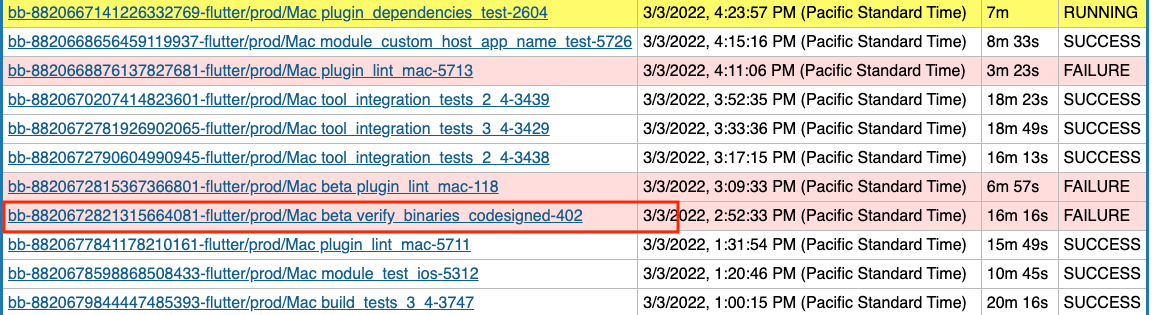
All these three bots started hitting runtine package issue after a failure on a releaser builder, e.g.
jmagman commentedon Mar 4, 2022
When you download a vanilla version of Xcode, there's a default iOS simulator located in
Contents/Developer/Platforms/iPhoneOS.platform/Library/Developer/CoreSimulator/Profiles/Runtimes(iOS 15 in this case). However whenmac_toolchainuploads the Xcode bundle, it strips that runtime out. The runtime is uploaded as a separate cipd packageios_runtime. See https://source.chromium.org/chromium/infra/infra/+/main:go/src/infra/cmd/mac_toolchain/README.md and https://g3doc.corp.google.com/company/teams/chrome/ios/docs/infra/xcode_upload.md?cl=head#upload-ios-runtimesSo how this should work is when the Xcode cache is first by
it should download three packages,
flutter_internal/ios/xcode/mac,flutter_internal/ios/xcode/ios(one of those the Xcode bundle with nothing in that directory), andflutter_internal/ios/xcode/ios_runtime(which just has the runtime, and puts it in the correctContents/Developer/Platforms/iPhoneOS.platform/Library/Developer/CoreSimulator/Profiles/Runtimesdirectory.(copied from a
ledrun but it should look like this everywhere when the Xcode cache is populated). https://logs.chromium.org/logs/flutter/led/magder_google.com/34b0add45b8fe97daadbfb8f634b2426c6fdea1e39c03af96488ca5ff59eb6f2/+/u/install_xcode/stdoutSo either the
ios_runtimepart isn't being downloaded, or it is but it's somehow being stripped out of the cache, or maybe there's something wrong withios-15runtime package as @keyonghan suggested in #99039 (comment) (pretty sure these are the same issues). However if there was something wrong with the runtime I would expect these tests to fail on every builder, not just some.Some questions to answer:
Contents/Developer/Platforms/iPhoneOS.platform/Library/Developer/CoreSimulator/Profiles/Runtimesempty?ios_runtimedownload in theinstall_xcodestep?mac_toolchainversion correct on these machines? The runtime feature was introduced not that long ago. See Engine builders running Xcode 13 do not have any valid iOS simulator runtimes #94780 and https://flutter-review.googlesource.com/c/recipes/+/23980xcode_runtime_ios-15-0cache explicitly somewhere? @godofredoc may have insights here.godofredoc commentedon Mar 4, 2022
If a build using custom runtimes ran on the failing test bed it deletes all the runtimes and installs the one passed explicitly. Because the next executions do not pass a custom runtime and the original xcode was already cached it does not install the cipd packages again and only the custom runtime installed previously is available.
https://cs.opensource.google/flutter/recipes/+/main:recipe_modules/osx_sdk/api.py;l=214
[-]Prod bot `build807-m9` is causing test flake due to missing `runtime`[/-][+]Mac tests are flaking due to missing `runtime`[/+]jmagman commentedon Mar 4, 2022
This is happening in prod, and there aren't any custom runtimes in prod, only the "default" one.
Though it looks like no runtimes are available, though still want to know what's in
Contents/Developer/Platforms/iPhoneOS.platform/Library/Developer/CoreSimulator/Profiles/Runtimesto know if the runtime is there and bad somehow, or if the directory is empty.28 remaining items
godofredoc commentedon Mar 16, 2022
Not sure how codesigned is impacting xcode, specially if they are using different caches.
christopherfujino commentedon Mar 16, 2022
Just merged a recipe change to fix this, however, I believe the bots may need to be manually recovered: https://flutter-review.googlesource.com/c/recipes/+/28064
zanderso commentedon Mar 17, 2022
The tree is closed on this, so I have increased to P0.
godofredoc commentedon Mar 17, 2022
All the new failures are coming from these bots:
godofredoc commentedon Mar 17, 2022
Caches for those builders have been cleaned.
godofredoc commentedon Mar 17, 2022
This is fixed after @christopherfujino's change and cleaning up the caches.
github-actions commentedon Mar 31, 2022
This thread has been automatically locked since there has not been any recent activity after it was closed. If you are still experiencing a similar issue, please open a new bug, including the output of
flutter doctor -vand a minimal reproduction of the issue.