Repository navigation
SP7: Surface Pro 7 does not thermal throttle correctly #221
Description
Activity
Here is a (terrible) recording showing the thermal throttling: https://youtu.be/j4JXoVRSwFk
- changed the title
[-]SP7: Surface Pro 7 (i5 model only?) does not thermal throttle correctly[/-][+]SP7: Surface Pro 7 (i5 only?) does not thermal throttle correctly[/+]on Jun 26, 2020 This affects my i7 model too.
After a few minutes of running games at maximum graphics, the framerate does indeed suddenly drop. However, I have a room fan that I can point at the front top right corner, and the framerate doesn't drop anymore.
it will gradually throttle down
This will help a lot when I don't have a room fan. When I do have a room fan though, that sounds like it would decrease the framerate below that of the current behavior.
Reacted by Flameopathic- changed the title
[-]SP7: Surface Pro 7 (i5 only?) does not thermal throttle correctly[/-][+]SP7: Surface Pro 7 does not thermal throttle correctly[/+]on Jun 27, 2020 Nice to see confirmation that the i7 model also experiences this. I work around the issue by pointing a fan at the SP7 too. I have a 14" floor-standing fan pointed in its general direction. Though it of course is not practical, and not much of a viable solution when traveling.
When the SP7 reaches ~70°C it will throttle down to 200 MHz (0.2 GHz !) until it "cooled down" to ~50°C. This takes about 60-70 seconds.
It also looks like that when longer jobs are running, throttling might kick in as early as 60°C (and then want to drop to 50°C again). But I haven't gotten enough data to confirm it.Observed on the i5 Model (passive cooling), kernel 5.7, with
energy_performance_preference=balance_performanceTLDR; In practice it means that you can't watch one episode of your favorite series without stutter if the video is 1080p60 encoded with AV1 (because that one isn't hardware accelerated).
AFAIK this is the default throttling behavior on Surface devices, which is basically overheating protection handled in hardware. You can avoid reaching the critical temperature where that kicks in by using
thermald(or something equivalent), which can basically throttle the CPU via one of multiple mechanisms (power limit, P-states, frequency, ...) more dynamically (meaning you won't drop directly down to 200MHz). You'll need to configure that though.I've set up
thermaldon my SB2 using the config file from https://wiki.gentoo.org/wiki/Toshiba_Radius_12#Thermals and replaced the<Temperature>77000</Temperature>field (that's 77°C, replace it with whatever you want). A warning on that though: I have basically no experience withthermald. I have not yet tried changing anything else and I think going with RAPL (throttling via power limit) instead of P-states might yield better results. All I can really say is that this works for me and keeps the system relatively cool (with appropriate temperature limit). If anyone has more experience with that, feel free to post your config or add it to the wiki.Thank you for your feedback. After some research and reading some papers I have found the following to RAPL (Running Average Power Limit):
A simplified (and not entirely correct) explanation would be that it represents TDP. RAPL results are available at
/sys/class/powercap/intel-rapl/, and described in the Kernel Documentation. The interesting attribute ispower_limit_uwfor setting the power limit in micro watts.max_power_uwis read only and was (if possible) determined with powercap.On my SP7 with an i5-1035G4 it looks like this:
intel-rapl
├── ...
├── intel-rapl:0
│  ├── constraint_0_max_power_uw          => 15000000
│  ├── constraint_0_name                  => long_term
│  ├── constraint_0_power_limit_uw        => 25000000
│  ├── constraint_1_max_power_uw          => 0
│  ├── constraint_1_name                  => short_term
│  ├── constraint_1_power_limit_uw        => 61000000
│  ├── name                               => package-0
│  ├── intel-rapl:0:0
│  │  ├── constraint_0_max_power_uw       => <no data>
│  │  ├── constraint_0_name               => long_term
│  │  ├── constraint_0_power_limit_uw     => 0
│  │  ├── name                            => core
│  │  └── ...
│  ├── intel-rapl:0:1
│  │  ├── constraint_0_max_power_uw       => 0
│  │  ├── constraint_0_name               => long_term
│  │  ├── constraint_0_power_limit_uw     => 0
│  │  ├── name                            => uncore
│  │  └── ...
├── intel-rapl:1
│  ├── constraint_0_max_power_uw          => 45000000
│  ├── constraint_0_name                  => long_term
│  ├── constraint_0_power_limit_uw        => 45000000
│  ├── constraint_1_max_power_uw          => 45000000
│  ├── constraint_1_name                  => short_term
│  ├── constraint_1_power_limit_uw        => 45000000
│  ├── name                               => psys
│  └── ...
└── ...
Please note that I have hyper-threading disabled via UEFI. So some values might be different for you.
intel-rapl:0    == Power Zone 0             == PKG = CPU + GPU + Cache + System Agent
intel-rapl:0:0  == Power Zone 0, Subzone 0  == CPU
intel-rapl:0:1  == Power Zone 0, Subzone 1  == GPU
intel-rapl:1    == Power Zone 1             == PSYS = PKG + PCH
For a visual representation please see this Twitter image, or here or in the Paper "RAPL in Action: Experiences in Using RAPL for Power Measurements" by Kashif Nizam Khan and Mikael Hirki. PKG (Package) is everything that would be in a traditional CPU you place into the sockel of on a desktop motherboard. For reference look at the Block Diagram of Skylake on Wikichip. Intel Mobile CPUs in contrast come as multi-chip package (MCP) where the PCH (Platform Controller Hub) in the same physical casing as the CPU, see Wikichip again. Zone:1 (PSYS) here would be the complete MCP.
no entry                            = 12 W =           = TDP down
Zone:0 constraint_0_max_power_uw    = 15 W = PL1 = PKG = TDP
Zone:0 constraint_0_power_limit_uw  = 25 W = PL1 = PKG = TDP up
Zone:0 constraint_1_power_limit_uw  = 61 W = PL2 = PKG = Turbo
Zone:1 constraint_0_power_limit_uw  = 45 W = PL1 = PSYS
For an explanation about power consumption and the influence of PL1, PL2, TDP and more please read Why Intel Processors Draw More Power Than Expected: TDP and Turbo Explained.
What does that mean? The i5 should only draw 45W overall long term. The PKG (well, CPU mostly) is set 25W, should only consume 15W, but can spike up to 61W.
The question is: How much wattage can the cooling disperse?
For this I would like your feedback, but my suspicion is that the passive cooling of the i5 Model can't handle the 45W long term of the PSYS. My estimation would probably be more in the region of 30-35W. So some tuning is in order. But for all of them I would expected a decrease in overall performance (for more stable long term performance).
Possible RAPL Options:
- Reduce Zone:1 constraint_0_power_limit_uw
Limit the TDP of the PSYS. It would only run with so much power as the heatsink can soak. Would require to find the thermal performance of the passive cooling. - Reduce Zone:0 constraint_1_power_limit_uw
Don't let the PKG consume 61W on spikes. The heatsink would not get "overwhelmed" with a sudden heat dump. This would prolong the time until the cooling can't keep up anymore. The problem is how "short termed" short term is. - Set a limit for Zone:0:0 constraint_0_power_limit_uw
Limited the CPU only. The difference to above is that this value is long term and fairly specific. The advantage is that GPU, Cache, System Agent and others won't be throttled only because "the CPU" exhausted the power limit. - A (balanced) combination of all the above.
The crux is finding the right wattage. That can't be done without some testing...
Other options that might be beneficial:
- Disable turbo frequency with
/sys/devices/system/cpu/intel_pstate/no_turbo= 1. The CPU would then run with the base frequency (1.1 GHz). It would still report a max frequency of 3.7 GHz, just not use it. - Limit the turbo frequency with
/sys/devices/system/cpu/intel_pstate/max_perf_pct. - Limit the max frequency with
/sys/devices/system/cpu/cpufreq/policy*/scaling_max_freq. This is rather brute force and usingintel_pstatewould be more elegant. - Set
/sys/devices/system/cpu/cpufreq/policy0/scaling_governortobalance_powerorpower. How big of an impact that might have remains to be seen.
- Reduce Zone:1 constraint_0_power_limit_uw
Sure, you can manually try to tune that, but I think the easiest way is to let thermald do that for you based on current temperatures etc. That's basically what I meant in my previous comment: The config I linked to just uses P-states, but replacing
<type>intel_pstate</type>with<type>rapl_controller</type>should choose RAPL over P-states. Again, I haven't tested that yet.Thermald also allows you to keep other temperatures under control (e.g. Surface devices have a skin temperature sensor for the back of the device) etc. (you'll have to configure that manually). Also lets you combine multiple cooling devices (e.g. RAPL + P-states working together).
On the other hand, with thermald you probably loose some fine-grained control. Not sure if there's much that can be changed in detail for the RAPL device config via thermald or if that even makes much of a difference (I'd hope that it doesn't, as thermald is written/maintained by Intel). The benefit of thermald is that it automates all that for you based on the temperature sensors and targets you describe in the config.
I can confirm that running thermald with a config similar to the one linked above solves the thermal throttling issue for me (i5 model).
Here are some crude diagrams showing the CPU frequency during a stress test before enabling thermald:

and after enabling thermald, with max. temperature set to 65° using rapl_controller:
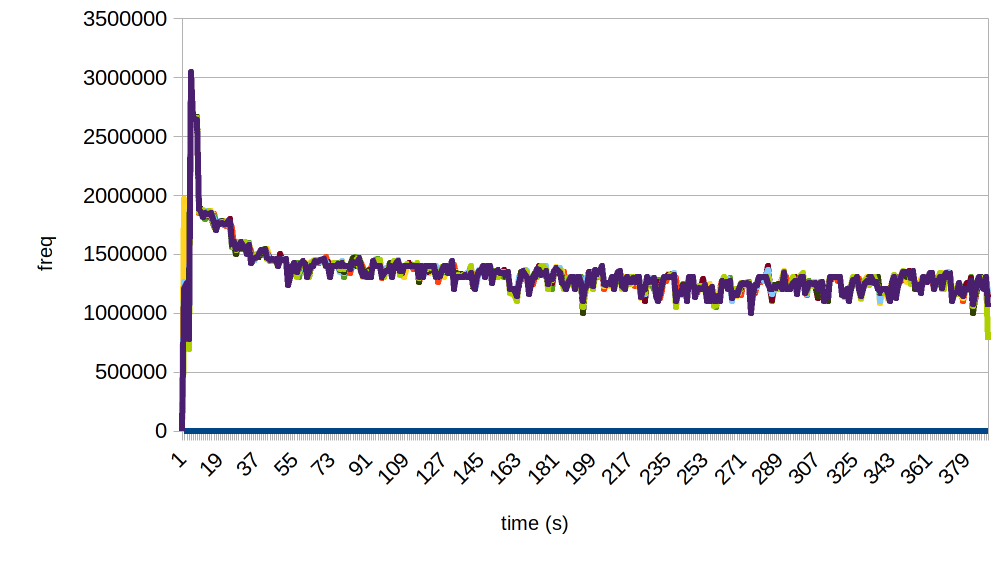 Reacted by Flameopathic
I am running the sp7 i5 with on Ubuntu 20.04.
Might someone provide me with a "working" config file ?The toshiba config makes my sp7 now freeze a lot and my journal looks weird.
● thermald.service - Thermal Daemon Service Loaded: loaded (/lib/systemd/system/thermald.service; enabled; vendor preset: enabled) Active: active (running) since Wed 2020-09-16 07:42:24 CEST; 6min ago Main PID: 1085 (thermald) Tasks: 2 (limit: 8999) Memory: 6.6M CGroup: /system.slice/thermald.service └─1085 /usr/sbin/thermald --no-daemon --dbus-enable Sep 16 07:42:24 crashFace systemd[1]: Starting Thermal Daemon Service... Sep 16 07:42:24 crashFace systemd[1]: Started Thermal Daemon Service. Sep 16 07:42:24 crashFace thermald[1085]: [WARN]27 CPUID levels; family:model:stepping 0x6:7e:5 (6:126:5) Sep 16 07:42:24 crashFace thermald[1085]: [WARN]Polling mode is enabled: 4 Sep 16 07:42:24 crashFace thermald[1085]: [WARN]sensor id 13 : No temp sysfs for reading raw temp Sep 16 07:42:24 crashFace thermald[1085]: [WARN]sensor id 13 : No temp sysfs for reading raw temp Sep 16 07:42:24 crashFace thermald[1085]: [WARN]sensor id 13 : No temp sysfs for reading raw temp Sep 16 07:42:24 crashFace thermald[1085]: [WARN]sysfs open failedHere's a basic config to use rapl based off the Gentoo wiki one @Crashdummyy
Details
<?xml version="1.0"?>
<ThermalConfiguration>
<Platform>
	<Name>Surface Pro 7 Thermal Workaround</Name>
	<ProductName>*</ProductName>
	<Preference>QUIET</Preference>
	<ThermalZones>
		<ThermalZone>
			<Type>cpu</Type>
			<TripPoints>
				<TripPoint>
					<SensorType>x86_pkg_temp</SensorType>
					<Temperature>65000</Temperature>
					<type>passive</type>
					<ControlType>SEQUENTIAL</ControlType>
					<CoolingDevice>
						<index>1</index>
						<type>rapl_controller</type>
						<influence>100</influence>
						<SamplingPeriod>10</SamplingPeriod>
					</CoolingDevice>
				</TripPoint>
			</TripPoints>
		</ThermalZone>
	</ThermalZones>
</Platform>
</ThermalConfiguration>
Save this file as
/etc/thermald/thermal-conf.xml(NOT/etc/thermald/thermald.conflike mentioned in Gentoo wiki. Not sure if this is an Ubuntu thing or just old info in Gentoo wiki)Then take this file:
Details
<CoolingDeviceOrder>
	<CoolingDevice>rapl_controller</CoolingDevice>
	<CoolingDevice>intel_pstate</CoolingDevice>
	<CoolingDevice>intel_powerclamp</CoolingDevice>
	<CoolingDevice>cpufreq</CoolingDevice>
	<CoolingDevice>Processor</CoolingDevice>
</CoolingDeviceOrder>
And save it as
/etc/thermald/thermal-cpu-cdev-order.xmlThen a quick
systemctl restart thermaldshould do the trick.
I've been running this config for about a month without issue.Reacted by Crashdummy, Erik Holmgren, TheRoboxx, h4rkyn and Andre@QuadPiece
Thanks for your configs.
The only difference between our config files is a different value of the temperature.
I removed the CoolingDevice block as well ( i5 surface... no fan.... )I'll try your config and hope it wont freeze again.
Btw the warnings in the journal are still there, did you get them, too ?@Crashdummyy
You need the<CoolingDevice>block. It tells thermald to use rapl (max wattage adjustment as far as I understood) to lower the temperatures. Without it thermald likely will not do anything. I have an i5 model without a fan as well. It makes my i5 model settle in around 1.5GHz after I let it idle with Dragon Quest XI as a testTemperature you can adjust as see fit. 65000 has been very stable for me. But I live in cold Norway and keep my indoor temperature at 17° Celcius using AC. So a lower target temperature might be needed for situations where the ambient room temperature is less... "nordic" (But it must be less than 70000, since 70° is where the hardware throttle kicks in.)
Also yes. I get the warnings. But I'm pretty sure it's just some lacking thermal sensor. My i5 SP7 does not throttle so it seems to be working regardless of the warnings in the journal.
Reacted by Crashdummyokay thanks :-) Ill try it
9 remaining items
I don't know if this is useful additional information but I have a SP7 [email protected] running Fedora 35 and on my system thermald fails to even start. The
ConditionVirtualization=norequirement in the service file fails andsystemd-detect-virtreportsmicrosoft. So for some newer versions of SystemD/thermald the issue may be that the service isn't starting due to bad detection of the platform.Seeing the same issue with the failed requirement here, that sounds like a systemd bug.
That sounds related to #647 / systemd/systemd#21468.
I found that thermald stopped working for me after updating to Fedora 35.
Finally found the issue, seems the intel_rapl endpoint "moved" after updating. Setting the CPU's wattage in F34 and earlier was done in
/sys/class/powercap/intel-rapl:0.I've discovered that in Fedora 35, in order to affect the CPU processor's power consumption and frequency, the wattage must now be set in
/sys/class/powercap/intel-rapl:1/sys/class/powercap/intel-rapl:0still exists in Fedora 35, and is where thermald attepts to set its wattage. But it appears to do absolutely nothing so the device overheats. I haven't been able to find any way to specify which intel_rapl endpoint thermald should use. It does have a<Path>option that can be used inside of<CoolingDevice>, but entering the correct intel_rapl path there does not seem to affect anything, it's possible that config option only works for fans.Setting cooling device to
intel_pstatealso does nothing, I've been unable to figure out why.For now I'm using my own TDP Script that's meant for manual power management on a GPD Win 3 (Change
0to1in therapl_pathvariable at the top of thetdpfile to make it work on the SP7)If someone knows how to specify which intel_rapl endpoint thermald uses, that would be very helpful and could be documented somewhere.
thermald for Fedora users
If you want to use the thermald configs mentioned above, follow the same steps (putting the files into
/etc/thermald). But then you must edit/usr/lib/systemd/system/thermald.serviceand remove--adaptivefrom theExecStart=line.Thank you! That applies to Ubuntu as well.
What's the latest on this issue? My SP7 still slows down with the thermald settings below:
<?xml version="1.0"?> <ThermalConfiguration> <Platform> <Name>Surface Pro 7 Thermal Workaround</Name> <ProductName>*</ProductName> <Preference>QUIET</Preference> <ThermalZones> <ThermalZone> <Type>cpu</Type> <TripPoints> <TripPoint> <SensorType>x86_pkg_temp</SensorType> <Temperature>60000</Temperature> <type>passive</type> <ControlType>SEQUENTIAL</ControlType> <CoolingDevice> <index>1</index> <type>rapl_controller</type> <influence>100</influence> <SamplingPeriod>10</SamplingPeriod> </CoolingDevice> </TripPoint> </TripPoints> </ThermalZone> </ThermalZones> </Platform> </ThermalConfiguration>Guys can you try this: linux-surface/kernel#117 (comment)
thermald is a software solution, but there is a hardware mechanism for throttling, partly thermal, partly power.Note, do not take my setting directly -- you should tune it to adapt to SP7.
Also I'm curious, is the fan spinning as fast as in Windows for you SP7 fellows?
Hi, I recently bought an SP7 with i5 CPU (fanless).
First of all: Thank you for the great work for all the Linux Surface devs! :-)My initial setup as per the docs here - throttles to 200 MHz
I installed all the updates under Windows, then installed Fedora 38 and the latest Surface kernel.
$ uname -a
Linux surface 6.4.12-1.surface.fc38.x86_64 #1 SMP PREEMPT_DYNAMIC Fri Aug 25 21:30:59 UTC 2023 x86_64 GNU/Linux
I also did both the thermald and cpupower-gui configs mentioned here:https://github.com/linux-surface/linux-surface/wiki/Surface-Pro-7
However, when doing heavy tasks, thermal throttling still kicked in, lowered the CPU freq to 200 MHz - I guess it's an emergency-level. The ambient temperature was 23 Celsius.
For testing I simply used a 8k YouTube video in Firefox. Note, you need to manually raise the quality to 8k to force CPU rendering (4k might have hardware support depending on the video).
Working alternative config
After some testing, I figured out this config, which works quite nice.
Note: this is the first time I change these settings ever, so don't trust me, please verify everything on your own.cpupower: Default setting.
current policy: frequency should be within 400 MHz and 3.70 GHz.
The governor "powersave" may decide which speed to use within this range.This can be achieved e.g. with:
cpupower-gui profile BalancedVerify with:
cpupower frequency-infothermald, thermal-conf.xml
The
rapl_controllerseems to work, but kicks in too late.
I tried all other cooling devices that I found in documentations / by debugging.There are 3 that don't seem to do anything (nothing appears in the thermald debug log):
- TCC Offset
- cpufreq
- Processor
But the 3 below work, the thermald log shows when they change states and they seem to cooperate good.
It works nice with 60 C (Temperature=60000) as well, but like that the max performance is significantly lower, so I kept 65 C (Temperature=65000). The CPU's max tolerable temperature is 100 C, and during my tests the max moved around 85 C with this config.
<?xml version="1.0"?>
<ThermalConfiguration>
  <Platform>
    <Name>Surface Pro 7 Thermal Workaround</Name>
    <ProductName>*</ProductName>
    <Preference>QUIET</Preference>
    <ThermalZones>
      <ThermalZone>
        <Type>cpu</Type>
        <TripPoints>
          <TripPoint>
            <SensorType>x86_pkg_temp</SensorType>
            <Temperature>65000</Temperature>
            <type>passive</type>
            <ControlType>PARALLEL</ControlType>
            <CoolingDevice>
              <index>1</index>
              <type>rapl_controller</type>
              <influence> 100 </influence>
              <SamplingPeriod> 10 </SamplingPeriod>
            </CoolingDevice>
            <CoolingDevice>
              <index>2</index>
              <type>intel_pstate</type>
              <influence> 90 </influence>
              <SamplingPeriod> 10 </SamplingPeriod>
            </CoolingDevice>
            <CoolingDevice>
              <index>3</index>
              <type>intel_powerclamp</type>
              <influence> 80 </influence>
              <SamplingPeriod> 10 </SamplingPeriod>
            </CoolingDevice>
          </TripPoint>
        </TripPoints>
      </ThermalZone>
    </ThermalZones>
  </Platform>
</ThermalConfiguration>
Documentations
Processor reference for frequency and power targets:
https://ark.intel.com/content/www/us/en/ark/products/196591/intel-core-i51035g4-processor-6m-cache-up-to-3-70-ghz.htmlGood explanation on thermald and the cooling devices:
https://wiki.ubuntu.com/Kernel/PowerManagement/ThermalIssuesManual for thermald:
https://manpages.ubuntu.com/manpages/trusty/en/man5/thermal-conf.xml.5.htmlUseful scripts
Cooling device states (actually, only the "intel_powerclamp" changes with the config above):
watch -n.1 "paste <(cat /sys/class/thermal/cooling_device*/type) <(cat /sys/class/thermal/cooling_device*/cur_state) | column -s $'\t' -t"Thermal sensor data:
watch -n.1 "paste <(cat /sys/class/thermal/thermal_zone*/type) <(cat /sys/class/thermal/thermal_zone*/temp) | column -s $'\t' -t | sed 's/...$/.0°C/'"Actual CPU frequency:
watch -n.1 "grep \"^[c]pu MHz\" /proc/cpuinfo"For testing the thermald config, starting thermald with debug logging:
sudo systemctl stop thermald.service
sudo thermald --no-daemon --loglevel=debug
Don't forget to restart the service after finished testing and check if it's running!
sudo systemctl start thermald.service sudo systemctl status thermald.serviceReacted by Maximilian Luz, Null, João Filipe Silva de Almeida and junek1206Reacted by João Filipe Silva de AlmeidaHey everyone,
Sorry to be a pain - I've had a look through here and implemented the thermald config for a surface pro 7, however I'm not sure it's working properly.
When I stress test the CPU, I get no throttling any more, however my CPU temps in Psensor are showing in the 90c range, not something I want to run long term.
My laptop is a SL3 15", with the Intel Core i5-1035G7 and 16GB RAM. Sorry - totally new to Linux, so not sure what's going on, any help appreciated - thanks!
Reacted by with9- added a commit that references this issue
on Aug 29, 2025 Hey everyone,
Sorry to be a pain - I've had a look through here and implemented the thermald config for a surface pro 7, however I'm not sure it's working properly.
When I stress test the CPU, I get no throttling any more, however my CPU temps in Psensor are showing in the 90c range, not something I want to run long term.
My laptop is a SL3 15", with the Intel Core i5-1035G7 and 16GB RAM. Sorry - totally new to Linux, so not sure what's going on, any help appreciated - thanks!
You may also want to check your PL1 (long-term power limit).
On Surface devices running Linux, PL1 is sometimes set much higher than the actual TDP, which causes the CPU to sit around 90 °C and never throttle properly.
#1917I fixed this by changing my TDP from 35 back down 15
I'm running linux mint 22.2 on a Surface pro 9 but I think this will work if your on a surface pro 7Little Guide
Commands I used
cat /sys/class/powercap/intel-rapl/intel-rapl:0/constraint_0_power_limit_uw
if doesn't say 15000000 then continueSudo -i login into your root account
then run
echo 15000000 > /sys/class/powercap/intel-rapl:0/constraint_0_power_limit_uwthen again run
cat /sys/class/powercap/intel-rapl/intel-rapl:0/constraint_0_power_limit_uw
and if says 15000000
your good to goThis worked for me
Sorry to be a bother but I have the same issue on my Surface Pro 7**+**, running Fedora.
I hope its okay if i post here eventhough I technically do not have a base 7 but a 7+.
I also have one with a fan, though fan control doesn't seem to work at all outside of the base hardware curve.
I already removed the --adaptive from the service and tried several thermald configs. I even tried auto-cpufreq and setting the tdp lower using echo 15000000 > /sys/class/powercap/intel-rapl:0/constraint_0_power_limit_uwHowever, nothing on this worked. After only half a minute of running any game, my cpu gets set to min_state aka 200 mhz and the gpu with that as well. This goes for higher workloads in the office as well.
Im running fedora KDE on a fresh install i downloaded today (newest version, up to date etc.)
Trying to disable BD PROCHOT but it seems to not be working. The returned value also indicates this.
I have some new SP7 i7 fan evidence that may help answer the earlier question about whether the fan is spinning under Linux.
Test system:
- Surface Pro 7 i7
- BIOS
24.109.140(2025-07-21) 6.19.8-surface-3- SAM firmware
14.800.139
The SP7 firmware responds successfully to the same read-only SSAM request used by the upstream
surface_fanhwmon driver:- target category:
0x05(FAN) - target ID:
0x01 - command ID:
0x01 - instance ID:
0x01
Five direct reads returned approximately 6095-6115 RPM.
The existing driver does not bind because
ssam_node_group_sp7insurface_aggregator_registry.comits the already-definedssam_node_fan_speednode. I built and live-tested this minimal change against the running kernel:static const struct software_node *ssam_node_group_sp7[] = { &ssam_node_root, &ssam_node_bat_ac, &ssam_node_bat_main, &ssam_node_tmp_perf_profile, + &ssam_node_fan_speed, NULL, };After replacing only the registry module and loading
surface_fan:ssam:d01c05t01i01f01was instantiated and bound tosurface_fan/sys/class/hwmon/.../fan1_inputreported about 6097 RPM- battery reporting and the balanced platform profile remained functional
During a bounded 45-second load across all eight logical CPUs:
- fan stayed around 6065-6118 RPM
- package temperature peaked at 86 C
- package/core thermal-throttle counter deltas remained zero
- temperature recovered to 63 C three seconds after load ended
The packaged registry module was restored after the test; no unsigned test module was installed persistently.
This establishes that the SP7 i7 fan is active and firmware-controlled, and that read-only RPM telemetry can be exposed with the existing driver plus the one-line registry addition. It does not establish safe manual fan-control commands; I did not send any undocumented FAN writes.


My Surface Pro 7 has erratic thermal throttling behavior under Linux. The CPU will run fine at roughly 2.4GHz for a while when pushed. But will drop to a mere 200MHz. After it cools down a bit it will run at 2+ GHz again. This loop continues indefinitely until you let the machine properly cool down.
This is not much of an issue during regular use as the "initial heat up" requires a few minutes of continued max load. But if one attempts to do anything which pushes the CPU/iGPU for an extended period of time, it can make the SP7 nigh unusable. For example if you try to enjoy most modern 3D video games, or if you are encoding video files in the background.
The SP7 (Especially i5 model) seems to rely very heavily on software-controlled thermal throttling to sustain a usable state under load.
Under Windows
This appears to be a hardware "emergency throttle" when the CPU gets too hot. As the same behavior can be found in Windows, but not in the factory install, only on a fresh copy of the OS. With a fresh Windows 10 2004 install, the machine will start cycling between 2+ GHz and 200MHz after heating up just like Linux does.
However, once you install the Surface Pro driver pack (found here) the throttling behavior changes. Rather than switching between high performance and 200MHz, once the machine heats up it will gradually throttle down. After having Windows push the system for a while it tends to settle in at a sustained frequency between 700MHz and 900MHz, depending on ambient temperature.
Environment
Linux suika 5.7.5-surface #1 SMP Wed Jun 24 15:46:34 UTC 2020 x86_64 x86_64 x86_64 GNU/LinuxI suspect this is an issue that mostly affects the i5 model of the SP7, as:
If i3 or i7 users could confirm whether their devices exhibit this issue, that would be excellent.
`dmesg` output
The following is a snippet of dmesg taken after leaving Dragon Quest XI running for a while.
I do not know if the "unhandled power event" messages are related, or caused by something else.