Repository navigation
npm start failing on newly created lb4 app #1405
Description
Activity
Hmm, it seems to be an issue related to TypeScript 2.9 (https://blogs.msdn.microsoft.com/typescript/2018/05/31/announcing-typescript-2-9/#import-types).
Running
npm run buildforloopback-next/packages/contextproduces an invalidkey.d.tsfromsrc/key.ts:... const CONTROLLER_CLASS: BindingKey<import("../../context/src/value-promise").Constructor<any>>;
Please note the relative import is invalid outside the monorepo.
- added a commit that references this issue
on Jun 9, 2018 I'm proposing a workaround at #1406.
- added a commit that references this issue
on Jun 9, 2018 Please try
npm i -g @loopback/[email protected]Thanks @raymondfeng
@loopback/[email protected]looks fine.Its failing again on
@loopback/[email protected]but with a different error now: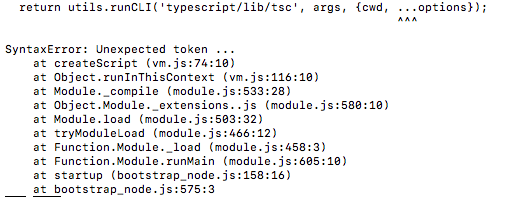
Okay, just found out that it fails with
node v8.2.1but withnode v8.3.0it does work. Maybe the docs should actually refer that the minimum node version is 8.3.0?Reacted by Kyusung ShimI've been able to reproduce the problem.
I see two options:
- update our docs to have 8.3 and above
- replace object spread operators with
Object.assign
What do you think @strongloop/sq-lb-apex, @bajtos, @raymondfeng?
Considering that Node.js 8.x LTS is at 8.11.3 now and 8.3.0 was released almost a year ago (2017-08-09) before 8.x entered LTS, I think it's acceptable to require our users to use 8.3.0 or newer.
I am proposing to update our docs and mention
8.9.0as the minimum required version (8.9.0was the first 8.x version covered by LTS). As part of this change, we should also update all of ourpackage.jsonfiles and modifyenginessection to use>=8.9instead of current>=8version spec for Node.Reacted by Cristiano Santos, Taranveer Virk and Biniam Admikew


Description / Steps to reproduce / Feature proposal
The app created following getting started guide is not in working state.
Current Behavior
Geting below exception when running
npm start.Expected Behavior
App should run without any issue