Repository navigation
Version 1.1.0 sometimes does not install cpptools binaries on Windows #6453
Description
Activity
Vince Williams (@VinceW31) could you try uninstalling the extension (ensure that the folder for version 1.1.0 is deleted too upon uninstall) and re-installing it instead of letting it update? We've had cases when it does not update properly which we have not found a solid repro for.
Are you on a 32-bit Windows OS?
I have the same problem.
Windows 10 Pro x64
C/C++ ver 1.1.0
VSCode 1.51.0.
At start of VS I get message that C/C++ language server was not started.
Files are missing as well.Antonín Skala (@Tony763) If you uninstall the C/C++ extension, restart VS code, and then reinstall the C/C++ extension does the issue repro? When I do that, my "C/C++" Output logging shows:
Updating C/C++ dependencies...

Downloading package 'C/C++ language components (Windows)' (7144 KB)  Done!
Downloading package 'ClangFormat (Windows)' (814 KB)  Done!
Downloading package 'Visual Studio Windows Debugger' (13813 KB)  Done!

Installing package 'C/C++ language components (Windows)'
Installing package 'ClangFormat (Windows)'
Installing package 'Visual Studio Windows Debugger'

Finished installing dependencies

cpptools/didChangeCppProperties
What do you see?
- I did just that and deleted the folder manually. Then in platform IO I reinstalled from scratch but the new bin folder is still missing the exe file, it's missing on your github bin folder too. On 6 Nov 2020 19:11, Michelle Matias <[email protected]> wrote: @VinceW31 could you try uninstalling the extension (ensure that the folder for version 1.1.0 is deleted too upon uninstall) and re-installing it instead of letting it update? We've had cases when it does not update properly which we have not found a solid repro for. —You are receiving this because you were mentioned.Reply to this email directly, view it on GitHub, or unsubscribe.
- No, 64 bitOn 6 Nov 2020 20:32, Sean McManus <[email protected]> wrote: Are you on a 32-bit Windows OS? —You are receiving this because you were mentioned.Reply to this email directly, view it on GitHub, or unsubscribe.
- Yes, that's exactly it. Reverting to ver 101 fixes it. On 6 Nov 2020 20:56, Antonín Skala <[email protected]> wrote: I have the same problem. Windows 10 Pro x64 C/C++ ver 1.1.0 VSCode 1.51.0. At start of VS I get message that C/C++ language server was not started. Files are missing as well. —You are receiving this because you were mentioned.Reply to this email directly, view it on GitHub, or unsubscribe.
Sean McManus (@sean-mcmanus) I cannot locate C/C++ log
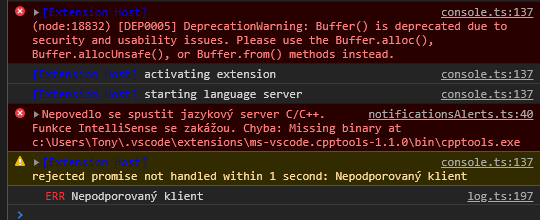
Do you see the C++ pane in the Output window after installing?

No, C/C++ option is missing in panel. I only get instant message about C/C++ not starting.
After installing ver 1.1.0 the cpptools application file is not in the bin folder like it was in ver 101. Its also missing from your own Bin folder on the Github code.
For some unknown reason, the online binaries are not getting downloaded/installed. I'm not sure yet how that would be possible or what change from #6448 could be causing that.
A potential workaround is to download/install the offline vsix which has the binaries preinstalled: https://github.com/microsoft/vscode-cpptools/releases/download/1.1.0/cpptools-win32.vsix (via the Install from VSIX command, not double clicking it).
Reacted by Antonín Skala1 remaining item
For now Ive just reinstalled the earlier extension version 1.0.1 in VSCode and its working fine, so happy using that for now. Good luck getting it sorted.
Sean McManus (@sean-mcmanus) For now it is working (with vsix), if You need a future testing, ping me.
- changed the title
[-]ver 1.1.0 not working with Platform IO, ver 1.0.1 is fine[/-][+]Version 1.1.0 does not install cpptools binaries[/+]on Nov 6, 2020 - pinned this issue
on Nov 7, 2020 For some unknown reason, the online binaries are not getting downloaded/installed. I'm not sure yet how that would be possible or what change from #6448 could be causing that.
A potential workaround is to download/install the offline vsix which has the binaries preinstalled: https://github.com/microsoft/vscode-cpptools/releases/download/1.1.0/cpptools-win32.vsix (via the Install from VSIX command, not double clicking it).
It works!
For some unknown reason, the online binaries are not getting downloaded/installed. I'm not sure yet how that would be possible or what change from #6448 could be causing that.
A potential workaround is to download/install the offline vsix which has the binaries preinstalled: https://github.com/microsoft/vscode-cpptools/releases/download/1.1.0/cpptools-win32.vsix (via the Install from VSIX command, not double clicking it).It works!
No, it still does not work with VSCode and Platform IO. The compiler refuses to start. Ver 1.0.1 still works fine.
For some unknown reason, the online binaries are not getting downloaded/installed. I'm not sure yet how that would be possible or what change from #6448 could be causing that.
A potential workaround is to download/install the offline vsix which has the binaries preinstalled: https://github.com/microsoft/vscode-cpptools/releases/download/1.1.0/cpptools-win32.vsix (via the Install from VSIX command, not double clicking it).It works!
No, it still does not work with VSCode and Platform IO. The compiler refuses to start. Ver 1.0.1 still works fine.
I downloaded the file cpptools-win32,vsix, unload the old extension, and install from VSIX command. Finally, it works.
- changed the title
[-]Version 1.1.0 does not install cpptools binaries[/-][+]Version 1.1.0 sometimes does not install cpptools binaries on Windows[/+]on Nov 9, 2020 We believe the cause of this bug is the call to "wmic os get osarchitecture" is failing.
A pending fix is at #6480 .
It should be fixed now with 1.1.1: https://github.com/microsoft/vscode-cpptools/releases/tag/1.1.1.
Yes, confirm that ver 1.1.1 installs, works and compiles correctly now. Cheers guys and gals, great job!
- unpinned this issue
on Nov 10, 2020 - locked and limited conversation to collaborators
on Dec 25, 2020


After updating C++ extension in VS code to ver 1.1.0 then Platform IO reports the following when trying to compile:
Missing binary at c:\Users\vince.vscode\extensions\ms-vscode.cpptools-1.1.0\bin\cpptools.exe
I looked in the bin folder and the file cpptools.exe is missing.
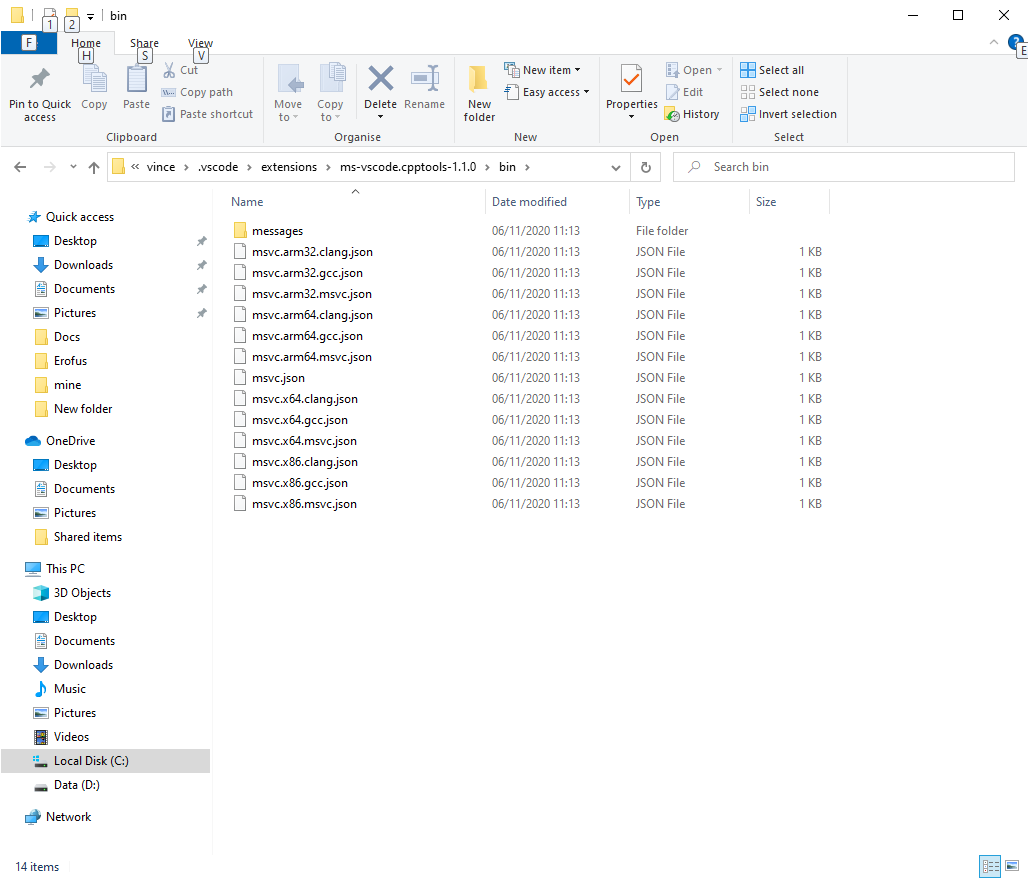
I reloaded C++ ver 1.0.1 and it all works fine, the bin folder contains cpptools.exe plus many other missing files.
