

Cloud computing has transformed how organizations build, deploy, and scale technology. Instead of owning physical infrastructure, users access computing resources over the internet on demand.
- Eliminates the need for physical servers and upfront hardware costs.
- Enables on-demand access to computing power and storage.
- Supports scalability, flexibility, and cost efficiency.
Problem That Cloud Computing Solves
Before the cloud, if a company wanted to launch a website or an application, it had to follow a slow and expensive process:
The Old Way (On-Premises)
- Companies had to purchase physical servers, storage devices, and networking equipment.
- This required a large upfront investment known as Capital Expenditure (CapEx).
- Peak usage had to be estimated in advance, often leading to over-provisioning and wasted resources.
- Procuring and setting up new servers could take weeks or even months.
The New Way (Cloud Computing)
- Hardware is no longer purchased; computing resources are rented from cloud providers such as AWS, Google, or Microsoft.
- Costs shift from a large upfront investment to a pay as you go Operational Expenditure model.
- Resources can be provisioned instantly without long waiting periods.
- Eliminates over-provisioning, guesswork, and resource wastage.
Architecture
Cloud computing architecture refers to the components and sub-components required for cloud computing. These components typically refer to:
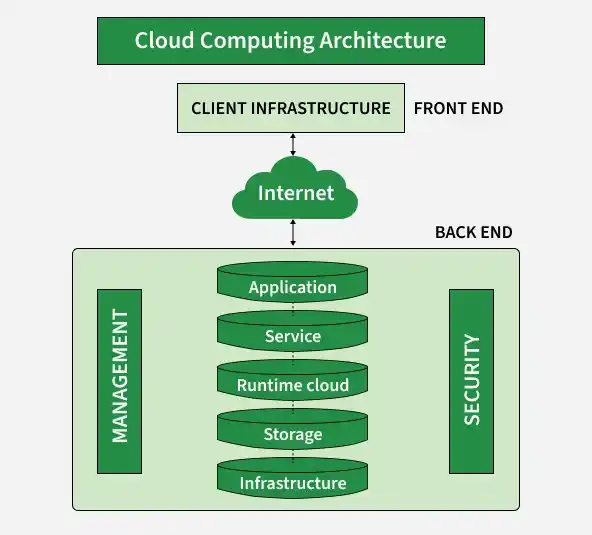
- Front End (User Interaction Enhancement): Includes user interfaces and client devices. Thin clients use web browsers for simple access, while fat clients provide advanced features and a better user experience.
- Back-End Platforms (Cloud Computing Engine): Consists of servers and storage systems that handle data processing, application management, and data storage in the cloud.
- Cloud-Based Delivery and Network: Provides access to cloud services through the Internet, Intranet, and Intercloud for smooth communication, connectivity, and data transfer.
Characteristics
All cloud services share five fundamental characteristics that define them:
- On-Demand Self-Service: Users can create and manage resources anytime without provider support.
- Broad Network Access: Cloud services can be accessed from anywhere using devices like laptops and phones.
- Resource Pooling: Resources are shared among multiple users and assigned as needed.
- Rapid Elasticity: Resources can quickly scale up or down based on demand.
- Measured Service: Users pay only for the resources they use.
- Shared Responsibility: Cloud Provider is responsible for security OF the cloud, while Customer is responsible for security IN the cloud.
Types
The following are the types of Cloud Computing:
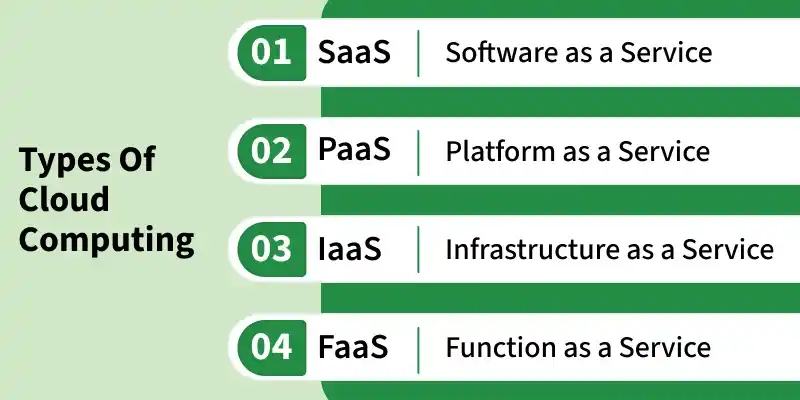
1. Infrastructure as a Service ( IaaS )
Infrastructure as a Service (IaaS) is a type of cloud computing that gives people access to IT tools like virtual computers, storage, and networks through the internet. You don’t need to buy or manage physical hardware. Instead, you pay only for what you use.
Example: Amazon EC2 is an Infrastructure as a Service (IaaS) that provides virtual servers on the cloud, allowing users to create, manage, and scale computing resources as needed.
Benefits of using IaaS
- Flexibility and Control: It comes up with providing virtualized computing resources such as VMs, Storage, and networks facilitating users with control over the Operating system and applications.
- Reducing Expenses of Hardware: It provides business cost savings with the elimination of physical infrastructure investments making it cost-effective.
- Scalability of Resources: The cloud provides in scaling of hardware resources up or down as per demand facilitating optimal performance with cost efficiency.
2. Platform as a Service ( PaaS )
Platform as a Service (PaaS) is a cloud computing model where a third-party provider offers the software and hardware tools needed to develop, test, and run applications. This allows users to focus on building their applications without worrying about managing servers or infrastructure.
Example: AWS Elastic Beanstalk is a Platform as a Service (PaaS) by Amazon Web Services that helps developers deploy and manage applications easily while AWS handles servers, scaling, and load balancing.
Benefits of using PaaS
- Simplifying the Development: It offers application development by keeping the underlying Infrastructure as an Abstraction. It helps the developers to completely focus on application logic ( Code ) and background operations are completely managed by the AWS platform.
- Enhancing Efficiency and Productivity: It lowers the Management of Infrastructure complexity, speeding up the Execution time and bringing the updates quickly to market by streamlining the development process.
- Automation of Scaling: Management of resource scaling, guaranteeing the program's workload efficiency is ensured by PaaS.
3. Software as a Service (SaaS)
Software as a Service (SaaS) is a way of using software over the internet instead of installing it on your computer. The software is hosted by a company, and you can use it just by logging in through a web browser. You don’t need to worry about updates, maintenance, or storage the provider takes care of all that.
Example: Google Docs allows users to create, edit, and share documents online without installing any software.
Benefits of using SaaS
- Collaboration And Accessibility: It helps users to easily access applications without having the requirement of local installations. It is fully managed by the AWS
- Software working as a service over the internet encouraging effortless cooperation and ease of access.
- Automation of Updates: It providers manage the handling of software maintenance with automatic latest updates ensuring users gain experience with the latest features and security patches.
- Cost Efficiency: It acts as a cost-effective solution by reducing the overhead of IT support by eliminating the need for individual software licenses.
4. Function as a Service (FaaS)
Function as a service (FaaS) is a cloud-computing service that allows customers to run code in response to events, without managing the complex infrastructure. You just write the code, upload it and the cloud provider runs it only when it's needed. You pay only for the time your code runs.
Example: AWS Lambda lets you run code automatically when an event occurs, such as uploading a photo to a website, without managing or running servers all the time.
Benefits of using FaaS
- Event-Driven Execution: It helps in the maintenance of servers and infrastructure making users worry about it. FaaS facilitates the developers to run code as a response to the events.
- Cost Efficiency: FaaS facilitates cost efficiency by coming up with the principle "Pay as per you Run" for the computing resources used.
- Scalability and Agility: Serverless Architectures scale effortlessly in handing the workloads promoting agility in development and deployment.
Deployment Models
- Private Cloud: Dedicated to a single organization, offering greater security and control.
- Public Cloud: Provided by third-party providers and available over the internet with scalable, pay-as-you-go resources.
- Hybrid Cloud: Combines private and public clouds, allowing sensitive data to stay private while using public cloud resources.
- Multi-Cloud: Uses services from multiple cloud providers to avoid vendor lock-in and choose the best services from each.
Top Leading Cloud Computing Providers and their Services
- AWS (Amazon Web Services): Provides computing, storage, databases, networking, and AI services.
- Microsoft Azure: Provides cloud computing, AI, analytics, and hybrid cloud solutions.
- Google Cloud: Provides AI, data analytics, Kubernetes, and cloud storage services.
- Alibaba Cloud: Provides infrastructure, AI, big data, security, and CDN services.
- Oracle Cloud: Provides enterprise cloud, databases, SaaS, and PaaS solutions.
- IBM Cloud: Provides AI, hybrid cloud, security, and advanced computing services.
- Salesforce Cloud: Provides CRM, SaaS, AI, and business analytics solutions.
- Tencent Cloud: Provides AI, gaming, IoT, and big data cloud services.
- Akamai Connected Cloud: Provides edge computing, CDN, cloud security, and web performance services.
Cloud Security
Cloud security recommended to measures and practices designed to protect data, applications, and infrastructure in cloud computing environments. The following are some of the best practices of cloud security:
- Data Encryption: Encryption protects cloud data by making it unreadable to unauthorized users, even if the data is intercepted.
- Access Control: Access control ensures that only authorized users can access sensitive cloud data and resources.
- Multi-Factor Authentication (MFA): MFA improves security by requiring multiple verification methods, such as passwords, OTPs, or biometrics, before access is granted.