
Summary: in this tutorial, you will learn how to use SQL Server INSTEAD OF trigger to insert data into an underlying table via a view.
What is an INSTEAD OF trigger #
An INSTEAD OF trigger is a trigger that allows you to skip an INSERT, DELETE, or UPDATE statement to a table or a view and execute other statements defined in the trigger instead. The actual insert, delete, or update operation does not occur at all.
In other words, an INSTEAD OF trigger skips a DML statement and execute other statements.
SQL Server INSTEAD OF trigger syntax #
The following illustrates the syntax of how to create an INSTEAD OF trigger:
CREATE TRIGGER [schema_name.] trigger_name
ON {table_name | view_name }
INSTEAD OF {[INSERT] [,] [UPDATE] [,] [DELETE] }
AS
{sql_statements}
In this syntax:
- First, specify the name of the trigger and optionally the name of the schema to which the trigger belongs in the
CREATE TRIGGERclause. - Second, specify the name of the table or view which the trigger associated with.
- Third, specify an event such as
INSERT,DELETE, orUPDATEwhich the trigger will fire in theINSTEAD OFclause. The trigger may be called to respond to one or multiple events. - Fourth, place the trigger body after the
ASkeyword. A trigger’s body may consist of one or more Transact-SQL statements.
SQL Server INSTEAD OF trigger example #
A typical example of using an INSTEAD OF trigger is to override an insert, update, or delete operation on a view.
Suppose, an application needs to insert new brands into the production.brands table. However, the new brands should be stored in another table called production.brand_approvals for approval before inserting into the production.brands table.
To accomplish this, you create a view called production.vw_brands for the application to insert new brands. If brands are inserted into the view, an INSTEAD OF trigger will be fired to insert brands into the production.brand_approvals table.
The following picture illustrates the process:
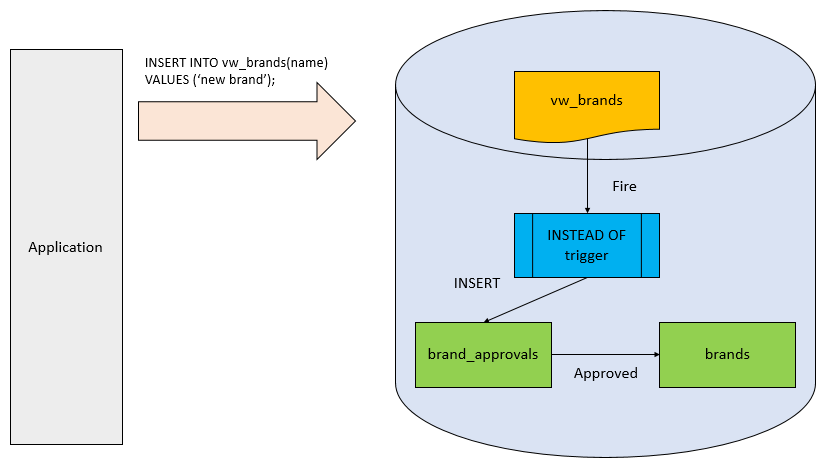
This diagram does not show the schema name of all the database objects for the sake of simplicity.
The following statement creates a new table named production.brand_approvals for storing pending approval brands:
CREATE TABLE production.brand_approvals(
brand_id INT IDENTITY PRIMARY KEY,
brand_name VARCHAR(255) NOT NULL
);
The following statement creates a new view named production.vw_brands against the production.brands and production.brand_approvals tables:
CREATE VIEW production.vw_brands
AS
SELECT
brand_name,
'Approved' approval_status
FROM
production.brands
UNION
SELECT
brand_name,
'Pending Approval' approval_status
FROM
production.brand_approvals;
Once a row is inserted into the production.vw_brands view, we need to route it to the production.brand_approvals table via the following INSTEAD OF trigger:
CREATE TRIGGER production.trg_vw_brands
ON production.vw_brands
INSTEAD OF INSERT
AS
BEGIN
SET NOCOUNT ON;
INSERT INTO production.brand_approvals (
brand_name
)
SELECT
i.brand_name
FROM
inserted i
WHERE
i.brand_name NOT IN (
SELECT
brand_name
FROM
production.brands
);
END
The trigger inserts the new brand name into the production.brand_approvals if the brand name does not exist in the production.brands.
Let’s insert a new brand into the production.vw_brands view:
INSERT INTO production.vw_brands(brand_name)
VALUES('Eddy Merckx');
This INSERT statement fired the INSTEAD OF trigger to insert a new row into the production.brand_approvals table.
If you query data from the production.vw_brands table, you will see a new row appear:
SELECT
brand_name,
approval_status
FROM
production.vw_brands;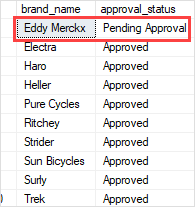
The following statement shows the contents of the production.brand_approvals table:
SELECT
*
FROM
production.brand_approvals;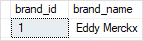
In this tutorial, you have learned about SQL Server INSTEAD OF trigger and how to create an INSTEAD OF trigger for inserting data into an underlying table via a view.
Thank you for your feedback!