Repository navigation
[add-to-app] error : Namespace not specified. Please specify a namespace in the module's build.gradle #126403

Description
Activity
It seems you are using AGP and Gradle version from 8.0 because I can see this issue when upgrading AGP to
8.0.0and Gradle to8.0. Meanwhile, the worked version is AGP7.2.0/Gradle7.3.3.This issue is reproducible on the latest
stableandmasterchannels. Labeling the issue for further insights.Sample code: namespace-gradle-issue
flutter doctor -v (stable and master)
[✓] Flutter (Channel stable, 3.7.12, on macOS 13.0.1 22A400 darwin-x64, locale en-VN) • Flutter version 3.7.12 on channel stable at /Users/huynq/Documents/GitHub/flutter • Upstream repository https://github.com/flutter/flutter.git • Framework revision 4d9e56e694 (2 days ago), 2023-04-17 21:47:46 -0400 • Engine revision 1a65d409c7 • Dart version 2.19.6 • DevTools version 2.20.1 [✓] Android toolchain - develop for Android devices (Android SDK version 32.0.0) • Android SDK at /Users/huynq/Library/Android/sdk • Platform android-33, build-tools 32.0.0 • ANDROID_HOME = /Users/huynq/Library/Android/sdk • Java binary at: /Applications/Android Studio.app/Contents/jbr/Contents/Home/bin/java • Java version OpenJDK Runtime Environment (build 11.0.15+0-b2043.56-8887301) • All Android licenses accepted. [✓] Xcode - develop for iOS and macOS (Xcode 14.3) • Xcode at /Applications/Xcode.app/Contents/Developer • Build 14E222b • CocoaPods version 1.11.3 [✓] Chrome - develop for the web • Chrome at /Applications/Google Chrome.app/Contents/MacOS/Google Chrome [✓] Android Studio (version 2022.1) • Android Studio at /Applications/Android Studio.app/Contents • Flutter plugin can be installed from: 🔨 https://plugins.jetbrains.com/plugin/9212-flutter • Dart plugin can be installed from: 🔨 https://plugins.jetbrains.com/plugin/6351-dart • Java version OpenJDK Runtime Environment (build 11.0.15+0-b2043.56-8887301) [✓] IntelliJ IDEA Community Edition (version 2022.1.1) • IntelliJ at /Users/huynq/Library/Application Support/JetBrains/Toolbox/apps/IDEA-C/ch-0/221.5591.52/IntelliJ IDEA CE.app • Flutter plugin can be installed from: 🔨 https://plugins.jetbrains.com/plugin/9212-flutter • Dart plugin can be installed from: 🔨 https://plugins.jetbrains.com/plugin/6351-dart [✓] VS Code (version 1.77.3) • VS Code at /Applications/Visual Studio Code.app/Contents • Flutter extension version 3.62.0 [✓] Connected device (3 available) • SM T225 (mobile) • R9JT3004VRJ • android-arm64 • Android 13 (API 33) • macOS (desktop) • macos • darwin-x64 • macOS 13.0.1 22A400 darwin-x64 • Chrome (web) • chrome • web-javascript • Google Chrome 112.0.5615.137 [✓] HTTP Host Availability • All required HTTP hosts are available • No issues found![!] Flutter (Channel master, 3.11.0-2.0.pre.73, on macOS 13.0.1 22A400 darwin-x64, locale en-VN) • Flutter version 3.11.0-2.0.pre.73 on channel master at /Users/huynq/Documents/GitHub/flutter_master ! Warning: `flutter` on your path resolves to /Users/huynq/Documents/GitHub/flutter/bin/flutter, which is not inside your current Flutter SDK checkout at /Users/huynq/Documents/GitHub/flutter_master. Consider adding /Users/huynq/Documents/GitHub/flutter_master/bin to the front of your path. ! Warning: `dart` on your path resolves to /Users/huynq/Documents/GitHub/flutter/bin/dart, which is not inside your current Flutter SDK checkout at /Users/huynq/Documents/GitHub/flutter_master. Consider adding /Users/huynq/Documents/GitHub/flutter_master/bin to the front of your path. • Upstream repository https://github.com/flutter/flutter.git • Framework revision 8c5a1ea728 (7 hours ago), 2023-05-08 14:00:20 -0700 • Engine revision 8d3a8162b3 • Dart version 3.1.0 (build 3.1.0-86.0.dev) • DevTools version 2.23.1 • If those were intentional, you can disregard the above warnings; however it is recommended to use "git" directly to perform update checks and upgrades. [✓] Android toolchain - develop for Android devices (Android SDK version 32.0.0) • Android SDK at /Users/huynq/Library/Android/sdk • Platform android-33, build-tools 32.0.0 • ANDROID_HOME = /Users/huynq/Library/Android/sdk • Java binary at: /Applications/Android Studio.app/Contents/jbr/Contents/Home/bin/java • Java version OpenJDK Runtime Environment (build 17.0.6+0-17.0.6b802.4-9586694) • All Android licenses accepted. [✓] Xcode - develop for iOS and macOS (Xcode 14.3) • Xcode at /Applications/Xcode.app/Contents/Developer • Build 14E222b • CocoaPods version 1.11.3 [✓] Chrome - develop for the web • Chrome at /Applications/Google Chrome.app/Contents/MacOS/Google Chrome [✓] Android Studio (version 2022.2) • Android Studio at /Applications/Android Studio.app/Contents • Flutter plugin can be installed from: 🔨 https://plugins.jetbrains.com/plugin/9212-flutter • Dart plugin can be installed from: 🔨 https://plugins.jetbrains.com/plugin/6351-dart • Java version OpenJDK Runtime Environment (build 17.0.6+0-17.0.6b802.4-9586694) [✓] VS Code (version 1.78.0) • VS Code at /Applications/Visual Studio Code.app/Contents • Flutter extension version 3.62.0 [✓] Connected device (2 available) • macOS (desktop) • macos • darwin-x64 • macOS 13.0.1 22A400 darwin-x64 • Chrome (web) • chrome • web-javascript • Google Chrome 112.0.5615.137 [✓] Network resources • All expected network resources are available. ! Doctor found issues in 1 category.
Reacted by Dave Sellars and Ezzeddin Essam- added and removed
on May 10, 2023 22 remaining items
- added a commit that references this issue
on Jun 6, 2023 Sorry for commenting on a closed issue, but this still seems not included in stable version.

The changelog for Flutter 3.10.4 mentions this as an included hotfix, but the error stated above still applies on this version, even when deleting manually the .android folder and running pub get again.
Reacted by lekim, vdmytrovskyi-hpe, Jamil Shamy and Michael PiercySorry for commenting on a closed issue, but this still seems not included in stable version.
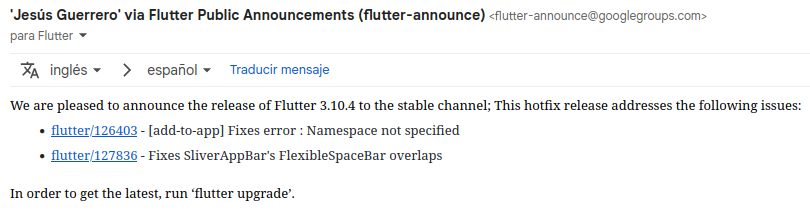
The changelog for Flutter 3.10.4 mentions this as an included hotfix, but the error stated above still applies on this version, even when deleting manually the .android folder and running pub get again.
I believe this is true and the fix is not part of Flutter 3.10.4. Sorry about the confusion!
I was able to reproduce the issue and thanks to the reproduction example above and @reidbaker's suggestion to try the AGP upgrade assistant in Android Studio. I can confirm we need to add namespace to all of the
build.gradlefiles in the module and in thebuild.gradlefile for the app itself.I'm battling with this, I have a Flutter app. The upgrade agent / scripts removed the namespace from the manifest and added it to the app's
build.gradle. The "namespace" is also present in the samebuild.gradleunder the android > defaultConfig > applicationId. What module are we talking about? My app is not complicated but I count 18 modules, which are effectively Flutter plugins I depend on which that native Android parts. I'm afraid to ask (or even think about it) but am I supposed to interfere and fiddle with those 18 build.gradle files of those plugins to make this error go away?All of the StackOverflow entries I found so far are garbage, I suspected my case would be quite common. People advise to simply remove the namespace (going against the error message) and similar things.
I'm battling with this, I have a Flutter app. The upgrade agent / scripts removed the namespace from the manifest and added it to the app's
build.gradle. The "namespace" is also present in the samebuild.gradleunder the android > defaultConfig > applicationId. What module are we talking about? My app is not complicated but I count 18 modules, which are effectively Flutter plugins I depend on which that native Android parts. I'm afraid to ask (or even think about it) but am I supposed to interfere and fiddle with those 18 build.gradle files of those plugins to make this error go away?All of the StackOverflow entries I found so far are garbage, I suspected my case would be quite common. People advise to simply remove the namespace (going against the error message) and similar things.
In Flutter modules, you need to ensure that
.andriod/build.gradle,.android/app/build.gradle, and.android/Flutter/build.gradlefiles have thenamespaceproperty in theandroidblock to get rid of the error. I'm not sure if your Flutter plugins are part of the issue. Plugin templates should have received a similar fix in #126354 as plugins also need the property in theandroidblock in theirbuild.gradlefile for AGP 8 compatibility.In Flutter modules, you need to ensure that
.andriod/build.gradle,.android/app/build.gradle, and.android/Flutter/build.gradlefiles have thenamespaceproperty in theandroidblock to get rid of the error. I'm not sure if your Flutter plugins are part of the issue. Plugin templates should have received a similar fix in #126354 as plugins also need the property in theandroidblock in theirbuild.gradlefile for AGP 8 compatibility.Maybe this is off-topic because I landed here mostly as an app developer. I don't have a
.android/Flutter/build.gradlefile. namespace in.andriod/build.gradleis relevant for plugins only I think, so whoever is an app developer (not plugin), the.android/app/build.gradlewill be the valid place for namespace and the AGP update scripts already supplement that.In my case when the error complains about modules it is about some subset of plugins which lack the namespace. The main issue could be that looking at the error from a mile in Android Studio it is generic and does not tell if it's about the app itself or a plugin, and which plugin exactly. Only when looking at details turns out that it's about some plugins.
Community plugins and SDK plugins have now conditional namespace in the
build.gradle(in the form ofif (project.android.hasProperty("namespace")) { namespace ... }) however some of these might not be available if the plugin is prevented to be at the required version due to other plugins' transitive dependencies holding them back (such as constraint about thehttppackage being 0.13 vs 1.0, package_info_plus, device_info_plus).App developers might land here. Newer Android studio will advise them of the AGP 8.0+ upgrade. Once they go through with it some lagging plugins which drag their feet could hold their whole project back. This ("outside" lagging plugins) is out of jurisdiction of the SDK and the community plugins repositories, but I just document this here because it could be an issue overall.
Just a few examples:
Reacted by Camille Simon@MrCsabaToth Thank you for in-depth explanation! You make a great point about developers discovering this issue in ways not directly related to using Flutter in an add-to-app context.
If you would be open to it, we would be greatly appreciative for you to answer questions about this with essentially your explanation above if you run into them so that developers can see the solution more clearly. For example:
@camsim99 i was checkout master branch and still got the same error
This is a fix for the
build.gradletemplates. You may need to re-create your Flutter modules if you still see the issue. If you are not using Flutter in an add-to-app context, see @MrCsabaToth's explanation above!This thread has been automatically locked since there has not been any recent activity after it was closed. If you are still experiencing a similar issue, please open a new bug, including the output of
flutter doctor -vand a minimal reproduction of the issue.- locked as resolved and limited conversation to collaborators
on Jun 30, 2023


Is there an existing issue for this?
Steps to reproduce
Create a new android app and add a new flutter module to it using steps in option 2 : https://docs.flutter.dev/add-to-app/android/project-setup
run 'flutter pub get' in module to build .android folder
sync project in android studio
Expected results
build is successful
Actual results
app fails to build.
Android studio is looking for 'namespace' setting in .android/build.gradle. adding a value manually makes the app build but this is a generated .android folder so any further runs of 'flutter pub get' to update dependencies remove any edits.
Error happens with 3.7.12-stable and 3.10.0-1.5.pre-beta
error output:
Screenshots or Video
Screenshots / Video demonstration
[Upload media here]
Logs
Logs
[Paste your logs here]Flutter Doctor output
Doctor output