Repository navigation
Fix text selection toolbar appearing under obstructions - #29809
Conversation


|
Thanks for your pull request. It looks like this may be your first contribution to a Google open source project (if not, look below for help). Before we can look at your pull request, you'll need to sign a Contributor License Agreement (CLA). 📝 Please visit https://cla.developers.google.com/ to sign. Once you've signed (or fixed any issues), please reply here (e.g. What to do if you already signed the CLAIndividual signers
Corporate signers
ℹ️ Googlers: Go here for more info. |


 goderbauer
added
framework
goderbauer
added
framework


|
@justinmc could you take a first pass at this? |

 justinmc
left a comment
justinmc
left a comment
justinmc
left a comment
There was a problem hiding this comment.
For this strategy, it looks good overall and my only comments are just a small few code quality things.
We do need to decide if this is the right overall approach for this problem though. I meant to try running this code myself, but I'm on airport internet and I think it's blocking Flutter from updating itself. Assuming it works in all cases though, the code is pretty simple and unintrusive. My main concern is that Tooltip does something similar and there is currently no code reuse between that solution and this one. I'm talking about _TooltipPositionDelegate and positionDependentBox.
Hoping to start a discussion and see what other people think.

|
CLAs look good, thanks! ℹ️ Googlers: Go here for more info. |

|
@jiisd Check out the failures under the "analyze" check when you get a chance. There are some small linter failures to fix. |

🙂 already fixed. |
|
Thank you! One more thing that I forgot to mention, sorry. This will definitely need tests. There are similar tests for the selection menu in https://github.com/flutter/flutter/blob/master/packages/flutter/test/material/text_field_test.dart#L887. You can reuse some of that code to get the selection menu to appear in your test. Then get its location with something like |

|
CC @xster @LongCatIsLooong we should check the native iOS behavior, and then pull down this branch and compare. |
Thanks for your reminder! The corresponding regression test logic has been added(this commit).
|
|
@jiisd The test looks good, thanks. I confirmed that it fails without this fix. How do you feel about increasing the distance from the input to the menu in Android so that the selection handles are visible? It looks like native Android positions the menu so that the handles are visible. Android (native): iOS looks fine I think, except problems unrelated to this PR like the position of the arrow. iOS (native): iOS (Flutter, this branch): |


|
@justinmc Yep, on android, I think your idea of increasing distance is very appropriate and can make the user experience better. |
|
Thanks. This is the issue about the arrow position FYI: #22576 |
|
The iOS arrow can be done in a separate PR (if you'd like to keep sending us PR :D) It's tracked in #11274 |

 xster
left a comment
xster
left a comment
xster
left a comment
There was a problem hiding this comment.
Thanks so much for your contribution. Some comments.
xster
left a comment
xster
left a comment
There was a problem hiding this comment.
Thanks so much for your patience! This PR looks great now.
The test seems unrelated. Can you rebase your branch to the head of master and push again? It's probably something else on the master branch where you branched from.
Please draft a message for the community regarding the breaking change of adding another parameter to buildToolbar based on https://github.com/flutter/flutter/wiki/Tree-hygiene#handling-breaking-changes.
You may not have permission to send an announcement to flutter-announce. In that case, you can just write the message in markdown and post it in this github PR thread and I'll forward it.
|
@xster Thanks! [Breaking Change] The public interface of the abstract class TextSelectionControlsDescriptionWhen repairing the problem of #29808, it found that the interface is no longer sufficient. In order to get a more accurate anchor point for the toolbar, some parameters are added to the relevant interface. You can get more details form #29809. The path of the change class Previous interface definition: /// Builds a toolbar near a text selection.
///
/// Typically displays buttons for copying and pasting text.
Widget buildToolbar(BuildContext context, Rect globalEditableRegion, Offset position, TextSelectionDelegate delegate);
Current interface definition: /// Builds a toolbar near a text selection.
///
/// Typically displays buttons for copying and pasting text.
///
/// [globalEditableRegion] is the TextField size of the global coordinate system
/// in logical pixels.
///
/// The [position] is a general calculation midpoint parameter of the toolbar.
/// If you want more detailed position information, can use [endpoints]
/// to calculate it.
Widget buildToolbar(
BuildContext context,
Rect globalEditableRegion,
Offset position,
List<TextSelectionPoint> endpoints,
TextSelectionDelegate delegate,
);How to updateIf you have already used this interface, you should update it to the latest version and add the |
|
@xster Any idea on the test failure? It seems unrelated. Something about gradle. |
xster
changed the title
|
The failure went green after a rerun. I think this is ready to merge. |
|
Yup, LGTM I copy edited the message a bit. @jiisd if you're ok with the edit, I'll send it out and give the community a day to give feedback. Thanks again for the fix. [Breaking Change] TextSelectionControls.buildToolbar signature adds another 'endpoint' argumentIf you don't implement your own TextSelectionControls subclass, you can stop reading. DescriptionWhile fixing the problem of #29808, it was found that the In lib/src/widgets/text_selection.dart: Previous interface definition /// Builds a toolbar near a text selection.
///
/// Typically displays buttons for copying and pasting text.
Widget buildToolbar(
BuildContext context,
Rect globalEditableRegion,
Offset position,
TextSelectionDelegate delegate,
);becomes /// Builds a toolbar near a text selection.
///
/// Typically displays buttons for copying and pasting text.
///
/// [globalEditableRegion] is the TextField size of the global coordinate system
/// in logical pixels.
///
/// The [position] is a general calculation midpoint parameter of the toolbar.
/// If you want more detailed position information, can use [endpoints]
/// to calculate it.
Widget buildToolbar(
BuildContext context,
Rect globalEditableRegion,
Offset position,
List<TextSelectionPoint> endpoints,
TextSelectionDelegate delegate,
);Specifically How to updateIf you currently implement this interface, you should update its signature to the latest version and add the |
|
@xster Awesome thanks! |
|
Actually on second thought, I sent you an invite to join our flutter-announce google group (to your 163.com). You can send the breaking change announcement yourself once you accept the invitation. |
|
@xster The email from 163.com was rejected. Can you invite another account(gmail.com)? |
|
Thanks, sent |
|
Still failing, is the target email address of [email protected] incorrectly? |
|
Sorry, one of the permission settings wasn't set correctly. Your gmail address should have posting rights now. |
|
It works! |

|
Since we’re breaking the API, is it better to make parameters into a Details object (as in here) so that we can add more information in the future without breaking the code again and without having too many parameters? |
|
I think it's mostly ok. The gesture events is a highly public API used by callback implementers everywhere. Since we might change the arguments in any signature in the future, the argument can be generally applied to all functions having a single data class as argument so it's non-breaking-modifiable :D So we'd have to draw the line somewhere and for subclass overrides, I think it's ok. |

|
Thanks so much for fixing this @jiisd! |


|
we use Flutter 1.7.8+hotfix.4, still have this issue. |

|
@FrankYan09 could you create a new issue here https://github.com/flutter/flutter/issues/new/choose, preferably with screenshots and code to reproduce the issue so we would be able to identify the problem quickly? |

10 participants


Fixed an issue described in this link
#29808
Description
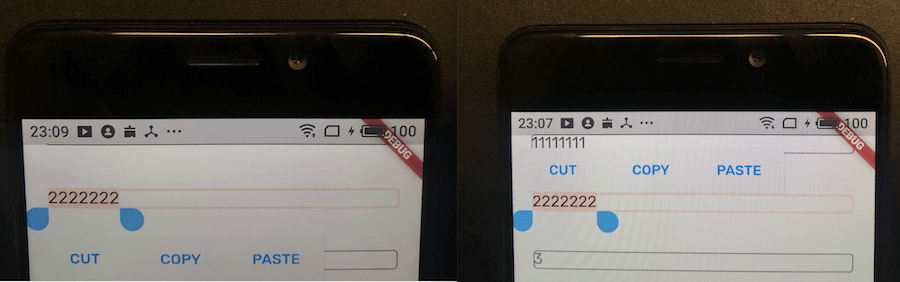
If the distance from the top is less than a certain value, the toolbar should be displayed below the input box.
If don't do this, the toolbar will be displayed incorrectly on top of some phones and cannot be clicked, such as iPhone X or some Android models.
iPhone 6SP (Flutter, this branch):

iPhone XR (Flutter, this branch):

Android (Flutter, this branch):