Repository navigation
Swift as external storage fails in Nextcloud 12 #5882
Description
Activity
Failing for me too :
Fresh install, external storage created with GUI app.

and the folder is well created :

What I get in the logs :
{"reqId":"Lc6pRUj1oz1cRFEHpeOS","level":3,"time":"August 01, 2017 16:22:55","remoteAddr":"192.168.0.10","user":"ncadmin","app":"PHP","method":"PUT","url":"\/nextcloud\/remote.php\/webdav\/Photos\/lZimZGwDXKz2.jpg","message":"Undefined index: \/tmp\/oc_tmp_xCKSfT-.part at \/var\/www\/nextcloud\/apps\/files_external\/lib\/Lib\/Storage\/Swift.php#620","userAgent":"Mozilla\/5.0 (Windows NT 6.1; WOW64; rv:54.0) Gecko\/20100101 Firefox\/54.0","version":"12.0.0.29"} {"reqId":"Lc6pRUj1oz1cRFEHpeOS","level":3,"time":"August 01, 2017 16:22:55","remoteAddr":"192.168.0.10","user":"ncadmin","app":"webdav","method":"PUT","url":"\/nextcloud\/remote.php\/webdav\/Photos\/lZimZGwDXKz2.jpg","message":"renaming part file to final file failed","userAgent":"Mozilla\/5.0 (Windows NT 6.1; WOW64; rv:54.0) Gecko\/20100101 Firefox\/54.0","version":"12.0.0.29"} {"reqId":"Lc6pRUj1oz1cRFEHpeOS","level":4,"time":"August 01, 2017 16:22:56","remoteAddr":"192.168.0.10","user":"ncadmin","app":"webdav","method":"PUT","url":"\/nextcloud\/remote.php\/webdav\/Photos\/lZimZGwDXKz2.jpg","message":"Exception: {\"Message\":\"HTTP\\\/1.1 500 Could not rename part file to final file\",\"Exception\":\"Sabre\\\\DAV\\\\Exception\",\"Code\":0,\"Trace\":\"#0 \\\/var\\\/www\\\/nextcloud\\\/apps\\\/dav\\\/lib\\\/Connector\\\/Sabre\\\/Directory.php(151): OCA\\\\DAV\\\\Connector\\\\Sabre\\\\File->put(Resource id #22)\\n#1 \\\/var\\\/www\\\/nextcloud\\\/3rdparty\\\/sabre\\\/dav\\\/lib\\\/DAV\\\/Server.php(1095): OCA\\\\DAV\\\\Connector\\\\Sabre\\\\Directory->createFile('lZimZGwDXKz2.jp...', Resource id #22)\\n#2 \\\/var\\\/www\\\/nextcloud\\\/3rdparty\\\/sabre\\\/dav\\\/lib\\\/DAV\\\/CorePlugin.php(525): Sabre\\\\DAV\\\\Server->createFile('Photos\\\/lZimZGwD...', Resource id #22, NULL)\\n#3 [internal function]: Sabre\\\\DAV\\\\CorePlugin->httpPut(Object(Sabre\\\\HTTP\\\\Request), Object(Sabre\\\\HTTP\\\\Response))\\n#4 \\\/var\\\/www\\\/nextcloud\\\/3rdparty\\\/sabre\\\/event\\\/lib\\\/EventEmitterTrait.php(105): call_user_func_array(Array, Array)\\n#5 \\\/var\\\/www\\\/nextcloud\\\/3rdparty\\\/sabre\\\/dav\\\/lib\\\/DAV\\\/Server.php(479): Sabre\\\\Event\\\\EventEmitter->emit('method:PUT', Array)\\n#6 \\\/var\\\/www\\\/nextcloud\\\/3rdparty\\\/sabre\\\/dav\\\/lib\\\/DAV\\\/Server.php(254): Sabre\\\\DAV\\\\Server->invokeMethod(Object(Sabre\\\\HTTP\\\\Request), Object(Sabre\\\\HTTP\\\\Response))\\n#7 \\\/var\\\/www\\\/nextcloud\\\/apps\\\/dav\\\/appinfo\\\/v1\\\/webdav.php(71): Sabre\\\\DAV\\\\Server->exec()\\n#8 \\\/var\\\/www\\\/nextcloud\\\/remote.php(162): require_once('\\\/var\\\/www\\\/nextcl...')\\n#9 {main}\",\"File\":\"\\\/var\\\/www\\\/nextcloud\\\/apps\\\/dav\\\/lib\\\/Connector\\\/Sabre\\\/File.php\",\"Line\":188,\"User\":\"ncadmin\"}","userAgent":"Mozilla\/5.0 (Windows NT 6.1; WOW64; rv:54.0) Gecko\/20100101 Firefox\/54.0","version":"12.0.0.29"}Nextcloud version 12.0.0 installed via https://cloud.techandme.se/index.php/s/whxC00V1I0l4CY8
Hi,
I got the same bug as described in 1st post.Steps to reproduce
- Install Nextcloud 12.0.0
- Enable External Storage Support app
- Configure Swift as external storage, verify operation (green icon, read access works fine)
- Upload a file to external storage
Expected behaviour
The upload should succeed.
Actual behaviour
"Internal server error" is shown in browser
"server replied: Internal Server Error (Could not rename part file to final file)" is shown in desktop client"Server configuration
Operating system: Debian 9.1
Web server: Apache 2.4.25-3+deb9u2
Database: PostgreSQL
PHP version: 7.0+49
Nextcloud version: 12.0.0
Updated from an older Nextcloud/ownCloud or fresh install: fresh install
Where did you install Nextcloud from: tarball
Signing status:
Signing status
No errors have been found.List of activated apps:
App list
Enabled:
  - activity: 2.5.2
  - audioplayer: 2.0.2
  - bruteforcesettings: 1.0.2
  - calendar: 1.5.3
  - comments: 1.2.0
  - contacts: 1.5.3
  - dav: 1.3.0
  - federatedfilesharing: 1.2.0
  - federation: 1.2.0
  - files: 1.7.2
  - files_external: 1.3.0
  - files_pdfviewer: 1.1.1
  - files_sharing: 1.4.0
  - files_texteditor: 2.4.1
  - files_trashbin: 1.2.0
  - files_versions: 1.5.0
  - files_videoplayer: 1.1.0
  - firstrunwizard: 2.1
  - gallery: 17.0.0
  - logreader: 2.0.0
  - lookup_server_connector: 1.0.0
  - mail: 0.6.4
  - nextcloud_announcements: 1.1
  - notifications: 2.0.0
  - oauth2: 1.0.5
  - password_policy: 1.2.2
  - provisioning_api: 1.2.0
  - serverinfo: 1.2.0
  - sharebymail: 1.2.0
  - survey_client: 1.0.0
  - systemtags: 1.2.0
  - theming: 1.3.0
  - twofactor_backupcodes: 1.1.1
  - updatenotification: 1.2.0
  - workflowengine: 1.2.0
Disabled:
  - admin_audit
  - encryption
  - user_external
  - user_ldap
Nextcloud configuration:
Config report
{
    "system": {
        "instanceid": "ocm0zd33kmft",
        "passwordsalt": "***REMOVED SENSITIVE VALUE***",
        "secret": "***REMOVED SENSITIVE VALUE***",
        "trusted_domains": [
            "cloud.mirtouf.fr"
        ],
        "datadirectory": "\/var\/www\/nextcloud\/data",
        "overwrite.cli.url": "https:\/\/cloud.mirtouf.fr\/nextcloud",
        "memcache.local": "\\OC\\Memcache\\APCu",
        "filelocking.enabled": "true",
        "memcache.locking": "\\OC\\Memcache\\Redis",
        "redis": {
            "host": "127.0.0.1",
            "port": 6379,
            "timeout": 0
        },
        "dbtype": "pgsql",
        "version": "12.0.0.29",
        "dbname": "nextcloud",
        "dbhost": "localhost",
        "dbport": "",
        "dbtableprefix": "oc_",
        "dbuser": "***REMOVED SENSITIVE VALUE***",
        "dbpassword": "***REMOVED SENSITIVE VALUE***",
        "installed": true,
        "mail_smtpmode": "smtp",
        "mail_smtpauthtype": "PLAIN",
        "mail_from_address": "noreply",
        "mail_domain": "mirtouf.fr",
        "mail_smtpsecure": "tls",
        "mail_smtpauth": 1,
        "mail_smtphost": "mail.mirtouf.fr",
        "mail_smtpport": "587",
        "mail_smtpname": "***REMOVED SENSITIVE VALUE***",
        "mail_smtppassword": "***REMOVED SENSITIVE VALUE***",
        "updater.release.channel": "stable",
        "app.mail.imaplog.enabled": true,
        "app.mail.smtplog.enabled": true,
        "app.mail.imap.timeout": 20,
        "app.mail.smtp.timeout": 20
    }
}
Are you using external storage, if yes which one: OpenStack Swift (OVH)
Are you using encryption: no
Are you using an external user-backend, if yes which one: none
Client configuration
Browser: Firefox (v54.0.1) and Chrome (60.0.3112.78)
Operating system: multiple OSes
Logs
Web server error log
Web server error log
1.1.1.1 - - [01/Aug/2017:22:01:06 +0200] "PUT /nextcloud/remote.php/webdav/SBG1-1/PC/dvb-usb-af9015.fw HTTP/2.0" 500 223 "-" "Mozilla/5.0 (X11; Linux x86_64; rv:54.0) Gecko/20100101 Firefox/54.0"Nextcloud log (data/nextcloud.log)
Nextcloud log
{"reqId":"nORIsvZ3cn6AlYcaS1F2","level":3,"time":"2017-08-01T20:01:09+00:00","remoteAddr":"1.1.1.1","user":"mirtouf","app":"PHP","method":"PUT","url":"\/nextcloud\/remote.php\/webdav\/SBG1-1\/PC\/dvb-usb-af9015.fw","message":"Undefined index: \/tmp\/oc_tmp_5CgywV-.part at \/var\/www\/nextcloud\/apps\/files_external\/lib\/Lib\/Storage\/Swift.php#620","userAgent":"Mozilla\/5.0 (X11; Linux x86_64; rv:54.0) Gecko\/20100101 Firefox\/54.0","version":"12.0.0.29"}
{"reqId":"nORIsvZ3cn6AlYcaS1F2","level":3,"time":"2017-08-01T20:01:09+00:00","remoteAddr":"1.1.1.1","user":"mirtouf","app":"webdav","method":"PUT","url":"\/nextcloud\/remote.php\/webdav\/SBG1-1\/PC\/dvb-usb-af9015.fw","message":"renaming part file to final file failed","userAgent":"Mozilla\/5.0 (X11; Linux x86_64; rv:54.0) Gecko\/20100101 Firefox\/54.0","version":"12.0.0.29"}
{"reqId":"nORIsvZ3cn6AlYcaS1F2","level":4,"time":"2017-08-01T20:01:09+00:00","remoteAddr":"1.1.1.1","user":"mirtouf","app":"webdav","method":"PUT","url":"\/nextcloud\/remote.php\/webdav\/SBG1-1\/PC\/dvb-usb-af9015.fw","message":"Exception: {\"Message\":\"HTTP\\\/1.1 500 Could not rename part file to final file\",\"Exception\":\"Sabre\\\\DAV\\\\Exception\",\"Code\":0,\"Trace\":\"#0 \\\/var\\\/www\\\/nextcloud\\\/apps\\\/dav\\\/lib\\\/Connector\\\/Sabre\\\/Directory.php(151): OCA\\\\DAV\\\\Connector\\\\Sabre\\\\File->put(Resource id #21)\\n#1 \\\/var\\\/www\\\/nextcloud\\\/3rdparty\\\/sabre\\\/dav\\\/lib\\\/DAV\\\/Server.php(1095): OCA\\\\DAV\\\\Connector\\\\Sabre\\\\Directory->createFile('dvb-usb-af9015....', Resource id #21)\\n#2 \\\/var\\\/www\\\/nextcloud\\\/3rdparty\\\/sabre\\\/dav\\\/lib\\\/DAV\\\/CorePlugin.php(525): Sabre\\\\DAV\\\\Server->createFile('SBG1-1\\\/PC\\\/dvb-u...', Resource id #21, NULL)\\n#3 [internal function]: Sabre\\\\DAV\\\\CorePlugin->httpPut(Object(Sabre\\\\HTTP\\\\Request), Object(Sabre\\\\HTTP\\\\Response))\\n#4 \\\/var\\\/www\\\/nextcloud\\\/3rdparty\\\/sabre\\\/event\\\/lib\\\/EventEmitterTrait.php(105): call_user_func_array(Array, Array)\\n#5 \\\/var\\\/www\\\/nextcloud\\\/3rdparty\\\/sabre\\\/dav\\\/lib\\\/DAV\\\/Server.php(479): Sabre\\\\Event\\\\EventEmitter->emit('method:PUT', Array)\\n#6 \\\/var\\\/www\\\/nextcloud\\\/3rdparty\\\/sabre\\\/dav\\\/lib\\\/DAV\\\/Server.php(254): Sabre\\\\DAV\\\\Server->invokeMethod(Object(Sabre\\\\HTTP\\\\Request), Object(Sabre\\\\HTTP\\\\Response))\\n#7 \\\/var\\\/www\\\/nextcloud\\\/apps\\\/dav\\\/appinfo\\\/v1\\\/webdav.php(71): Sabre\\\\DAV\\\\Server->exec()\\n#8 \\\/var\\\/www\\\/nextcloud\\\/remote.php(162): require_once('\\\/var\\\/www\\\/nextcl...')\\n#9 {main}\",\"File\":\"\\\/var\\\/www\\\/nextcloud\\\/apps\\\/dav\\\/lib\\\/Connector\\\/Sabre\\\/File.php\",\"Line\":188,\"User\":\"mirtouf\"}","userAgent":"Mozilla\/5.0 (X11; Linux x86_64; rv:54.0) Gecko\/20100101 Firefox\/54.0","version":"12.0.0.29"}
Browser log
Browser log
Error 500 <?xml version="1.0" encoding="utf-8"?> <d:error xmlns:d="DAV:" xmlns:s="http://sabredav.org/ns"> <s:exception>Sabre\DAV\Exception</s:exception> <s:message>Could not rename part file to final file</s:message> </d:error>We have just noticed that when individual users mount Swift as external storage, it does work. So if as an admin, I allow users to mount Swift as external storage, and they do so, it will work for them.
But if as an admin I mount Swift myself, all users see it, but it does not work.
cc @icewind1991
The first issue described in this bug report is fixed through PR #6101 (don't know if it will be merged in release 12.0.3) but concerning the issue described by @jmdeboer-surfsara about the rights for mounting external storages I cannot tell.
Hello,
The first issue does not seem to be solved.
Swift as an external storage fails (red square on the left of the external apps UI) without providing logs.Several reports seem to show it:
https://help.nextcloud.com/t/swift-as-external-storage-problems-apps-files-external/21614
https://help.nextcloud.com/t/debug-openstack-external-storage-error/24703/2Thank you
I am using NC stable v13 on an up-to-date Debian 9 and I can confirm OVH S3 storage is working perfectly (modulo OVH random crashes).
Hi @mirtouf ,
Could you share a screenshot of your external storage conf?
If it is your primary storage, could you share your config.php 'objectstore'?Thank you
Hi,
afaik, using S3 as a primary storage is not enough reliable.
Concerning the mount options I filled in NC interface, here they are:

All settings are downloaded through OVH panel (Cloud-->Servers-->Openstack).Thank you for the info @mirtouf
I am trying to understand what I did wrong here.
Is the info I get from OVH OK?

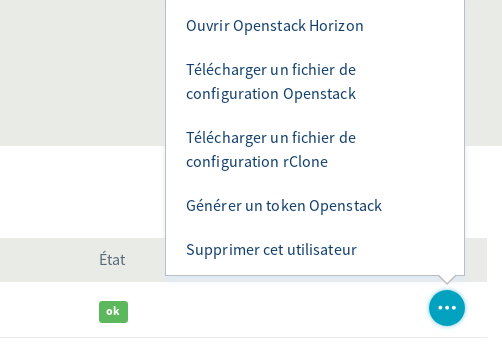
Download the Openstack configuration file, all informations are inside except the password.Reacted by Rémi Debette1 remaining item
@icewind1991 @rullzer We did quite some changes in the more recent 12 and 13 releases. Could this one be solved as well? I guess trying those releases might be helpful.
Also in the upcoming Nextcloud 14 we improved massively the swift support (especially v3):
Just to reference some of the issues/PRs:
- Support of Swift V3 Auth aka Identity v3 API for Swift Object Storage #1504
- update guzzlehttp/guzzle to 6.3.0 #8259
- update openstack sdk #8314
- Support swift v3 authentication #8359
- Swift v3 requires setting a scope #9280
- Better swift V3 token handling #9322
- Log mount and storage issues in getFileInfo #9364
Let's close this for now.
Swiftv3 should work as primary storage, but might need more work as external storage. Help is of course welcome and if you need this in your company, best contact support at our portal: portal.nextcloud.com (you should have received credentials with your customer onboarding email).
Both External and primary storage work fine now for the OVH cloud hosting provider.
For the record I opened a new issue about Openstack swift as a primary storage: 10737.
Looking forward to try Nextcloud 14!@remidebette could you share the ENV Variable names that u used in the form i can't figure it out for v3 and nextcloud 15
Hi @frank-dspeed , my configuration has been working on swift v2 since Nextcloud 12.
My Nextcloud instance is currently up to date (15.0.7), I just tried to port it to swift v3 which is supported by OVH. It did not work.@jospoortvliet could you help us figure out what I do wrong?
(note: I executedocc maintenance:repairafter the switch in case some data is cached)What I did is the following:
Use my existing bucket and user in OVH and downloaded their "OpenStack RC" file, it looks like this#!/bin/bash # To use an Openstack cloud you need to authenticate against keystone, which # returns a **Token** and **Service Catalog**. The catalog contains the # endpoint for all services the user/tenant has access to - including nova, # glance, keystone, swift. # export OS_AUTH_URL=https://auth.cloud.ovh.net/v3/ export OS_IDENTITY_API_VERSION=3 export OS_USER_DOMAIN_NAME=${OS_USER_DOMAIN_NAME:-"Default"} export OS_PROJECT_DOMAIN_NAME=${OS_PROJECT_DOMAIN_NAME:-"Default"} # With the addition of Keystone we have standardized on the term **tenant** # as the entity that owns the resources. export OS_TENANT_ID=<__REDACTED__> export OS_TENANT_NAME=<__REDACTED__> # In addition to the owning entity (tenant), openstack stores the entity # performing the action as the **user**. export OS_USERNAME=<__REDACTED__> # With Keystone you pass the keystone password. echo "Please enter your OpenStack Password: " read -sr OS_PASSWORD_INPUT export OS_PASSWORD=$OS_PASSWORD_INPUT # If your configuration has multiple regions, we set that information here. # OS_REGION_NAME is optional and only valid in certain environments. export OS_REGION_NAME="GRA3" # Don't leave a blank variable, unset it if it was empty if [ -z "$OS_REGION_NAME" ]; then unset OS_REGION_NAME; fi
The swift v2 configuration that has worked for me in the last year is:
<?php
$CONFIG = array (
  'objectstore' =>
  array (
    'class' => 'OC\\Files\\ObjectStore\\Swift',
    'arguments' =>
    array (
      'username' => '<OS_USERNAME from RC file>',
      'password' => '<OS_PASSWORD>',
      'container' => '<Bucket>',
      'objectPrefix' => 'oid:urn:',
      'autocreate' => true,
      'region' => 'GRA3',
      'url' => 'https://auth.cloud.ovh.net/v2.0/',
      'tenantName' => '<OS_TENANT_NAME from RC file>',
      'serviceName' => 'swift',
    ),
  ),
  'trusted_domains' =>
  array (
    0 => '<__REDACTED__>',
    1 => '<__REDACTED__>',
    2 => '<__REDACTED__>',
  ),
  'passwordsalt' => '<__REDACTED__>',
  'secret' => '<__REDACTED__>',
  'datadirectory' => '/var/www/nextcloud/data',
  'overwrite.cli.url' => '<__REDACTED__>',
  'dbtype' => 'pgsql',
  'version' => '15.0.7.0',
  'dbname' => 'nextcloud',
  'dbhost' => 'localhost',
  'dbport' => '',
  'dbtableprefix' => 'oc_',
  'dbuser' => '<__REDACTED__>',
  'dbpassword' => '<__REDACTED__>',
  'installed' => true,
  'instanceid' => '<__REDACTED__>',
  'logtimezone' => 'UTC',
  'ldapIgnoreNamingRules' => false,
  'ldapUserCleanupInterval' => '51',
  'memcache.local' => '\\OC\\Memcache\\APCu',
  'filelocking.enabled' => 'true',
  'memcache.locking' => '\\OC\\Memcache\\Redis',
  'redis' =>
  array (
    'host' => 'localhost',
    'port' => 6379,
    'timeout' => 0.0,
  ),
  'appstore.experimental.enabled' => true,
  'mail_smtpmode' => 'sendmail',
  'mail_domain' => '<__REDACTED__>',
  'mail_from_address' => 'admin',
  'updater.release.channel' => 'stable',
  'skeletondirectory' => '',
  'trashbin_retention_obligation' => 'auto',
  'enable_previews' => true,
  'loglevel' => 1,
  'ldapProviderFactory' => '\\OCA\\User_LDAP\\LDAPProviderFactory',
  'htaccess.RewriteBase' => '/',
  'maintenance' => false,
  'updater.secret' => '<__REDACTED__>',
);
The new swift v3 configuration I tried following this PR :
  'objectstore' =>
  array (
    'class' => 'OC\\Files\\ObjectStore\\Swift',
    'arguments' =>
    array (
        'user' => [
                'name' => '<OS_USERNAME from RC file>',
                'password' => '<OS_PASSWORD>',
                'domain' => [
                        'name' => 'default',
                ]
        ],
      'bucket' => '<Bucket>',
      'objectPrefix' => 'oid:urn:',
      'autocreate' => true,
      'region' => 'GRA3',
      'url' => 'https://auth.cloud.ovh.net/v3/',
      'tenantName' => '<OS_TENANT_NAME from RC file>',
      'serviceName' => 'swift',
    ),
  ),
This is the final error I get when accessing my instance:
Storage unauthorized. Scope has to be defined for V3 requests Storage is temporarily not availableI have no idea what the objectstore.user.domain.name should be in my case, removing it does not work either:
Storage is temporarily not availableReacted by ogmkp, Benjamin A, Turbomortel and Luca OrlandiHello @remidebette , I facing to the exactly same problem, migrating from V2 to V3 keystone OpenStack version (OVH object storage too). The V2 endpoint will soon be down (deprecated), did you find a way to well works with V3 ? Thanks a lot 👍
Reacted by Guillaume CompagnonHi @BloodMotion
I encountered problems as well , eventually found the solution !
1/ My config in config/config.php :
'objectstore' => [ 'class' => 'OC\\Files\\ObjectStore\\Swift', 'arguments' => [ 'autocreate' => true, 'user' => [ 'name' => 'OS_USERNAME', 'password' => '****', 'domain' => [ 'name' => 'Default', ], ], 'scope' => [ 'project' => [ 'name' => 'OS_TENANT_NAME', 'domain' => [ 'name' => 'Default', ], ], ], 'tenantName' => 'OS_TENANT_NAME', 'serviceName' => 'swift', 'region' => 'OS_REGION_NAME',
-> endpoints on Object Storage API changed recently (mine from GRA5 to GRA)
'url' => 'https://auth.cloud.ovh.net/v3', 'bucket' => 'YOUR_BUCKET_NAME', ], ],2/ I also did this modification (commenting scope code in /lib/private/Files/ObjectStore/SwiftFactory.php) :
#11264Hope it helps
Reacted by Guillaume Compagnon and KubaReacted by Rémi DebetteReacted by Benjamin A, Guillaume Compagnon and Rémi DebetteHi @Turbomortel ! Thanks a lot for that
Reacted by TurbomortelHi @Turbomortel. Thanks a lot for the solution. I hadn't tried again since last year and that does the trick with OVH.
I guess our cloud instances will not be down on the 14th of March !Fixed via #19540
@Turbomortel, @remidebette do you have the information on which filed on OVH side need to go in which field of the Nextcloud GUI ?
I appiied the modification of the patch from #19540 on my instance, but still no luck (I am on Nextcloud 17.0.6).
Here is what I am doing and I guess I am doing something wrong:Nextcloud field Value used Where is this value coming from ? Service Name OVH Can be any string as far as I understand Region DE OS_REGION_NAME Bucket Nextcloud_container Name of the Object storage container Request Timeout (seconds) 120 N/A User <not shown for security reason>OS_USERNAME Domain Default OS_USER_DOMAIN_NAME or OS_PROJECT_DOMAIN_NAME Password <not shown for security reason>Password of the OS_USERNAME Identity endpoint URL https://auth.cloud.ovh.net/v3/ OS_AUTH_URL When I found out how to make it work, I'll update the documentation (cf. nextcloud/documentation#1846)
Hi @doc75 , it has been a long time now, but my remembrance is:
Instead of relying on the OVH GUI, the first thing is to do is to download the file of OVH described in this comment: #5882 (comment)An important point is to use the OS_TENANT_NAME of OVH as stated here: #5882 (comment)
in the config.php it should be set inobjectstore.arguments.scope.project.name, for the UI I am not sure anymoreNothing worked for me for both config.php primary storage or Nextcloud UI secondary storage before I understood that.
Also, sometimes the changes were not actually applied before I restarted the server and made sure the caches were cleaned. Make sure to do that between each iteration before stating your configuration is wrong.
Does it solve you issue?
@remidebette thanks for your feedback. It helped me in finding my mistake (it was the bad Service Name indeed).
Here is the correct settings in the GUI for an external storage in OpenStack v3:
Nextcloud field Value used Where is this value coming from ? Service Name swift N/A Region DE OS_REGION_NAME found in the OpenStack RC file downloaded from User section of OVH Public Cloud interface Bucket Nextcloud_container Name of the Object storage container Request Timeout (seconds) 120 N/A User <not shown for security reason>Name of the user defined in OVH Public cloud interface Domain Default N/A Password <not shown for security reason>Password of the user defined in OVH Public cloud interface Tenant Name <not shown for security reason>OS_TENANT_NAME found in the OpenStack RC file downloaded from User section of OVH Public Cloud interface Identity endpoint URL https://auth.cloud.ovh.net/v3/ OS_AUTH_URL found in the OpenStack RC file downloaded from User section of OVH Public Cloud interface


Steps to reproduce
Expected behaviour
The upload should succeed
Actual behaviour
"Internal server error" is shown in browser
"server replied: Internal Server Error (Could not rename part file to final file)" is shown in desktop client
Server configuration
Operating system: CentOS 7.2
Web server: Apache
Database: MySQL
PHP version: 7.0.20
Nextcloud version: 12.0.1 RC2 Build:2017-07-26T01:01:43+00:00
Updated from an older Nextcloud/ownCloud or fresh install: Fresh install
Where did you install Nextcloud from: Daily build tarball
Signing status:
Signing status
List of activated apps:
App list
Nextcloud configuration:
Config report
Are you using external storage, if yes which one: Openstack Swift
Are you using encryption: no
Are you using an external user-backend, if yes which one: None
Client configuration
Browser: Firefox, but also sync client
Operating system: Multiple
Logs
Web server error log
Web server error log
Nextcloud log (data/nextcloud.log)
Nextcloud log