The GROUP BY clause allows you to arrange the rows of a query in groups. The groups are determined by the columns that you specify in the GROUP BY clause.
The following illustrates the GROUP BY clause syntax:
SELECT
select_list
FROM
table_name
GROUPBY
column_name1,
column_name2 ,...;
In this query, the GROUP BY clause produces a group for each combination of the values in the columns listed in the GROUP BY clause.
Consider the following example:
SELECT
customer_id,
YEAR (order_date) order_year
FROM
sales.orders
WHERE
customer_id IN (1, 2)
ORDERBY
customer_id;
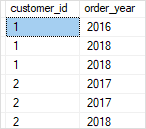
In this example, we retrieve the customer id and the ordered year of the customers with customer id 1 and 2.
The output indicates that the customer with id 1 placed one order in 2016 and two orders in 2018. The customer id 2 placed two orders in 2017 and one order in 2018.
Let’s add a GROUP BY clause to the query to see the effect:
SELECT
customer_id,
YEAR (order_date) order_year
FROM
sales.orders
WHERE
customer_id IN (1, 2)
GROUPBY
customer_id,
YEAR (order_date)
ORDERBY
customer_id;
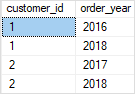
The GROUP BY clause arranged the first three rows into two groups and the next three rows into the other two groups with the unique combinations of the customer id and order year.
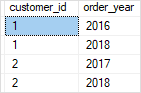
Functionally speaking, the GROUP BY clause in the above query produced the same result as the following query that uses the DISTINCT clause:
SELECTDISTINCT
customer_id,
YEAR (order_date) order_year
FROM
sales.orders
WHERE
customer_id IN (1, 2)
ORDERBY
customer_id;
SQL Server GROUP BY clause and aggregate functions #
In practice, the GROUP BY clause is often used with aggregate functions for generating summary reports.
An aggregate function performs a calculation on a group and returns a unique value per group. For example, COUNT() returns the number of rows in each group. Other commonly used aggregate functions are SUM(), AVG() (average), MIN() (minimum), MAX() (maximum).
The GROUP BY clause arranges rows into groups and an aggregate function returns the summary (count, min, max, average, sum, etc.,) for each group.
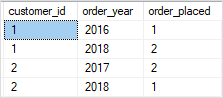
For example, the following query returns the number of orders placed by the customer by year:
SELECT
customer_id,
YEAR (order_date) order_year,
COUNT (order_id) order_placed
FROM
sales.orders
WHERE
customer_id IN (1, 2)
GROUPBY
customer_id,
YEAR (order_date)
ORDERBY
customer_id;
If you want to reference a column or expression that is not listed in the GROUP BY clause, you must use that column as the input of an aggregate function. Otherwise, you will get an error because there is no guarantee that the column or expression will return a single value per group. For example, the following query will fail:
SELECT
customer_id,
YEAR (order_date) order_year,
order_status
FROM
sales.orders
WHERE
customer_id IN (1, 2)
GROUPBY
customer_id,
YEAR (order_date)
ORDERBY
customer_id;
Let’s take some more examples to understand how the GROUP BY clause works.
1) Using GROUP BY clause with the COUNT() function example #
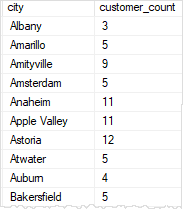
The following query returns the number of customers in every city:
SELECT
city,
COUNT (customer_id) customer_count
FROM
sales.customers
GROUPBY
city
ORDERBY
city;
In this example, the GROUP BY clause groups the customers by city and the COUNT() function returns the number of customers in each city.
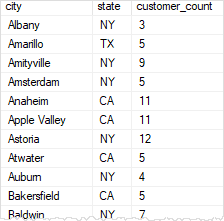
Similarly, the following query returns the number of customers by state and city.
SELECT
city,
state,
COUNT (customer_id) customer_count
FROM
sales.customers
GROUPBY
state,
city
ORDERBY
city,
state;
2) Using GROUP BY clause with the MIN and MAX functions example #
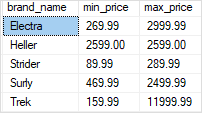
The following statement returns the minimum and maximum list prices of all products with the model 2018 by brand:
SELECT
brand_name,
MIN (list_price) min_price,
MAX (list_price) max_price
FROM
production.products p
INNERJOIN production.brands b ON b.brand_id = p.brand_id
WHERE
model_year = 2018GROUPBY
brand_name
ORDERBY
brand_name;
In this example, the WHERE clause is processed before the GROUP BY clause, as always.
3) Using GROUP BY clause with the AVG() function example #
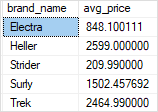
The following statement uses the AVG() function to return the average list price by brand for all products with the model year 2018:
SELECT
brand_name,
AVG (list_price) avg_price
FROM
production.products p
INNERJOIN production.brands b ON b.brand_id = p.brand_id
WHERE
model_year = 2018GROUPBY
brand_name
ORDERBY
brand_name;
4) Using GROUP BY clause with the SUM function example #
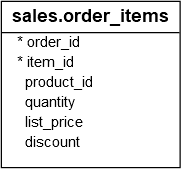
See the following order_items table:
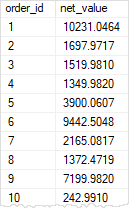
The following query uses the SUM() function to get the net value of every order:
SELECT
order_id,
SUM (
quantity * list_price * (1 - discount)
) net_value
FROM
sales.order_items
GROUPBY
order_id;