
Summary: in this tutorial, you will learn how to rename a table using Transact SQL and SQL Server Management Studio.
SQL Rename table using Transact SQL #
SQL Server does not have any statement that directly renames a table. However, it does provide you with a stored procedure named sp_rename that allows you to change the name of a table.
The following shows the syntax of using the sp_rename stored procedure for changing the name of a table:
EXEC sp_rename 'old_table_name', 'new_table_name'
Note that both the old and new name of the table whose name is changed must be enclosed in single quotations.
Let’s see the following example.
First, create a new table named sales.contr for storing sales contract’s data:
CREATE TABLE sales.contr (
contract_no INT IDENTITY PRIMARY KEY,
start_date DATE NOT NULL,
expired_date DATE,
customer_id INT,
amount DECIMAL (10, 2)
);
Second, use the sp_rename stored procedure to rename the sales.contr table to contracts in the sales schema:
EXEC sp_rename 'sales.contr', 'contracts';
SQL Server returns the following message:
Caution: Changing any part of an object name could break scripts and stored procedures.However, it renamed the table successfully.
SQL Server rename table using SSMS #
Another way to rename a table is to use the function provided by SQL Server Management Studio.
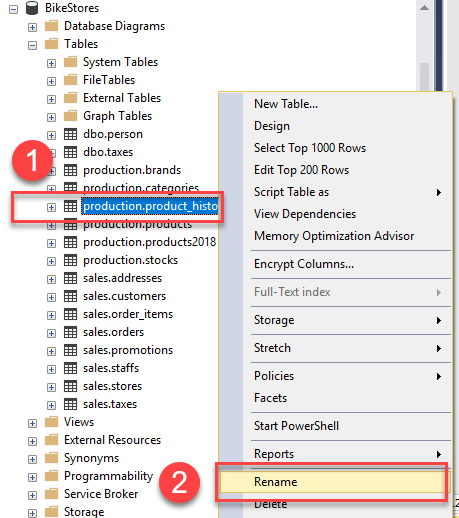
The following example illustrates how to rename the product_history table to product_archive.
First, right-click on the table name and choose Rename menu item:
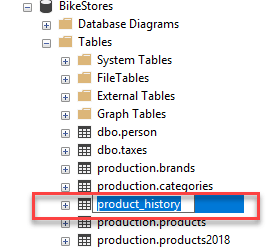
Second, type the new name of the table e.g., product_archive and press Enter:
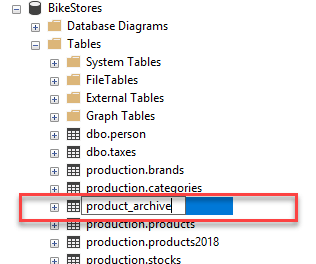
In this tutorial, you have learned how to rename a table in a database using the sp_rename stored procedure and SQL Server Management Studio.
Thank you for your feedback!