
Summary: in this tutorial, you will learn how to use the SQL DATEDIFF() function to calculate the difference between two dates.
Note that the DATEDIFF function is not included in SQL Standard but is implemented by SQL Server, MySQL, and MariaDB.
Introduction to the SQL DATEDIFF function #
To calculate the difference between the two dates, you use the DATEDIFF()function.
Here’s the syntax of the DATEDIFF() function in SQL Server:
DATEDIFF ( datepart , startdate , enddate )In this syntax
datepartis the units such as year, month, day, hour, minute, and second in which you want the function to return the difference betweenstartdateandenddate.startdateis the starting date (or datetime, time, timestamp, etc.)enddateis the ending date (or datetime, time, timestamp, etc.)
The function returns a signed integer value with the unit specified by the datepart argument.
The following table illustrates the valid units of date in SQL Server:
| datepart | Abbreviations |
|---|---|
| year | yy, yyyy |
| quarter | qq, q |
| month | mm, m |
| dayofyear | dy, y |
| day | dd, d |
| week | wk, ww |
| weekday | dw, w |
| hour | hh |
| minute | mi, n |
| second | ss, s |
| millisecond | ms |
| microsecond | mcs |
| nanosecond | ns |
SQL DATEDIFF function Examples #
Let’s take some examples of using the DATEDIFF function.
Calculating the difference in year, day, and month #
The following query uses the DATEDIFF function to return the number of years between two dates:
SELECT DATEDIFF(year,'2015-01-01','2018-01-01');Output:
3To get the difference in month or day between two dates, you can change the first argument to month or day accordingly. For example:
SELECT DATEDIFF(month,'2015-01-01','2018-01-01'),
DATEDIFF(day,'2015-01-01','2018-01-01');Output:
m d
----------- -----------
36 1096Notice that the DATEDIFF() function takes the leap year into account.
Since 2016 is the leap year, the difference in days between the two dates '2015-01-01' and '2018-01-01' is 2×365 + 366 = 1096.
Calculating the difference in hour #
The following query uses the DATEDIFF() function to calculate the difference in hours between two DATETIME values:
SELECT DATEDIFF(hour,'2015-01-01 01:00:00','2015-01-01 03:00:00');Output:
2Consider the following example:
SELECT DATEDIFF(hour,'2015-01-01 01:00:00','2015-01-01 03:45:00');It also returns 2:
2
The reason is that the DATEDIFF() function returns an integer only. In this case, it truncated the minute part and only considered the hour part.
Using DATEDIFF with table data example #
We’ll use the employees table from the HR sample database:
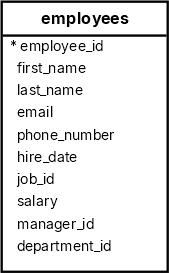
The following query uses the DATEDIFF() function to calculate the year of services of employees up to January 1st, 2018:
SELECT
first_name,
last_name,
DATEDIFF (YEAR, hire_date, '2018-01-01') year_of_services
FROM
employees
ORDER BY
first_name;Note that the playground does not support the DATEDIFF function.
DATEDIFF Function in MySQL #
Unlike SQL Server, the DATEDIFF() function in MySQL has a slightly different syntax:
DATEDIFF(end_date, start_date)MySQL returns the difference between two dates in days only. It ignores the time part of the date in the calculation.
For example:
SELECT DATEDIFF('2018-08-18', '2018-08-09') days;The difference is nine days:
days
-----
9Summary #
- Use the SQL
DATEDIFF()function to calculate the difference between two dates.
Thank you for your feedback!